
目的
Ollama Web UIを利用しない形でOllamaを利用したLLMのチャットツールを作成したい!
Ollama Web UI を作成する際は、Docker環境を構築し、その環境下でDocker環境を立ち上げる必要がある。
Docker For Desktopは使用する場面によっては有料利用を行う必要があるため、別の対応を行う形でOllama Chat Apiを利用できるようにしたい。
Docker利用についての詳細:
Docker Desktopの利用が有料になる条件は、原則として、従業員数250人以上または年間売上高1000万ドル(約15億円)以上の企業が、Docker Desktopを商用利用する場合です。個人利用、スモールビジネス(上記条件に該当しない)、教育機関、非商用のオープンソースプロジェクトは引き続き無料で利用可能です。
有料になる条件:
従業員数250人以上
年間売上高1000万ドル(約15億円)以上
上記いずれかに該当する組織が、Docker Desktopを商用利用する場合
無償で利用できる条件:
個人利用
スモールビジネス(従業員数250人未満かつ年間売上高1000万ドル未満)
教育機関
非商用のオープンソースプロジェクト
ReactプログラムをCluadeを利用してそれっぽいものを作成してみました、
私の備忘録としてこの記事を残しておきます。
実際のコード (React **.jsx)
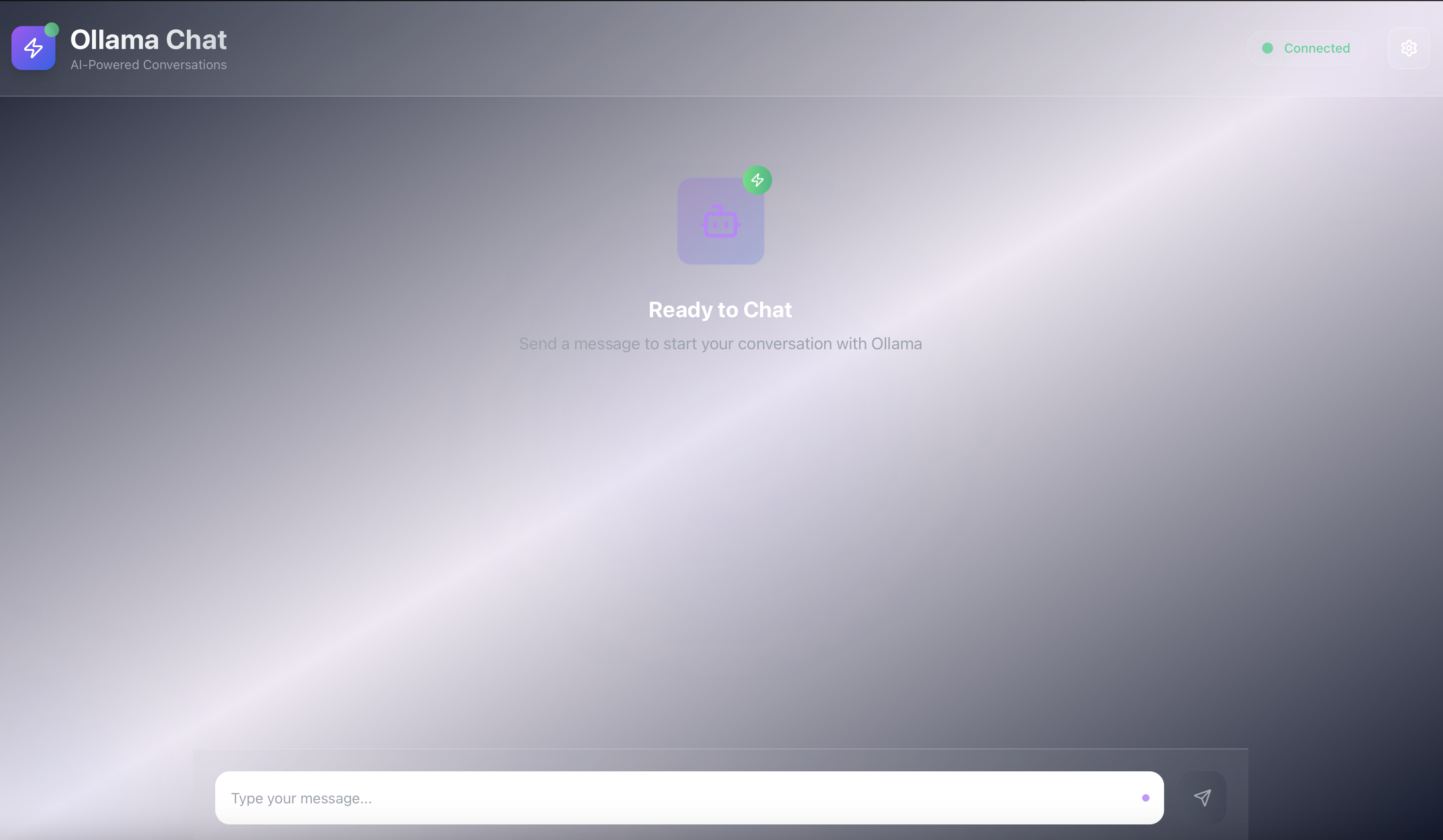
見た目はこんな感じです。
import React, { useState, useEffect, useCallback } from 'react';
import { Send, Bot, User, AlertCircle, Settings, Zap, Globe } from 'lucide-react';

const OllamaClient = () => {
  const [messages, setMessages] = useState([]);
  const [input, setInput] = useState('');
  const [loading, setLoading] = useState(false);
  const [models, setModels] = useState([]);
  const [selectedModel, setSelectedModel] = useState('');
  const [ollamaUrl, setOllamaUrl] = useState('http://localhost:11434');
  const [connectionStatus, setConnectionStatus] = useState('disconnected');
  const [showSettings, setShowSettings] = useState(false);
  const [useStreaming, setUseStreaming] = useState(true);

  // Ollamaサーバーの接続確認
  const checkConnection = useCallback(async () => {
    try {
      const response = await fetch(`${ollamaUrl}/api/tags`);
      if (response.ok) {
        setConnectionStatus('connected');
        return true;
      } else {
        setConnectionStatus('error');
        return false;
      }
    } catch (error) {
      setConnectionStatus('error');
      console.error('Connection error:', error);
      return false;
    }
  }, [ollamaUrl]);

  // 利用可能なモデル一覧を取得
  const fetchModels = useCallback(async () => {
    try {
      const response = await fetch(`${ollamaUrl}/api/tags`);
      if (response.ok) {
        const data = await response.json();
        setModels(data.models || []);
        if (data.models && data.models.length > 0 && !selectedModel) {
          setSelectedModel(data.models[0].name);
        }
      }
    } catch (error) {
      console.error('Error fetching models:', error);
    }
  }, [ollamaUrl, selectedModel]);

  // メッセージをOllamaに送信
  const sendMessage = async (message) => {
    if (!message.trim() || !selectedModel) return;

    const userMessage = { role: 'user', content: message };
    setMessages(prev => [...prev, userMessage]);
    setInput('');
    setLoading(true);

    try {
      const response = await fetch(`${ollamaUrl}/api/chat`, {
        method: 'POST',
        headers: {
          'Content-Type': 'application/json',
        },
        body: JSON.stringify({
          model: selectedModel,
          messages: [...messages, userMessage],
          stream: false
        }),
      });

      if (response.ok) {
        const data = await response.json();
        const assistantMessage = {
          role: 'assistant',
          content: data.message?.content || 'レスポンスを取得できませんでした。'
        };
        setMessages(prev => [...prev, assistantMessage]);
      } else {
        throw new Error(`HTTP error! status: ${response.status}`);
      }
    } catch (error) {
      console.error('Error sending message:', error);
      setMessages(prev => [...prev, {
        role: 'assistant',
        content: `エラーが発生しました: ${error.message}`
      }]);
    } finally {
      setLoading(false);
    }
  };

  // ストリーミングレスポンス用の関数
  const sendMessageStream = async (message) => {
    if (!message.trim() || !selectedModel) return;

    const userMessage = { role: 'user', content: message };
    setMessages(prev => [...prev, userMessage]);
    setInput('');
    setLoading(true);

    try {
      const response = await fetch(`${ollamaUrl}/api/chat`, {
        method: 'POST',
        headers: {
          'Content-Type': 'application/json',
        },
        body: JSON.stringify({
          model: selectedModel,
          messages: [...messages, userMessage],
          stream: true
        }),
      });

      if (!response.ok) {
        throw new Error(`HTTP error! status: ${response.status}`);
      }

      const reader = response.body.getReader();
      const decoder = new TextDecoder();
      let assistantMessage = { role: 'assistant', content: '' };

      setMessages(prev => [...prev, assistantMessage]);

      while (true) {
        const { done, value } = await reader.read();
        if (done) break;

        const chunk = decoder.decode(value);
        const lines = chunk.split('\n').filter(line => line.trim());

        for (const line of lines) {
          try {
            const data = JSON.parse(line);
            if (data.message?.content) {
              assistantMessage.content += data.message.content;
              setMessages(prev => {
                const newMessages = [...prev];
                newMessages[newMessages.length - 1] = { ...assistantMessage };
                return newMessages;
              });
            }
          } catch (e) {
            // JSONパースエラーは無視
          }
        }
      }
    } catch (error) {
      console.error('Error sending message:', error);
      setMessages(prev => [...prev, {
        role: 'assistant',
        content: `エラーが発生しました: ${error.message}`
      }]);
    } finally {
      setLoading(false);
    }
  };

  useEffect(() => {
    const initializeConnection = async () => {
      const connected = await checkConnection();
      if (connected) {
        await fetchModels();
      }
    };
    initializeConnection();
  }, [ollamaUrl, checkConnection, fetchModels]);

  const handleSubmit = (e) => {
    e.preventDefault();
    if (!input.trim() || !selectedModel || connectionStatus !== 'connected') return;
    if (useStreaming) {
      sendMessageStream(input);
    } else {
      sendMessage(input);
    }
  };

  const getConnectionStatusColor = () => {
    switch (connectionStatus) {
      case 'connected': return 'text-emerald-400';
      case 'error': return 'text-red-400';
      default: return 'text-gray-400';
    }
  };

  return (
    <div className="min-h-screen bg-gradient-to-br from-slate-900 via-purple-900/10 to-slate-900 flex flex-col relative overflow-hidden">
      {/* Animated background elements */}
      <div className="absolute inset-0 overflow-hidden pointer-events-none">
        <div className="absolute -top-40 -right-40 w-80 h-80 bg-purple-500/10 rounded-full blur-3xl animate-pulse"></div>
        <div className="absolute -bottom-40 -left-40 w-80 h-80 bg-blue-500/10 rounded-full blur-3xl animate-pulse" style={{animationDelay: '2s'}}></div>
        <div className="absolute top-1/2 left-1/2 transform -translate-x-1/2 -translate-y-1/2 w-96 h-96 bg-indigo-500/5 rounded-full blur-3xl animate-pulse" style={{animationDelay: '4s'}}></div>
      </div>

      {/* Header */}
      <div className="relative z-10 bg-white/10 backdrop-blur-xl border-b border-white/20 p-6">
        <div className="flex justify-between items-center">
          <div className="flex items-center gap-4">
            <div className="relative">
              <div className="w-12 h-12 bg-gradient-to-br from-purple-500 to-blue-600 rounded-xl flex items-center justify-center shadow-lg">
                <Zap className="w-6 h-6 text-white" />
              </div>
              <div className="absolute -top-1 -right-1 w-4 h-4 bg-gradient-to-r from-green-400 to-emerald-500 rounded-full animate-pulse"></div>
            </div>
            <div>
              <h1 className="text-3xl font-bold bg-gradient-to-r from-white to-gray-300 bg-clip-text text-transparent">
                Ollama Chat
              </h1>
              <p className="text-gray-400 text-sm">AI-Powered Conversations</p>
            </div>
          </div>

          <div className="flex items-center gap-6">
            <div className="flex items-center gap-3 bg-white/5 rounded-full px-4 py-2 border border-white/10">
              <div className={`w-3 h-3 rounded-full ${connectionStatus === 'connected' ? 'bg-emerald-400 shadow-lg shadow-emerald-400/50' : 'bg-red-400 shadow-lg shadow-red-400/50'} animate-pulse`}></div>
              <span className={`text-sm font-medium ${getConnectionStatusColor()}`}>
                {connectionStatus === 'connected' ? 'Connected' : 'Disconnected'}
              </span>
            </div>
            <button
              onClick={() => setShowSettings(!showSettings)}
              className="relative group p-3 bg-white/10 hover:bg-white/20 rounded-xl border border-white/20 transition-all duration-300 hover:scale-105"
            >
              <Settings className="w-5 h-5 text-white group-hover:rotate-45 transition-transform duration-300" />
            </button>
          </div>
        </div>
      </div>

      {/* Settings Panel */}
      {showSettings && (
        <div className="relative z-10 bg-white/10 backdrop-blur-xl border-b border-white/20 p-6 transform transition-all duration-500">
          <div className="flex flex-col gap-6 max-w-4xl mx-auto">
            <div className="grid md:grid-cols-2 gap-6">
              <div className="space-y-3">
                <label className="block text-sm font-semibold text-gray-300 mb-2 flex items-center gap-2">
                  <Globe className="w-4 h-4" />
                  Ollama Server URL
                </label>
                <input
                  type="text"
                  value={ollamaUrl}
                  onChange={(e) => setOllamaUrl(e.target.value)}
                  className="w-full p-4 bg-white/10 border border-white/20 rounded-xl text-white placeholder-gray-400 focus:outline-none focus:ring-2 focus:ring-purple-500/50 focus:border-purple-500/50 transition-all duration-300"
                  placeholder="http://localhost:11434"
                />
              </div>
              <div className="space-y-3">
                <label className="block text-sm font-semibold text-gray-300 mb-2 flex items-center gap-2">
                  <Bot className="w-4 h-4" />
                  Model Selection
                </label>
                <select
                  value={selectedModel}
                  onChange={(e) => setSelectedModel(e.target.value)}
                  className="w-full p-4 bg-white/10 border border-white/20 rounded-xl text-white focus:outline-none focus:ring-2 focus:ring-purple-500/50 focus:border-purple-500/50 transition-all duration-300"
                >
                  <option value="" className="bg-slate-800">Select a model...</option>
                  {models.map((model) => (
                    <option key={model.name} value={model.name} className="bg-slate-800">
                      {model.name}
                    </option>
                  ))}
                </select>
              </div>
              <div className="space-y-3">
                <label className="block text-sm font-semibold text-gray-300 mb-2 flex items-center gap-2">
                  <Zap className="w-4 h-4" />
                  Response Mode
                </label>
                <div className="flex items-center gap-4">
                  <button
                    onClick={() => setUseStreaming(true)}
                    className={`flex-1 p-3 rounded-xl border transition-all duration-300 ${
                      useStreaming
                        ? 'bg-gradient-to-r from-purple-600 to-blue-600 text-white border-purple-500/50'
                        : 'bg-white/10 text-gray-300 border-white/20 hover:bg-white/20'
                    }`}
                  >
                    Streaming
                  </button>
                  <button
                    onClick={() => setUseStreaming(false)}
                    className={`flex-1 p-3 rounded-xl border transition-all duration-300 ${
                      !useStreaming
                        ? 'bg-gradient-to-r from-purple-600 to-blue-600 text-white border-purple-500/50'
                        : 'bg-white/10 text-gray-300 border-white/20 hover:bg-white/20'
                    }`}
                  >
                    Standard
                  </button>
                </div>
              </div>
            </div>
            <button
              onClick={() => {
                checkConnection().then(connected => {
                  if (connected) fetchModels();
                });
              }}
              className="bg-gradient-to-r from-purple-600 to-blue-600 hover:from-purple-700 hover:to-blue-700 text-white px-6 py-3 rounded-xl font-semibold transition-all duration-300 hover:scale-105 hover:shadow-lg hover:shadow-purple-500/25 w-fit"
            >
              Reconnect Server
            </button>
          </div>
        </div>
      )}

      {/* Chat Area */}
      <div className="flex-1 flex flex-col max-w-6xl mx-auto w-full relative z-10">
        {/* Messages */}
        <div className="flex-1 overflow-y-auto p-6 space-y-6">
          {messages.length === 0 && (
            <div className="text-center text-gray-400 mt-16">
              <div className="relative inline-block mb-8">
                <div className="w-24 h-24 bg-gradient-to-br from-purple-500/20 to-blue-600/20 rounded-2xl flex items-center justify-center backdrop-blur-sm border border-white/10">
                  <Bot size={48} className="text-purple-400" />
                </div>
                <div className="absolute -top-2 -right-2 w-8 h-8 bg-gradient-to-r from-green-400 to-emerald-500 rounded-full flex items-center justify-center animate-bounce">
                  <Zap className="w-4 h-4 text-white" />
                </div>
              </div>
              <h2 className="text-2xl font-bold text-white mb-2">Ready to Chat</h2>
              <p className="text-lg">Send a message to start your conversation with Ollama</p>
            </div>
          )}

          {messages.map((message, index) => (
            <div
              key={index}
              className={`flex gap-4 ${
                message.role === 'user' ? 'justify-end' : 'justify-start'
              } animate-fade-in-up`}
              style={{animationDelay: `${index * 0.1}s`}}
            >
              <div
                className={`flex gap-4 max-w-[85%] ${
                  message.role === 'user' ? 'flex-row-reverse' : 'flex-row'
                }`}
              >
                <div className="flex-shrink-0">
                  <div className={`w-10 h-10 rounded-xl flex items-center justify-center ${
                    message.role === 'user'
                      ? 'bg-gradient-to-br from-purple-500 to-blue-600 shadow-lg shadow-purple-500/25'
                      : 'bg-gradient-to-br from-emerald-500 to-teal-600 shadow-lg shadow-emerald-500/25'
                  }`}>
                    {message.role === 'user' ? (
                      <User size={18} className="text-white" />
                    ) : (
                      <Bot size={18} className="text-white" />
                    )}
                  </div>
                </div>
                <div
                  className={`p-4 rounded-2xl backdrop-blur-sm border transition-all duration-300 hover:scale-[1.02] ${
                    message.role === 'user'
                      ? 'bg-gradient-to-br from-purple-600/90 to-blue-600/90 text-white border-white/20 shadow-lg shadow-purple-500/20'
                      : 'bg-white/10 text-gray-100 border-white/20 shadow-lg'
                  }`}
                >
                  <div className="whitespace-pre-wrap leading-relaxed">{message.content}</div>
                </div>
              </div>
            </div>
          ))}

          {loading && (
            <div className="flex gap-4 justify-start animate-fade-in-up">
              <div className="w-10 h-10 rounded-xl bg-gradient-to-br from-emerald-500 to-teal-600 flex items-center justify-center shadow-lg shadow-emerald-500/25">
                <Bot size={18} className="text-white" />
              </div>
              <div className="bg-white/10 backdrop-blur-sm border border-white/20 p-4 rounded-2xl shadow-lg">
                <div className="flex space-x-2">
                  <div className="w-3 h-3 bg-emerald-400 rounded-full animate-bounce shadow-lg shadow-emerald-400/50"></div>
                  <div className="w-3 h-3 bg-emerald-400 rounded-full animate-bounce shadow-lg shadow-emerald-400/50" style={{animationDelay: '0.2s'}}></div>
                  <div className="w-3 h-3 bg-emerald-400 rounded-full animate-bounce shadow-lg shadow-emerald-400/50" style={{animationDelay: '0.4s'}}></div>
                </div>
              </div>
            </div>
          )}
        </div>

        {/* Input Form */}
        <div className="border-t border-white/20 bg-white/5 backdrop-blur-xl p-6">
          {connectionStatus !== 'connected' && (
            <div className="mb-6 p-4 bg-gradient-to-r from-yellow-500/20 to-orange-500/20 border border-yellow-500/30 rounded-xl flex items-center gap-3 backdrop-blur-sm">
              <div className="w-8 h-8 bg-yellow-500/20 rounded-lg flex items-center justify-center">
                <AlertCircle size={18} className="text-yellow-400" />
              </div>
              <span className="text-yellow-200 font-medium">
                Unable to connect to Ollama server. Please ensure the server is running.
              </span>
            </div>
          )}

          <form onSubmit={handleSubmit} className="flex gap-4">
            <div className="flex-1 relative">
              <input
                type="text"
                value={input}
                onChange={(e) => setInput(e.target.value)}
                placeholder={selectedModel ? "Type your message..." : "Please select a model first"}
                className="w-full p-4 pr-12 bg-white/10 border border-white/20 rounded-2xl text-white placeholder-gray-400 focus:outline-none focus:ring-2 focus:ring-purple-500/50 focus:border-purple-500/50 transition-all duration-300 backdrop-blur-sm"
                disabled={loading || !selectedModel || connectionStatus !== 'connected'}
              />
              <div className="absolute right-4 top-1/2 transform -translate-y-1/2">
                <div className="w-2 h-2 bg-purple-400 rounded-full animate-pulse"></div>
              </div>
            </div>
            <button
              type="submit"
              disabled={loading || !input.trim() || !selectedModel || connectionStatus !== 'connected'}
              className="bg-gradient-to-r from-purple-600 to-blue-600 hover:from-purple-700 hover:to-blue-700 disabled:from-gray-600 disabled:to-gray-700 text-white p-4 rounded-2xl transition-all duration-300 hover:scale-105 hover:shadow-lg hover:shadow-purple-500/25 disabled:cursor-not-allowed disabled:opacity-50 disabled:scale-100 group"
            >
              <Send size={20} className="group-hover:translate-x-0.5 transition-transform duration-300" />
            </button>
          </form>
        </div>
      </div>

      <style jsx>{`
        @keyframes fade-in-up {
          from {
            opacity: 0;
            transform: translateY(20px);
          }
          to {
            opacity: 1;
            transform: translateY(0);
          }
        }
        .animate-fade-in-up {
          animation: fade-in-up 0.6s ease-out forwards;
        }
      `}</style>
    </div>
  );
};

export default OllamaClient;
デザイン用にインポートしたパッケージの追記を忘れてました。
私は下記のコードをindex.htmlの<header/>に追記しました
<script src="https://cdn.tailwindcss.com"></script>