
これなに
iOS 用の .ipa を Transporter 経由で App Store Connect にアップロードしたところ、検証で Missing purpose string in Info.plist というエラー (エラーコード 90683) が出たので、その解決までの作業記録メモです。
あくまで特定のエラーに対する対処記録のため、網羅的に対応しているわけではない点についてはご容赦ください。
対象読者
iOS, iPadOS, macOS 向けのアプリ開発者のうち、特に歴の浅い方や App Store 公開に向けて作業を行っている方を想定しています。
前提知識
本記事で出てくる用語で特に覚えておくと分かりやすいかもしれないものをピックアップして概要を以下の通り書いておきます。
今時は AI やらネット検索すれば分かる話ではありますが、念のため簡単に。
- App Store Connect: Apple が提供する、iOS や macOS 向けのアプリを App Store へ登録・管理・配信するためのプラットフォーム
- ipa: iPhone や iPad、Apple Silicon 搭載の Mac で iOS アプリを実行・インストールするためのアプリパッケージ形式(Android でいう apk ファイルに相当)
- Transporter: App Store Connect や iTunes Connect へコンテンツを配信するためのツール
発生環境
- Flutter 3.47.8
- Dart 3.13.7
- pub.dev > file_picker 11.0.3
- macOS Golden Gate 27.0.1
エラー内容
以下のようなメッセージが出てきたのが始まりです。
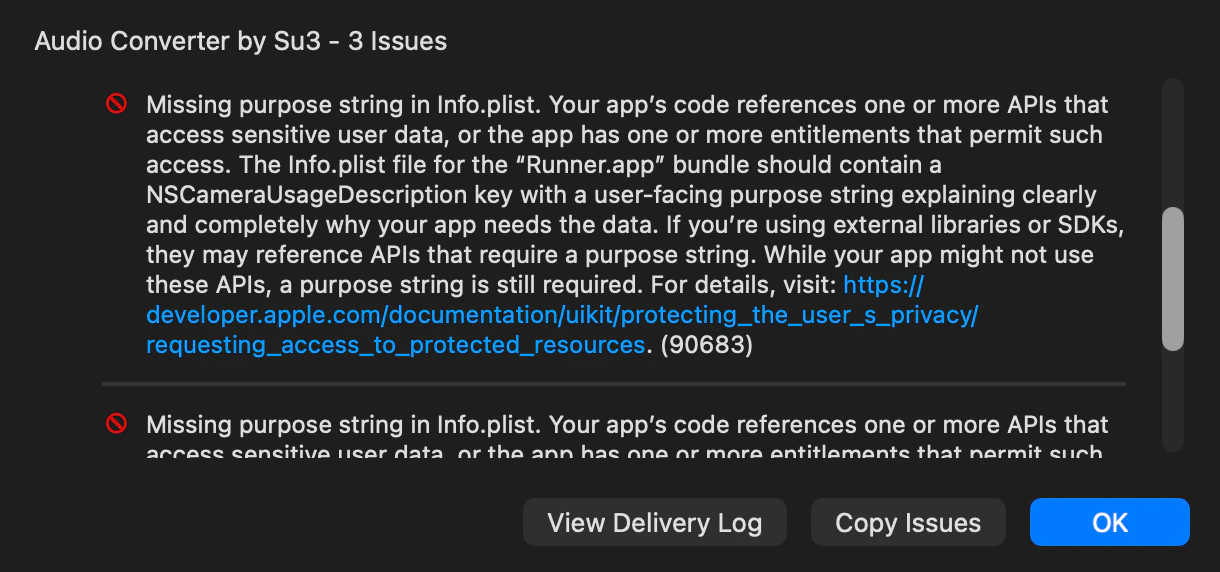
全文は以下の通り。記載の通り NSLocationWhenInUseUsageDescription, NSCameraUsageDescription, NSPhotoLibraryUsageDescription がキーとなっていて、要するにアプリがユーザーに位置情報、カメラ、写真ライブラリの利用許可を求めているのにも関わらずその利用目的が入っていないということが原因のようです。
Missing purpose string in Info.plist. Your app’s code references one or more APIs that access sensitive user data, or the app has one or more entitlements that permit such access. The Info.plist file for the “Runner.app” bundle should contain a NSLocationWhenInUseUsageDescription key with a user-facing purpose string explaining clearly and completely why your app needs the data. If you’re using external libraries or SDKs, they may reference APIs that require a purpose string. While your app might not use these APIs, a purpose string is still required. For details, visit: https://developer.apple.com/documentation/uikit/protecting_the_user_s_privacy/requesting_access_to_protected_resources. (90683)

Missing purpose string in Info.plist. Your app’s code references one or more APIs that access sensitive user data, or the app has one or more entitlements that permit such access. The Info.plist file for the “Runner.app” bundle should contain a NSCameraUsageDescription key with a user-facing purpose string explaining clearly and completely why your app needs the data. If you’re using external libraries or SDKs, they may reference APIs that require a purpose string. While your app might not use these APIs, a purpose string is still required. For details, visit: https://developer.apple.com/documentation/uikit/protecting_the_user_s_privacy/requesting_access_to_protected_resources. (90683)

Missing purpose string in Info.plist. Your app’s code references one or more APIs that access sensitive user data, or the app has one or more entitlements that permit such access. The Info.plist file for the “Runner.app” bundle should contain a NSPhotoLibraryUsageDescription key with a user-facing purpose string explaining clearly and completely why your app needs the data. If you’re using external libraries or SDKs, they may reference APIs that require a purpose string. While your app might not use these APIs, a purpose string is still required. For details, visit: https://developer.apple.com/documentation/uikit/protecting_the_user_s_privacy/requesting_access_to_protected_resources. (90683)
原因
詳細を調べていくと以下のようなことがわかりました。
要するに、作っていた Flutter アプリで file_picker を使って音声ファイルをピックさせる動線を作っていたのですが、その file_picker で写真ライブラリやカメラ、位置情報の API を参照していたことで、その利用目的を入れよと Validation でエラーとなったということでした。
-
file_picker(^11.0.3) は iOS 向けにメディアピッカーを同梱しているのですが、DKImagePickerController に依存していて、写真ライブラリ、カメラ、位置情報 (アセットのメタデータ) の API を参照していた。なお、DKImagePickerControllerは v12 から削除されていますが、このアプリ開発時には依存関係を精査した結果、v11 系を採用している形です。 - Apple はアップロード時の静的解析でこれらの API 参照を検出し、アプリが実行時に呼ばない場合でも対応する目的文字列を
Info.plistに求めるようになっている模様。 - 作っているアプリはドキュメントピッカーで FileType.any を使っているだけで、メディアピッカーは不要。
-
file_pickerには、メディアピッカーを除外する CocoaPods 用のスイッチ (Pod::PICKER_MEDIA = false) がある。しかし、作っていたアプリでは Swift Package Manager (SPM) でプラグインを統合していた。プラグインのPackage.swiftは.define("PICKER_MEDIA")を固定で定義し、常にDKImagePickerControllerに依存していたため Podfile のスイッチは効かなかった。(Runner.xcodeprojにFlutterGeneratedPluginSwiftPackageの参照があり、ios/Podfile.lockにはfile_pickerもDKImagePickerControllerも載っていなかった)
対応策
簡単に解決するなら NSPhotoLibraryUsageDescription、NSCameraUsageDescription、NSLocationWhenInUseUsageDescription を Info.plist に追加すればエラーは消える想定なのですが、アプリで使っていない権限を宣言することになり、最小権限の方針から考えると無駄になります。
そこで採用したのは以下の通り。
1: Podfile のスイッチを有効化
pubspec.yaml で flutter: セクションに config: enable-swift-package-manager: false を追加し、file_picker を CocoaPods 経由で統合して Podfile のスイッチを有効化。
なお、この設定はプロジェクト全体に影響し、他のプラグインも CocoaPods 経由になります。
# The following section is specific to Flutter packages.
flutter:

  # The following line ensures that the Material Icons font is
  # included with your application, so that you can use the icons in
  # the material Icons class.
  uses-material-design: true
  generate: true

  # file_picker's Swift Package hard-codes the media picker (DKImagePickerController), which makes
  # App Store Connect demand photo, camera and location purpose strings. Use CocoaPods so the
  # Podfile can disable it (Pod::PICKER_MEDIA = false).
  config:
    enable-swift-package-manager: false
2: メディアピッカーを使わない宣言を追加
ios/Podfile の project ブロックの前に Pod::PICKER_MEDIA = false をコメント付きで以下のように追加。
# Uncomment this line to define a global platform for your project
platform :ios, '15.0'

# The app only picks files through the document picker (FileType.any). Disable file_picker's
# media (photo gallery/camera) picker so DKImagePickerController is not linked; otherwise App
# Store Connect requires photo library, camera and location purpose strings (error 90683).
Pod::PICKER_MEDIA = false

# CocoaPods analytics sends network stats synchronously affecting flutter build latency.
ENV['COCOAPODS_DISABLE_STATS'] = 'true'

project 'Runner', {
  'Debug' => :debug,
  'Profile' => :release,
  'Release' => :release,
}
3: ipa ファイルを再ビルド
再度ビルドし直して Transporter へアップロードして無事エラーが解消されました。
↓ 実行したコマンド(一度 pods と flutter をクリーンにした上でビルド)
rm -rf ios/Pods ios/Podfile.lock macos/Pods macos/Podfile.lock
fvm flutter clean
fvm flutter build ipa --release
↓ Transporter の Success ログメッセージ抜粋
UPLOAD SUCCEEDED with no errors
Delivery UUID: hogehoge # Delivery UUID は公開できないので hogehoge で書いてます
Transferred 22,240,045 bytes in 5.188 seconds (4.3MB/s, 34.295Mbps)
↓ 念のための確認コマンド
grep -n "file_picker\|DKImage" ios/Podfile.lock
# 期待: file_picker が載っていて、DKImagePickerController は載っていない
今後の注意
-
file_pickerを更新するときは、ios/Podfile.lockにDKImagePickerControllerが再び現れないか確認する。 - プラグインを追加するときは Transporter の検証まで行い、90683 が出ないか確認する。
- CocoaPods 経由の方法が使えなくなった場合の代替対応策としては 3 つの目的文字列を
Info.plistに追加する。(ただし、実態に沿った文面にするか、使われない理由を説明できるようにしておく)
参考リソース
- Apple, Protecting the user's privacy / Requesting access to protected resources:
https://developer.apple.com/documentation/uikit/protecting_the_user_s_privacy/requesting_access_to_protected_resources - Apple, Upload builds (App Store Connect ヘルプ):
https://developer.apple.com/help/app-store-connect/manage-builds/upload-builds - Apple, Transporter: https://apps.apple.com/us/app/transporter/id1450874784
- file_picker パッケージ: https://pub.dev/packages/file_picker
- file_picker リポジトリ (
Package.swift、podspec): https://github.com/miguelpruivo/flutter_file_picker - DKImagePickerController: https://github.com/zhangao0086/DKImagePickerController
- Flutter, アプリ開発者向け Swift Package Manager:
https://docs.flutter.dev/packages-and-plugins/swift-package-manager/for-app-developers