
日本語手書き文字認識システム
これは、ユーザーがアップロードした画像を使用して、日本語の手書き文字または印刷文字(ひらがな、カタカナ)を認識するシンプルなOCRベースのツールです。
コード
import gradio as gr
import easyocr
import cv2
import numpy as np
from PIL import Image
#Initialize OCR once (loads model)
reader = easyocr.Reader(['ja'], gpu=False)

def ocr_image(image):
    # Convert PIL to OpenCV format
    image_cv = cv2.cvtColor(np.array(image), cv2.COLOR_RGB2BGR)
    results = reader.readtext(image_cv)
    if results:
        return "\n".join([f"{text} (confidence: {prob:.2f})" for _, text, prob in results])
    return "No text detected."

#Gradio interface
iface = gr.Interface(
    fn=ocr_image,
    inputs=gr.Image(type="pil"),
    outputs=gr.Textbox(label="Detected Text")
)

iface.launch()
コードの出力

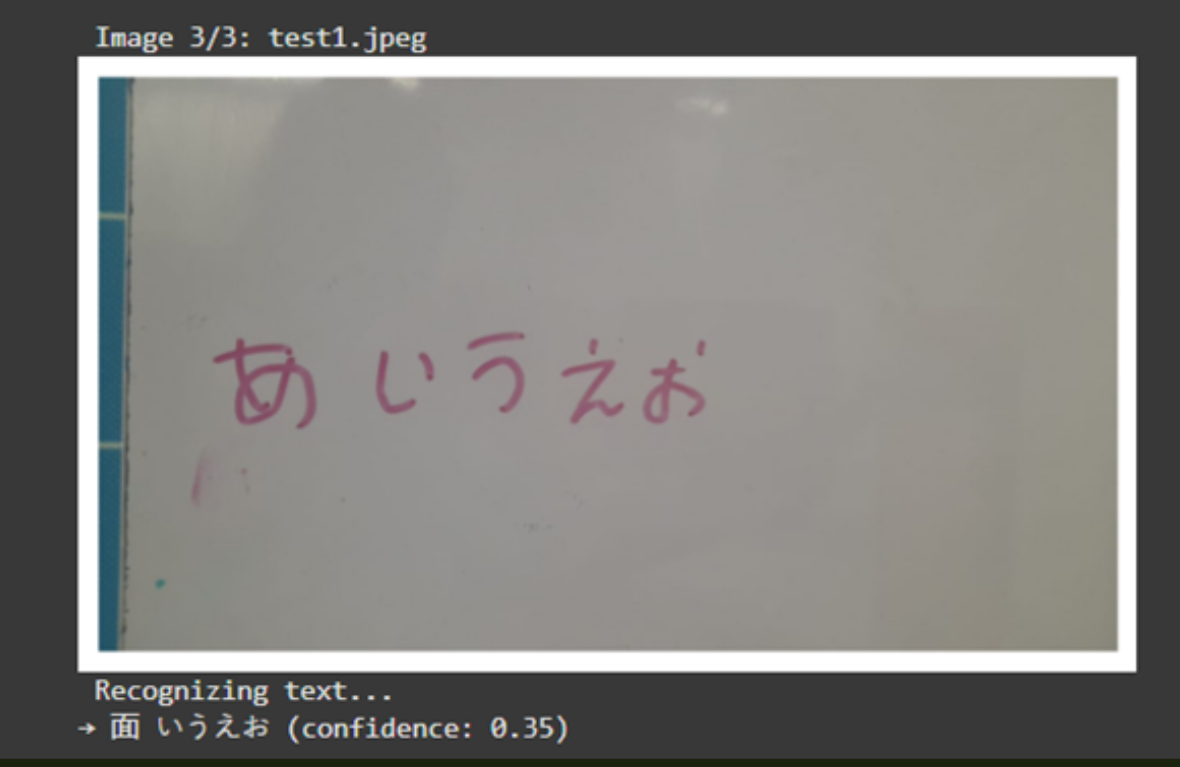
ウェブサイトへのリンク :
https://huggingface.co/spaces/nikisded/japanese-using-opencv
締めくくりの言葉
カスタムの手書きデータセットを用いてCNN(またはRNN)で学習させることで、分析結果を改善できる可能性がある。
読んでいただきありがとうございます!もし試してみたら感想を聞かせてください!