
概要
neondatabase/serverlessのライブラリを使用すると、HTTPやWebSocketsを経由してNeonDBにアクセスできます。ローカルのPostgreSQLへもこのneondatabase/serverlessを使用してアクセスしたいなと思いまして、今回はlocal-neon-http-proxyを使用して実現してみたのでそのメモ書きです。
前提
- 使用したneondatabase/serverlessは
1.0.2です。
前準備
Docker環境で、以下の通りPostgreSQLとlocal-neon-http-proxyのコンテナを用意します。
なお、local-neon-http-proxyはneon_control_planeというスキーマを自動で作成するので、先にPostgreSQLのコンテナを起動するようにします。
docker-compose_postgres.yml
services:
  db:
    image: postgres:18.1
    container_name: postgres_pta
    ports:
      - 5432:5432
    volumes:
      - db-store:/var/lib/postgresql
    environment:
      POSTGRES_USER: 'user'
      POSTGRES_PASSWORD: 'postgres'
    networks:
      - shared-network
volumes:
  db-store:

networks:
  shared-network:
    external: true
docker-compose_local-neon-http-proxy.yml
services:
  neon-proxy:
    image: ghcr.io/timowilhelm/local-neon-http-proxy:main
    environment:
      PG_CONNECTION_STRING: postgres://user:postgres@db:5432/sample_db
    ports:
      - '4444:4444'
    networks:
      - shared-network
networks:
  shared-network:
    external: true
接続部分の実装サンプル
drizzleを使用している場合の実装サンプルは、以下の通りになります。引数には環境変数等に設定した接続先を入れる前提です。
ローカル実行の時のみ、localNeonFetchPointへはhttp://localhost:4444/sqlのように設定します。また、databaseUrlへはpostgres://user:postgres@db.localtest.me:5432/sample_dbのように設定します。
import { neon, neonConfig } from "@neondatabase/serverless";
import { drizzle } from "drizzle-orm/neon-http";
import * as schema from "@/db/schema";

export const getDrizzleDb = (
  databaseUrl: string,
  localNeonFetchPoint?: string,
) => {
  if (localNeonFetchPoint) {
    neonConfig.fetchEndpoint = localNeonFetchPoint;
    neonConfig.useSecureWebSocket = false;
    neonConfig.pipelineTLS = false;
    neonConfig.pipelineConnect = false;
  }

  return drizzle(neon(databaseUrl), { schema });
};
その他
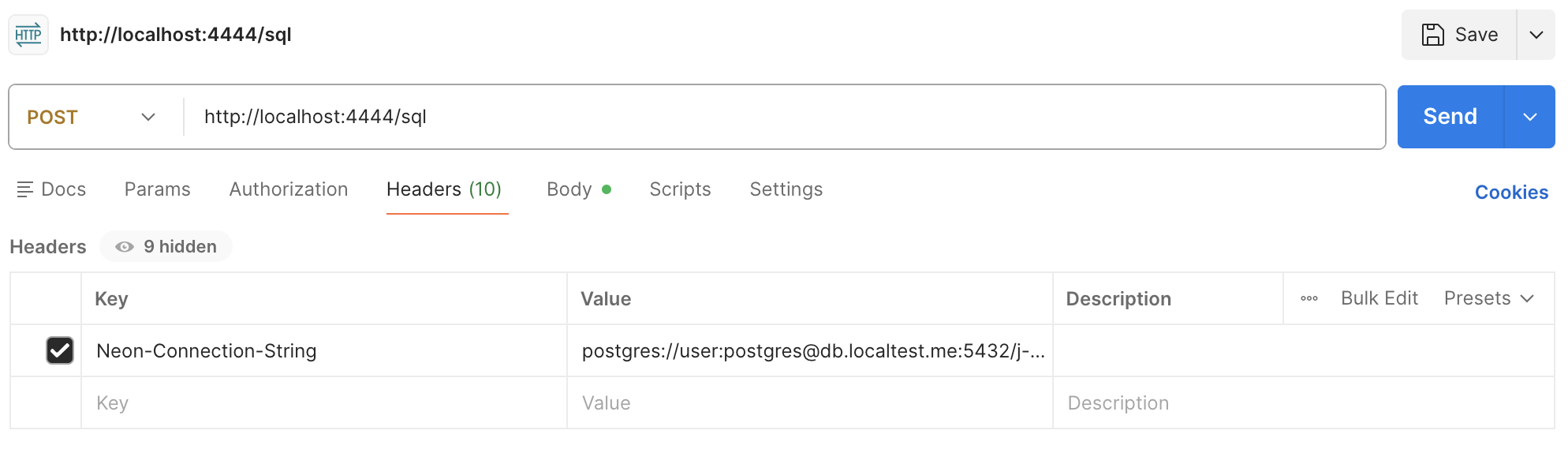
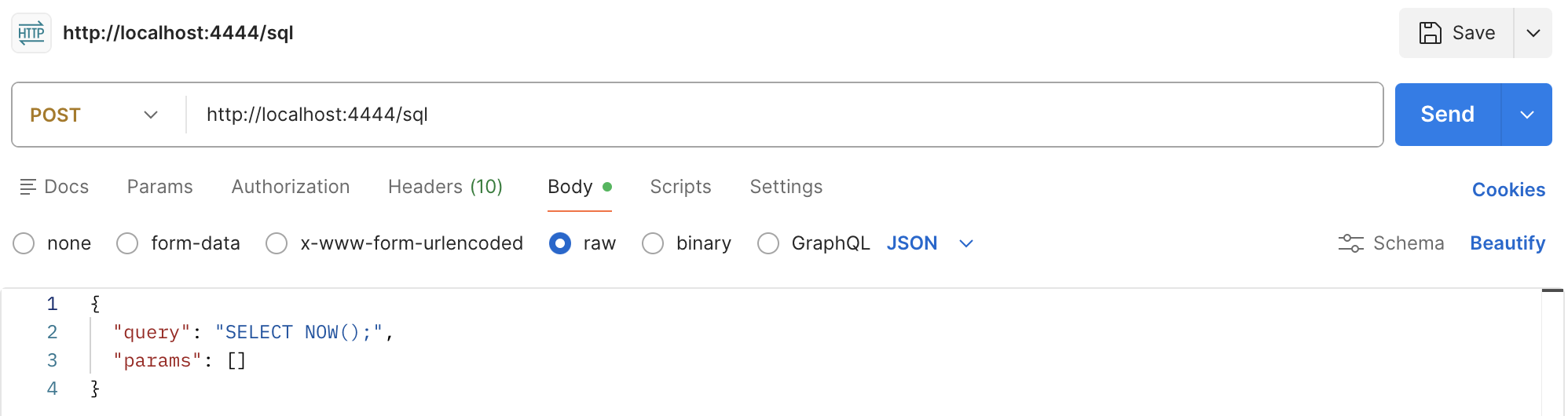
- Postmanからも、こんな感じのPOSTリクエストでSQLを実行できます。
参考
Neon(Postgres)のDockerをローカルで稼働させ、Drizzleを使ったマイグレーションとCloudflare Workersのローカル実行からの接続を行ったメモ