
イントロ
セルフホスティングで認証っているの?笑 って思う方もいるかもしれません。
でも、ログインが必要なサービスをいくつか建てると、そのサービスごとのパスワード管理って面倒なんです・・・
そんなあなたにPocketID!
PocketIDはシンプルなOIDCプロバイダーです。
シンプルかつ、IDパスワードを持たない、WebAuthn認証のみをサポートしているのが特徴です。
すでにLDAPサーバーを持っていれば同期することも可能ですが、LDAP機能も持っているIdPとして探す場合はAuthentikなど他の選択をした方がいいでしょう。
ちなみにWebAuthnに対応していない端末でも、一時的なログインコードで認証することも可能です
(手持ちのスマホでWebAuthn認証をしてログインコードを発行し、PCでそのコードを使ってログインするようなイメージ)
ちなみに最近S3に対応したことで、サーバーレス環境でも動くようになりました。
もう少し早かったらCloudRunで動かしてたんだけどなぁ・・・
PocketIDの使い方
環境情報
$ docker version
Client: Docker Engine - Community
 Version:           29.1.3
 API version:       1.52
 Go version:        go1.25.5
 Git commit:        f52814d
 Built:             Fri Dec 12 14:49:51 2025
 OS/Arch:           linux/amd64
 Context:           default

Server: Docker Engine - Community
 Engine:
  Version:          29.1.3
  API version:      1.52 (minimum version 1.44)
  Go version:       go1.25.5
  Git commit:       fbf3ed2
  Built:            Fri Dec 12 14:49:51 2025
  OS/Arch:          linux/amd64
  Experimental:     false
 containerd:
  Version:          v2.2.0
  GitCommit:        1c4457e00facac03ce1d75f7b6777a7a851e5c41
 runc:
  Version:          1.3.4
  GitCommit:        v1.3.4-0-gd6d73eb8
 docker-init:
  Version:          0.19.0
  GitCommit:        de40ad0
前提条件
- Dockerがインストールされていること
- Traefikが導入されていること(リバースプロキシサーバー)
- Let's EncryptでTLS証明書を自動発行できるようにしておくこと(WebAuthnはHTTPS必須のため)
- WebAuthn対応のデバイスがあること(スマホやPCの指紋認証など)
手順
-
compose.ymlの作成domain.tldは自分のドメインに置き換えてください。https://auth.domain.tldでPocketIDの認証サーバーにアクセスできるようにしています。compose.ymlservices: pocket-id: container_name: pocket-id image: ghcr.io/pocket-id/pocket-id restart: unless-stopped env_file: .env expose: - 1411 volumes: - "./data:/app/data" healthcheck: test: "curl -f http://localhost:1411/healthz" interval: 1m30s timeout: 5s retries: 2 start_period: 10s labels: traefik.enable: true traefik.http.services.pocket-id.loadbalancer.server.port: 1411 traefik.http.routers.pocket-id.rule: Host(`auth.domain.tld`) traefik.http.routers.pocket-id.entrypoints: websecure traefik.http.routers.pocket-id.tls: true traefik.http.routers.pocket-id.tls.certResolver: cloudflare traefik.docker.network: traefik-network networks: - traefik-network networks: traefik-network: external: true -
.envファイルの作成TZ="Asia/Tokyo" APP_URL="https://auth.domain.tld" # MAXMIND_LICENSE_KEY="" # GeoLite2による位置情報を有効にする場合に設定 -
PocketIDの起動
下記コマンドを実行したらhttps://auth.domain.tldにアクセスできる
docker compose up -d
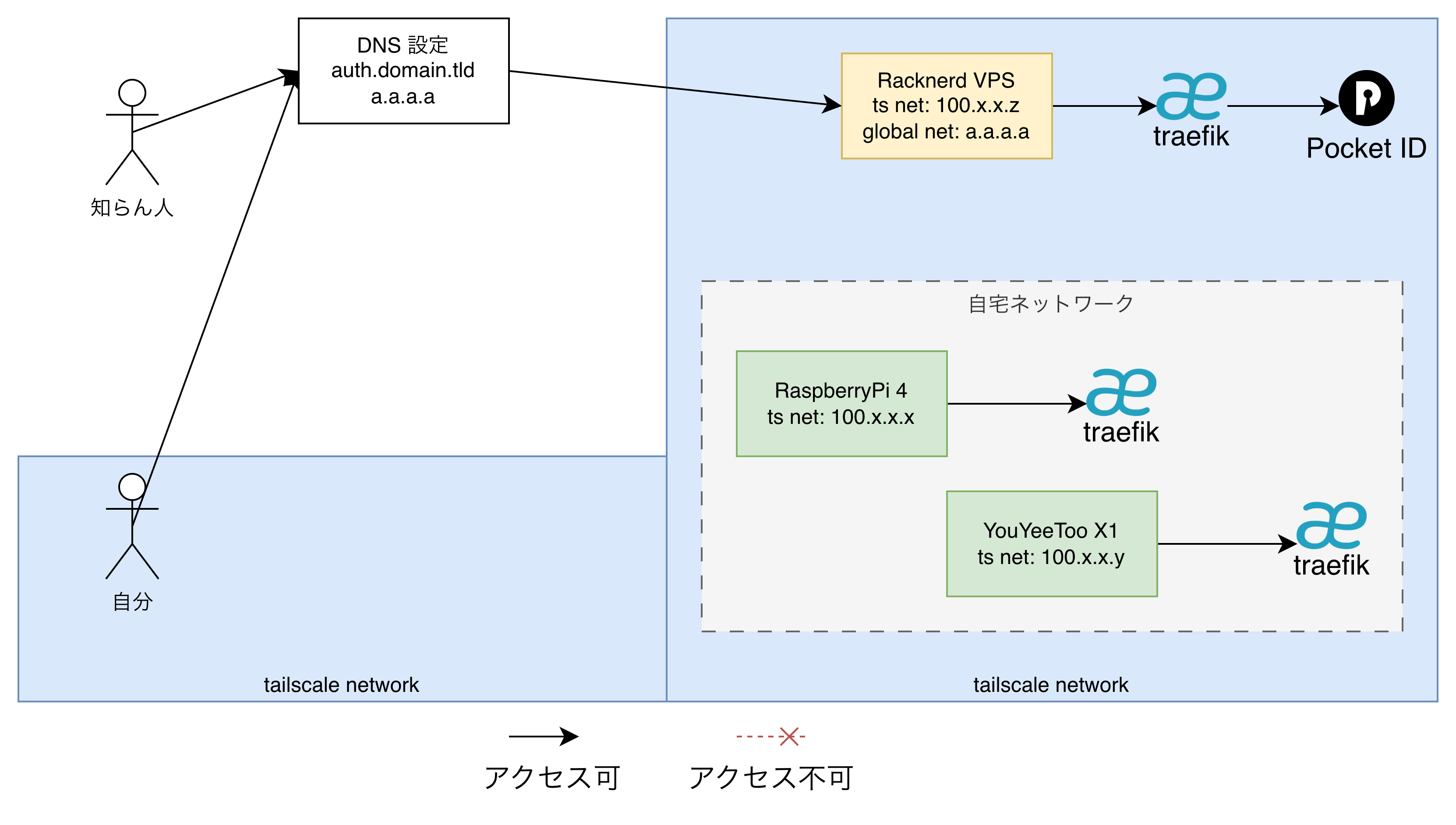
アクセス経路のイメージ図
私の場合はPublicに公開することで、セルフホスティング環境や、外部SaaSのOIDCプロバイダーとしても利用できるようにしています。
PocketIDの感想
- 良いところ
- シンプルなOIDCプロバイダーとして使いやすい
- 機能としても超シンプルで、余計な設定画面で悩むことがない
- WebAuthn対応デバイスがあればパスワードレス認証が可能
- Dockerで簡単にセットアップできる
- シンプルなOIDCプロバイダーとして使いやすい
- 不満・使いこなせていないところ
- 特になし
以上でPocketIDの紹介を終わり!
正直不満は微塵もなくて、大満足の一言に尽きる・・・
次はTinyAuthの紹介をします。