

課題
Nuxt3で作成したWebサイトをS3+CloudFrontで配信をした時に、動的ルーティング(/item/[id]のようにURLに含めたパラメータに応じたページにルーティングする仕組み)したページのURLをブラウザに直接入力してアクセスするとAccess Deniedになり、正しく表示ができません。
解決策
この問題は指定されたURLに従ってCloudFrontがS3からコンテンツを配信しようとした時に、配信するページが無いために発生しています。
そこで、対策として配信ページがない場合(つまり、404や403エラーが発生した場合)はトップページを表示させることでNuxtのルーティングが動作するようにすることで解決ができます。
コンソールから設定する場合
- AWS Management Consoleにサインインし、CloudFrontサービスに移動します。
- 対象のディストリビューションを選択し、"Error Pages"タブに移動します。
- "Create Custom Error Response"ボタンをクリックします。
- 404と403エラーのためのカスタムエラーレスポンスをそれぞれ作成します。
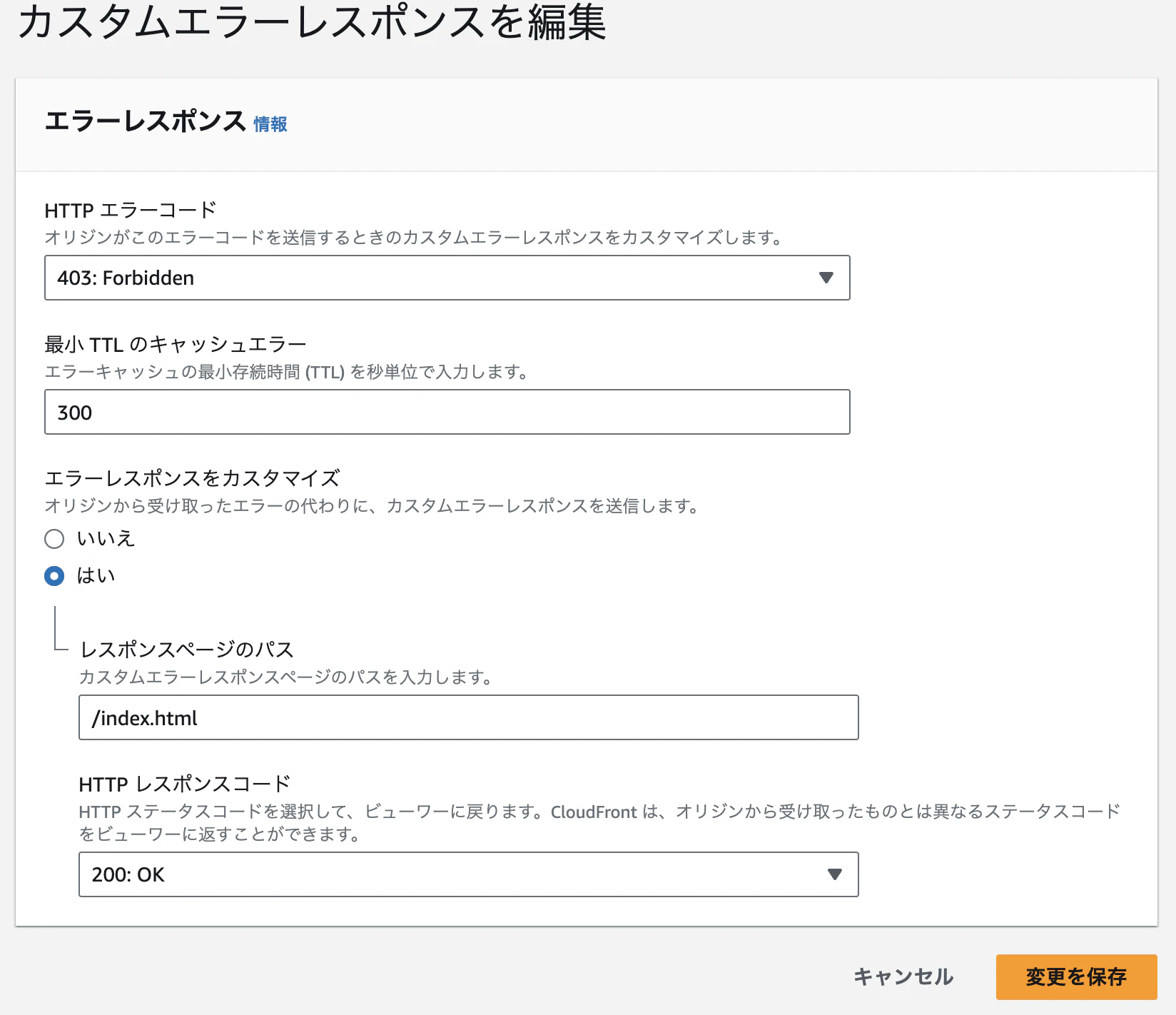
SAMテンプレートで設定する場合
CloudFrontのDistributionConfig内に下記のように追加します。
CloudFrontDistribution:
  Type: AWS::CloudFront::Distribution
  Properties:
    DistributionConfig:
      ...
      CustomErrorResponses:
        - ErrorCode: 404
          ResponsePagePath: /index.html
          ResponseCode: 200
        - ErrorCode: 403
          ResponsePagePath: /index.html
          ResponseCode: 200
まとめ
Nuxt3で作成したSPAをS3とCloudFrontを使用して配信する際に直面する可能性がある動的ルーティングの問題は、CloudFrontのカスタムエラーレスポンスを適切に設定することで解決できます。
この設定により、存在しないページへのアクセスもトップページにリダイレクトされ、Nuxtのルーティング機能が適切に動作するようになります。