

https://cloud.ibm.com/docs/vpc?topic=vpc-quotas#security-group-quotas

1. 1 VPCあたり100個のSecurity Groupの制限
1つのVPCに、100個のSecurity Groupを作成(VPC名はvpc-sg)
$ for i in $(seq -f "%03g" 1 100); do ibmcloud is sgc sg$i vpc-sg; done
101個目のSecurity Groupを作成した際のエラー。Quotaに引っかかった。
$ ibmcloud is sgc sg101 vpc-sg
Creating security group sg101 under account xxx-xx-xxx as user xxxxxxx@xx.xxx.xxx...
FAILED
Error code: over_quota
Error message: Creating a new security group will put the user over quota. Allocated: 100, Requested: 1, Quota: 100
Trace ID: a0b0700e-4562-4b11-a78e-690a74fa91c2

2. 1 Security Groupあたり250個のruleの制限
1つのSecurity Groupに250個のSecurity Groupを作成(Security Group名はsg002)
$ for i in $(seq -f "%03g" 1 250); do ibmcloud is security-group-rule-add sg002 inbound icmp --icmp-type 8 --icmp-code 0 --name rule$i ; done
251個目のruleを作成した際のエラー。Quotaに引っかかった。
ibmcloud is security-group-rule-add sg002 inbound icmp --icmp-type 8 --icmp-code 0 --name rule251
Creating rule for security group sg002 under account xxx-xx-xxx as user xxxxxxx@xx.xxx.xxx...
FAILED
Error code: over_quota
Error message: Creating a new security group rule will put the user over quota. Allocated: 250, Requested: 1, Quota: 250
Trace ID: d59a6e25-d6e3-44d1-9ad1-7b37a98cdccf
3. 1 Security Groupあたり1000ターゲットの制限
ターゲットであるVNIを1001個作成
for i in $(seq 1 250); do ibmcloud is vnic --name vni-vpcsg-$(printf "%04d" "$i")  --subnet vpc-sg-subnet01  --vpc vpc-sg --rip-address 10.0.0.$((i+3)); done
for i in $(seq 251 500); do ibmcloud is vnic --name vni-vpcsg-$(printf "%04d" "$i")  --subnet vpc-sg-subnet01  --vpc vpc-sg --rip-address 10.0.1.$((i-247)); done
for i in $(seq 501 750); do ibmcloud is vnic --name vni-vpcsg-$(printf "%04d" "$i")  --subnet vpc-sg-subnet01  --vpc vpc-sg --rip-address 10.0.2.$((i-497)); done
for i in $(seq 751 1000); do ibmcloud is vnic --name vni-vpcsg-$(printf "%04d" "$i")  --subnet vpc-sg-subnet01  --vpc vpc-sg --rip-address 10.0.3.$((i-747)); done
ibmcloud is vnic --name vni-vpcsg-1001  --subnet vpc-sg-subnet01  --vpc vpc-sg --rip-address 10.0.4.4
sg002というSecurity Groupを1000個のVNIに割り当て
syasuda@MacBook-Pro ~ % for i in $(seq -f "%04g" 1 1000); do ibmcloud is sg-ta sg002 vni-vpcsg-$i --trt virtual_network_interface ; done
sg002というSecurity Groupを1001個目のVNIに割り当てた際のエラー。Quotaに引っかかった。
ibmcloud is sg-ta sg002 vni-vpcsg-1001 --trt virtual_network_interface
Adding target vni-vpcsg-1001 for security group sg002 under account xxx-xx-xxx as user xxxxxxx@xx.xxx.xxx...
FAILED
Error code: over_quota
Error message: Exceeded limit of targets per security group (the limit is 1000 targets per security group).

Attaching another target to the security group would exceed the limit of targets per security group. Consider creating another security group with similar rules.
Trace ID: 0f01ee2e-f419-4527-8b2f-52731272a0dd
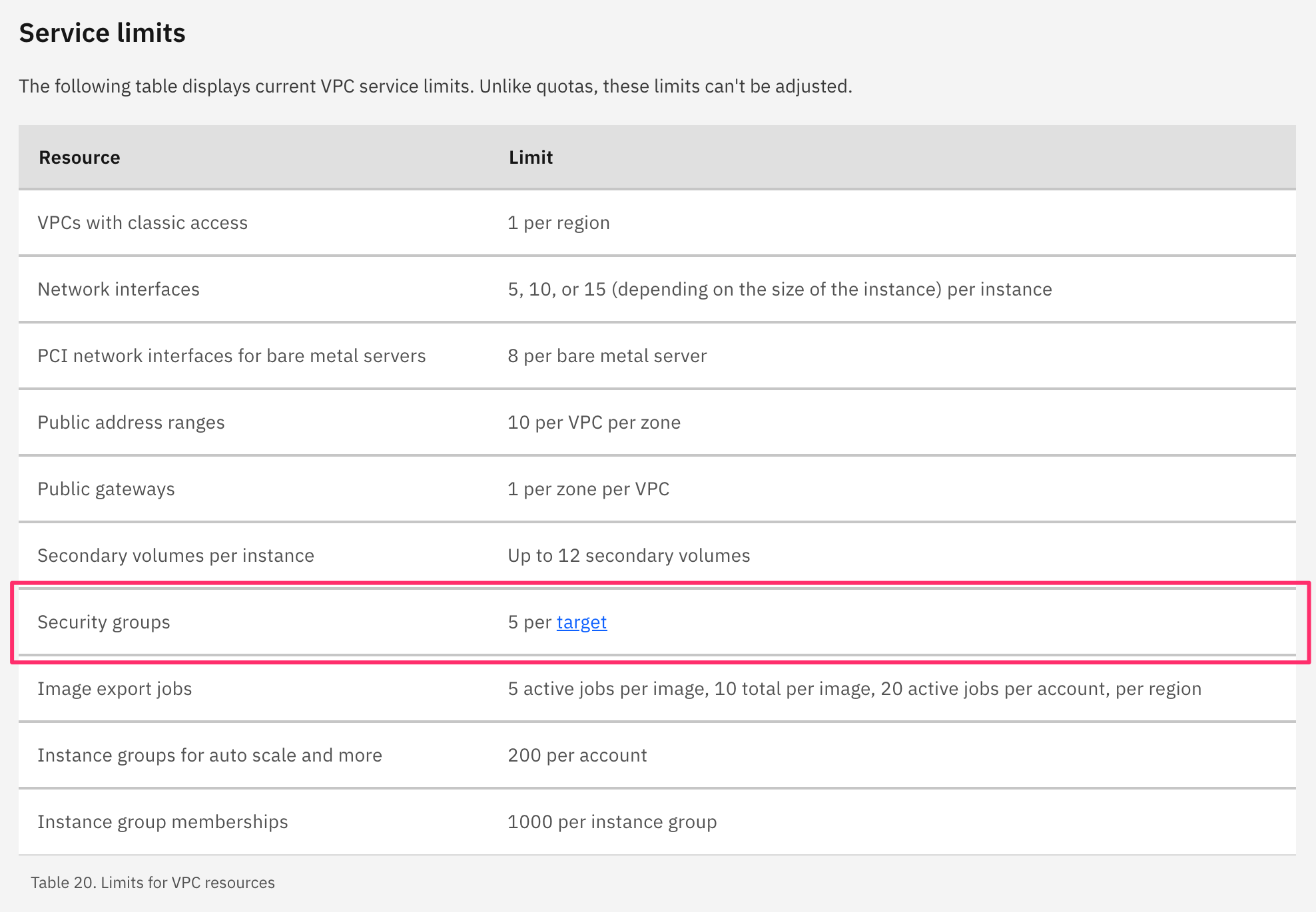
4. 1 Targetあたり5個のSecurity Groupの制限
Security Groupとして、すでにデフォルトのsg001と先ほど作業したsg002の2つが登録されているはずなので、あと3つ追加する。
5つ登録された状態
$ ibmcloud is sg-ta sg003 vni-vpcsg-0001 --trt virtual_network_interface
$ ibmcloud is sg-ta sg004 vni-vpcsg-0001 --trt virtual_network_interface
$ ibmcloud is sg-ta sg005 vni-vpcsg-0001 --trt virtual_network_interface
6個目のSecurity Groupを追加した際のエラー。Quotaに引っかかった。
$ ibmcloud is sg-ta sg006 vni-vpcsg-0001 --trt virtual_network_interface
Adding target vni-vpcsg-0001 for security group sg006 under account xxx-xx-xxx as user xxxxxxx@xx.xxx.xxx...
FAILED
Error code: over_service_limit
Error message: Service limit of 5 security groups per target exceeded
Error target name: id, type: parameter
Error target value: 02e7-a4e48b3c-4e7f-46f8-b398-64cb95530076
More information: https://cloud.ibm.com/docs/vpc?topic=vpc-quotas#service-limits-for-vpc-services
Trace ID: 5fce2986-9439-43c2-8c12-4a3193d8d1e0
参考(UIでの確認情報)
defaultのsecurity groupについては1000を超えるTargetも追加されていた。
