0
0

Delete article

Deleted articles cannot be recovered.

Draft of this article would be also deleted.

Are you sure you want to delete this article?

More than 3 years have passed since last update.

Figmaの使い方

Posted at

この記事ではFigmaの使い方を簡単に紹介いたします。
もちろん、随時更新予定です。

まず、Figma とは?

ブラウザ上で簡単にデザインできるツール。
(公式ページ)
https://www.figma.com

Figmaでできること

・操作する場所を選ばない
・共同編集ができる
・操作がシンプルで動作が軽い
・データの共有が簡単

料金は?

▼公式サイトからのキャプチャ▼
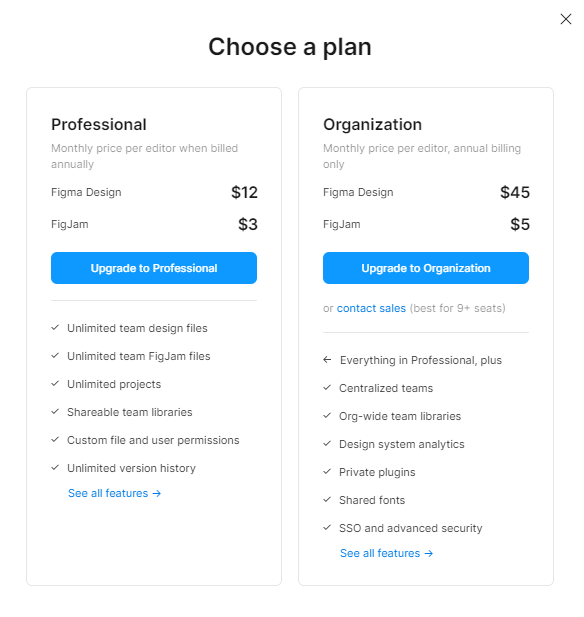
image.png
もちろん無料枠もございます。

ログイン

emailアドレスがございましたら、登録できる!
Googleのアカウントが有れば、それでも登録できるよ!

デザイン開始

画面構成

image.png

あとは、自由に作成していきましょう!

以下の記事も一緒に読むといいかもです!
https://nocodedb.world/archives/5580

ご愛読ありがとうございました。
何か気づきや質問があれば、コメントお願いします。
新しい情報を取得するたび、更新していきます。

良ければ、LGTM、ストックよろしくお願いいたします!

0
0
0

Register as a new user and use Qiita more conveniently

  1. You get articles that match your needs
  2. You can efficiently read back useful information
  3. You can use dark theme
What you can do with signing up
0
0

Delete article

Deleted articles cannot be recovered.

Draft of this article would be also deleted.

Are you sure you want to delete this article?