Twitter Bootstrapを利用するための、zf2モジュールはいくつかありますが、
http://modules.zendframework.com/?query=Twitter
ここでは、rwoverdijk/assetmanager (kriswallsmith/assetic を内部的に利用) の依存を前提に作られた、spoonx/sxbootstrapの導入について紹介します。
https://github.com/SpoonX/SxBootstrap
(基本的にはREAME.mdでこと足りるでしょう)
ZendSkeletonApplicationの構成(Zend\Mvc\Application::init()でのアプリケーション)を前提とします。
変更箇所は以下のとおり。
- composer.json
{
    "require":{
        "zendframework/zendframework": ">=2.2.0",
        "rwoverdijk/assetmanager": "1.*",
        "spoonx/sxbootstrap": "1.*",
    }
}
- config/application.config.php
<?php
return array(
    'modules' => array(
        'Application',
        'AssetManager',
        'SxBootstrap',
     ),
- module/Application/view/layout/layout.phtml
<?php echo $this->doctype(); ?>

<html lang="en">
    <head>
        <meta charset="utf-8">
        <?php $this->sxBootstrap();?>
headタグ内では他に、すくなくともjqueryの読み込みは行いましょう。よって上記の続きは、
    <?php echo $this->headScript()->prependFile($this->basePath() . '/js/jquery.min.js');?>
</head>
config/autoload内に設定情報を記述します。以下はApcをキャッシュに使う場合のサンプルです。
- config/autoload/bootstrap.local.php
<?php
return array(
    'twitter_bootstrap' => array(
        'variables'             => array(),
        'included_components'   => array(),
        'excluded_components'   => array(),
        'included_plugins'      => array(),
        'excluded_plugins'      => array(),
        'plugin_alias'          => 'js/bootstrap.js',
        'filter'                => array(
            'node_bin'      => '/usr/bin/node',
            'node_paths'    => array(),
        ),
    ),
    'asset_manager' => array(
        'caching' => array(
            'js/bootstrap.js' => array(
                'cache' => 'Apc',
            ),
            'css/bootstrap.css' => array(
                'cache' => 'Apc',
            ),
        ),
    ),
);
再度ですが配置する際に、public配下のcss,jsそのものと phpで返却するassetのレスポンスのルーティングに注意します。
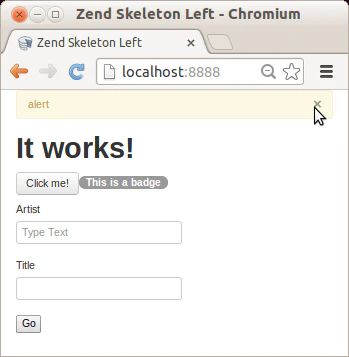
動作確認
viewファイル *.phtmlにて 以下のようなヘルパーメソッドの呼び出しが行えれば確認できるはずです。
<?php echo $this->sxbAlert("alert");?>
<h1>It works!</h1>
<?php echo $this->sxbButton('Click me!')->toggle('button'); ;?>
<?php echo $this->sxbBadge('This is a badge', 'badge-info');?>
<?php echo $this->sxbForm($this->form); ?>