
自分のワールドで、オブジェクトの状態を保存できると楽しそうですよね。
今回は、動かしたPartの位置を保存して、ワールドに再入場したときに復元するシンプルな例を紹介します。
まずは、テスト用にボタンを2つと、保存対象のPartを配置します。
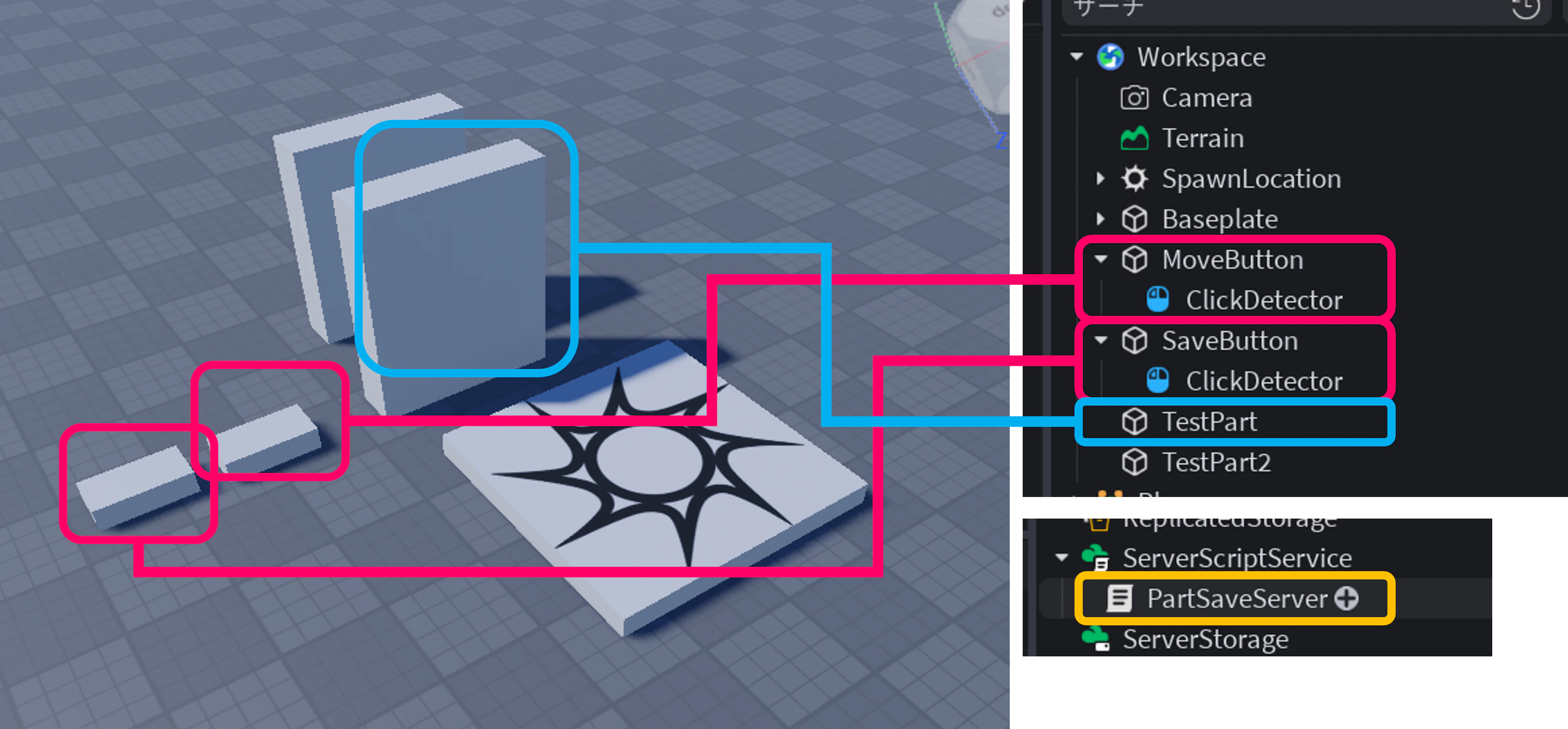
スクリプトはサーバー側に、次のように実装します。
local DataStoreService = game:GetService("DataStoreService")

local partStore = DataStoreService:GetDataStore("SimplePartSave_v1")

local testPart = workspace:WaitForChild("TestPart")
local moveButton = workspace:WaitForChild("MoveButton")
local saveButton = workspace:WaitForChild("SaveButton")

local moveClick = moveButton:WaitForChild("ClickDetector")
local saveClick = saveButton:WaitForChild("ClickDetector")

local DATA_KEY = "SharedPartState"

local function cframeToTable(cf)
	local x, y, z, r00, r01, r02, r10, r11, r12, r20, r21, r22 = cf:GetComponents()
	return {
		x = x, y = y, z = z,
		r00 = r00, r01 = r01, r02 = r02,
		r10 = r10, r11 = r11, r12 = r12,
		r20 = r20, r21 = r21, r22 = r22,
	}
end

local function tableToCFrame(data)
	return CFrame.new(
		data.x, data.y, data.z,
		data.r00, data.r01, data.r02,
		data.r10, data.r11, data.r12,
		data.r20, data.r21, data.r22
	)
end

local function loadPartState()
	local ok, result = pcall(function()
		return partStore:GetAsync(DATA_KEY)
	end)

	if ok and result then
		testPart.CFrame = tableToCFrame(result)
		print("Partの位置を復元しました")
	elseif not ok then
		warn("読み込み失敗:", result)
	else
		print("保存データがないため、初期位置のまま開始します")
	end
end

local function savePartState()
	local data = cframeToTable(testPart.CFrame)

	local ok, result = pcall(function()
		partStore:SetAsync(DATA_KEY, data)
	end)

	if ok then
		print("Partの位置を保存しました")
	else
		warn("保存失敗:", result)
	end
end

moveClick.MouseClick:Connect(function(player)
	testPart.CFrame = testPart.CFrame + Vector3.new(5, 0, 0)
	print(player.Name .. " が TestPart を移動しました")
end)

saveClick.MouseClick:Connect(function(player)
	savePartState()
	print(player.Name .. " が保存しました")
end)

loadPartState()
※ DataStoreを試すときは、API Services の設定も確認しておきましょう。
実行すると、移動して保存したPartが、ワールドに再入場したあともその位置を維持します。
今回はシンプルな例として、1つのPartの位置だけを保存しています。
ここから発展させると、複数オブジェクトの保存や、プレイヤーごとの保存にもつなげられます。