
はじめに
今回は下記記事の続きです。
前回は AWS MCP Server 自体の紹介でしたが、今回こそ 1/29 の以下のアップデートを追ってみます。
この記事で学べること
- Agent SOP の概要と、現時点で利用可能な SOP の一覧
- Deployment Agent SOP を使った Next.js アプリの AWS デプロイ手順
- SOP によるデプロイの実際の流れと、自動生成されるドキュメント
前提知識・条件
- 今回はKiroを利用して動作確認しています
- AWS MCP Server のセットアップについては前回の記事を参照ください
- 今回使用した主なバージョン
- Next.js: 16.1.6
- AWS CDK: 2.238.0
- aws-cdk CLI: 2.1100.1
Agent SOPとは?
最初に言葉の整理をしてみます。
まず SOP は標準作業の手順書(Standard Operating Procedures)のことです。
下記サイトでは、業務を標準化し、一貫性のある成果を出すための手順書と説明されています。
そして、Agent SOP についても、以下のサイトに説明がありました。
Agent SOPs are pre-built, tested workflows that guide AI assistants through complex multi-step AWS tasks. These automated procedures eliminate the guesswork from common AWS operations by providing step-by-step instructions that follow AWS best practices and security guidelines.
AWS に関するタスクを Agent が適切に実行できるための手順書という理解で良さそうです。
今回のアップデートは Deployment Agent SOPs と呼ばれる、デプロイ周りの SOP が新規追加された模様です。
SOPの種類
2026/02 時点でどのような SOP があるかは、AWS MCP Server の aws___retrieve_agent_sop ツールを引数なしで実行すれば取得できます。
以下、Deployment Agent SOPsのみリストアップしておきます。
| SOP名 | 説明 |
|---|---|
| deploy-webapp | 静的サイト/フロントエンドアプリのデプロイ |
| deploy-frontend-app | Amazon S3 + Amazon CloudFront への完全なデプロイワークフロー |
| setup-pipeline | CDK アプリ用の CI/CD パイプライン作成(AWS CodePipeline) |
| document-deployment | デプロイプランの作成と管理 |
やってみた
では動作確認してみます!
今回は、Deployment Agent SOP を使って簡単な Next.js アプリを AWS 環境にデプロイしてみます。
準備
まずはデプロイ対象のアプリを create-next-app で作成しておきます。
今回は簡単な動作確認のため、作成後は一切手を入れていません。
プランニング
では、SOPでnextjsappのデプロイ戦略考えてみて と伝えてみます。
以下、結果です。
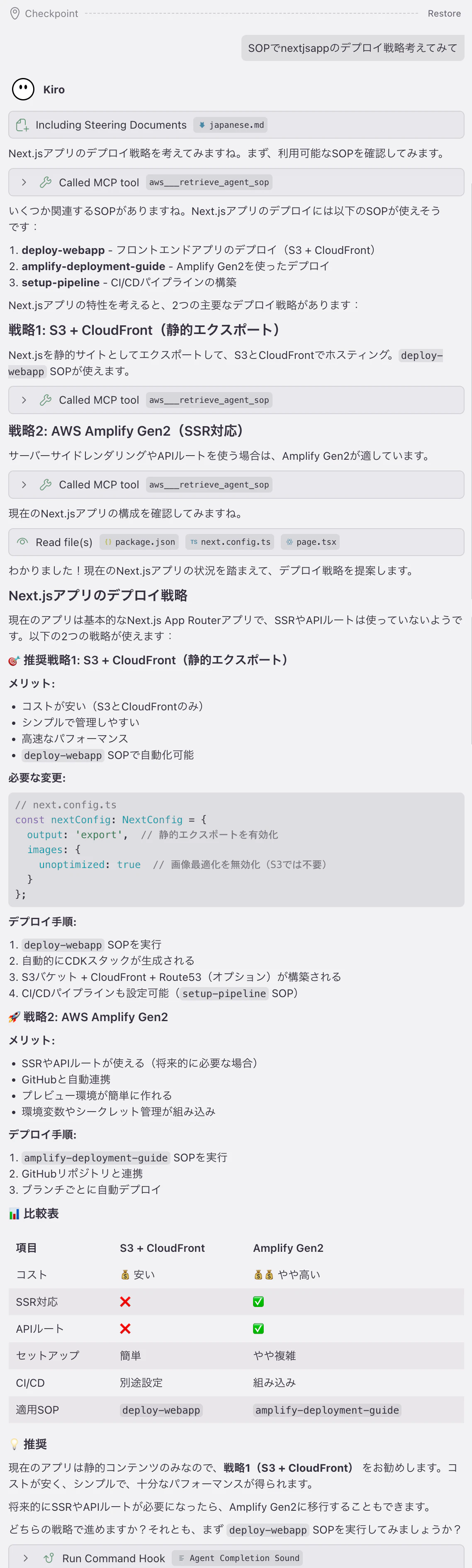
package.json next.config.ts などを確認し、現在のアプリの状況を踏まえて、以下2つの戦略を提案してくれました。
- 【推奨】S3 + CloudFront(静的エクスポート)
- AWS Amplify Gen2(SSR 対応)
コストを含めた比較表も出してくれて、初心者でもわかりやすい提案ですね。
今回は推奨してくれた通り、deploy-webapp を使ってみます。
なお、deploy-webapp の SOP は以下の通りです。
deploy-webapp SOP(クリックで展開)
# Deploy Web Application to AWS (Router)

## Overview

Routes web applications to appropriate AWS deployment scripts. Analyzes codebase structure, dependencies, and configuration to detect application type. Supports static websites and frontend apps; blocks backend/SSR/Supabase applications.

## Parameters

None required. All information derived from codebase analysis, package.json detection, and AWS credential verification.

## Critical Behaviors

**No Code Changes**: This SOP only analyzes and routes. Specialized SOPs make code changes.

**Prerequisite Checks**: Verify tools and credentials before analysis.

**Clear Routing**: Only route to specialized SOP if application type is supported.

## Your Role

Analyze web applications and route to the appropriate deployment SOP. Determine application type and delegate to specialized SOP.

## Communication Style

Professional, technical, direct. Avoid unnecessary explanations, verbose descriptions, emoji. Focus on actionable recommendations.

## Execution Flow

Step 1: Check Prerequisites
Step 2: Analyze Codebase
Step 3: Route or Decline

---

## Step 0: Inform User of Execution Flow

This routing SOP will:
- [ ] Check prerequisites (AWS CLI, credentials, package manager)
- [ ] Analyze codebase to determine application type
- [ ] Route to specialized deployment SOP or decline if unsupported

If supported, execution continues automatically to the deployment script.

## Step 1: Check Prerequisites

- [ ] File system: Read/write access available
- [ ] Shell execution: Command execution available
- [ ] AWS CLI: `aws --version` returns v2.x installed
- [ ] Package manager: `npm --version` or `bun --version` installed
- [ ] AWS credentials: `aws sts get-caller-identity` returns account ID

If tools missing: Inform user with brief remediation guidance. Ask to proceed. Respect user's decision.

## Step 2: Analyze Codebase & Determine Type

### 2.1 Scan Project Structure Systematically

- Directory structure and files
- Documentation (README.md, AGENTS.md)
- `package.json` dependencies and scripts (if present)
- Environment files (.env*)
- Build/deployment config
- Output directories (dist/, build/, out/)

### 2.2 Check for Unsupported Patterns

| Pattern Type | Indicators | Action |
|--------------|------------|--------|
| Supabase (actual usage) | `supabase/migrations/` directory, `supabase.from(` in code, `supabase.auth.` calls | Block deployment |
| Supabase (scaffolding only) | `@supabase/supabase-js` in package.json but no actual usage | Allow deployment |
| Backend/SSR | Express/Fastify/Koa in package.json, API route directories, Next.js without static export | Block deployment |
| CLI tools | bin entries in package.json, commander/yargs dependencies | Block deployment |
| Desktop apps | electron, tauri dependencies | Block deployment |
| Mobile apps | react-native, capacitor, cordova | Block deployment |

**Supabase Detection - Avoid False Positives:**

Presence of `@supabase/supabase-js` does NOT mean app uses Supabase. Only flag if actual usage found.

**Indicates Supabase IS used (block):**
- `supabase/migrations/` directory at project root
- Code contains: `supabase.from(`, `supabase.auth.`, `supabase.storage.`, `supabase.rpc(`
- React Query hooks calling Supabase methods

**Does NOT indicate usage (allow):**
- `@supabase/supabase-js` dependency (boilerplate)
- `src/integrations/supabase/` with only client setup (scaffolding)
- Empty type definitions (`Tables: { [_ in never]: never }`)
- Supabase client configured but never imported/called

**Verification if scaffolding detected:**
1. Search for database calls: `supabase.from(` patterns
2. Search for auth usage: `supabase.auth.` patterns
3. Check if client imported and used in components
4. If no actual usage → allow deployment as static frontend

### 2.3 Check for Supported Patterns

| Pattern Type | Indicators | Action |
|--------------|------------|--------|
| Static website | `index.html` in root or build output, CDN-ready assets (hashed filenames) | Route to deploy-frontend-app |
| Frontend app | Build script outputs to static directory, no backend dependencies, React/Vue/Angular | Route to deploy-frontend-app |
| Next.js static | `next.config.js` with `output: 'export'` or `next export` script | Route to deploy-frontend-app |
| Nuxt static | `nuxt.config.js` with `target: 'static'` or `ssr: false` | Route to deploy-frontend-app |
| SvelteKit static | `@sveltejs/adapter-static` in dependencies | Route to deploy-frontend-app |
| Static site generators | `gatsby-config.js`, `_config.yml`, `hugo.toml`, `hugo.yaml` | Route to deploy-frontend-app |

## Step 3: Route or Decline

### 3.1 If Unsupported - Supabase/Backend

Decline by adapting the message below.

I cannot deploy this application because it uses a database/backend. This deployment system currently only supports:
- Pure static websites
- Frontend applications without backend dependencies
- Applications that don't require database integration

Your application uses Supabase for [database/auth/storage]. To deploy this application, you would need to:
1. Use a different deployment approach that supports Supabase integration
2. Or migrate away from Supabase to AWS-native services

Would you like guidance on alternative deployment strategies?

Stop execution. Do not proceed to routing.

### 3.2 If Unsupported - Other Type

Decline by adapting the message below.

I cannot deploy this application because it is a [type: Backend API/SSR Application/CLI Tool/etc.].

This deployment system currently only supports:
- Pure static websites (HTML/CSS/JS)
- Single Page Applications (React, Vue, Angular) with static builds
- Static Site Generators (Gatsby, Hugo, Jekyll)

Your application appears to be [description of what was detected].

Would you like guidance on alternative deployment strategies for this type of application?

Stop execution. Do not proceed to routing.

### 3.3 If Supported - Route to Specialized SOP

Load and execute `deploy-frontend-app` using `retrieve_agent_sop`, `retrieve_agent_script` or `get_execution_plan` tool.

Follow ALL steps in specialized SOP. It handles CDK generation, deployment, configuration, and final instructions. Do not return to this router after delegation.
デプロイ
デプロイは以下のような手順で、SOP の通りに進みます。
-
Phase 1: コンテキスト収集と設定
- Step 1: デプロイプランの作成
- Step 2: デプロイブランチの作成
- Step 3: ビルド設定の検出
- Step 4: 前提条件の検証
- Step 5: デプロイプランの見直し
-
Phase 2: AWS CDK インフラストラクチャの構築
- Step 6: CDK 基盤の初期化
- Step 7: CDK スタックの生成
- Step 8: デプロイスクリプトの作成
- Step 9: CDK Synth の検証
-
Phase 3: デプロイと検証
- Step 10: CDK デプロイの実行
- Step 11: AWS CloudFormation スタックの検証
-
Phase 4: ドキュメントの更新
- Step 12 & 13: デプロイプランの最終化と README 更新
念の為動作確認もしましたが、特に問題なさそうです。

モノレポ構成のディレクトリをすでに作っていたため、CDK 関連のソース格納場所だけは指摘(packages/nextjsapp/infra -> packages/cdk)しましたが、それ以外は自律的に Git ブランチを管理し、ドキュメント作成までしてくれていますね。
作成したドキュメントも参考までに紹介しておきます。
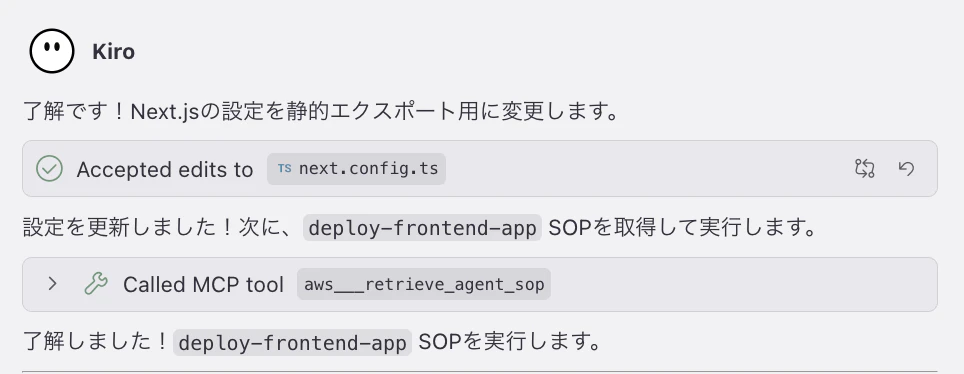
なお、静的コンテンツでの配信する場合は、next.config.tsの修正が必要ですが、この対応はSOPによるデプロイ前に自律的に実施してくれました。
まとめ
以下の点を意識してデプロイをしてくれるのは安心感があるなと感じました。
- 現在の資材を事前チェックしているところ
- Git で変更管理を行なっていること
-
deploy-webappにはソースの変更は行わないことが明示的にプロンプトされていること
複雑なデプロイに対応してくれるかは要検証ですが、シンプルなデプロイであれば安心してお任せできそうです。