趣味でSwiftをいじっている私ですが@Publishedプロパティラッパーとかを見て、「dotnetアプリ開発でお世話になっているReactivePropertyっぽいな...」と思ってました。
ってことはとっつきやすいのでは?と思いSwiftUI/Swift: 既存のプロジェクトをMVVMパターンに変更する - Qiitaで@Published等を使ってみたのですが、2時間くらいハマった出来事があったので共有します。
ハマったこと
@Published var value:Tの値を変更しているのに監視側で定義したsink()内の処理が実行されない
状況再現アプリ
ボタンとカウント表示があるだけのカウントアップアプリを作ります。
C#でもSwiftでも、ボタンをクリックするとModelの値が+1されて、その変更通知がViewに届くという作りです。
環境
- dotnet WPF app
- dotnet5
- ReactiveProperty 7.12.0
- Swift app
- XCode 13
- Swift 5
dotnet WPF app
今回論点となるViewModel。Subscribe()の戻り値であるIDisposableはクラスのフィールドとして参照を保持していなくてもカウントアップした結果はViewにまで到達します。
    public class MainWindowViewModel
    {
        // model
        private CountStore store = new CountStore();

        public MainWindowViewModel()
        {
            this.CountUpCommand = new RelayCommand(_ => store.CountUp());
            Count = new ReactiveProperty<int>(store.Count.Value);

            var _ = store.Count.Subscribe(onNext: count => this.Count.Value = count);
        }

        // ボタンクリック時に実行されるCommand
        public ICommand CountUpCommand { get; }
        // Modelの値が反映されるプロパティ
        public ReactiveProperty<int> Count { get; private set; }
    }
CountStore.cs カウントアップした値を保持するクラスです
    public class CountStore
    {
        public CountStore()
        {
            Count = new ReactiveProperty<int>(0);
        }
        public ReactiveProperty<int> Count { get; private set; }
        public void CountUp()
        {
            Count.Value++;
        }
    }
View(コードビハインドは無し)
<Window x:Class="WpfApp1.MainWindow"
        xmlns="http://schemas.microsoft.com/winfx/2006/xaml/presentation"
        xmlns:x="http://schemas.microsoft.com/winfx/2006/xaml"
        xmlns:d="http://schemas.microsoft.com/expression/blend/2008"
        xmlns:mc="http://schemas.openxmlformats.org/markup-compatibility/2006"
        xmlns:local="clr-namespace:WpfApp1"
        mc:Ignorable="d"
        Title="MainWindow" Height="450" Width="800">
    <Window.DataContext>
        <local:MainWindowViewModel/>
    </Window.DataContext>
    <Grid>
        <StackPanel>
            <TextBlock Text="{Binding Count.Value}" TextAlignment="Center"/>
            <Button Command="{Binding CountUpCommand}" >Count up</Button>
        </StackPanel>
    </Grid>
</Window>
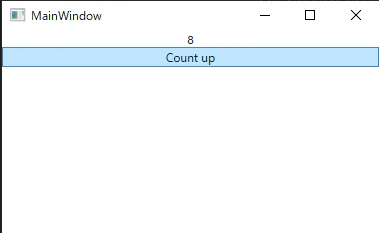
結果、ちゃんとカウントアップします。
Swift iOS app
ViewModel
class ContentViewModel: ObservableObject{
    // modelの値が反映されるプロパティ
    @Published private (set) var value:Int = -1
    private let store:CounterStore = .init()
    init(){
        let _ = store.$count.sink(receiveValue: {count in self.value = count})
    }

    // ボタンクリック時に実行される関数
    public func countUp() -> Void{
        store.countUp()
    }
}
CountStore
class CounterStore: ObservableObject{
    @Published private (set) var count:Int = 0
    public func countUp() -> Void{
        count += 1
    }
}
View
struct ContentView: View {
    @ObservedObject var vm = ContentViewModel()
    var body: some View {
        VStack(alignment: .center, spacing: nil){
            Text("\(vm.value)").padding()
            Button("Count up"){vm.countUp()}
        }
    }
}
結果、カウントアップしないです。ボタンをクリックしてもずっと0のまま。

どういうことなのか
公式ドキュメント[AnyCancellable - developper.apple.com]より
An AnyCancellable instance automatically calls cancel() when deinitialized. (意訳:保持しとかないと使い終わったとみなして勝手にキャンセルするぞ)
SwiftではARCという名のメモリ管理が行われているらしく、この件もAnyCancellableへの参照数が0になり即破棄されたため起きた問題だったようです。ARCについては知識として身につけておきたいところです。(ARCについてとても参考になった記事:ARCの光と影)
つまり、今回の場合ViewModelを次のようにしてAnyCancellableの参照をキープしておく必要があるわけです。
class ContentViewModel: ObservableObject{
    @Published private (set) var value:Int = -1
    private let store:CounterStore = .init()
    private var subscriptions = Set<AnyCancellable>()
    init(){
        // NG: init()のスコープを抜けると破棄される
        //let _ = store.$count.sink(receiveValue: {count in self.value = count})

        // OK: Set<AnyCancellable>に保持しておくことで参照が保たれる
        store.$count.sink(receiveValue: {count in self.value = count}).store(in: &subscriptions)
    }

    public func countUp() -> Void{
        store.countUp()
    }
}
OK!