
学習教材
Node.jsを使ったバックエンド開発
サーバーとブラウザの関係
ブラウザ(PC)
欲しい情報を要求(リクエスト)... https://example.com/
↓ ↑
サーバー(Node.js)
要求されたデータを受信(レスポンス)... HTML/CSS/JavaScript/JSON
HTTPサーバーを実装しよう
// Node.jsが標準で持っているhttpモジュール
import * as http from "http";

const server = http.createServer(function( req, res ) {
  console.log(req.url);

  // レスポンスを返す処理
  res.end('hello!');
});

server.listen(8080);
node (実行したいファイル)

nodemon(ノードモン)で開発の効率化
npmのパッケージの一つ
ファイル内で変更があった際、勝手にサーバーが再起動するようになる
// インストール
npm i -g nodemon
nodemon (実行したいファイル)
ファイル内で変更があると
res.end('Yooooooo!');
勝手にサーバーが再起動する

リロード一つで変更可能

パス毎に制御を加える
const server = http.createServer(function( req, res ) {
  console.log(req.url);

  // /helloならhello、/byeならbyeを返却
  if (req.url === '/hello'){
    res.end('hello');
  } else if(req.url === '/bye'){
    res.end('bye');
  }
});
localhostとは
自身のPCを表すドメイン
Content-Typeについて学ぼう
Content-Type
ブラウザとサーバーが通信しているコンテンツのフォーマットと文字コードの情報
const server = http.createServer(function( req, res ) {
  console.log(req.url);

  // 200はステータスコード
  res.writeHead(200, {'content-type':'text/html; charset=utf-8'});

  if (req.url === '/hello'){
    res.end('<h1>こんにちは</h1>');
  } else if(req.url === '/bye'){
    res.end('bye');
  }
});

HTTPステータスコードについて学ぼう
HTTPステータスコード
// 200番台: 成功
//  - コンテンツ作成成功:201、その他の処理成功:200
// 300番台: リダイレクト
//  - 恒久:301, 一時:302, キャッシュ利用:304
// 400番台: クライアントエラー
//  - 認証失敗:401, アクセス禁止:403, Not Found:404
// 500番台: サーバーエラー
//  - 不明なエラー:500、サービスダウン:503
HTTPメソッド
リクエストメソッド
GETメソッド
/**
* GETメソッド: コンテンツの取得
* タイミング:ブラウザのURL指定、リンクのクリック、<form>のデフォルト
* 特徴:URLの一部にパラメータを渡す
*/
const server = http.createServer(function (req, res) {
  console.log(req.url);
  if (req.url === '/') {
    res.end(`<a href = "/result">Get Method Link</a>`);
  } else if (req.url === '/bye') {
    res.end('bye');
  } else {
    res.end(req.url);
  }
});
リンクのクリック


POSTメソッド
/**
* POSTメソッド: コンテンツの作成
* タイミング:<form>のPOSTメソッド
* 特徴:リクエストの本文にパラメータを渡す
*/
const server = http.createServer(function (req, res) {
  console.log(req.url);
  if (req.url === "/") {
    res.write(`<a href = "/result">Get Method Link</a>`);
    res.end(`
    <form action="/result" method="post">
      <input type="text" name="title">
      <input type="submit">
    </form>
    `);
  } else if (req.url === "/bye") {
    res.end("bye");
  } else {
    res.end(req.url);
  }
});


res.endの仕様
// Node.jsでendは一つのリクエストの最後に呼ぶもの
// endはresによる処理が完了した目印になるので、2つ呼ぶとエラーになる
res.end('')
res.end(``)
↓
// writeでresに対して、内容を追加していく
res.write('')
res.end(``)
[予期せぬ挙動]ペイロードに表示されない
titleに書いた文字がペイロードに正しく表示されない
原因は日本語がHTMLエンコードされているため

解決策
// HTMLフォームの文字コードの指定をする
res.end(`
  <form action="/result" method="post" accept-charset="UTF-8">
    <input type="text" name="title">
    <input type="submit">
  </form>
  `);

[Express]サーバーを構築しよう
Express
Node.jsでサーバーを構築する際に最もよく使用されているライブラリ
サーバーの機能をNode.js上に実装する際はExpressを使うようにする
import express from 'express';
// PORTを定数で宣言
const PORT = 8080;
// appはserverに値するもの
const app = express();
// GETメソッドで"/"(ルートパス)にリクエストが飛んできた時に実行する関数を定義
// POSTメソッドの場合 → app.post("/",fu...);
app.get("/", function(req, res){
// endも使えるがsendの方が高機能
res.send(`
<a href="/result?param1=1¶m2=2">Get Method Link</a>
<form action="/result" method="POST">
<input type="text" name="title">
<input type="text" name="description">
<input type="submit">
</form>
`)
});
// 第一引数にPORT、第二引数の関数に実行したい内容を入れる
app.listen(PORT, function() {
console.log(`Server start: http://localhost/${PORT}`);
})

[Express]GETパラメーターを取得しよう
app.get("/result", function(req, res){
  // GETのパラメータを取得
  const params = req.query;
  console.log(params);
});

param1とparam2が格納された、オブジェクトが取得できる
.query
URLの「?」以降に書かれたクエリパラメータ(GETパラメータ)をオブジェクトとして取得するためのもの
[Express]POSTの本文を取得しよう
// POSTパラメータを取得する際は設定を追加する必要がある
// POSTの本文の値をbodyプロパティから取得できる
// 呼ばないとbodyのプロパティは空になる
app.use(express.urlencoded());

app.post("/result", function(req, res){
  // POSTのパラメータを取得
  const params = req.body;
  console.log(params);
});


[Express]エラーハンドリングを実装しよう
よくあるエラー

app.get("/", function(req, res){
res.send(`
<a href="/result?param1=1¶m2=2">Get Method Link</a>
<form action="/result" method="POST">
<input type="text" name="title">
<input type="text" name="description">
<input type="submit">
</form>
`)
res.send('hello');
});
1回目のsendでresを返却したのに、もう一度返却はできない
resの返却を返すメソッドが複数回呼ばれている可能性があるエラー文
expressは1つのリクエストに1つのsendメソッドで返却する
[Express]練習問題
練習問題
下記のフォームで送信したリクエストを「商品1、商品2がカートに追加されました。」のようなレスポンスとして返却する処理を記述しましょう
import express from 'express';

const PORT = 8080;
const app = express();

app.use(express.urlencoded({ extended: true }));

app.get('/', function (req, res) {
  res.send(`
    <form action="/cart" method="POST">
    <div>
      <label>商品:<input type="text" name="product[]"></label>
    </div>
    <div>
      <label>商品:<input type="text" name="product[]"></label>
    </div>
    <input type="submit">
    </form>
    `);
});

app.post('/cart', function(req, res){
      const products = req.body.product;
      res.send(`${products[0]}、${products[1]}がカートに追加されました`)
    });

app.listen(PORT, function(){
      console.log(`Server start: http://localhost/${PORT}`)
    });


JSONを返却する実装をしよう
JSON
オブジェクトに近い形の文字列
app.get('/', function(req, res) {
    // オブジェクトのmessageプロパティに対して設定すると、JSONに変換されブラウザに返却される
    res.send({message: 'hello'});
})

// .stringify → 渡ってきたobjや配列をJSONの文字列に変換する
// JSON.stringify({message: 'hello', number: 1, array: ['banana', 'apple', 1]});

app.get('/', function(req, res) {
    // 文字列でも数値でも配列でもOK
    res.send({message: 'hello', number: 1, array: ['banana', 'apple', 1]});
})

// レスポンスを必ずJSONで返したい場合
res.json({message: 'hello', number: 1, array: ['banana', 'apple', 1]});

// 文字列で返したい場合
res.end({message: 'hello', number: 1, array: ['banana', 'apple', 1]});

// 渡された値によって返却する値が変わる
res.send({message: 'hello', number: 1, array: ['banana', 'apple', 1]});
JSONを受け取る実装をしよう
フォームを送信する時のContent-Type

formの機能ではJSONを送信できないのでJavaScriptで実装する必要がある
クライアントサイドでJSONを飛ばす設定
app.get('/', function (req, res) {
  res.send(`
    <form action="/result" method="POST">
      <input type="text" name="title">
      <input type="text" name="description">
      <input type="submit">
      <script>
        const formEl = document.querySelector('form');
        formEl.onsubmit = function(event){
          event.preventDefault();
          const title = formEl[0].value
          const desc = formEl[1].value

          const data = {
            title,
            desc
          };

          fetch('/result', {
            method: 'POST',
            headers: {
              'Content-Type': 'application/json'
            },
            body: JSON.stringify(data)
          });
        }
      </script>
    </form>
    `);
});

formは送信ボタンを押すと"/result"ページに遷移するところまでがactionに含まれている。今回はページ遷移を発生させたくないので、event.preventDefault()メソッドを使い、ページによる画面遷移を防ぐ必要がある。
preventDefault()はブラウザの標準的な機能を止める役割がある。onsubmitはページ遷移まで行うactionになっていて、event.preventDefault()の1行で止めることができる。

formの中のinput要素は、formの配列に格納されている。その値を取得したい場合は、formEl[配列].valueで取得できる。その値を送信する際は、fetch()メソッドを使う
fetct()は、第一引数に送信したいリクエスト先のURL、第二引数の"method"オブジェクトのオプションに送信したいメソッドの"POST"とする。
→ これで、/resultのパスにPOSTメソッドが送信される

本文にJSONを設定する

送信する先のデータをオブジェクトとして作成する

作成したのはただのオブジェクトなので、JSONに変換させるため".stringify"を使う
サーバー側でJSONを受け取るために必要なこと
app.use(express.json());


JSONを応答として返す方法
app.post('/result', function (req, res) {
  const params = req.body;
  console.log(params);
  res.json({meg: 'success'});
});

fetchでリクエストを送信して、応答としてJSONを受け取る方法
  fetch('/result', {
    method: 'POST',
     headers: {
      'content-type': 'application/json'
    },
    body: JSON.stringify(data)
  }).then(async function(res) {
    const data = await res.json();
    return
  });
}
res.json()は非同期関数なので、awaitをつける
fetchの役割
サーバー通信(リクエスト)を送って、結果が返ってくる約束を返す
thenの役割
「後で結果が来た時」に動く関数を登録するメソッド
REST API
以下の特徴を持つ、サーバーへのリクエスト方式のこと
・リソート毎にURLを定義
・メソッドでリリースに対する処理を定義
・JSONでデータをやり取りする
REST APIを使ってみよう
import express from 'express';

const PORT = 8080;
const app = express();

app.use(express.json());

const products = [
  { name: "table", price: 1000 },
  { name: "chair", price: 100 },
  { name: "clock", price: 700 },
];

app.get('/products', function (req, res) {
  res.json(products);
});
追加する
app.post('/products', function (req, res) {
  const newProduct = req.body;
  products.push(newProduct);
  console.log(products);
  res.json(newProduct);
});
POST http://localhost:8080/products
content-type: application/json

{
  "name": "bed",
  "price": 1500
}

削除する
// :id → ダイナミックルーティング
app.delete('/products/:id', function (req, res) {
  const deleteId = req.params.id;
  products.splice(deleteId, 1);
  console.log(products);
  res.json({deleteId});
});
// productsの削除する対象は1番目
DELETE  http://localhost:8080/products/1

変更する
// patch → 部分更新
app.patch('/products/:id', function (req, res) {
 const targetProduct = products[req.params.id];
 if(req.body.hasOwnProperty('name')){
  targetProduct.name = req.body.name;
 }
 if(req.body.hasOwnProperty('price')){
  targetProduct.price = req.body.price;
 }
 console.log(products);
  res.json(targetProduct);
});
PATCH http://localhost:8080/products/2
content-type: application/json

{
  "price": 100
}

特定の行のみを取得
app.get('/products/:id', function (req, res) {
  const targetId = req.params.id;
  res.json(products[targetId]);
});
GET http://localhost:8080/products/2
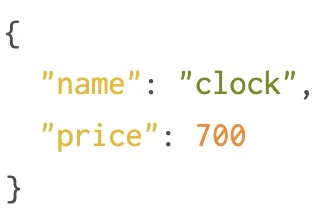
GET http://localhost:8080/products/0

Routerを使ってコードを整理しよう
コード分割の手法を学ぶ
import express from 'express';

const router = express.Router();

const products = [
  { name: "table", price: 1000 },
  { name: "chair", price: 100 },
  { name: "clock", price: 700 },
];

router.get('/products', function (req, res) {
  res.json(products);
});

router.get('/products/:id', function (req, res) {
  const targetId = req.params.id;
  res.json(products[targetId]);
});


router.post('/products', function (req, res) {
  const newProduct = req.body;
  products.push(newProduct);
  console.log(products);
  res.json(newProduct);
});

router.delete('/products/:id', function (req, res) {
  const deleteId = req.params.id;
  products.splice(deleteId, 1);
  console.log(products);
  res.json({deleteId});
});

router.patch('/products/:id', function (req, res) {
 const targetProduct = products[req.params.id];
 if(req.body.hasOwnProperty('name')){
  targetProduct.name = req.body.name;
 }
 if(req.body.hasOwnProperty('price')){
  targetProduct.price = req.body.price;
 }
 console.log(products);
  res.json(targetProduct);
});

export default router;
import express from 'express';
import router from './api-routes/products.mjs'

const PORT = 8080;
const app = express();

app.use(express.json());

app.use(router);

app.listen(PORT, function () {
  console.log(`Server start: http://localhost:${PORT}`);
});
GET http://localhost:8080/products

Routerとは?
appと基本同じでGETやPOSTを実装できる。Routerはあくまでappに追加するものであって、単独では使えない
// 好きな名前でrouterを使える
import productRoutes from './api-routes/products.mjs'

// appでrouterを使うには
app.use(router);

// パスの変更も容易にできる
app.use('/api', productRoutes);
ミドルウェアの仕組みと挙動
ミドルウェア
Expressにおけるミドルウェアとは、リクエスト(req)、レスポンス(res)を中心とした関数を指す
ブラウザでの操作をしてhttpリクエストを送信時、Expressがブラウザから来たhttpリクエストを受け、何らかの処理を実行してレスポンスを返す
つまりミドルウェアは、要求と応答との間で何らかの処理を実行する仕組みを担っている
// ミドルウェア:ルートハンドラの前後に行われる処理
app.use('/', function(req, res, next) {

});
ルートハンドラ
function関数の中身、実行の内容
// ルートハンドラ:パスとメソッドに紐付くメインの処理
app.get('/', function(req, res) {

});
next()
## next()の使い方
- nextの必要性
- next後の処理も実行される
− nextで例外処理を呼び出す
  - res.sendの多重呼び出しを防ぐ
*/