
概要
C#で動的に生成したコードを実行できることが最近(といっても数年前の.Net Framework4.6から)できるようになり
今回、動的に複雑な分岐条件等を組み合わせ実行するアプリを作成するため、調査したため、メモを残しておきます
コンポーネントインストール
NuGetから下記を選択しインストールします
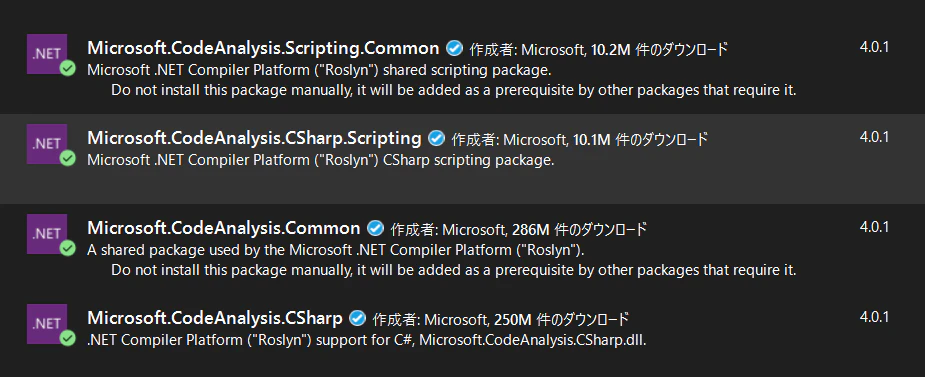
参照に下記コンポーネントが追加されていることを確認します
Microsoft.CodeAnalysis
Microsoft.CodeAnalysis.CSharp
Microsoft.CodeAnalysis.CSharp.Scripting
Microsoft.CodeAnalysis.Scripting
コード実装
CSharpScript宣言
下記を宣言します
using Microsoft.CodeAnalysis.CSharp.Scripting;
スクリプト処理
CSharpScriptクラスから「EvaluateAsync」メソッドを呼び出し、引数に動的に実行したいコードを渡し実行します
await CSharpScript.EvaluateAsync<戻り値変数の型>(スクリプトコード);
コード実装例1
もっとも単純な実装例です
C#スクリプトで変数同士の加算をし、結果を戻すサンプルになります
非同期に実行されるため、メソッドにasync キーワードを宣言する必要があります
private async void doCsScript()
{
     var result = await CSharpScript.EvaluateAsync<int>(@"var x = 1;var y = 2;x + y");
     System.Console.WriteLine(result);
}
上記を実行すると、スクリプトが実行され、下記のように表示されます
3
コード実装例2
C#スクリプト内でusingディレクティブ宣言を実施
非同期で戻り値を取得しています
private void doScript()
{
    //--------スクリプトコードを生成
    StringBuilder actionCodeStr = new StringBuilder();

    //宣言の定義
    actionCodeStr.AppendLine("using System.Collections.Generic; ");
    actionCodeStr.AppendLine("using System; ");

    //処理コードを生成(List変数に数字を追加)
    actionCodeStr.AppendLine("List<int> result = new List<int>(); ");
    for (int i = 0; i < 4; i++)
    {
        actionCodeStr.Append(@"result.Add(").Append(i).AppendLine(");");
    }
    actionCodeStr.AppendLine("result ");
    System.Console.WriteLine(actionCodeStr.ToString());

    //--------スクリプトを実行
    Task<List<int>> task = doCsScript(actionCodeStr.ToString());

    //結果を出力
    foreach (int rs in task.Result)
    {
        System.Console.WriteLine(rs);
    }
}

private async Task<List<int>> doCsScript(string actionScrptStr)
{
    return await CSharpScript.EvaluateAsync<List<int>>(actionScrptStr);
}
上記を実行すると、スクリプトが実行され、下記のように表示されます
0
1
2
3