
💡 はじめに(背景)
GitHubのプロフィールREADMEでよく使われている以下OSS。
github-readme-statsgithub-profile-trophy
上記を使用してこんな感じの表示を入れている人もいるかと思います↓

問題の503
しかしある日・・・

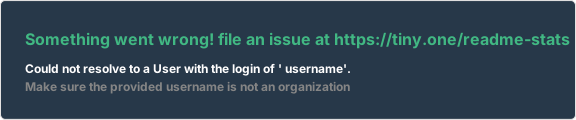
READMEのStatsが表示されないではないですか!
しかも画像URLに直接アクセスすると 503・・・
その原因は Vercelの公式ホストが混雑・レート制限に引っかかっていることでした。
✅ 結論
github-readme-stats を自分の Vercel にデプロイすれば、解決できます!
✅ 手順
- github-readme-stats を fork
- Vercel にデプロイ
- GitHubのアクセストークンを環境変数に設定
- 自分専用URLを README に設定
✅ 手順①:github-readme-stats リポジトリをfork
まず、公式リポジトリを fork します。
👉 https://github.com/anuraghazra/github-readme-stats
GitHub上で Fork を押すだけです!
✅ 手順②:GitHub API トークンを作成
GitHubのAPIにアクセスする権限を作ってあげましょう。
✅ トークン作成手順
- Githubで自前のアカウントログインをする
- Generate new token
- 以下にチェック
✅ repo
✅ read:user
✅ public_repo
トークンを生成して 必ずコピー
Access Tokenは一度しかコピーするチャンスがないので
必ず取得しておくこと!
✅ 手順③:Vercel に 環境変数 を設定
- Vercel のプロジェクト設定から下記に遷移
Settings → Environment Variables
- 下記を設定
| Key | Value |
|---|---|
PAT_1 |
GitHubで作成したトークン |
環境変数を設定したら再度デプロイをしておくこと!
✅ 手順④:Vercel デプロイ
上記Vercelにアクスし、ログインしましょう。
- 「New Project」
- forkした github-readme-stats を選択
- そのまま Deploy
Deploy後しばらくすると、自分専用のURLが発行されます。
✅ 手順⑤:README でプロフィールを表示しよう!
ブラウザで以下が表示されることを確認します。
https://github-readme-stats-xxxxx.vercel.app/api?username=yourname&show_icons=true&theme=vue-dark
github-readme-stats-xxxxx.vercel.app
はVercelでデプロイ後に作成される「Domains」の値
問題なければ、READMEにこれを貼るだけです。


ブラウザで表示が成功してから、Githubで表示されるようになるまで
時間差があります!
top-langsが表示された!

追記
キャッシュを長くして負荷を減らしたりしても、応急処置は可能です!
ただこの方法ですと、時間が経つと同じ事象になってしまう可能性があるので注意です。
またGihub-profile-trophyでも同じ事象が起きた方は下記リポジトリ
に対しても同じ手順を踏めば解決します!