
コードレス(プログラミング無し)で便利なGUIアプリ(ツール)を自然言語×MCPで作る
「画像をドロップするとモノクロ画像に変換して保存してくれるアプリ、作って」
そんな自然言語の指示だけで、Pythonコードが生成され、ビルドされて、スタンドアローンで動作するアプリが完成する。
夢のような「コードレス開発」を実現するための MCPサーバー を紹介します。
(本記事のコードはmacbookで開発しましたが、Windowsでも動作します)
🎯 本記事の目的
- 自然言語だけでPython GUIアプリを作る
- Claude + MCPで自動的にコード → バイナリ化まで行う
- 誰でも簡単にスタンドアローンのツールを量産できる環境を構築する
本記事は下のQiitaの記事の拡張版です:
Claude + MCP を使ってPythonコードを自然言語から実行する環境構築
🛠️ 環境構築
1. サーバーファイルを作成(変更)(server.py)
ベースとなるQiitaの記事のserver.pyを以下のコードに変更するだけです。その後
macOS版のserver.py
# from mcp.server.fastmcp import FastMCP
import subprocess
import sys
import tempfile
import os
import json
import shutil
import platform
from datetime import datetime
from pathlib import Path
from typing import List, Dict, Optional, Union
import traceback
# MCPサーバーを初期化
mcp = FastMCP("PythonExecutorServer")
# グローバル状態管理
class ServerState:
def __init__(self):
self.current_working_directory = os.getcwd()
self.project_root = None
self.last_build_info = {}
def set_working_directory(self, path: str) -> str:
"""作業ディレクトリを設定し、状態を更新"""
try:
abs_path = os.path.abspath(path)
if not os.path.exists(abs_path):
os.makedirs(abs_path, exist_ok=True)
self.current_working_directory = abs_path
os.chdir(abs_path)
# プロジェクトルートを初回設定時に記録
if self.project_root is None:
self.project_root = abs_path
return abs_path
except Exception as e:
raise Exception(f"Failed to set working directory: {str(e)}")
def resolve_path(self, path: str) -> str:
"""パスを現在の作業ディレクトリを基準に解決"""
if os.path.isabs(path):
return os.path.abspath(path)
return os.path.abspath(os.path.join(self.current_working_directory, path))
def get_relative_path(self, path: str) -> str:
"""プロジェクトルートからの相対パスを取得"""
abs_path = self.resolve_path(path)
if self.project_root:
try:
return os.path.relpath(abs_path, self.project_root)
except ValueError:
return abs_path
return abs_path
# グローバル状態インスタンス
server_state = ServerState()
def ensure_pyinstaller():
"""PyInstallerがインストールされているか確認し、なければインストール"""
try:
import PyInstaller
return True
except ImportError:
try:
subprocess.run([sys.executable, "-m", "pip", "install", "pyinstaller"],
check=True, capture_output=True)
return True
except subprocess.CalledProcessError:
return False
# ===== 状態管理ツール =====
@mcp.tool()
def set_project_directory(directory_path: str, create_if_missing: bool = True) -> Dict:
"""
プロジェクトの作業ディレクトリを設定
Args:
directory_path: 設定する作業ディレクトリのパス
create_if_missing: ディレクトリが存在しない場合に作成するか
Returns:
設定結果と現在の状態
"""
try:
abs_path = os.path.abspath(directory_path)
if not os.path.exists(abs_path):
if create_if_missing:
os.makedirs(abs_path, exist_ok=True)
else:
return {
"success": False,
"error": f"Directory '{abs_path}' does not exist",
"current_directory": server_state.current_working_directory
}
if not os.path.isdir(abs_path):
return {
"success": False,
"error": f"'{abs_path}' is not a directory",
"current_directory": server_state.current_working_directory
}
# 状態を更新
server_state.set_working_directory(abs_path)
return {
"success": True,
"previous_directory": server_state.current_working_directory if server_state.current_working_directory != abs_path else None,
"current_directory": abs_path,
"project_root": server_state.project_root,
"message": f"Working directory set to: {abs_path}"
}
except Exception as e:
return {
"success": False,
"error": str(e),
"current_directory": server_state.current_working_directory
}
@mcp.tool()
def get_project_status() -> Dict:
"""
現在のプロジェクト状態を取得
Returns:
プロジェクトの現在状態
"""
try:
current_dir = server_state.current_working_directory
# ディレクトリ内のファイル一覧
files = []
if os.path.exists(current_dir):
for item in os.listdir(current_dir):
item_path = os.path.join(current_dir, item)
if os.path.isfile(item_path):
stat_info = os.stat(item_path)
files.append({
"name": item,
"type": "file",
"size": stat_info.st_size,
"extension": Path(item).suffix,
"modified": datetime.fromtimestamp(stat_info.st_mtime).isoformat()
})
elif os.path.isdir(item_path) and not item.startswith('.'):
files.append({
"name": item,
"type": "directory",
"size": None,
"extension": None,
"modified": None
})
return {
"current_directory": current_dir,
"project_root": server_state.project_root,
"directory_exists": os.path.exists(current_dir),
"is_writable": os.access(current_dir, os.W_OK) if os.path.exists(current_dir) else False,
"files": files,
"python_files": [f["name"] for f in files if f["extension"] == ".py"],
"last_build": server_state.last_build_info,
"platform": platform.system(),
"python_version": sys.version
}
except Exception as e:
return {
"error": str(e),
"current_directory": server_state.current_working_directory
}
@mcp.tool()
def resolve_file_path(file_path: str) -> Dict:
"""
ファイルパスを解決し、詳細情報を取得
Args:
file_path: 解決するファイルパス(相対または絶対)
Returns:
パス解決結果と詳細情報
"""
try:
resolved_path = server_state.resolve_path(file_path)
relative_path = server_state.get_relative_path(file_path)
info = {
"original_path": file_path,
"resolved_path": resolved_path,
"relative_to_project": relative_path,
"current_working_directory": server_state.current_working_directory,
"project_root": server_state.project_root,
"exists": os.path.exists(resolved_path),
"is_absolute": os.path.isabs(file_path)
}
if os.path.exists(resolved_path):
stat_info = os.stat(resolved_path)
info.update({
"is_file": os.path.isfile(resolved_path),
"is_directory": os.path.isdir(resolved_path),
"size": stat_info.st_size,
"modified": datetime.fromtimestamp(stat_info.st_mtime).isoformat(),
"permissions": oct(stat_info.st_mode)[-3:]
})
if os.path.isfile(resolved_path):
info["extension"] = Path(resolved_path).suffix
return info
except Exception as e:
return {
"error": str(e),
"original_path": file_path,
"current_working_directory": server_state.current_working_directory
}
# ===== 既存ツールの改良版 =====
@mcp.tool()
def execute_python_code(code: str, timeout: int = 30, working_directory: str = None) -> dict:
"""
Execute Python code safely and return the output.
Args:
code: Python code to execute
timeout: Maximum execution time in seconds (default: 30)
working_directory: Directory to execute code in (default: current working directory)
Returns:
Dictionary with stdout, stderr, return_code, and execution_time
"""
# 実行ディレクトリを決定
exec_dir = working_directory if working_directory else server_state.current_working_directory
try:
# 一時ファイルを作成してコードを保存
with tempfile.NamedTemporaryFile(mode='w', suffix='.py', delete=False, dir=exec_dir) as f:
f.write(code)
temp_file = f.name
start_time = datetime.now()
# Pythonコードを実行(指定されたディレクトリで)
result = subprocess.run(
[sys.executable, temp_file],
capture_output=True,
text=True,
timeout=timeout,
cwd=exec_dir
)
end_time = datetime.now()
execution_time = (end_time - start_time).total_seconds()
# 一時ファイルを削除
os.unlink(temp_file)
return {
"stdout": result.stdout,
"stderr": result.stderr,
"return_code": result.returncode,
"execution_time": execution_time,
"success": result.returncode == 0,
"working_directory": exec_dir
}
except subprocess.TimeoutExpired:
if 'temp_file' in locals():
os.unlink(temp_file)
return {
"stdout": "",
"stderr": f"Execution timed out after {timeout} seconds",
"return_code": -1,
"execution_time": timeout,
"success": False,
"working_directory": exec_dir
}
except Exception as e:
if 'temp_file' in locals():
try:
os.unlink(temp_file)
except:
pass
return {
"stdout": "",
"stderr": f"Error executing code: {str(e)}",
"return_code": -1,
"execution_time": 0,
"success": False,
"working_directory": exec_dir
}
@mcp.tool()
def execute_python_expression(expression: str) -> dict:
"""
Evaluate a Python expression and return the result.
Args:
expression: Python expression to evaluate
Returns:
Dictionary with result, error, and success status
"""
try:
# 安全な環境で式を評価
result = eval(expression, {"__builtins__": {}}, {
"abs": abs, "round": round, "min": min, "max": max,
"sum": sum, "len": len, "str": str, "int": int, "float": float,
"list": list, "dict": dict, "tuple": tuple, "set": set,
"range": range, "enumerate": enumerate, "zip": zip,
"sorted": sorted, "reversed": reversed,
"math": __import__("math"),
"datetime": __import__("datetime"),
})
return {
"result": str(result),
"type": type(result).__name__,
"success": True,
"error": None
}
except Exception as e:
return {
"result": None,
"type": None,
"success": False,
"error": str(e)
}
@mcp.tool()
def install_package(package_name: str) -> dict:
"""
Install a Python package using pip.
Args:
package_name: Name of the package to install
Returns:
Dictionary with installation status and output
"""
try:
result = subprocess.run(
[sys.executable, "-m", "pip", "install", package_name],
capture_output=True,
text=True,
timeout=300, # 5分のタイムアウト
cwd=server_state.current_working_directory
)
return {
"success": result.returncode == 0,
"stdout": result.stdout,
"stderr": result.stderr,
"return_code": result.returncode,
"package": package_name,
"working_directory": server_state.current_working_directory
}
except subprocess.TimeoutExpired:
return {
"success": False,
"stdout": "",
"stderr": f"Package installation timed out after 300 seconds",
"return_code": -1,
"package": package_name,
"working_directory": server_state.current_working_directory
}
except Exception as e:
return {
"success": False,
"stdout": "",
"stderr": f"Error installing package: {str(e)}",
"return_code": -1,
"package": package_name,
"working_directory": server_state.current_working_directory
}
@mcp.tool()
def list_installed_packages() -> dict:
"""
List all installed Python packages.
Returns:
Dictionary with list of installed packages
"""
try:
result = subprocess.run(
[sys.executable, "-m", "pip", "list", "--format=json"],
capture_output=True,
text=True,
timeout=30
)
if result.returncode == 0:
packages = json.loads(result.stdout)
return {
"success": True,
"packages": packages,
"count": len(packages)
}
else:
return {
"success": False,
"error": result.stderr,
"packages": [],
"count": 0
}
except Exception as e:
return {
"success": False,
"error": str(e),
"packages": [],
"count": 0
}
@mcp.tool()
def check_syntax(code: str) -> dict:
"""
Check Python code syntax without executing it.
Args:
code: Python code to check
Returns:
Dictionary with syntax check results
"""
try:
compile(code, '<string>', 'exec')
return {
"valid": True,
"error": None,
"message": "Syntax is valid"
}
except SyntaxError as e:
return {
"valid": False,
"error": "SyntaxError",
"message": str(e),
"line": e.lineno,
"offset": e.offset
}
except Exception as e:
return {
"valid": False,
"error": type(e).__name__,
"message": str(e),
"line": None,
"offset": None
}
# ===== 改良されたビルドツール =====
@mcp.tool()
def create_python_file(file_path: str, code: str, overwrite: bool = False) -> Dict:
"""
プロジェクトにPythonファイルを作成
Args:
file_path: 作成するファイルのパス(相対推奨)
code: Pythonコード
overwrite: 既存ファイルを上書きするか
Returns:
作成結果
"""
try:
resolved_path = server_state.resolve_path(file_path)
# ファイルが既に存在する場合の処理
if os.path.exists(resolved_path) and not overwrite:
return {
"success": False,
"error": f"File '{resolved_path}' already exists. Set overwrite=True to replace it.",
"file_path": resolved_path,
"relative_path": server_state.get_relative_path(file_path)
}
# ディレクトリが存在しない場合は作成
directory = os.path.dirname(resolved_path)
if directory and not os.path.exists(directory):
os.makedirs(directory, exist_ok=True)
# ファイルを作成
with open(resolved_path, 'w', encoding='utf-8') as f:
f.write(code)
# ファイル情報を取得
stat_info = os.stat(resolved_path)
return {
"success": True,
"file_path": resolved_path,
"relative_path": server_state.get_relative_path(file_path),
"file_size": stat_info.st_size,
"created": datetime.fromtimestamp(stat_info.st_ctime).isoformat(),
"working_directory": server_state.current_working_directory,
"message": f"Created Python file: {server_state.get_relative_path(file_path)}"
}
except Exception as e:
return {
"success": False,
"error": str(e),
"file_path": file_path,
"working_directory": server_state.current_working_directory
}
@mcp.tool()
def build_executable(
script_path: str,
output_name: str = None,
output_dir: str = None,
onefile: bool = True,
windowed: bool = False,
icon_path: str = None,
additional_packages: List[str] = None,
hidden_imports: List[str] = None,
exclude_modules: List[str] = None,
add_data_files: List[List[str]] = None,
clean: bool = True
) -> Dict:
"""
Pythonスクリプトを実行可能ファイルにビルド(改良版)
Args:
script_path: ビルドするPythonスクリプトのパス
output_name: 出力ファイル名(省略時はスクリプト名から生成)
output_dir: 出力ディレクトリ(省略時は現在の作業ディレクトリ)
onefile: 単一ファイルとして作成するか
windowed: ウィンドウモード(コンソールを隠す)
icon_path: アイコンファイルのパス
additional_packages: 追加パッケージのリスト
hidden_imports: 隠しインポートのリスト
exclude_modules: 除外モジュールのリスト
add_data_files: 追加データファイル [[source, destination], ...]
clean: ビルド前にクリーンアップするか
Returns:
ビルド結果の詳細情報
"""
if not ensure_pyinstaller():
return {
"success": False,
"error": "Failed to install PyInstaller",
"output_path": None,
"build_time": 0
}
start_time = datetime.now()
try:
# スクリプトパスを解決
resolved_script_path = server_state.resolve_path(script_path)
if not os.path.exists(resolved_script_path):
return {
"success": False,
"error": f"Script file '{resolved_script_path}' not found",
"script_path": resolved_script_path,
"working_directory": server_state.current_working_directory
}
# 出力名を決定
if output_name is None:
output_name = Path(resolved_script_path).stem
# 出力ディレクトリを決定
if output_dir is None:
output_dir = server_state.current_working_directory
else:
output_dir = server_state.resolve_path(output_dir)
os.makedirs(output_dir, exist_ok=True)
# PyInstallerコマンドを構築
cmd = [
sys.executable, "-m", "PyInstaller",
"--name", output_name,
"--distpath", os.path.join(output_dir, "dist"),
"--workpath", os.path.join(output_dir, "build"),
"--specpath", output_dir
]
if clean:
cmd.append("--clean")
if onefile:
cmd.append("--onefile")
if windowed:
cmd.append("--windowed")
# アイコンファイル
if icon_path:
resolved_icon = server_state.resolve_path(icon_path)
if os.path.exists(resolved_icon):
cmd.extend(["--icon", resolved_icon])
# 追加パッケージ
if additional_packages:
for package in additional_packages:
cmd.extend(["--hidden-import", package])
# 隠しインポート
if hidden_imports:
for hidden_import in hidden_imports:
cmd.extend(["--hidden-import", hidden_import])
# 除外モジュール
if exclude_modules:
for exclude in exclude_modules:
cmd.extend(["--exclude-module", exclude])
# 追加データファイル
if add_data_files:
for src, dst in add_data_files:
resolved_src = server_state.resolve_path(src)
if os.path.exists(resolved_src):
cmd.extend(["--add-data", f"{resolved_src}{os.pathsep}{dst}"])
cmd.append(resolved_script_path)
# PyInstallerを実行
result = subprocess.run(
cmd,
capture_output=True,
text=True,
timeout=600, # 10分のタイムアウト
cwd=server_state.current_working_directory
)
end_time = datetime.now()
build_time = (end_time - start_time).total_seconds()
# 実行ファイルのパスを特定
if platform.system() == "Windows":
exe_name = f"{output_name}.exe"
else:
exe_name = output_name
dist_dir = os.path.join(output_dir, "dist")
output_path = os.path.join(dist_dir, exe_name)
# ビルド情報を状態に保存
build_info = {
"timestamp": end_time.isoformat(),
"script_path": resolved_script_path,
"output_path": output_path if os.path.exists(output_path) else None,
"build_time": build_time,
"success": result.returncode == 0 and os.path.exists(output_path),
"command": " ".join(cmd)
}
server_state.last_build_info = build_info
if result.returncode == 0 and os.path.exists(output_path):
# ファイルサイズを取得
file_size = os.path.getsize(output_path)
return {
"success": True,
"output_path": output_path,
"relative_output_path": server_state.get_relative_path(output_path),
"dist_directory": dist_dir,
"build_directory": os.path.join(output_dir, "build"),
"file_size": file_size,
"file_size_mb": round(file_size / 1024 / 1024, 2),
"build_time": build_time,
"executable_name": exe_name,
"platform": platform.system(),
"script_path": resolved_script_path,
"working_directory": server_state.current_working_directory,
"command_used": " ".join(cmd),
"stdout": result.stdout,
"stderr": result.stderr
}
else:
return {
"success": False,
"error": "Build failed or output file not found",
"output_path": output_path,
"build_time": build_time,
"stdout": result.stdout,
"stderr": result.stderr,
"return_code": result.returncode,
"command_used": " ".join(cmd),
"working_directory": server_state.current_working_directory
}
except subprocess.TimeoutExpired:
end_time = datetime.now()
build_time = (end_time - start_time).total_seconds()
return {
"success": False,
"error": "Build timed out after 10 minutes",
"output_path": None,
"build_time": build_time,
"stdout": "",
"stderr": "Build process timed out",
"working_directory": server_state.current_working_directory
}
except Exception as e:
end_time = datetime.now()
build_time = (end_time - start_time).total_seconds()
return {
"success": False,
"error": f"Build error: {str(e)}",
"output_path": None,
"build_time": build_time,
"stdout": "",
"stderr": str(e),
"working_directory": server_state.current_working_directory
}
# レガシー関数(下位互換性のため)
@mcp.tool()
def build_standalone_binary(
code: str,
output_name: str = "app",
output_dir: str = None,
onefile: bool = True,
windowed: bool = False,
icon_path: str = None,
additional_packages: list = None,
hidden_imports: list = None,
exclude_modules: list = None,
add_data_files: list = None
) -> dict:
"""
レガシー関数: build_executableを使用してください
"""
try:
# 一時ファイルにコードを保存
temp_script = os.path.join(server_state.current_working_directory, f"{output_name}_temp.py")
with open(temp_script, 'w', encoding='utf-8') as f:
f.write(code)
# 新しい関数を呼び出し
result = build_executable(
script_path=temp_script,
output_name=output_name,
output_dir=output_dir,
onefile=onefile,
windowed=windowed,
icon_path=icon_path,
additional_packages=additional_packages,
hidden_imports=hidden_imports,
exclude_modules=exclude_modules,
add_data_files=add_data_files
)
# 一時ファイルを削除
try:
os.unlink(temp_script)
except:
pass
# レガシー形式に変換
if result["success"]:
return {
"success": True,
"output_path": result["output_path"],
"file_size": result["file_size"],
"build_time": result["build_time"],
"stdout": result["stdout"],
"stderr": result["stderr"],
"executable_name": result["executable_name"]
}
else:
return {
"success": False,
"error": result["error"],
"output_path": result.get("output_path"),
"build_time": result["build_time"],
"stdout": result.get("stdout", ""),
"stderr": result.get("stderr", ""),
"return_code": result.get("return_code", -1)
}
except Exception as e:
return {
"success": False,
"error": f"Legacy build error: {str(e)}",
"output_path": None,
"build_time": 0,
"stdout": "",
"stderr": str(e)
}
# サーバー情報リソース
@mcp.resource("info://server")
def get_server_info() -> str:
"""Get information about this Python executor MCP server"""
return json.dumps({
"name": "PythonExecutorServer",
"version": "2.0.0",
"description": "An improved Python MCP server with project state management and enhanced build capabilities",
"tools": [
"set_project_directory",
"get_project_status",
"resolve_file_path",
"create_python_file",
"execute_python_code",
"execute_python_expression",
"install_package",
"list_installed_packages",
"check_syntax",
"build_executable",
"build_standalone_binary" # レガシー
],
"improvements": [
"Project state management",
"Consistent working directory handling",
"Enhanced path resolution",
"Better build process with detailed feedback",
"Project-aware file operations"
],
"current_state": {
"working_directory": server_state.current_working_directory,
"project_root": server_state.project_root
},
"python_version": sys.version,
"python_executable": sys.executable,
"platform": platform.system()
}, indent=2)
if __name__ == "__main__":
mcp.run(transport="stdio")
```pyhton
Windows版のserver.py
# from mcp.server.fastmcp import FastMCP
from starlette.responses import JSONResponse
import subprocess
import sys
import tempfile
import os
import json
from datetime import datetime
import traceback

from typing import Dict, Any
import io
from contextlib import redirect_stdout, redirect_stderr

# MCPサーバーを初期化
mcp = FastMCP("PythonExecutorServer")


#from PIL import Image
#import matplotlib.pyplot as plt

#@mcp.tool()
#def show_image(path: str) -> dict:
#    """
#    指定した画像ファイルを表示する関数
#    """
#    try:
#        img = Image.open(path)
#        plt.imshow(img)
#        plt.axis('off')  # 軸を非表示にする
#        plt.title(f"Image: {path}")
#        plt.show()
#    except FileNotFoundError:
#        print(f"File not found: {path}")
#    except Exception as e:
#        print(f"Error displaying image: {e}")

@mcp.tool()
def execute_python_code(code: str, timeout: int = 30) -> dict:
    """
    Execute Python code safely and return the output.

    Args:
        code: Python code to execute
        timeout: Maximum execution time in seconds (default: 30)

    Returns:
        Dictionary with stdout, stderr, return_code, and execution_time
    """
    try:
        # 危険なコードの実行を避けるため、実行環境を制限
        exec_globals = {}
        exec_locals = {}

        # 安全な範囲でPythonコードを実行
        exec(code, exec_globals, exec_locals)

        return JSONResponse({
            "status": "success",
            "result": exec_locals
        })

    except Exception as e:
        return JSONResponse({
            "status": "error",
            "message": str(e)
        }, status_code=400)


@mcp.tool()
def execute_python_expression(expression: str) -> dict:
    """
    Evaluate a Python expression and return the result.

    Args:
        expression: Python expression to evaluate

    Returns:
        Dictionary with result, error, and success status
    """
    try:
        # 安全な環境で式を評価
        result = eval(expression, {"__builtins__": {}}, {
            "abs": abs, "round": round, "min": min, "max": max,
            "sum": sum, "len": len, "str": str, "int": int, "float": float,
            "list": list, "dict": dict, "tuple": tuple, "set": set,
            "range": range, "enumerate": enumerate, "zip": zip,
            "sorted": sorted, "reversed": reversed,
            "math": __import__("math"),
            "datetime": __import__("datetime"),
        })

        return {
            "result": str(result),
            "type": type(result).__name__,
            "success": True,
            "error": None
        }

    except Exception as e:
        return {
            "result": None,
            "type": None,
            "success": False,
            "error": str(e)
        }

@mcp.tool()
def install_with_uv(package_name: str):
    """
    uv pip を使用してパッケージをインストールする関数。
    uv コマンドがシステムにインストールされている必要があります。
    """
    try:
        print(f"Installing '{package_name}' using uv...")
        subprocess.check_call(["uv", "pip", "install", package_name])
        print(f"'{package_name}' installed successfully with uv.")
    except subprocess.CalledProcessError:
        print(f"Failed to install '{package_name}' using uv.")
    except FileNotFoundError:
        print("❌ 'uv' command not found. Please install uv first.")

@mcp.tool()
def list_installed_packages() -> dict:
    """
    List all installed Python packages.

    Returns:
        Dictionary with list of installed packages
    """
    try:
        result = subprocess.run(
            [sys.executable, "-m", "pip", "list", "--format=json"],
            capture_output=True,
            text=True,
            timeout=30
        )

        if result.returncode == 0:
            packages = json.loads(result.stdout)
            return {
                "success": True,
                "packages": packages,
                "count": len(packages)
            }
        else:
            return {
                "success": False,
                "error": result.stderr,
                "packages": [],
                "count": 0
            }

    except Exception as e:
        return {
            "success": False,
            "error": str(e),
            "packages": [],
            "count": 0
        }

@mcp.tool()
def check_syntax(code: str) -> dict:
    """
    Check Python code syntax without executing it.

    Args:
        code: Python code to check

    Returns:
        Dictionary with syntax check results
    """
    try:
        compile(code, '<string>', 'exec')
        return {
            "valid": True,
            "error": None,
            "message": "Syntax is valid"
        }
    except SyntaxError as e:
        return {
            "valid": False,
            "error": "SyntaxError",
            "message": str(e),
            "line": e.lineno,
            "offset": e.offset
        }
    except Exception as e:
        return {
            "valid": False,
            "error": type(e).__name__,
            "message": str(e),
            "line": None,
            "offset": None
        }

# PyInstaller exec版ビルド

# サーバー情報リソース
@mcp.resource("info://server")
def get_server_info() -> str:
    """Get information about this Python executor MCP server"""
    return json.dumps({
        "name": "PythonExecutorServer",
        "version": "2.0.0",  # バージョンアップ
        "description": "A Python MCP server that can execute Python code safely and build binaries with PyInstaller",
        "tools": [
            "execute_python_code",
            "execute_python_expression",
            "install_with_uv",
            "list_installed_packages",
            "check_syntax",
            "build_with_pyinstaller_api",      # 🆕
            "build_from_code",                 # 🆕
            "check_pyinstaller_status"         # 🆕
        ],
        "features": [                          # 🆕 追加
            "Safe Python code execution",
            "Package management with uv",
            "Syntax checking",
            "Binary compilation with PyInstaller",
            "Code-to-binary pipeline",
            "Cross-platform support"
        ],
        "python_version": sys.version,
        "python_executable": sys.executable
    }, indent=2)
@mcp.tool()
def build_with_pyinstaller_api(
    script_path: str,
    output_name: str = "MyApp",
    onefile: bool = True,
    windowed: bool = False,
    output_dir: str = "./dist",
    work_dir: str = "./build",
    icon_path: str = None,
    hidden_imports: list = None,
    additional_hooks_dir: str = None,
    exclude_modules: list = None
) -> Dict[str, Any]:
    """
    PyInstallerを使用してPythonスクリプトをバイナリー化する

    Args:
        script_path: ビルドするPythonスクリプトのパス
        output_name: 出力バイナリーの名前
        onefile: 単一ファイルとして出力するか (default: True)
        windowed: ウィンドウモード(コンソールなし)で実行するか (default: False)
        output_dir: 出力ディレクトリ (default: "./dist")
        work_dir: 作業ディレクトリ (default: "./build")
        icon_path: アイコンファイルのパス (optional)
        hidden_imports: 隠しインポートするモジュールのリスト (optional)
        additional_hooks_dir: 追加のフックディレクトリ (optional)
        exclude_modules: 除外するモジュールのリスト (optional)

    Returns:
        ビルド結果の詳細情報
    """

    result = {
        "success": False,
        "output_path": None,
        "error": None,
        "details": [],
        "build_info": {},
        "warnings": []
    }

    try:
        # ソースファイルの存在確認
        if not os.path.exists(script_path):
            result["error"] = f"Source script not found: {script_path}"
            return result

        result["details"].append(f"✅ Source script found: {script_path}")

        # 出力ディレクトリの準備
        os.makedirs(output_dir, exist_ok=True)
        os.makedirs(work_dir, exist_ok=True)

        result["details"].append(f"📁 Output directory: {output_dir}")
        result["details"].append(f"🔧 Work directory: {work_dir}")

        # PyInstallerビルドコードを作成
        pyinstaller_code = f'''
import sys
import os
import PyInstaller.__main__

# 引数の構築
args = [
    "{script_path}",
    "--name", "{output_name}",
    "--distpath", "{output_dir}",
    "--workpath", "{work_dir}",
    "--specpath", ".",
    "--log-level", "INFO",
    "--noconfirm"
]

# オプションの追加
if {onefile}:
    args.append("--onefile")
else:
    args.append("--onedir")

if {windowed}:
    args.append("--windowed")
else:
    args.append("--console")

# アイコンファイルの指定
icon_path = {repr(icon_path)}
if icon_path and os.path.exists(icon_path):
    args.extend(["--icon", icon_path])

# 隠しインポートの追加
hidden_imports = {repr(hidden_imports or [])}
for module in hidden_imports:
    args.extend(["--hidden-import", module])

# 除外モジュールの追加
exclude_modules = {repr(exclude_modules or [])}
for module in exclude_modules:
    args.extend(["--exclude-module", module])

# 追加フックディレクトリ
additional_hooks_dir = {repr(additional_hooks_dir)}
if additional_hooks_dir and os.path.exists(additional_hooks_dir):
    args.extend(["--additional-hooks-dir", additional_hooks_dir])

print(f"🚀 PyInstaller arguments: {{' '.join(args)}}")

# 現在のargvを保存
original_argv = sys.argv[:]

try:
    # sys.argvをPyInstaller用に設定
    sys.argv = ['pyinstaller'] + args

    print("🔨 Starting PyInstaller build...")

    # PyInstallerを実行
    PyInstaller.__main__.run()

    print("✅ PyInstaller build completed")

except Exception as e:
    print(f"❌ Build error: {{str(e)}}")
    raise

finally:
    # sys.argvを復元
    sys.argv = original_argv

print("🎉 Build process finished")
'''

        result["details"].append("🚀 Executing PyInstaller build...")

        # execを使用してPyInstallerを実行
        stdout_capture = io.StringIO()
        stderr_capture = io.StringIO()

        exec_globals = {
            "__builtins__": __builtins__,
            "PyInstaller": __import__("PyInstaller"),
            "sys": sys,
            "os": os,
        }
        exec_locals = {}

        with redirect_stdout(stdout_capture), redirect_stderr(stderr_capture):
            exec(pyinstaller_code, exec_globals, exec_locals)

        build_output = stdout_capture.getvalue()
        build_errors = stderr_capture.getvalue()

        if build_output:
            result["details"].append(f"📄 Build output: {build_output}")
        if build_errors:
            result["warnings"].append(f"⚠️ Build warnings: {build_errors}")

        # 生成されたファイルの確認
        if onefile:
            exe_name = f"{output_name}.exe" if sys.platform == "win32" else output_name
            exe_path = os.path.join(output_dir, exe_name)
        else:
            exe_name = f"{output_name}.exe" if sys.platform == "win32" else output_name
            exe_path = os.path.join(output_dir, output_name, exe_name)

        if os.path.exists(exe_path):
            file_size = os.path.getsize(exe_path)
            created_time = datetime.fromtimestamp(os.path.getctime(exe_path)).strftime('%Y-%m-%d %H:%M:%S')

            result["success"] = True
            result["output_path"] = exe_path
            result["build_info"] = {
                "executable_path": exe_path,
                "file_size": file_size,
                "file_size_mb": round(file_size / (1024 * 1024), 2),
                "build_type": "onefile" if onefile else "onedir",
                "windowed": windowed,
                "created_time": created_time,
                "platform": sys.platform
            }
            result["details"].append(f"🎯 Executable created: {exe_path}")
            result["details"].append(f"📊 File size: {file_size:,} bytes ({result['build_info']['file_size_mb']} MB)")
        else:
            result["error"] = f"Expected executable not found: {exe_path}"

            # distディレクトリの内容を確認
            if os.path.exists(output_dir):
                try:
                    dist_files = os.listdir(output_dir)
                    result["details"].append(f"📋 Files in output directory: {dist_files}")
                except:
                    result["details"].append("❌ Could not list output directory")

    except Exception as e:
        result["error"] = f"Build failed: {str(e)}"
        result["details"].append(f"❌ Exception: {traceback.format_exc()}")

    return result

@mcp.tool()
def build_from_code(
    code: str,
    script_name: str = "generated_script.py",
    output_name: str = "GeneratedApp",
    onefile: bool = True,
    windowed: bool = False,
    output_dir: str = "./dist_from_code",
    cleanup_source: bool = True
) -> Dict[str, Any]:
    """
    コードからファイルを作成し、PyInstallerでバイナリー化する

    Args:
        code: Pythonコード
        script_name: 一時的に作成するスクリプトファイル名
        output_name: 出力バイナリーの名前
        onefile: 単一ファイルとして出力するか
        windowed: ウィンドウモードで実行するか
        output_dir: 出力ディレクトリ
        cleanup_source: ビルド後にソースファイルを削除するか

    Returns:
        ビルド結果の詳細情報
    """

    result = {
        "success": False,
        "output_path": None,
        "error": None,
        "details": [],
        "source_file": script_name
    }

    try:
        # コードをファイルに保存
        with open(script_name, 'w', encoding='utf-8') as f:
            f.write(code)

        result["details"].append(f"📝 Created source file: {script_name}")

        # 構文チェック
        syntax_result = check_syntax(code)
        if not syntax_result["valid"]:
            result["error"] = f"Syntax error in code: {syntax_result['message']}"
            return result

        result["details"].append("✅ Syntax check passed")

        # PyInstallerでビルド
        build_result = build_with_pyinstaller_api(
            script_path=script_name,
            output_name=output_name,
            onefile=onefile,
            windowed=windowed,
            output_dir=output_dir
        )

        # 結果をマージ
        result.update(build_result)

        # ソースファイルのクリーンアップ
        if cleanup_source and os.path.exists(script_name):
            os.remove(script_name)
            result["details"].append(f"🗑️ Cleaned up source file: {script_name}")

    except Exception as e:
        result["error"] = f"Failed to build from code: {str(e)}"
        result["details"].append(f"❌ Exception: {traceback.format_exc()}")

        # エラー時もクリーンアップ
        if cleanup_source and os.path.exists(script_name):
            try:
                os.remove(script_name)
            except:
                pass

    return result

@mcp.tool()
def check_pyinstaller_status() -> Dict[str, Any]:
    """
    PyInstallerのインストール状況と設定を確認する

    Returns:
        PyInstallerの状態情報
    """
    status = {
        "pyinstaller_installed": False,
        "pyinstaller_version": None,
        "python_version": sys.version,
        "platform": sys.platform,
        "available_options": [],
        "recommendations": []
    }

    try:
        import PyInstaller
        status["pyinstaller_installed"] = True
        status["pyinstaller_version"] = PyInstaller.__version__

        # 利用可能なオプション
        status["available_options"] = [
            "onefile: 単一実行ファイル出力",
            "onedir: ディレクトリ形式で出力",
            "windowed: GUIアプリ(コンソールなし)",
            "console: コンソールアプリ",
            "icon: アイコンファイル指定",
            "hidden-import: 隠しインポート",
            "exclude-module: モジュール除外"
        ]

        # 推奨事項
        if sys.platform == "win32":
            status["recommendations"].append("Windows: .exe形式で出力されます")
            status["recommendations"].append("GUIアプリの場合は windowed=True を推奨")
        elif sys.platform == "darwin":
            status["recommendations"].append("macOS: .app形式での配布も可能")
        else:
            status["recommendations"].append("Linux: 実行権限の設定が必要な場合があります")

    except ImportError:
        status["recommendations"].append("PyInstallerをインストールしてください: pip install pyinstaller")

    return status


if __name__ == "__main__":
    mcp.run(transport="stdio")
編集後Claudeを一度完全に終了して、再起動してください。
🚀 実行例 プロンプトでアプリを生成
📦 事前準備
そのアプリに必要なpackageは、my-python-serverフォルダ内に移動してターミナルから
uv add pytk     # ダイアログ表示用

uv add PyInstaller # Pythonコードのexek
などのようにinstallしておきます。build中に足りないpackageがわかったら、生成をストップし、ターミナルから uv add ~ で追加します。
💬 プロンプト(指示)
Claudeに以下のようにプロンプト(指示)を入力します:
実行するとダイアログを出力し、そのダイアログにファイルのアイコンをドロップすると、
そのダイアログにファイル情報を表示するpythonコードを生成し、それをbuildして、
途中経過を詳細にリポートして
すると、MCPサーバーが指示通りのコードを生成し、スタンドアローンで実行できるバイナリをビルドしてくれます。
💡 完成品はスタンドアローンで動作する .exe や .app などのGUIアプリになります。
(この実行ファイルは誰かに送って使ってもらうこともできます。)
💡 補足:開発のコツ
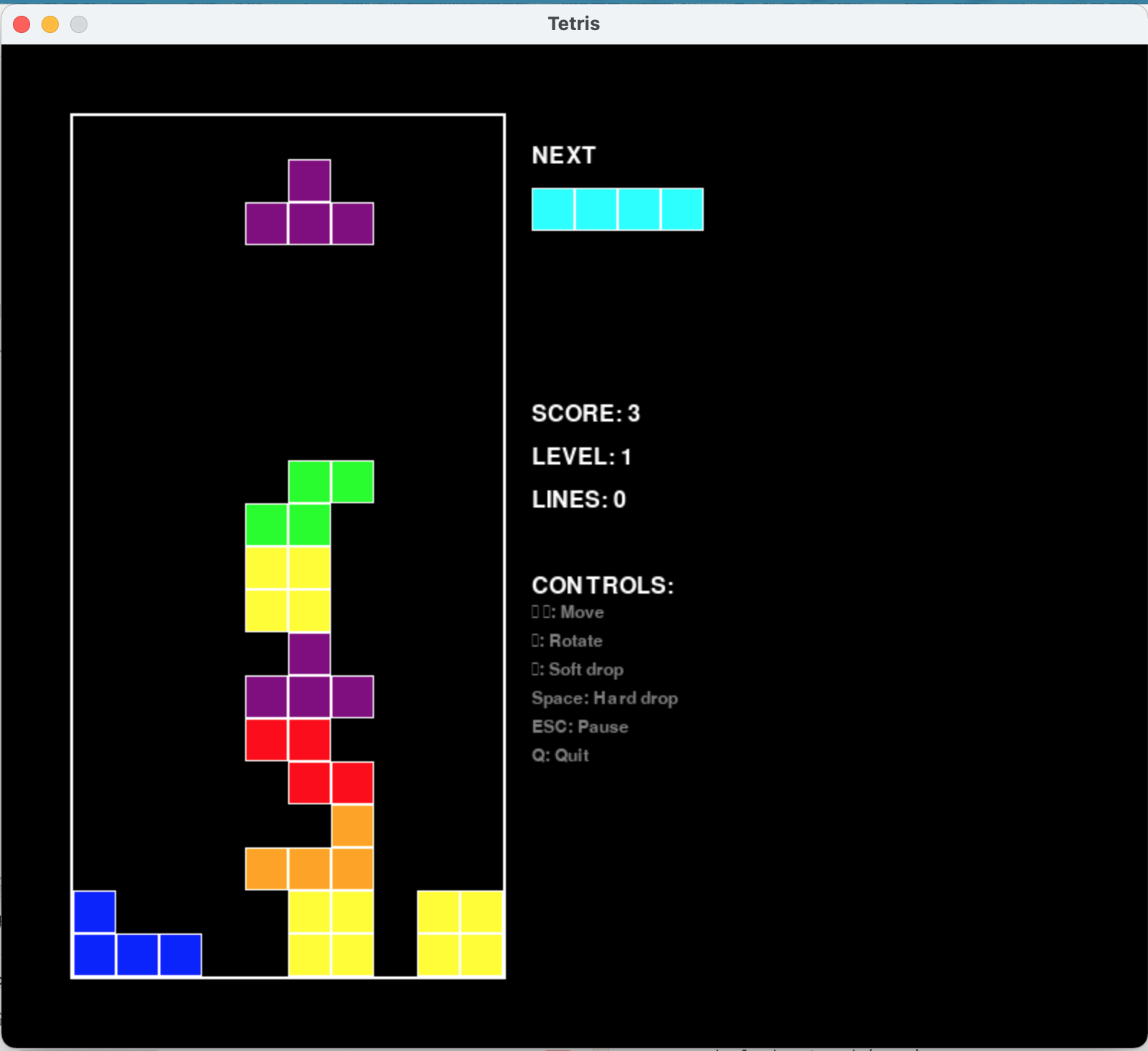
- 一発で完成することは稀です。(テトリスは一発でした
- エラー内容や挙動をフィードバックしながら、Claudeに再指示することで完成版をめざします。
📋 典型的な開発フロー
- 初回生成: まず基本機能を指示
- エラー修正: 不足パッケージの追加やエラー修正
- 機能追加: 追加機能の指示
- 最終調整: UI改善や動作確認
🔧 よくある修正例
エラーが出ました:
ModuleNotFoundError: No module named 'PIL'

このエラーを修正して再度ビルドしてください
アプリに以下の機能を追加してください:
- プログレスバーの表示
- ファイル保存先の選択
- エラーメッセージの表示
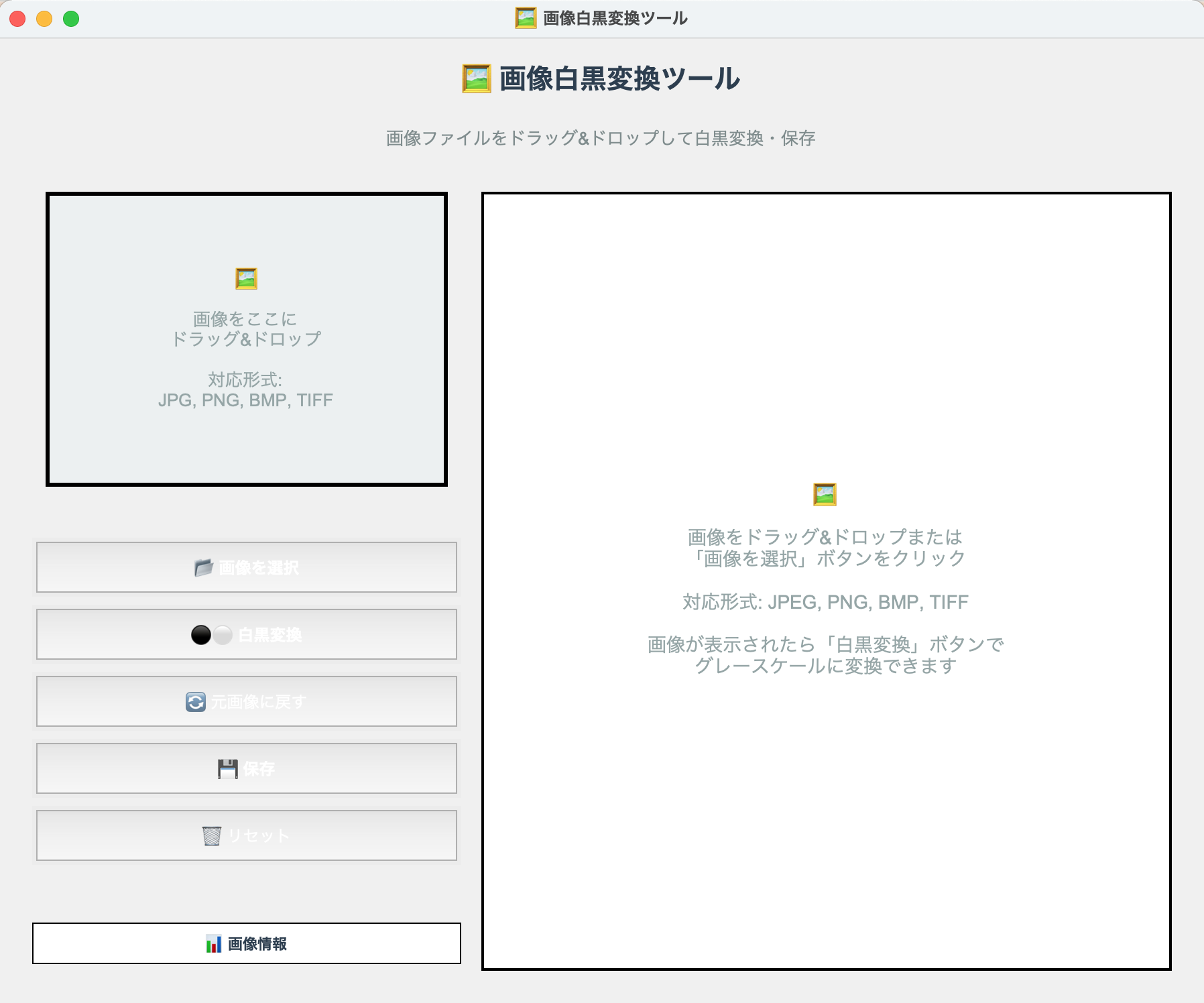
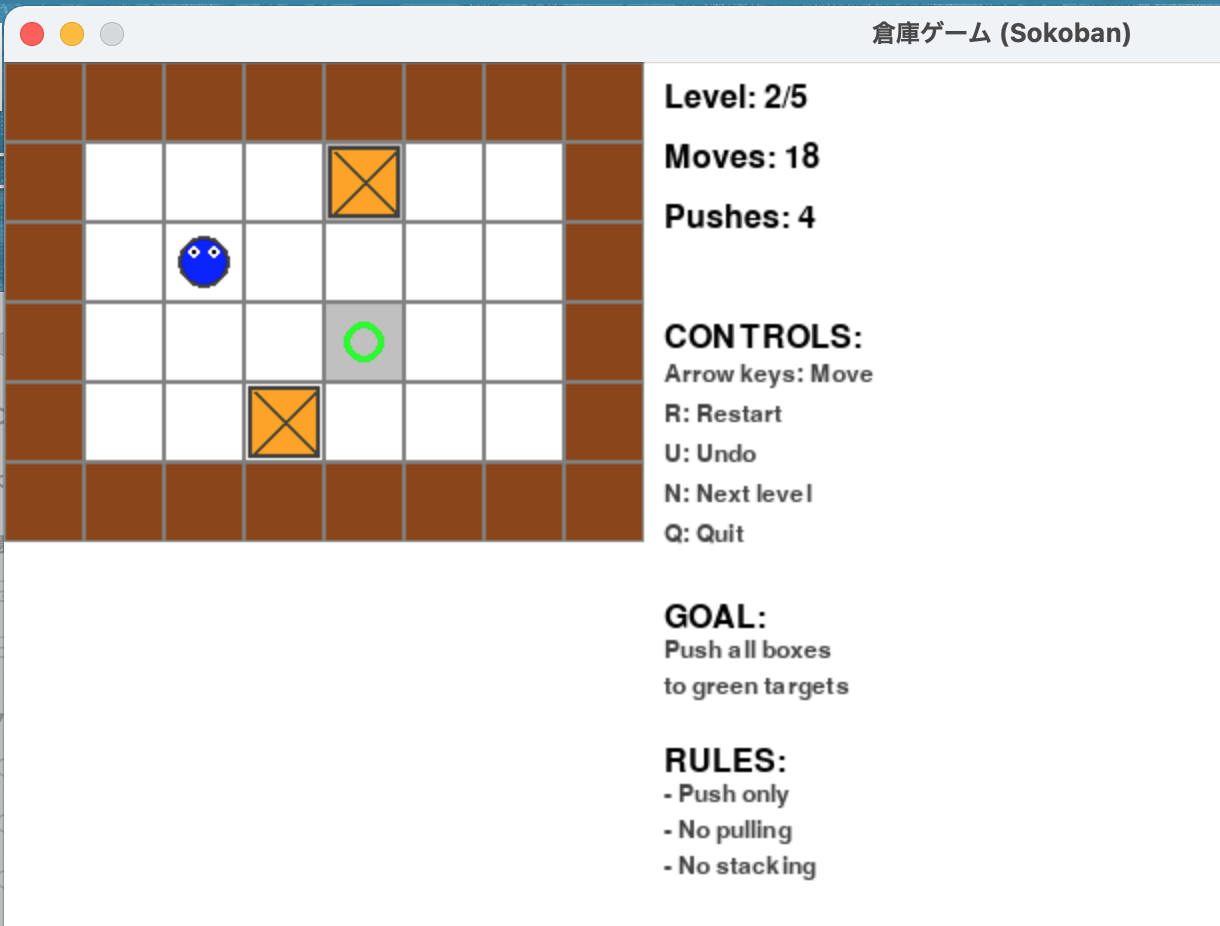
📸 動作イメージ
倉庫番
📦 MCPサーバーの主な機能(server.py)
| ツール名 | 説明 |
|---|---|
execute_python_code |
Pythonコードの安全な実行 |
build_with_pyinstaller_api |
PyInstallerによるバイナリ化 |
build_from_code |
コードから直接バイナリ生成 |
check_pyinstaller_status |
PyInstallerの状態確認 |
install_with_uv |
uvを使用したパッケージインストール |
list_installed_packages |
インストール済みパッケージ一覧 |
check_syntax |
コードの構文チェック |
🎯 実用的な活用例
📁 ファイル処理ツール
PDFファイルをドラッグ&ドロップすると、自動で画像に変換するアプリを作って
🖼️ 画像処理ツール
画像ファイルを複数選択して、一括でリサイズできるGUIアプリを作って
📊 データ分析ツール
CSVファイルを読み込んで、グラフを自動生成するアプリを作って
🔧 システムユーティリティ
指定フォルダのディスク使用量を分析して、大きなファイルを見つけるアプリを作って
🔧 トラブルシューティング
よくあるエラーと対処法
パッケージ不足エラー
# 必要なパッケージを追加
uv add pillow          # 画像処理
uv add opencv-python   # OpenCV
uv add pandas          # データ分析
uv add matplotlib      # グラフ作成
📝 おわりに
Pythonコードを書けなくても、自然言語でGUIアプリが作れる時代がきました。
個人開発者やノーコード志向のユーザーにとっては非常に大きな武器になると思います。
ぜひ、Claude + MCP + PyInstaller のトリオを使って、あなたの業務や生活を便利にするミニGUIツールを作ってみてください。
🎁 この方法のメリット
- ✅ 完全コードレス: プログラミング知識不要
- ✅ 即座にビルド: 思いついたらすぐ形に
- ✅ スタンドアローン: 配布可能な実行ファイル
- ✅ 反復改善: エラーも自動修正
🌟 今後の可能性
- AI駆動の開発環境の普及
- より複雑なアプリケーションの自動生成
- チーム開発での活用
- 教育現場での利用
🔗 関連リンク
- 元記事:Claude + MCP 環境構築
- PyInstaller公式
- uv(Rust製 Python パッケージマネージャ)
- MCP(Model Context Protocol)
- Claude Desktop App
この記事が役に立ったら、ぜひ ❤️ をお願いします!