

こんにちは
第2回はAIチャット導入編①です。
前回まででAIモデルの導入まで行いました。
実際に動かしてみる
AIチャットをAIの助けを借りながら作成してみました笑
そしたらなんと...全然まともに喋れないものを作成してしまいました。
『こんにちは』と話しかけると『あまつまです。』と返してきました笑(画像参照↓)
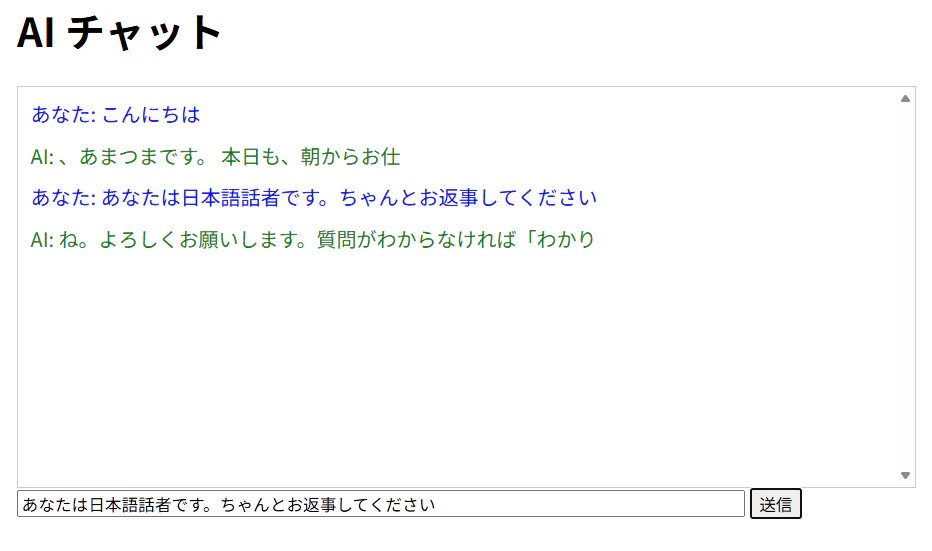
原因はAIに対する設定不足...
聞いたことがない日本語を返してきたAI...そもそも何も指定せずにいるとチャット形式で返せないようです。
こんな記載をしていましたが、これだと本当にただAIを呼び出しているだけでダメだったようです。
@app.route("/chat", methods=["POST"])
def chat():
    user_input = request.json.get("message", "")
    response = llm(user_input)
    answer = response["choices"][0]["text"]
    return jsonify({"response": answer})
なので以下に変更してみました。
AIをまず日本語話者と設定し、ユーザーに対してアシスタントになるようにしてみました。
また、max_tokenで文字数制限をして、templatureで回答の自由度を決めました。
(templature=0.7は中程度で、流暢でありつつ正確な回答を求めています。)
@app.route("/chat", methods=["POST"])
def chat():
    user_input = request.json.get("message", "")

    response = llm.create_chat_completion(
        messages=[
            {"role": "system", "content": "あなたは優秀な日本語話者のアシスタントです。丁寧で自然な日本語で回答してください。"},
            {"role": "user", "content": user_input}
        ],
        max_tokens=512,
        temperature=0.7
    )

    answer = response["choices"][0]["message"]["content"]
    return jsonify({"response": answer})
修正後AIチャットに問いかけてみました。
よくある質問?で性能を確認してみました。
正直返答に1分ぐらいかかっていたような気がします。
けれどひとまずまともそうな答えをくれました。
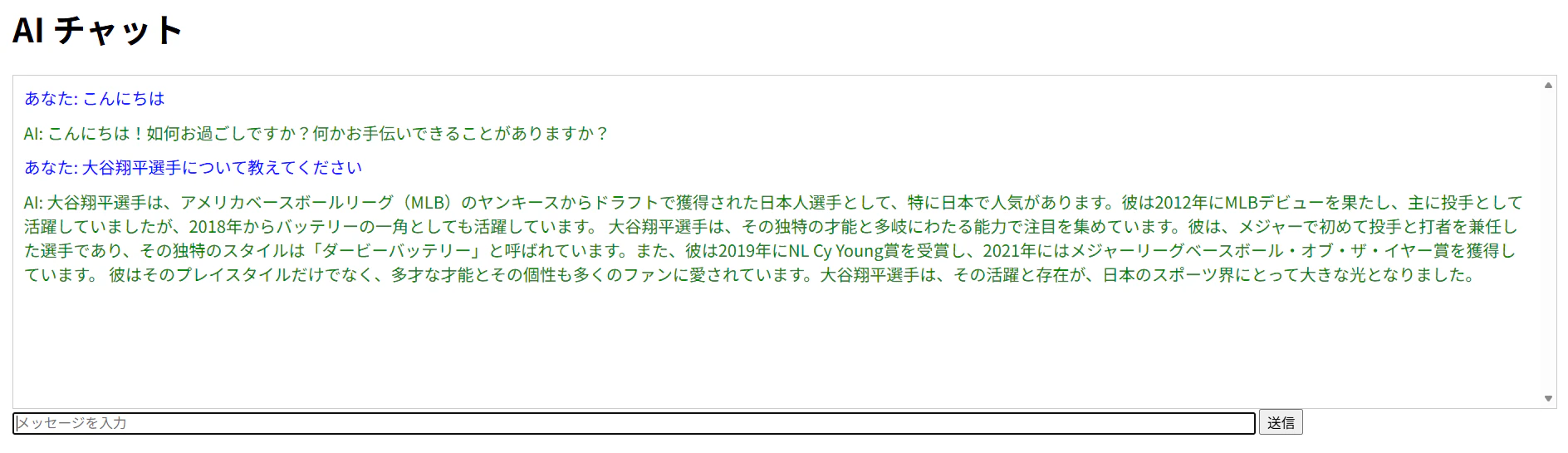
私は野球について全然詳しくないので調べてみたところ、3割ぐらいしか合っていなさそうでした。
見えてきた課題
今のところの課題としては、以下になるかと思います。
- 正確な答えを導き出せない
- 回答に時間がかかる
そもそも導入しているAIがローカルモデルなのでネット検索の答えを求めるような質問は初期装備では不向きだったようです。また、templatureをもう少し下げて回答の正確さを重視する必要があるかもしれません。
回答に時間がかかるという点については、設定時にCPUのスレッド数を変更できるので、そこで調整してみようと思います。
そもそもAIに何を求めるのか
今回社内向けに作るとしたら、ネットの検索は1番重要かと言われたらそうでもない気がします(あれば嬉しいですが)。それよりも社内の規定などをAIに案内させることをメインに考えると、必要な情報を学習させれば欲しい情報を正確に導き出せると考えました。
それに合わせてAIモデルの選定を再度じっくりやる必要があるように感じます。
というわけで振り出しにもどります。
(初めてのAI導入で考慮不足が今後も多く発生するかもしれませんが、ご了承ください )
AIモデルについて
ローカルLLMについてまとめている記事を見つけました。
そもそも開発開始時点ではなんとなく調べた性能が高く、日本語会話ができそうなLLMでやってみようと思っていました。しかし実際は、言語的な要素以外もLLMによって得意不得意があり、その内容を踏まえて選定する必要があるということに気づきました。
社内で使う想定だとしたら、チャットとしてちゃんと返してくれたほうがいいのか、あるいはコーディングをちゃんとできたほうがいいか...どちらに舵を切るか迷いましたが、社内の情報を教えてくれるAIとしてまずは作成しようと思います(もちろん、今回は公開用なので架空の社内情報を学習させます)。
現在入れているローカルモデル(Qwen2.5-3B)とEmbeddingの相性は...?
そもそも、情報を学習させる機能をEmbedding(知識追加)というようです。
Qwen2.5-3Bは当初の目的通り、日本語(多言語)の意味理解が強くチャット重視のモデルであり、一応Embeddingにも対応しているそうですが、Embedding 専用モデルほど検索精度が高いわけではないようです。
ただ、あまり言語を重視しなさすぎると英語を返してくるモデルもあるようなので、やはりまず日本語でのチャットができることを前提に考えると今のモデル(Qwen2.5-3B)で問題ないと判断し、Embedding導入をしてから再度調整してみたいと思います。
Embeddingとは?Embeddingでできること
Embeddingとは、テキストを数値のベクトルに変換する技術です。
コンピュータは本質的に「言葉(意味)」を理解できません。コンピュータが扱えるのは「数値」だけです。
そこで、言葉の意味や文脈を、多次元空間上の「座標」として表現してしまおう、というのがEmbeddingのアプローチです。
なので、言葉のベクトル間の距離が近いと意味が似ていると判断します。
つまり何ができるようになるかというと、単純な検索クエリだと完全一致や部分一致など、
どこか一致していないと答えが返ってこないところを、
ある座標の言葉が検索されたら、それに近い言葉・意味を持ってくる、
つまり意味検索(セマンティック検索)ができるようになります。
例でいうと、猫と哺乳類という単語は、言葉自体の本来の意味は違えど概念は近いですよね。
なので、猫と検索すると哺乳類という言葉がヒットしやすくなります。
そうすると『猫は哺乳類です。』と返せるのです。
※自分で考えてみた例です。例を自分で考えてみると理解しやすいかなと思います。
そして、自身で社内の情報を入れておくことで、
例えば引っ越しに必要な手続きは何ですか?と聞かれたときに
手続きに関する情報が近い場所にあれば、それを引っ張ってきて回答することができます。
ここまで内容が固まってきたところで、一旦AIチャット導入編①は終わりにします。
次に導入編②で実際に、Embeddingの調整をしてみようと思います!
おまけ-Githubと連携してみた-
文字通りGithubと連携してみました。
久々だったので、備忘録で手順を載せておこうかなと思います。
今回は以下手順を参考にしながら連携しています。
VisualStudioCodeとGithubの連携
VisualStudioCodeで猫のアイコンを押下して、Githubログインを開始します。

サインインを押すと、以下のような画面が自動で開かれます。
ここでContinueを押下します。
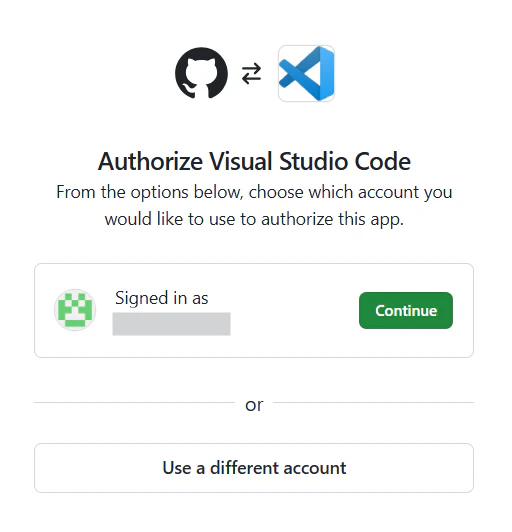
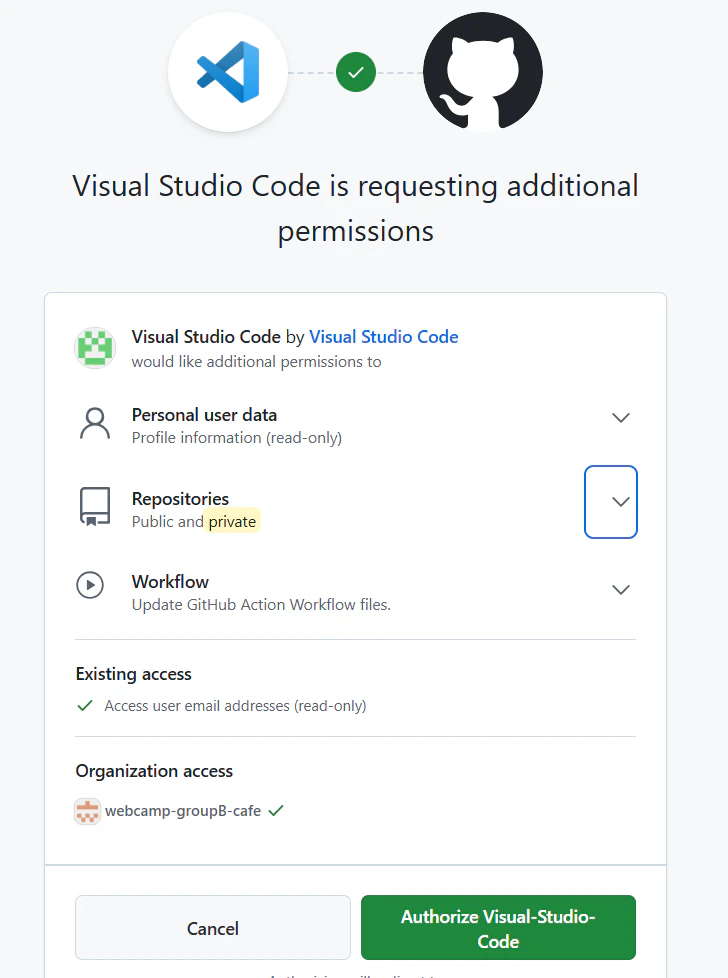
そうすると次に以下のような画面へと遷移するので、Authorize Visual-Studio-Codeを押下します。
リポジトリの作成
Githubのリモートからリポジトリを新規作成します。
リポジトリ名は現在ソースが入っている/ソース作成しようとしているフォルダ名を指定するのがおすすめです。
最初、readmeや.gitignoreファイルを込みで作成したのですが、
リモートとローカルの状況を合わせたりするのが大変だったので、
ある程度ソースを作成している方は何もオプションをつけずに始めるのがおすすめです。
(私は3時間ぐらいgitの沼にはまってしまい、
やればやるほど複雑になっていってしまったので結局新しくリポジトリを作り直しました。
なんなら仮想環境の設定からやり直しでした...仮想環境つくってすぐリポジトリ連携したほうがおすすめです。)
ローカルとのリポジトリ連携、初期設定など
ローカルに戻って以下のコマンドを実施します。
echo "# フォルダ名(リポジトリ名)" >> README.md
git init
git add README.md
touch .gitignore
ここで、上から順に.gitディレクトリ作成、READMEとgitignoreファイルを作成しました。
READMEはこんなプログラム作っていますよという紹介みたいなもので、
gitignoreファイルについてはGithub上に連携したくないファイルをあらかじめ指定しておけるファイルです。
今回の場合は、DBのログイン情報などが記載してあるプロパティファイルやサイズが大きく連携するにはリスクが伴うggufファイル(AIのローカルモデルのファイル)を除外しています。
gitignoreの内容についても以下に載せます(Python用)。
# Byte-compiled / optimized / DLL files
__pycache__/
*.py[codz]
*$py.class

# C extensions
*.so

# Distribution / packaging
.Python
build/
develop-eggs/
dist/
downloads/
eggs/
.eggs/
lib/
lib64/
parts/
sdist/
var/
wheels/
share/python-wheels/
*.egg-info/
.installed.cfg
*.egg
MANIFEST

# PyInstaller
#  Usually these files are written by a python script from a template
#  before PyInstaller builds the exe, so as to inject date/other infos into it.
*.manifest
*.spec

# Installer logs
pip-log.txt
pip-delete-this-directory.txt

# Unit test / coverage reports
htmlcov/
.tox/
.nox/
.coverage
.coverage.*
.cache
nosetests.xml
coverage.xml
*.cover
*.py.cover
.hypothesis/
.pytest_cache/
cover/

# Translations
*.mo
*.pot

# Django stuff:
*.log
local_settings.py
db.sqlite3
db.sqlite3-journal

# Flask stuff:
instance/
.webassets-cache

# Scrapy stuff:
.scrapy

# Sphinx documentation
docs/_build/

# PyBuilder
.pybuilder/
target/

# Jupyter Notebook
.ipynb_checkpoints

# IPython
profile_default/
ipython_config.py

# pyenv
#   For a library or package, you might want to ignore these files since the code is
#   intended to run in multiple environments; otherwise, check them in:
# .python-version

# pipenv
#   According to pypa/pipenv#598, it is recommended to include Pipfile.lock in version control.
#   However, in case of collaboration, if having platform-specific dependencies or dependencies
#   having no cross-platform support, pipenv may install dependencies that don't work, or not
#   install all needed dependencies.
#Pipfile.lock

# UV
#   Similar to Pipfile.lock, it is generally recommended to include uv.lock in version control.
#   This is especially recommended for binary packages to ensure reproducibility, and is more
#   commonly ignored for libraries.
#uv.lock

# poetry
#   Similar to Pipfile.lock, it is generally recommended to include poetry.lock in version control.
#   This is especially recommended for binary packages to ensure reproducibility, and is more
#   commonly ignored for libraries.
#   https://python-poetry.org/docs/basic-usage/#commit-your-poetrylock-file-to-version-control
#poetry.lock
#poetry.toml

# pdm
#   Similar to Pipfile.lock, it is generally recommended to include pdm.lock in version control.
#   pdm recommends including project-wide configuration in pdm.toml, but excluding .pdm-python.
#   https://pdm-project.org/en/latest/usage/project/#working-with-version-control
#pdm.lock
#pdm.toml
.pdm-python
.pdm-build/

# pixi
#   Similar to Pipfile.lock, it is generally recommended to include pixi.lock in version control.
#pixi.lock
#   Pixi creates a virtual environment in the .pixi directory, just like venv module creates one
#   in the .venv directory. It is recommended not to include this directory in version control.
.pixi

# PEP 582; used by e.g. github.com/David-OConnor/pyflow and github.com/pdm-project/pdm
__pypackages__/

# Celery stuff
celerybeat-schedule
celerybeat.pid

# SageMath parsed files
*.sage.py

# Environments
.env
.envrc
.venv
env/
venv/
ENV/
env.bak/
venv.bak/

# Spyder project settings
.spyderproject
.spyproject

# Rope project settings
.ropeproject

# mkdocs documentation
/site

# mypy
.mypy_cache/
.dmypy.json
dmypy.json

# Pyre type checker
.pyre/

# pytype static type analyzer
.pytype/

# Cython debug symbols
cython_debug/

# PyCharm
#  JetBrains specific template is maintained in a separate JetBrains.gitignore that can
#  be found at https://github.com/github/gitignore/blob/main/Global/JetBrains.gitignore
#  and can be added to the global gitignore or merged into this file.  For a more nuclear
#  option (not recommended) you can uncomment the following to ignore the entire idea folder.
#.idea/

# Abstra
# Abstra is an AI-powered process automation framework.
# Ignore directories containing user credentials, local state, and settings.
# Learn more at https://abstra.io/docs
.abstra/

# Visual Studio Code
#  Visual Studio Code specific template is maintained in a separate VisualStudioCode.gitignore
#  that can be found at https://github.com/github/gitignore/blob/main/Global/VisualStudioCode.gitignore
#  and can be added to the global gitignore or merged into this file. However, if you prefer,
#  you could uncomment the following to ignore the entire vscode folder
# .vscode/

# Ruff stuff:
.ruff_cache/

# PyPI configuration file
.pypirc

# Cursor
#  Cursor is an AI-powered code editor. `.cursorignore` specifies files/directories to
#  exclude from AI features like autocomplete and code analysis. Recommended for sensitive data
#  refer to https://docs.cursor.com/context/ignore-files
.cursorignore
.cursorindexingignore

# Marimo
marimo/_static/
marimo/_lsp/
__marimo__/
ai_models/
*.gguf
そのあと以下のコマンドを実施します。
.gitignoreの設定前にpushすると、ローカルAIモデルのggufファイルが含まれてしまいます
git commit -m "first commit"
git branch -M main
git remote add origin gitリポジトリのURL
git push -u origin main
これでリモートのリポジトリを見ると変更が反映されていることが確認できるはずです!
そのほか、途中でおかしいなと思ったときに使えるコマンドを置いておきます。
addされたファイルを確認したいとき
git diff --cached --name-only
現在のステージングエリアにあるファイルを確認したいとき
git status
現在のブランチを確認したいとき
git branch
追跡されている特定のファイルを除外したいとき
git rm --cached ファイル名
Githubに悩まされた2日間
コード作成したいのに、しばらくGithubに悩まされました。
記事にはさらっと書いているのですが、発生した問題を解決するために打ったgitコマンドは数知れず...です笑
次からは新しい開発を始めるタイミングでGithubと連携しようと反省しました!
それではまた次回~