
本投稿はDelphi AdventCalender 2025 #08の記事です。
この記事は,Delphi13でコードを書き,Windows11で動作を確認しています。
はじめに
Delphi13を使ってLM StudioとOllamaの切り替えができるのLLMとチャットするアプリを作ります。
この記事は,
の続きになり,これらで作成したUnitを使います。
これらの記事で使ったコードが前提となりますので,この記事を読む前にぜひこちらをご覧ください。
統合ユーティリティを作る
LM StudioとOllamaでやらせたい仕事はほぼ同じですので,これらをラップして,チャットだけでなく翻訳や要約などをさせるクラスを手間を減らして作ることができるように,統合ユーティリティを作りたいと思います。
対応するLLM実行ツールの選択をやりやすくする関数と,LLM実行ツールとチャットする機能を整理したクラスになります。OpenAI APIとOllama APIをほぼ同じように利用できます。
違う点は2つあり,1つ目はTAICompParamInで利用できる以下のパラメータです。
num_ctx:      integer; // コンテキスト長
num_predict:  integer; // 無限生成
top_k:        integer; // ナンセンスを生成する確率を減らすもの(デフォルト: 40)
min_p:        Single;  // top_pに代わるもの(デフォルト: 0.0)
KeepAlive:    string;  // ロードされた状態を維持する時間
2つ目は,Ollamaのchatは,開始時にモデルをロードし,終了時にモデルをクローズします。
KP.AICompUtils.pas
unit KP.AICompUtils;
(*
2025/10/21 KP KP.AICompThreadsの利用用関数群

LICENSE
Copyright (c) 2025 Yuzuru Kato
Released under the MIT license
http://opensource.org/licenses/mit-license.php
*)
interface

uses
  System.Types,
{$IFDEF FRAMEWORK_VCL} vcl.Forms, {$ENDIF}
{$IFDEF FRAMEWORK_FMX} FMX.Forms, {$ENDIF}
  KP.ListString, KP.AICompThreads;

const
  ModelPlamo='plamo-2-translate';
  gPromptTangTarget = '$$$$'; // SystemPromptの中の$$$$を翻訳する言語名に置き換える

function IndexToAICompType(AIndex:integer):TAICompType;        // IndexからTAICompTypeを返す 0:Ollama 1:Ollama_OpenAI 2:LM_Studio
function IndexFromAICompType(AAICompType:TAICompType):integer; // TAICompTypeからIndexを返す 0:Ollama 1:Ollama_OpenAI 2:LM_Studio
function AICompTypeToStr(AAICompType:TAICompType):string;      // TAICompTypeから文字列を返す
function AICompTypeIndexToStr(AIndex:integer):string;          // Indexから文字列を返す
function AICompTypeText:string;                                // Indexから文字列を返す

type
  // AHostのモデルをAAICompModelListに取得する
  TAICompModelList = class(TObject)
  private
    FAICompThreadModelListOut: TAICompThreadModelListOut;
    procedure AICompThreadModelListOut(AAICompModelList: TStringDynArray);
  protected
  public
    constructor Create(AAIComp:TAICompType; AHost:string;
      AAICompThreadModelListOut: TAICompThreadModelListOut;
      AAICompThreadError: TAICompThreadError);
    destructor  Destroy; override;
  end;

type
  TThreadChatOut    = procedure(AText:String; AAICompParamOut: TAICompParamOut) of object;

type
  TAICompChatIn     = procedure of object;
  TAICompChatOut    = procedure(AAICompParamOut: TAICompParamOut) of object;
  TAICompChatFinish = procedure of object;

  TAICompChat = class(TObject)
  private
    FisThreadStart:boolean;
    FStringListQ:TListString;
    FStringListA:TListString;
    FStringListCount:integer; // 憶えている会話の数
    FAICompThreadChat:TAICompThreadChat;
    FThreadIn:     TAICompChatIn;
    FThreadOut:    TAICompChatOut;
    FThreadFinish: TAICompChatFinish;
    procedure StringListCountSet(const Value: integer);
    procedure ThreadChatIn(AText:TListString);
    procedure ThreadChatOut(AText:String; AAICompParamOut:TAICompParamOut);
    procedure ThreadChatFinish;
  protected
  public
    constructor Create;
    destructor  Destroy; override;
    procedure Open(AAICompParamIn:    TAICompParamIn;
      AAICompChatIn:     TAICompChatIn;
      AAICompChatOut:    TAICompChatOut;
      AAICompChatFinish: TAICompChatFinish;
      AAICompThreadError:TAICompThreadError);
    procedure ChatClose;
    procedure ChatSend(AText:string; AAttach:string='');
    procedure ChatClear;
    property StringListQ:TListString read FStringListQ;
    property StringListA:TListString read FStringListA;
    property isThreadStart:boolean read FisThreadStart;
    property StringListCount:integer read FStringListCount write StringListCountSet;
  end;


implementation

uses
  System.Classes, System.SysUtils,
  System.RegularExpressions;

// AICompType
function IndexToAICompType(AIndex:integer):TAICompType;        // IndexからTAICompTypeを返す 0:Ollama 1:Ollama(OpenAI) 2:LM_Studio
begin
  if (Ord(Low(TAICompType))<=AIndex)and(AIndex<=Ord(High(TAICompType))) then begin
    Result:=TAICompType(AIndex);
  end else begin
    Result:=TAICompType.Ollama;
  end;
end;

function IndexFromAICompType(AAICompType:TAICompType):integer; // TAICompTypeからIndexを返す 0:Ollama 1:OpenAI
begin
  Result:=Ord(AAICompType);
end;

function AICompTypeToStr(AAICompType:TAICompType):string;      // TAICompTypeから文字列を返す
begin
  case AAICompType of
    Ollama:        Result := 'Ollama';
    Ollama_OpenAI: Result := 'Ollama(Open AI v1 API)';
    LM_Studio:     Result := 'LM Studio';
  end;
end;

function AICompTypeIndexToStr(AIndex:integer):string;          // TAICompTypeから文字列を返す
begin
  Result:=AICompTypeToStr(IndexToAICompType(AIndex));
end;

function AICompTypeText:string;
var
  i:integer;
begin
  Result:='';
  for i:=0 to Ord(High(TAICompType)) do begin
    Result:=Result+AICompTypeIndexToStr(i)+#13#10;
  end;
end;


//==============================================================================
{ TAICompModelList }
procedure TAICompModelList.AICompThreadModelListOut(
  AAICompModelList: TStringDynArray);
begin
  FAICompThreadModelListOut(AAICompModelList);
  Self.Free;
end;

constructor TAICompModelList.Create(AAIComp: TAICompType; AHost: string;
  AAICompThreadModelListOut: TAICompThreadModelListOut;
  AAICompThreadError: TAICompThreadError);
begin
  FAICompThreadModelListOut := AAICompThreadModelListOut;
  if AAIComp=TAICompType.Ollama then begin
    TOllamaThreadModelList.Create(AHost,
      AICompThreadModelListOut, AAICompThreadError);
  end else begin
    TOpenAIThreadModelList.Create(AHost,
      AICompThreadModelListOut, AAICompThreadError);
  end;
end;

destructor TAICompModelList.Destroy;
begin
  inherited;
end;

//==============================================================================
{ TAICompChat }
constructor TAICompChat.Create;
begin
  FisThreadStart := False;
  FAICompThreadChat := nil;
  FStringListQ   := TListString.Create;
  FStringListA   := TListString.Create;
  StringListCount := 5; // 憶えている会話の数
end;

destructor TAICompChat.Destroy;
begin
  if Assigned(FAICompThreadChat) then begin
    FAICompThreadChat.Terminate;
    while FisThreadStart do begin
      Application.ProcessMessages;
    end;
  end;
  FStringListQ.Free;
  FStringListA.Free;
  inherited;
end;

procedure TAICompChat.StringListCountSet(const Value: integer);

begin
  if Value<1 then begin
    FStringListCount := 1;
  end else begin
    FStringListCount := Value;
  end;
end;

procedure TAICompChat.ThreadChatIn(AText: TListString);
begin
  ListStringQAMarge(FStringListQ, FStringListA, AText);
  if AText.Count>0 then begin
    if Assigned(FThreadIn) then FThreadIn;
  end;
end;

procedure TAICompChat.ThreadChatOut(AText: String; AAICompParamOut: TAICompParamOut);
begin
  if (FStringListA.Count=FStringListCount) then begin
    FStringListQ.Delete(0);
    FStringListA.Delete(0);
  end;

  if pos(gAICompErrorText,AText)<>1 then begin
    if AText='' then begin
      AText := gAICompErrorText+' '+FStringListQ[FStringListA.Count];
    end;
  end;
  FStringListA.Add(AText);

  if Assigned(FThreadOut) then FThreadOut(AAICompParamOut);
end;

procedure TAICompChat.ThreadChatFinish;
begin
  if Assigned(FThreadFinish) then FThreadFinish;
  FisThreadStart := False;
end;

procedure TAICompChat.Open(AAICompParamIn:TAICompParamIn;
  AAICompChatIn: TAICompChatIn;
  AAICompChatOut: TAICompChatOut;
  AAICompChatFinish: TAICompChatFinish;
  AAICompThreadError: TAICompThreadError);
begin
  FThreadIn     := AAICompChatIn;
  FThreadOut    := AAICompChatOut;
  FThreadFinish := AAICompChatFinish;

  if AAICompParamIn.AICompType=TAICompType.Ollama then begin
    FAICompThreadChat := TOllamaThreadChat.Create(AAICompParamIn,
      ThreadChatIn, ThreadChatOut, ThreadChatFinish, AAICompThreadError);
  end else begin
    FAICompThreadChat := TOpenAIThreadChat.Create(AAICompParamIn,
      ThreadChatIn, ThreadChatOut, ThreadChatFinish, AAICompThreadError);
  end;
  FisThreadStart := True;
end;

procedure TAICompChat.ChatClose;
begin
  FAICompThreadChat.Terminate;
end;

procedure TAICompChat.ChatSend(AText: string; AAttach:string='');
var
  s:string;
begin
  if AAttach<>'' then begin
    s:=AText+gAttachHeader+AAttach;
  end else begin
    s:=AText;
  end;
  FStringListQ.Add(s);
end;

procedure TAICompChat.ChatClear;
begin
  FStringListQ.Clear;
  FStringListA.Clear;
end;

end.
LLMチャットのデモ
KP.AICompUtils,を使って,Ollama APIとOllama OpenAI API,LM Studioに接続してLLMを利用したチャットツールのデモを作ります。
※ KP.AICompThreadsは2025/12/06に更新されています。
以下のように,その3で作成したForm1を流用して,フォームの右上にComboBox2:TComboboxを追加し,上部の一列に配置したコンポーネントの位置を順序を変えずに調整します。
それから,ComboBox2.StyleをcsDropDownListに設定します。
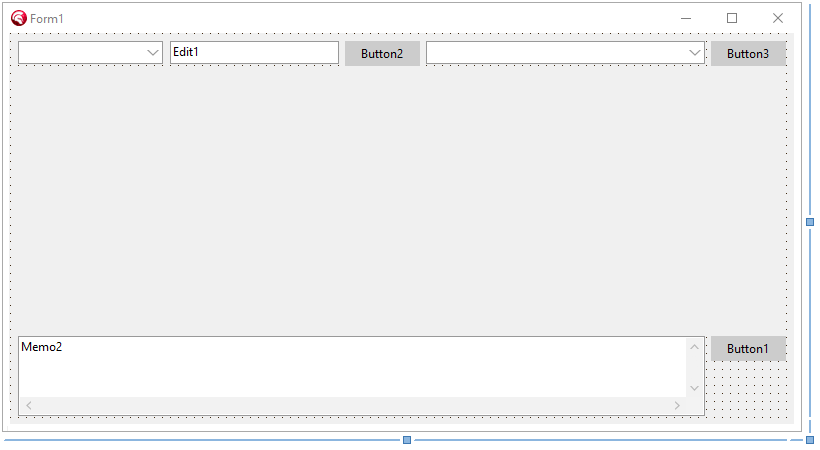
それぞれ以下の機能を持っています。
Button1: チャットの送信
Edit1: LM Studioのホスト名(プロトコルとポート番号は自動で追加されます)
Button2: ホストにダウンロードされているモデル一覧を取得する
Combobox1: モデル一覧
Button3: チャットの開始と終了
Combobox2: LLM実行ツールの一覧
必要なイベントを追加して以下のようにコードを書きます。
unit Unit1;

interface

uses
  Winapi.Windows, Winapi.Messages, System.SysUtils, System.Variants, System.Classes,
  System.Types, // TStringDynArray
  Vcl.Forms, Vcl.Graphics, Vcl.StdCtrls, Vcl.Controls,
  Winapi.WebView2, Winapi.ActiveX, Vcl.Edge,
  KP.ListString, KP.AICompThreads, KP.AICompUtils;

type
  TForm1 = class(TForm)
    EdgeBrowser1: TEdgeBrowser;
    Edit1: TEdit;
    Button1: TButton;
    Button2: TButton;
    Button3: TButton;
    Memo2: TMemo;
    ComboBox1: TComboBox;
    ComboBox2: TComboBox;
    procedure FormCreate(Sender: TObject);
    procedure FormDestroy(Sender: TObject);
    procedure Button1Click(Sender: TObject);
    procedure Button2Click(Sender: TObject);
    procedure Button3Click(Sender: TObject);
    procedure EdgeBrowser1NavigationCompleted(Sender: TCustomEdgeBrowser;
        IsSuccess: Boolean; WebErrorStatus: COREWEBVIEW2_WEB_ERROR_STATUS);
  private
    { Private 宣言 }
    AICompChat: TAICompChat;

    procedure ThreadError(AText:string);
    procedure ThreadModelListOut(AAICompModelList: TStringDynArray);

    procedure ThreadChatIn;
    procedure ThreadChatOut(AAICompParamOut:TAICompParamOut);
    procedure ThreadChatFinish;

    procedure ListStringToEdgeBrowser1;
  public
    { Public 宣言 }
  end;

var
  Form1: TForm1;

implementation

{$R *.dfm}

uses
  Vcl.Dialogs; // MessageDlg

procedure TForm1.ThreadError(AText: string);
begin
  if AText<>'' then begin
    MessageDlg(AText, TMsgDlgType.mtError, [TMsgDlgBtn.mbOK], 0);
  end;
end;

procedure TForm1.ThreadModelListOut(AAICompModelList: TStringDynArray);
var
  LModel, LItem:string;
  i:integer;
begin
  LItem:=ComboBox1.Items[ComboBox1.ItemIndex];
  ComboBox1.Items.Clear;
  for LModel in AAICompModelList do begin
    ComboBox1.Items.Add(LModel);
  end;
  i := ComboBox1.Items.IndexOf(LItem);
  if i=-1 then i := 0;
  ComboBox1.ItemIndex := i;
  Button3.Enabled     := Combobox1.Items.Count>0
end;

procedure TForm1.ThreadChatIn;
begin
  Button1.Enabled   := False;
end;

procedure TForm1.ThreadChatOut(AAICompParamOut: TAICompParamOut);
begin
//  StatusDisp(AAICompParamOut); // StatusBarにTokenの情報を出力
  ListStringToEdgeBrowser1;
  Button1.Enabled := True;
end;

procedure TForm1.ThreadChatFinish;
begin
  // Terminateをした後の処理
  Button1.Enabled   := False;
  Button2.Enabled   := True;
  Button3.Enabled   := True;
  Button3.Caption   := 'Start';
  Edit1.Enabled     := True;
  ComboBox1.Enabled := True;
  ComboBox2.Enabled := True;
end;

procedure TForm1.ListStringToEdgeBrowser1;
var
  s:string;
begin
  s:=ChatQAToHTML(AICompChat.StringListQ, AICompChat.StringListA);
  if not EdgeBrowser1.WebViewCreated then
  begin
    EdgeBrowser1.CreateWebView;
    while not EdgeBrowser1.WebViewCreated do begin
      Application.ProcessMessages;
      Sleep(100);
    end;
  end;
  EdgeBrowser1.NavigateToString(s);
end;

procedure TForm1.FormCreate(Sender: TObject);
begin
  Memo2.Lines.TrailingLineBreak := False;

  Edit1.Text       := 'localhost';
  Button1.Enabled  := False;
  Button2.Enabled  := True;
  Button3.Enabled  := False;
  Button3.Caption  := 'Start';

  AICompChat := TAICompChat.Create;
  Combobox2.Items.Text := AICompTypeText; // ローカルLLMフレームワークのタイプ
  Combobox2.ItemIndex  := 0;
end;

procedure TForm1.FormDestroy(Sender: TObject);
begin
  AICompChat.Free;
end;

procedure TForm1.EdgeBrowser1NavigationCompleted(Sender: TCustomEdgeBrowser;
    IsSuccess: Boolean; WebErrorStatus: COREWEBVIEW2_WEB_ERROR_STATUS);
begin
  // 一番下までスクロールする
  EdgeBrowser1.ExecuteScript('window.scroll(0, Number.MAX_SAFE_INTEGER);');
end;

procedure TForm1.Button1Click(Sender: TObject);
begin
  if Memo2.Lines.Text='' then exit;
  if not AICompChat.isThreadStart then begin
    Button3Click(Self);
  end;
  AICompChat.ChatSend(Memo2.Lines.Text);

  Edit1.Text := '';
//  edtAttach1.Text:='';
  ListStringToEdgeBrowser1;
end;

procedure TForm1.Button2Click(Sender: TObject);
var
  LHost:string;
begin
  LHost:= PrivateHostNameMod(Edit1.Text, IndexToAICompType(ComboBox2.ItemIndex));
  if LHost='' then exit;

  TAICompModelList.Create(IndexToAICompType(ComboBox2.ItemIndex), LHost, ThreadModelListOut, ThreadError);
end;

procedure TForm1.Button3Click(Sender: TObject);
var
  LHost:string;
  LAICompParamIn:TAICompParamIn;
begin
  LHost:= PrivateHostNameMod(Edit1.Text, IndexToAICompType(ComboBox2.ItemIndex));
  if LHost='' then exit;
  if Combobox1.Text='' then exit;
  if AICompChat.isThreadStart then begin
    AICompChat.ChatClose; // ThreadChatFinishイベントでTerminate後の処理を書く
  end else begin
    LAICompParamIn.Init;
    with LAICompParamIn do begin
      AICompType   := IndexToAICompType(ComboBox2.ItemIndex);
      Host         := LHost;
      Model        := ComboBox1.Text;
      SystemPrompt := '';
      Prompt       := '';
      Timeout      := 30*1000; // タイムアウトは30秒
      num_ctx      := 4098;    // コンテキスト長 LM_Studioでは使わない
    end;

    AICompChat.Open(LAICompParamIn,
      ThreadChatIn, ThreadChatOut, ThreadChatFinish, ThreadError);

    Button1.Enabled   := True;
    Button2.Enabled   := False;
    Button3.Caption   := 'Stop';
    Edit1.Enabled     := False;
    ComboBox1.Enabled := False;
    ComboBox2.Enabled := False;
  end;
end;

end.
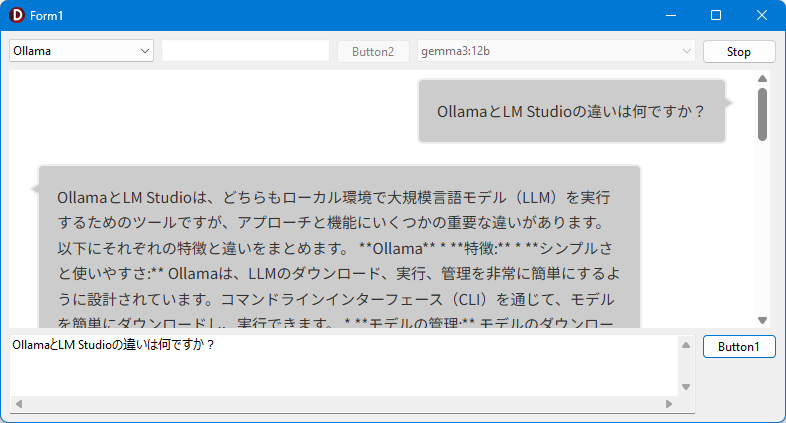
Combobo2でLLM実行ツールを選択し,Edit1にLocalhostや192.168.1.20などのLLM実行ツールを動かしているPCのIPアドレスを入力し,Button2をクリックするとComboBox1にモデルの一覧が表示されます。
利用したいモデルを選んで,Button3をクリックして,Memo2に質問を書いてButton1をクリックすると,入力した質問がEdgeBrowser1に表示され,LLM実行ツール上で動いているモデルからの回答が表示されます。
改良のヒント
-
TAICompChatを翻訳専用のものや要約専用のものに改造すると,TAICompChatの持つ機能を維持していろいろなツールが作れると思います。
謝辞
この記事やコードを書くにあたり,以下の記事やサイトを参考にしました。改めてこの場を借りて感謝します。
- 【Delphi】REST クライアントライブラリを使う @ht_deko(Hideaki Tominaga)
https://qiita.com/ht_deko/items/eb3f987c50012109e781 - [Delphi] JSON の処理は Serializer を使うのがナウい @pik(Jun HOSOKAWA)
https://qiita.com/pik/items/4e601c5db404d5a88dec