
本投稿はDelphi AdventCalender 2025 #03の記事です。
この記事は,Delphi13でコードを書き,Windows11で動作を確認しています。
はじめに
SmartCore AI Component Packの登場で,OpenAIなどのクラウドの生成AIとのやり取りを自前のRESTでやる必要はなくなりました。さらにSmartCore AI Component Packを使えば画像生成などもできるようになっています。
SmartCore AI Component Packでクラウドの生成AIを利用したアプリがいろいろ開発できそうです。
以下のEmbarcaderoのデベロッパーTVで詳しく紹介されています。
しかし,クラウドの生成AIはコストの問題や,社内の情報をクラウドに出したくないケースもあるのではないかと思います。そうなると,OllamaやLM Studio,vLLMを使ってまずはコストをかけずに始めたいです。
SmartCore AI Component PackではOllamaがサポートされていますが,Ollamaのtemperatureや,その他のパラメータがサポートされておらず,プロンプトの改良とパラメータの指定で落ち着いてきた翻訳や要約のシステムの運用をすぐにSmartCore AI Component Packに移行することは難しそうです。
また,SmartCore AI Component PackのOpenAI API v1を使って,OllamaのOpenAI互換APIやLM Studioを利用しようとしたのですが,うまくいきませんでした。
そこで,自前のRESTでもう少しの間OllamaやLM Studioを使いたいと考えました。まずは,生成AIとのチャット内容を管理するクラスを作りたいと思います。
チャット内容を管理するクラスの概要
生成AIとのチャットシステムを作るための文字列管理の要件は以下のようになるのではないかと思います。
- 改行を含む文字列である
- 質問と回答があり,交互にやり取りが行われる
- 一括翻訳をする場合には,先に質問が大量にあり,先頭から順番に回答される
- 質問とそれまでの履歴を交互に並べて生成AIに渡し,回答を受け取って履歴に追加する
- 会話の内容の履歴の数を設定して,それより多い履歴は消す
- チャット内容を簡単に表示する機能を持つ
そこで,質問と回答,生成AIへの送信を簡単に管理できるクラスとそのクラスを利用した関数群を書きました。
KP.ListString.pas
unit KP.ListString;
(*
TListString: 改行を含む文字列を管理するTList<string>を内包するクラス

LICENSE
Copyright (c) 2025 Yuzuru Kato
Released under the MIT license
http://opensource.org/licenses/mit-license.php

procedure ListStringCopy(FromListString, ToListString: TListString); // TListStringのコピー
procedure ListStringQAMarge(ATextQ, ATextA, LText: TListString);     // 質問と回答を交互に並べて一つにまとめる
function ChatQAToString(ATextQA: TListString): string;               // まとめられた質問と回答を文字列に出力
function ChatQAToString(ATextQ, ATextA: TListString): string;        // 個別の質問と回答を文字列に出力
function ChatQAToHTML(ATextQ, ATextA: TListString): string;          // 個別の質問と回答をチャットバブル風のHTML文字列に出力
*)

interface

uses
  System.Generics.Collections;

type
  TListString = class(TObject)
  private
    FStrings:TList<String>;
    function StringsGet(AIndex: Integer): string;
    procedure StringsPut(AIndex: Integer; const Value: string);
    function CountGet: integer;
  protected
  public
    constructor Create;
    destructor Destroy; override;
    procedure Clear;
    procedure Add(AText:string);
    procedure Delete(AIndex: integer);
    property Strings[AIndex: integer]: string read StringsGet write StringsPut; default;
    property Count: integer read CountGet;
  end;

procedure ListStringCopy(FromListString, ToListString: TListString);    // TListStringのコピー
procedure ListStringQAMarge(ATextQ, ATextA, LText: TListString);        // 質問と回答を交互に並べて一つにまとめる
function ChatQAToString(ATextQA: TListString): string; overload;        // まとめられた質問と回答を文字列に出力
function ChatQAToString(ATextQ, ATextA: TListString): string; overload; // 個別の質問と回答を文字列に出力
function ChatQAToHTML(ATextQ, ATextA: TListString): string;             // 個別の質問と回答をチャットバブル風のHTML文字列に出力

implementation

uses
  System.Classes, System.SysUtils,
  System.RegularExpressions;

{ TListString }

constructor TListString.Create;
begin
  FStrings:=TList<String>.Create;
end;

destructor TListString.Destroy;
begin
  FStrings.Free;
  inherited;
end;

procedure TListString.Clear;
begin
  FStrings.Clear;
end;

function TListString.CountGet: integer;
begin
  Result:=FStrings.Count;
end;

function TListString.StringsGet(AIndex: Integer): string;
begin
  if (0<=AIndex)and(AIndex<FStrings.Count) then begin
    Result:=FStrings[AIndex];
  end else begin
    Result:='';
  end;
end;

procedure TListString.StringsPut(AIndex: Integer; const Value: string);
begin
  if (0<=AIndex)and(AIndex<FStrings.Count) then begin
    FStrings[AIndex]:=Value;
  end;
end;

procedure TListString.Add(AText: string);
begin
  FStrings.Add(AText);
end;

procedure TListString.Delete(AIndex: integer);
begin
  if (0<=AIndex)and(AIndex<FStrings.Count) then begin
    FStrings.Delete(AIndex);
  end;
end;

// TListStringのサポート関数

procedure ListStringCopy(FromListString, ToListString: TListString);
var
  s:string;
begin
  ToListString.Clear;
  for s in FromListString.FStrings do begin
    ToListString.FStrings.Add(s);
  end;
end;

procedure ListStringQAMarge(ATextQ, ATextA, LText: TListString);
var
  i,cq,ca:integer;
begin
  cq:=ATextQ.Count;
  ca:=ATextA.Count;
  LText.Clear;
  if (cq>0)and(cq>ca) then begin
    for i:=0 to ca-1 do begin
      LText.Add(ATextQ[i]);
      LText.Add(ATextA[i]);
    end;
    LText.Add(ATextQ[ca]);
  end;
end;

function ChatQAToString(ATextQA: TListString): string; overload;
var
  st:TStringList;
  i,c:integer;
begin
  st:=TStringList.Create;
  c:=ATextQA.Count;
  for i:=0 to c-1 do begin
    if i mod 2=0 then begin
      st.Add('Q ---')
    end else begin
      st.Add('A ---')
    end;
    st.Add(ATextQA[i]);
  end;
  Result:=st.Text;
  st.Free;
end;

function ChatQAToString(ATextQ, ATextA: TListString): string; overload;
var
  st:TStringList;
  i,cq,ca:integer;
begin
  st:=TStringList.Create;
  cq:=ATextQ.Count;
  ca:=ATextA.Count;
  for i:=0 to cq-1 do begin
    st.Add('Q ---');
    st.Add(ATextQ[i]);
    if i<ca then begin
      st.Add('A ---');
      st.Add(ATextA[i]);
    end;
  end;
  Result:=st.Text;
  st.Free;
end;

function CRLFToHTMLBR(AString:string):string;
begin
  Result := StringReplace(AString,
    {$IFDEF MSWINDOWS} #13#10 {$ELSE} #10{$ENDIF},  // WindowsならCRLF,それ以外はLF
    '<br>', [rfReplaceAll]);
end;

function ChatQAToHTML(ATextQ, ATextA: TListString): string; overload;
var
  st:TStringList;
  i,cq,ca:integer;
begin
  st:=TStringList.Create;
  st.Add('''
<html lang="ja">
<head>
<meta charset="UTF-8">
<style type="text/css">
/* 全体 */
html {
  font-size: 62.5%;
  background-color: #fff;
}
.sb-box {
  position: relative;
  overflow: hidden;
}
/* 吹き出し */
.sb-side-left {
  position: relative;
  float: left;
  margin: 0 10.5rem 2.0rem 2.0rem; /* 吹き出しの上下左右の余白 */
}
.sb-side-right {
  position: relative;
  float: right;
  margin: 0 2.0rem 2.0rem 10.5rem; /* 吹き出しの上下左右の余白 */
}
/* 吹き出し内のテキスト */
.sb-txt {
  position: relative;
  border: 0.2rem solid #eee; /* 吹き出しの縁取りの太さとカラー */
  border-radius: 0.6rem; /* 吹き出しを角丸に */
  background: #ccc; /* 吹き出しの背景色 */
  color: #333; /* 吹き出し内のテキストのカラー */
  font-size: 1.5rem; /* 吹き出し内のフォントサイズ */
  line-height: 1.7; /* 吹き出し内のテキストが2行以上になった時の行間 */
  padding: 1.8rem; /* 吹き出し内の上下左右の余白 */
}
.sb-txt > p:last-of-type {
  padding-bottom: 0; /* 吹き出し内のテキストを改行した場合、最後のpタグにpadding-bottomをつけない */
  margin-bottom: 0; /* 吹き出し内のテキストを改行した場合、最後のpタグにmargin-bottomをつけない */
}
/* 吹き出しの三角 */
.sb-txt:before {
  content: "";
  position: absolute;
  border-style: solid;
  top: 1.6rem; /* 吹き出し内の三角の位置 */
  z-index: 3;
}
.sb-txt:after {
  content: "";
  position: absolute;
  border-style: solid;
  top: 1.5rem; /* beforeより-0.1rem */
  z-index: 2; /* beforeより-1 */
}
/* 吹き出しの三角(左) */
.sb-txt-left:before {
  left: -0.7rem;
  border-width: 0.7rem 1.0rem 0.7rem 0;
  border-color: transparent #ccc transparent transparent; /* 背景色と同じカラーに */
}
.sb-txt-left:after {
  left: -1.0rem; /* beforeより-3rem */
  border-width: 0.8rem 1.0rem 0.8rem 0; /* beforeより上下+0.1rem */
  border-color: transparent #eee transparent transparent; /* 縁取りと同じカラーに */
}
/* 吹き出しの三角(右) */
.sb-txt-right:before {
  right: -0.7rem;
  border-width: 0.7rem 0 0.7rem 1.0rem;
  border-color: transparent transparent transparent #ccc; /* 背景色と同じカラーに */
}
.sb-txt-right:after {
  right: -1.0rem; /* beforeより-3rem */
  border-width: 0.8rem 0 0.8rem 1.0rem; /* beforeより上下+1rem */
  border-color: transparent transparent transparent #eee; /* 縁取りと同じカラーに */
}

/* 40.0rem 以下 */
@media (max-width: 40.0rem) {
  /* 吹き出し(左) */
  .sb-side-left {
    margin: 0 7.8rem 1.5rem 0; /* 吹き出し(左)の上下左右の余白を狭く */
  }
  /* 吹き出し(右) */
  .sb-side-right {
    margin: 0 0 1.5rem 7.8rem; /* 吹き出し(右)の上下左右の余白を狭く */
  }
  /* 吹き出し内のテキスト */
  .sb-txt {
    padding: 1.2rem; /* 吹き出し内の上下左右の余白を-0.6rem */
  }
}
</style>
</head>
<body>
''');
  cq:=ATextQ.Count;
  ca:=ATextA.Count;
  for i:=0 to cq-1 do begin
    st.Add('<div class="sb-box"><div class="sb-side-right"><div class="sb-txt sb-txt-right">');
    st.Add(CRLFToHTMLBR(ATextQ[i]));
    st.Add('</div></div></div>');
    if i<ca then begin
      st.Add('<div class="sb-box"><div class="sb-side-left"><div class="sb-txt sb-txt-left">');
      st.Add(CRLFToHTMLBR(ATextA[i]));
      st.Add('</div></div></div>');
    end;
  end;
  st.Add('''
</body>
</html>
''');
  Result:=st.Text;
  st.Free;
end;

end.
チャットデモ ~ TMemoを使って
KP.ListString.pasを使って,簡単なデモプログラムを作ります。
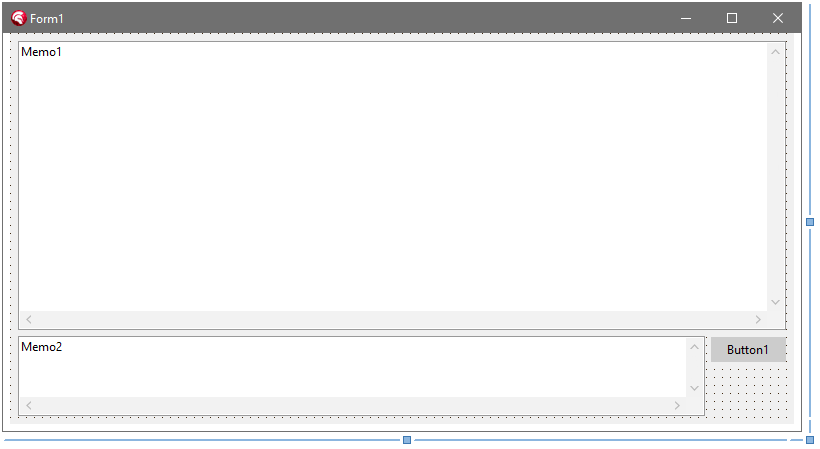
delphiでVCLアプリを新規作成して以下のように,Memo1:TMemo,Memo2:TMemo,Button1:TButtonコンポーネントを配置します。Form1:TFormのWidthは800ぐらいにしておくとよいと思います。
フォームをリサイズしても配置がおかしくならないようにそれぞれのコンポーネントのAnchorsを設定してください。
そして,Form1のOnCreateとOnDestoryイベントとButton1のOnClickイベントを作成して以下のようにコードを書きます。
unit Unit1;

interface

uses
  Winapi.Windows, Winapi.Messages, System.SysUtils, System.Variants, System.Classes,
  Vcl.Forms, Vcl.Graphics, Vcl.StdCtrls, Vcl.Controls,
  KP.ListString; // 上記のUnitを追加

type
  TForm1 = class(TForm)
    Button1: TButton;
    Memo1: TMemo;
    Memo2: TMemo;
    procedure FormCreate(Sender: TObject);
    procedure FormDestroy(Sender: TObject);
    procedure Button1Click(Sender: TObject);
  private
    { Private 宣言 }
    ListStringQ, ListStringA: TListString;  // TListStringを追加
    procedure ListStringToMemo1;            // チャット結果を表示する手続きを追加
  public
    { Public 宣言 }
  end;

var
  Form1: TForm1;

implementation

{$R *.dfm}

procedure TForm1.ListStringToMemo1; // チャット結果を表示する手続き
begin
  Memo1.Lines.BeginUpdate;
  Memo1.Lines.Text := ChatQAToString(ListStringQ, ListStringA);
  Memo1.Lines.EndUpdate;
  // https://www.gesource.jp/weblog/?p=5970
  Memo1.Perform(EM_LINESCROLL, 0, Memo1.Lines.Count); // 最下行を表示
end;

procedure TForm1.FormCreate(Sender: TObject);
begin
  Memo2.Lines.TrailingLineBreak := False; // 最後の改行は不要なのでつけないようにする

  ListStringQ := TListString.Create;
  ListStringA := TListString.Create;
end;

procedure TForm1.FormDestroy(Sender: TObject);
begin
  ListStringQ.Free;
  ListStringA.Free;
end;

procedure TForm1.Button1Click(Sender: TObject); // 仮のチャットのやり取り
begin
  if Memo2.Lines.Text='' then exit;
  ListStringQ.Add('質問:' + Memo2.Lines.Text);
  ListStringA.Add(Memo2.Lines.Text + 'の答え(仮)');
  ListStringToMemo1;
end;

end.
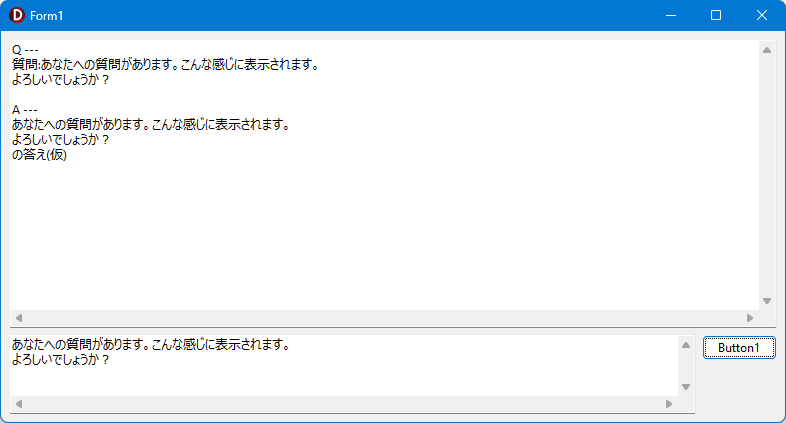
実行すると,こんな感じになります。
チャットデモ ~ TEdgeBrowserを使って
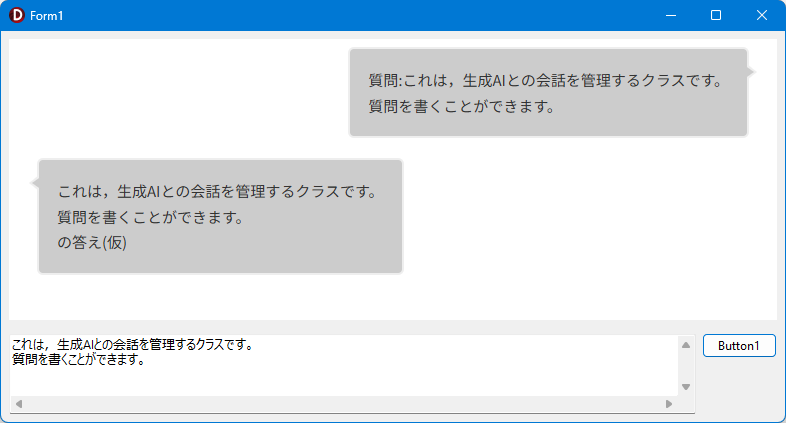
チェックには上記で十分ですが運用するには少し寂しいので,HTMLで表示してみます。
HTMLを表示するためにTEdgeBrowserを使いますが,32bitアプリケーションでは動作しません。
必ず64bitアプリケーションにして実行してください。
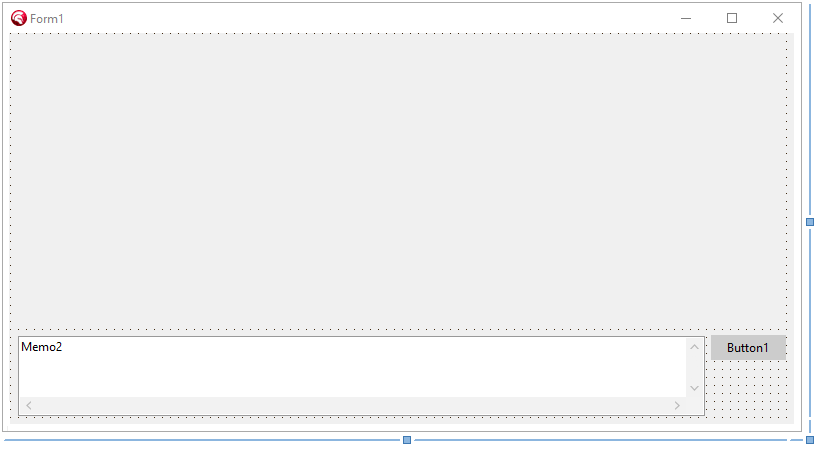
先ほど編集したdelphi VCLアプリから,Memo1:TMemoを削除し,EdgeBrowser1:TEdgeBrowserコンポーネントを配置します。Form1:TFormのWidthは800のままにします。
フォームをリサイズしても配置がおかしくならないようにEdgeBrowser1:TEdgeBrowserコンポーネントのAnchorsを設定してください。
そして,EdgeBrowser1のOnNavigationCompletedイベントを作成してUnit1.pasを以下のように編集します。
unit Unit1;

interface

uses
  Winapi.Windows, Winapi.Messages, System.SysUtils, System.Variants, System.Classes,
  Vcl.Forms, Vcl.Graphics, Vcl.StdCtrls, Vcl.Controls,
- KP.ListString;
+ KP.ListString, Winapi.WebView2, Winapi.ActiveX, Vcl.Edge; // TEdgeBrowserコンポーネントの追加で自動的に更新されます。

type
  TForm1 = class(TForm)
    Button1: TButton;
-   Memo1: TMemo;                // 表示用TMemoコンポーネントを削除
+   EdgeBrowser1: TEdgeBrowser;  // 表示用TWebBrowserを追加
    Memo2: TMemo;
    procedure FormCreate(Sender: TObject);
    procedure FormDestroy(Sender: TObject);
    procedure Button1Click(Sender: TObject);
+   procedure EdgeBrowser1NavigationCompleted(Sender: TCustomEdgeBrowser;
+       IsSuccess: Boolean; WebErrorStatus: COREWEBVIEW2_WEB_ERROR_STATUS); // OnNavigationCompleted イベントを追加
  private
    { Private 宣言 }
    ListStringQ, ListStringA: TListString;
-   procedure ListStringToMemo1;
+   procedure ListStringToEdgeBrowser1; // TedgeBrowser用に手続きを書き換える
  public
    { Public 宣言 }
  end;

var
  Form1: TForm1;

implementation

{$R *.dfm}

-procedure TForm1.ListStringToMemo1;
-begin
-  Memo1.Lines.BeginUpdate;
-  Memo1.Lines.Text := ChatQAToString(ListStringQ, ListStringA);
-  Memo1.Lines.EndUpdate;
-  Memo1.Perform(EM_LINESCROLL, 0, Memo1.Lines.Count); // 最下行を表示
-end;

+procedure TForm1.ListStringToEdgeBrowser1;
+var
+  s:string;
+begin
+ {$IFDEF Win64} // 念のため64bitのみで実行されるように書いています。
+  s:=ChatQAToHTML(ListStringQ, ListStringA);
+  if not EdgeBrowser1.WebViewCreated then begin
+    EdgeBrowser1.CreateWebView;
+    while not EdgeBrowser1.WebViewCreated do begin
+      Application.ProcessMessages;
+      Sleep(100);
+    end;
+  end;
+  EdgeBrowser1.NavigateToString(s);
+ {$ENDIF Win64}
+end;

procedure TForm1.FormCreate(Sender: TObject);
begin
  Memo2.Lines.TrailingLineBreak := False;

  ListStringQ := TListString.Create;
  ListStringA := TListString.Create;
end;

procedure TForm1.FormDestroy(Sender: TObject);
begin
  ListStringQ.Free;
  ListStringA.Free;
end;

procedure TForm1.Button1Click(Sender: TObject);
begin
  if Memo2.Lines.Text='' then exit;
  ListStringQ.Add('質問:' + Memo2.Lines.Text);
  ListStringA.Add(Memo2.Lines.Text + 'の答え(仮)');
-  ListStringToMemo1;
+  ListStringToEdgeBrowser1; // Memo1の表示からEdgeBrowser1の表示に変更
end;

+procedure TForm1.EdgeBrowser1NavigationCompleted(Sender: TCustomEdgeBrowser;
+    IsSuccess: Boolean; WebErrorStatus: COREWEBVIEW2_WEB_ERROR_STATUS);
+begin
+  // 一番下までスクロールする
+  EdgeBrowser1.ExecuteScript('window.scroll(0, Number.MAX_SAFE_INTEGER);');
+end;

end.
実行すると,こんな感じになります。
改良のヒント
-
EdgeWebBrowser1の初期化処理をForm1のOnShowでやったほうが良いかもしれません。 - 生成AIの回答ではMarkDown形式になるケースが多いので,HTMLを返す関数の中でMarkDownをHTMLに変換する関数を挟めばよりきれいな表示になるのではないかと思います。
謝辞
このクラスと関数群を作るにあたり以下のサイトの情報を参考にしました。この場を借りて感謝します。
- 山本隆の開発日誌 - Memoコンポーネントの行をスクロールする
https://www.gesource.jp/weblog/?p=5970 - ヘボHEBOLOG - 【CSS】チャット風吹き出しデザイン【LINE風・会話風・おしゃれ】
https://1997.hebochans.com/speech-bubble/ - W2 Co,.Ltd. TECH MEDIA - ユーザーにやさしい文字サイズの指定方法
https://www.w2solution.co.jp/corporate/tech/css_rem/ - TEdgeBrowserでWebView2を使う ~Delphiソースコード集
https://mam-mam.net/delphi/tedgebrowser.html