

ムーディ勝山インスタンスpart2彡(゚)(゚)
という訳で、表題の通り OCI VCN で VCN跨り で パケットを右から左に受け流すだけの Compute を作ってみます。
下記記事の続編的な記事となります。
OCI VCN でパケットを右から左に受け流すだけの Linux Compute を作ってみる。
(Oracle Cloud Infrastructure, IPフォワーディング, IPマスカレード)
https://qiita.com/ora_gonsuke777/items/68589aa7c0dded02d9dd
1. 背景
お仕事で IPS/WAF を Compute に導入する案件が有り、ルート表のルーティング設定検証の必要性に迫られました。
IPS/WAFそのものは有償で検証目的では導入できないため、疑似IPS/WAF として冒頭のような Linux Compute を作成します。
OCI Network の制限として Subnet の ルート表 で ターゲット に Private IP を指定する場合に、宛先CIDRとして同一VCN内のCIDRを指定できません。
マニュアル:VCNのルーティングの概要
https://docs.oracle.com/ja-jp/iaas/Content/Network/Tasks/managingroutetables.htm
一般的に、特定のVCNに属するルート表については、そのVCNのCIDR (またはサブセクション)をルールの宛先としてリストするルールを作成できません。Oracleでサブネットのルート表が使用されるのは、宛先IPアドレスがVCNのCIDRブロック内に存在しない場合のみです。
IPS/WAF の構成に依っては上記制限で VCN を分割する必要があったため、本記事の検証を行います。
※2022/8/4追記 下記機能(intra-VCN routing)がリリースされて VCN内 でもルーティングできるようになりました。
OCI now supports intra-VCN routing
https://docs.oracle.com/en-us/iaas/releasenotes/changes/a1ada1f2-ca21-4650-9ebe-9246f576bc74/
2. ネットワーク構成図
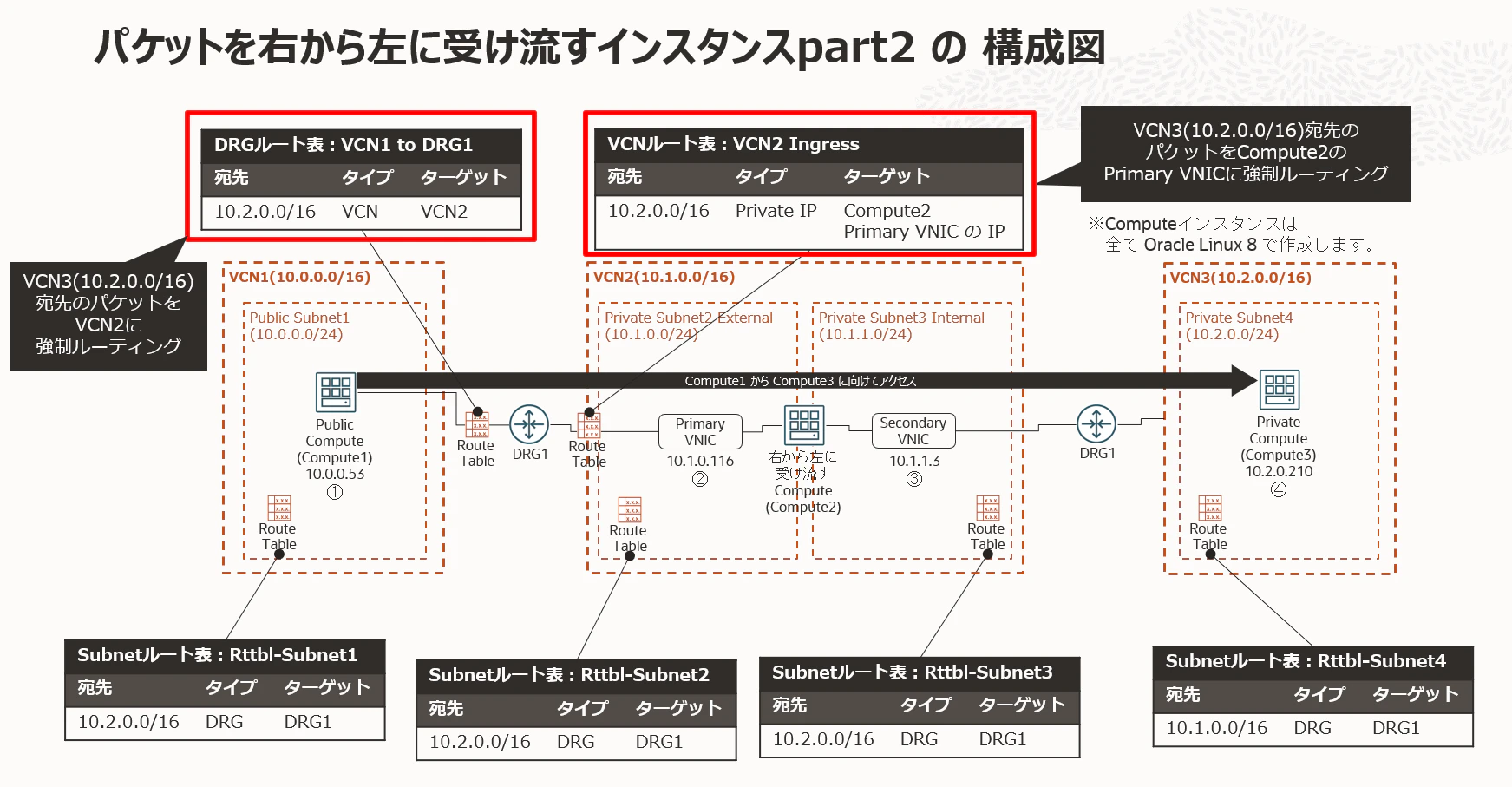
ネットワーク構成図は以下の通りです。Computeインスタンスは全て Oracle Linux 8 で作成します。
Compute1 から Compute3 にアクセスする時に、Compute2 を透過的に経由するように OCI Network や Compute2 を構成します。
赤で囲った DRGルート表、VCNルート表が本検証のポイント彡(゚)(゚)
3. VCN/Subnet/Compute/DRG の作成と接続
詳細は省略します。冒頭の記事や以下のような記事を参照して、VCN/Subnet/Compute/DRG等を作成・接続して下さい。
検証によく使う Oracle Cloud Infrastructure(OCI) の 環境構成(VCN, Seculity List, 各種Gateway, Route Table, Subnet, Compute)まとめ
https://qiita.com/ora_gonsuke777/items/08e4781af8c4f7e114ff
検証によく使う Oracle Cloud Infrastructure(OCI)環境を Terraform で作成してみる。
https://qiita.com/ora_gonsuke777/items/8651c4075ec6bf436c4f
[Oracle Cloud] 複数のVCN越しに疎通できるようにしてみた
https://qiita.com/nomu_kyou/items/4f369dd491d0ac5150d4
4. Secondory VNIC の追加と設定
冒頭の記事と同様のため詳細は省略します。下記記事の 4. を参照して下さい。
OCI VCN でパケットを右から左に受け流すだけの Linux Compute を作ってみる。
(Oracle Cloud Infrastructure, IPフォワーディング, IPマスカレード)
https://qiita.com/ora_gonsuke777/items/68589aa7c0dded02d9dd
5. Linux Compute の IPフォワーディング/IPマスカレード/静的ルーティング設定
冒頭の記事とほぼ同様のため詳細は省略します。VCN が増えているのでルーティング設定のみ下記の通り微妙に異なります。
route add -net 10.2.0.0 netmask 255.255.0.0 gw 10.1.1.1 ens5
route

[root@ayu-prv-compute02 work]# route add -net 10.2.0.0 netmask 255.255.0.0 gw 10.1.1.1 ens5
[root@ayu-prv-compute02 work]# route
Kernel IP routing table
Destination     Gateway         Genmask         Flags Metric Ref    Use Iface
default         _gateway        0.0.0.0         UG    0      0        0 ens3
default         _gateway        0.0.0.0         UG    100    0        0 ens3
10.1.0.0        0.0.0.0         255.255.255.0   U     0      0        0 ens3
10.1.0.0        0.0.0.0         255.255.255.0   U     100    0        0 ens3
10.1.1.0        0.0.0.0         255.255.255.0   U     0      0        0 ens5
10.2.0.0        _gateway        255.255.0.0     UG    0      0        0 ens5
link-local      0.0.0.0         255.255.0.0     U     0      0        0 ens3
link-local      0.0.0.0         255.255.0.0     U     100    0        0 ens3
[root@ayu-prv-compute02 work]#
その他は下記記事の 5. を参照して下さい。
OCI VCN でパケットを右から左に受け流すだけの Linux Compute を作ってみる。
(Oracle Cloud Infrastructure, IPフォワーディング, IPマスカレード)
https://qiita.com/ora_gonsuke777/items/68589aa7c0dded02d9dd
6. Primary VNIC の設定変更 と VCNルート表の静的ルーティング設定
Primary VNIC設定の変更は下記記事の 6. を参照して下さい。
OCI VCN でパケットを右から左に受け流すだけの Linux Compute を作ってみる。
(Oracle Cloud Infrastructure, IPフォワーディング, IPマスカレード)
https://qiita.com/ora_gonsuke777/items/68589aa7c0dded02d9dd
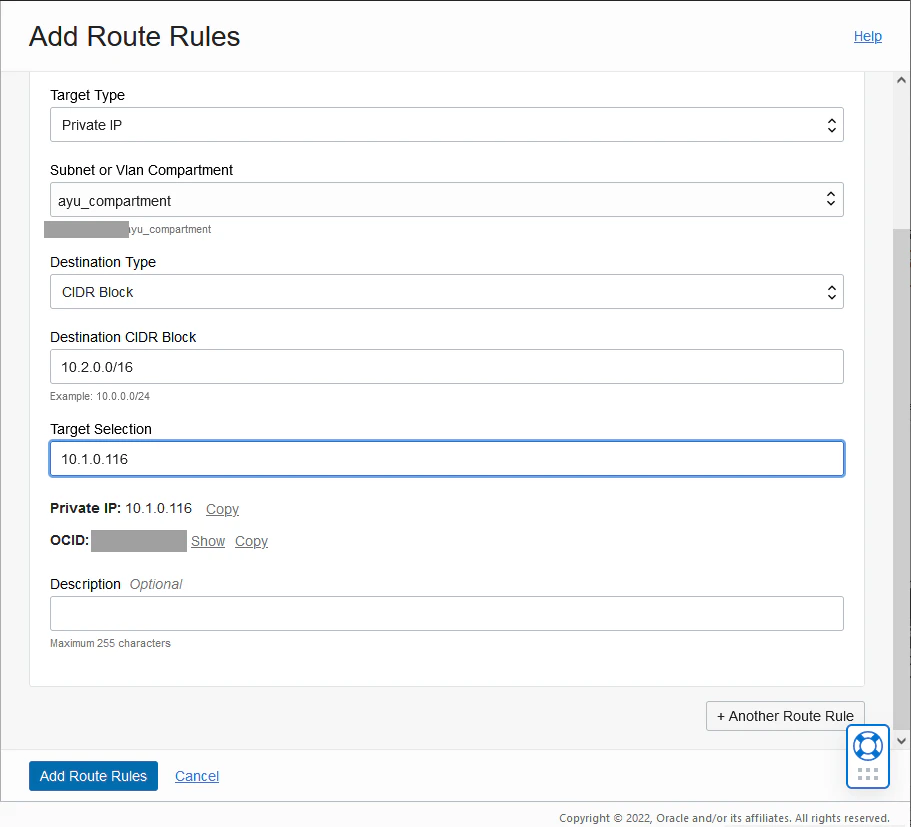
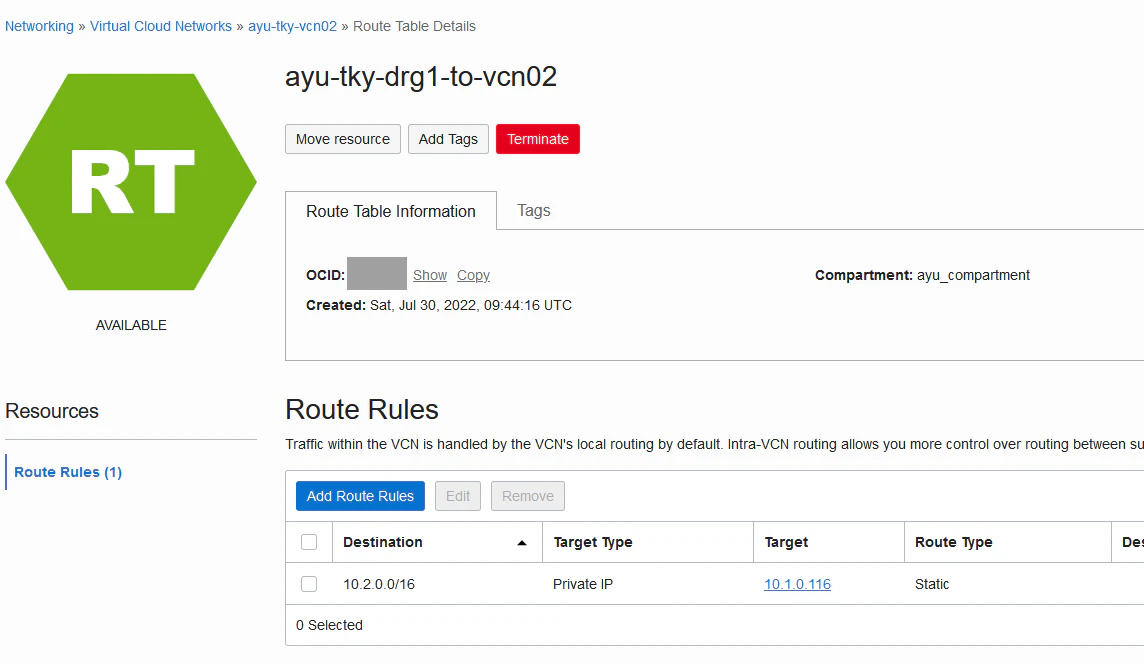
VCN2 に VCN3(10.2.0.0/16)宛先 の パケットを Compute2の Primary VNIC にルーティングする静的ルールを含んだルート表を作成します。
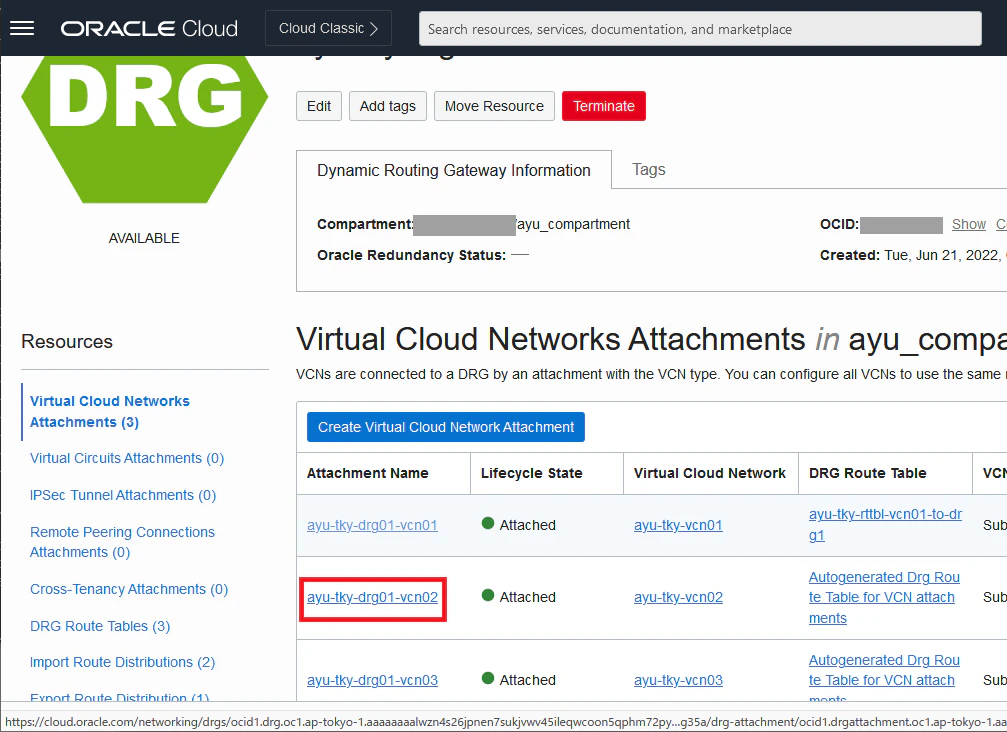
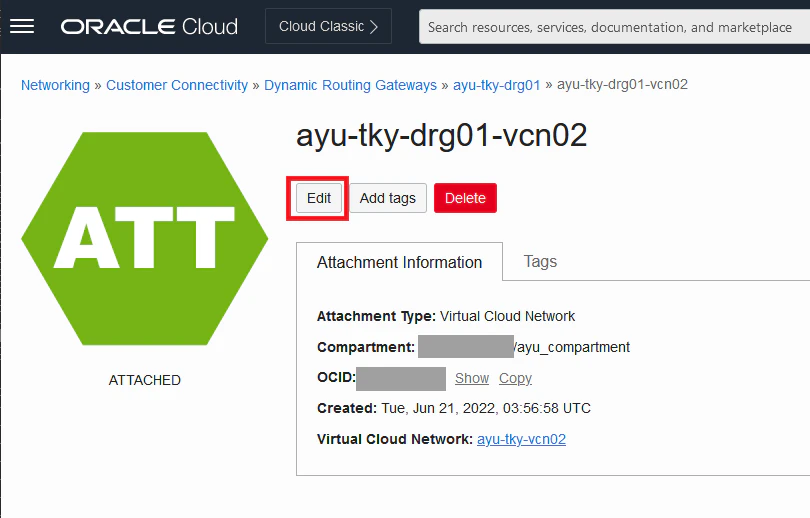
DRG(DRG Top) → 該当DRG(DRG1) → Virtual Cloud Networks Attachments と画面遷移して、DRG1 と VCN2 のアタッチメント(※)のリンクをクリックします。
※アタッチメントは DRG と各種リソース(VCN等)の結節点と覚えておくと良いです。
該当アタッチメントの Editボタン を押します。
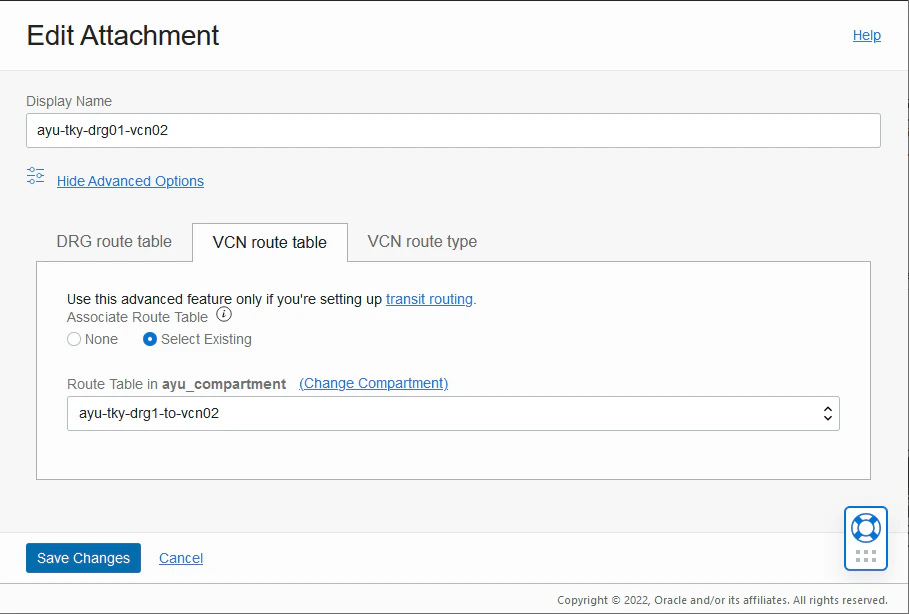
Show Advanced Options を展開して、VCN Route table に先ほど作成したルート表を選択して保存します。
7. DRGルート表の作成と設定
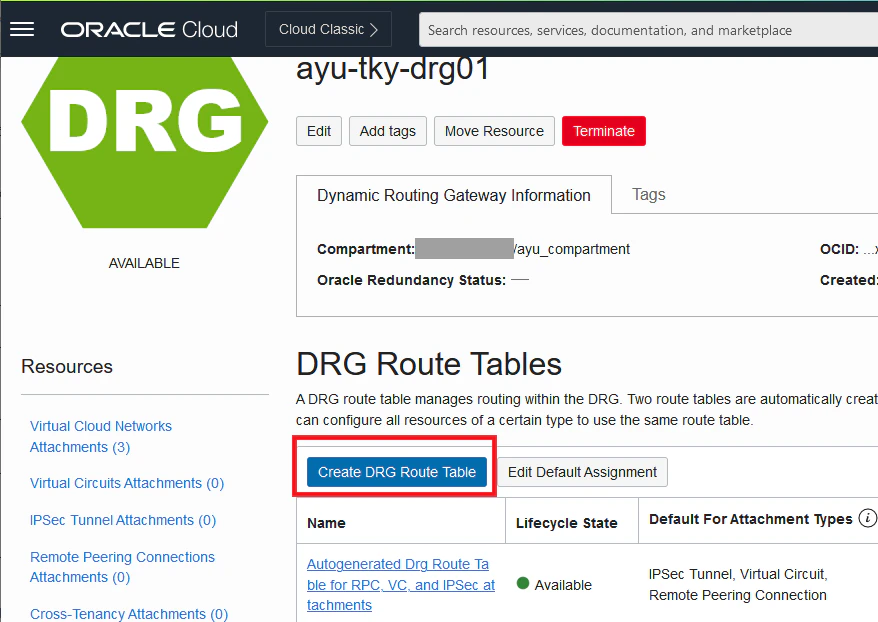
DRG(DRG Top) → 該当DRG(DRG1) → DRG Route Tables と画面遷移して、Create DRG Route Tableボタンをクリックします。
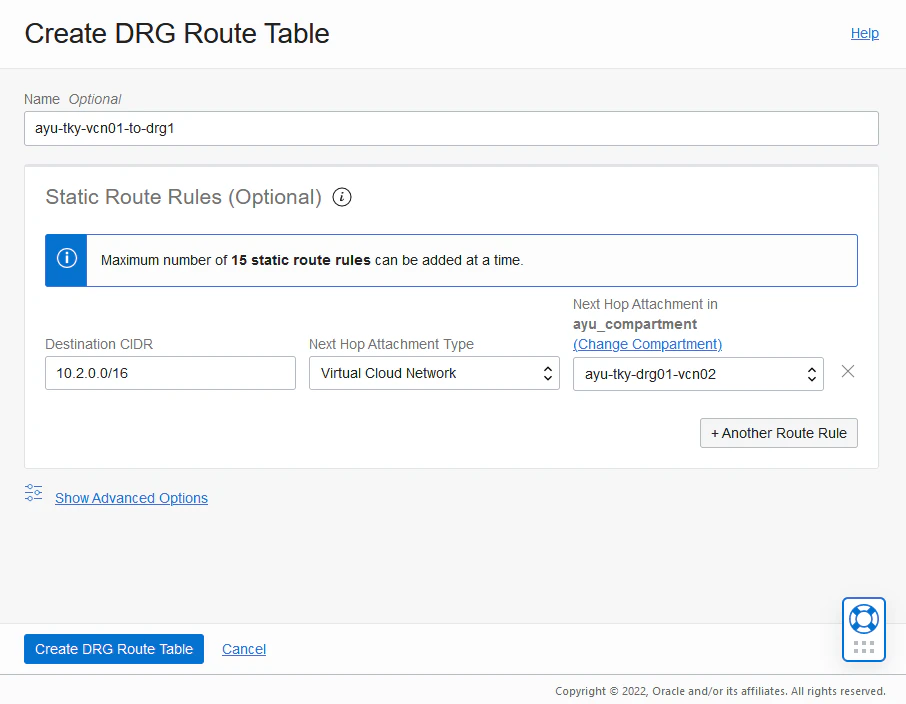
VCN3(10.2.0.0/16)宛先 の パケットを VCN2(正確には DRG1 と VCN2 のアタッチメント) にルーティングする静的ルールを含んだDRGルート表を作成します。
DRG(DRG Top) → 該当DRG(DRG1) → Virtual Cloud Networks Attachments と画面遷移して、DRG1 と VCN1 のアタッチメントのリンクをクリックします。
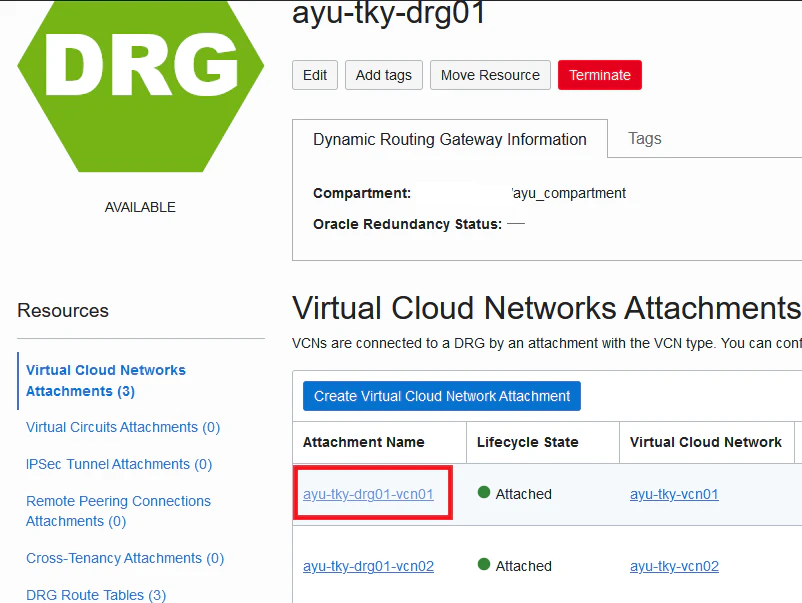
該当アタッチメントの Editボタン を押します。
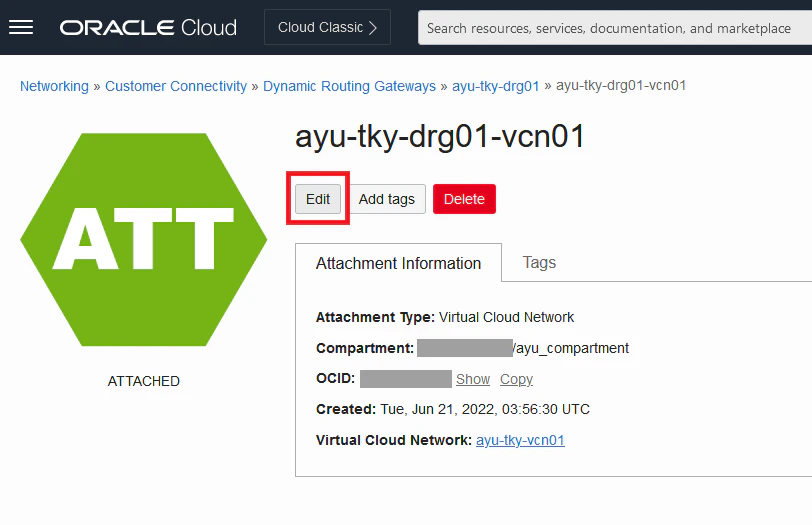
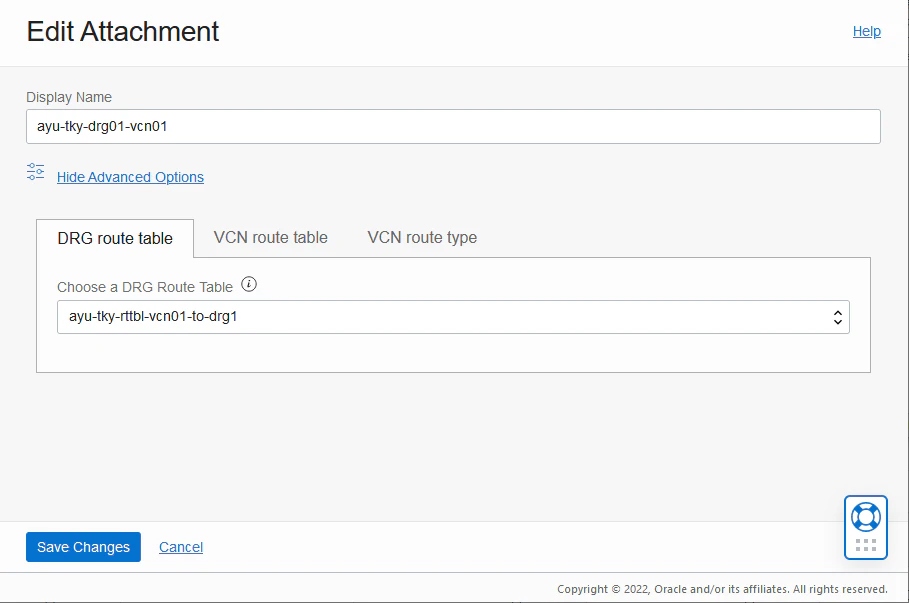
Show Advanced Options を展開して、DRG Route table に先ほど作成したDRGルート表を選択して保存します。
8. nping による疎通と tcpdump によるパケット確認
Compute1 から Compute3 への疎通を確認します。
この時パケットの通過を確認するために、構成図の③と④のインターフェースで tcpdump を仕掛けておきます。
Compute1 から Compute3 に以下のコマンド(nping)でパケットを飛ばします。
ポートはファイヤーウォール(Security List/NSG)で許可されていれば何でも良いですが、今回は 1521 で疎通してみます。
nping --tcp -p 1521 10.2.0.210
Compute2 の ③ のインタフェースに仕掛ける tcpdump は以下のコマンドです。インタフェース名は適宜読み替えて下さい。
tcpdump -i ens5 port 1521
Compute3 の ④ のインタフェースに仕掛ける tcodump は以下のコマンドとなります。インタフェース名は適宜読み替えて下さい。
tcpdump -i ens3 port 1521
結果は以下の通りです。上手く行きましたやで!彡(^)(^)
Compute1 の nping の結果(成功)
[root@ayu-pub-compute01 ~]# nping --tcp -p 1521 10.2.0.210

Starting Nping 0.6.40 ( http://nmap.org/nping ) at 2022-07-30 11:13 GMT
SENT (0.0136s) TCP 10.0.0.53:17654 > 10.2.0.210:1521 S ttl=64 id=3728 iplen=40  seq=2707322626 win=1480
RCVD (0.2062s) ICMP [10.2.0.210 > 10.0.0.53 Communication administratively prohibited by filtering (type=3/code=13) ] IP [ttl=61 id=42262 iplen=68 ]
SENT (1.0141s) TCP 10.0.0.53:17654 > 10.2.0.210:1521 S ttl=64 id=3728 iplen=40  seq=2707322626 win=1480
RCVD (1.0382s) ICMP [10.2.0.210 > 10.0.0.53 Communication administratively prohibited by filtering (type=3/code=13) ] IP [ttl=61 id=42459 iplen=68 ]
SENT (2.0152s) TCP 10.0.0.53:17654 > 10.2.0.210:1521 S ttl=64 id=3728 iplen=40  seq=2707322626 win=1480
RCVD (2.0782s) ICMP [10.2.0.210 > 10.0.0.53 Communication administratively prohibited by filtering (type=3/code=13) ] IP [ttl=61 id=42914 iplen=68 ]
SENT (3.0172s) TCP 10.0.0.53:17654 > 10.2.0.210:1521 S ttl=64 id=3728 iplen=40  seq=2707322626 win=1480
RCVD (3.1182s) ICMP [10.2.0.210 > 10.0.0.53 Communication administratively prohibited by filtering (type=3/code=13) ] IP [ttl=61 id=43154 iplen=68 ]
SENT (4.0192s) TCP 10.0.0.53:17654 > 10.2.0.210:1521 S ttl=64 id=3728 iplen=40  seq=2707322626 win=1480
RCVD (4.1582s) ICMP [10.2.0.210 > 10.0.0.53 Communication administratively prohibited by filtering (type=3/code=13) ] IP [ttl=61 id=44057 iplen=68 ]

Max rtt: 192.628ms | Min rtt: 24.067ms | Avg rtt: 103.919ms
Raw packets sent: 5 (200B) | Rcvd: 5 (340B) | Lost: 0 (0.00%)
Nping done: 1 IP address pinged in 4.17 seconds
[root@ayu-pub-compute01 ~]#
Compute2 の ③ のインタフェースに仕掛けた tcpdump
[root@ayu-prv-compute02 ~]# tcpdump -i ens5 port 1521
dropped privs to tcpdump
tcpdump: verbose output suppressed, use -v or -vv for full protocol decode
listening on ens5, link-type EN10MB (Ethernet), capture size 262144 bytes
11:13:55.777427 IP ayu-prv-compute02.17654 > 10.2.0.210.ncube-lm: Flags [S], seq 2707322626, win 1480, length 0
11:13:56.777950 IP ayu-prv-compute02.17654 > 10.2.0.210.ncube-lm: Flags [S], seq 2707322626, win 1480, length 0
11:13:57.779090 IP ayu-prv-compute02.17654 > 10.2.0.210.ncube-lm: Flags [S], seq 2707322626, win 1480, length 0
11:13:58.781028 IP ayu-prv-compute02.17654 > 10.2.0.210.ncube-lm: Flags [S], seq 2707322626, win 1480, length 0
11:13:59.783014 IP ayu-prv-compute02.17654 > 10.2.0.210.ncube-lm: Flags [S], seq 2707322626, win 1480, length 0
Compute3 の ④ のインターフェースに仕掛けた tcpdump
[root@ayu-prv-compute03 ~]# tcpdump -i ens3 port 1521
dropped privs to tcpdump
tcpdump: verbose output suppressed, use -v or -vv for full protocol decode
listening on ens3, link-type EN10MB (Ethernet), capture size 262144 bytes
11:13:55.777568 IP 10.1.1.3.17654 > ayu-prv-compute03.ayuprvsubnet04.ayutkyvcn03.oraclevcn.com.ncube-lm: Flags [S], seq 2707322626, win 1480, length 0
11:13:56.778076 IP 10.1.1.3.17654 > ayu-prv-compute03.ayuprvsubnet04.ayutkyvcn03.oraclevcn.com.ncube-lm: Flags [S], seq 2707322626, win 1480, length 0
11:13:57.779231 IP 10.1.1.3.17654 > ayu-prv-compute03.ayuprvsubnet04.ayutkyvcn03.oraclevcn.com.ncube-lm: Flags [S], seq 2707322626, win 1480, length 0
11:13:58.781157 IP 10.1.1.3.17654 > ayu-prv-compute03.ayuprvsubnet04.ayutkyvcn03.oraclevcn.com.ncube-lm: Flags [S], seq 2707322626, win 1480, length 0
11:13:59.783143 IP 10.1.1.3.17654 > ayu-prv-compute03.ayuprvsubnet04.ayutkyvcn03.oraclevcn.com.ncube-lm: Flags [S], seq 2707322626, win 1480, length 0
9. まとめ
前回に引き続き IPマスカレードでNATしているので、パケットを右から左に受け流していません。
構成は違えどもやってる事の本質に変わり無いので、結果も変わりませんね彡(^)(^)
とまれやりたい事をVCN跨りで実現できました。
前回とは別のムーディ勝山氏の動画で本記事の〆といたします。