
概要
cscの作法、調べてみた。
OpenRCF v2.8、見つけたので、windows11で、MSbuildしてみた。
調査してみた。
調査
プリミティブは、あるか
物理エンジンは、あるか
オービットは、あるのか
写真
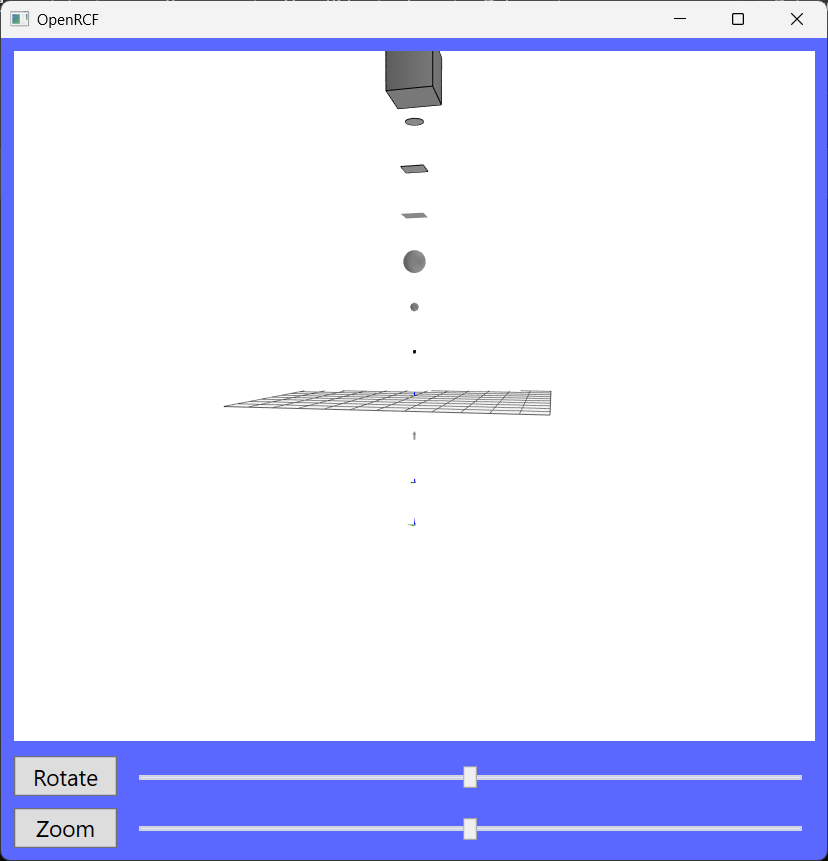
結果
-
プリミティブは、あるか
ある。
ConeFrustum
Pillar
SquareFrustum
Cuboid
Circle
Rectangle
RoughRectangle
Sphere
RoughSphere
LiDAR
Arrow
ThreeAxis
PrickleBall -
物理エンジンは、あるか
無い。 -
オービットは、あるのか
ある。
サンプルコード
using System;
using System.Windows;
using OpenRCF;
using Vector = OpenRCF.Vector;


namespace OpenRCF
{
	partial class MainWindow: Window {
		ConeFrustum 	Cone = new ConeFrustum();
		Pillar 			Wheel = new Pillar();
		SquareFrustum 	sf = new SquareFrustum();
		Cuboid 			box = new Cuboid(1, 1, 1);
		Circle 			en = new Circle();
		Rectangle 		rt = new Rectangle();
		RoughRectangle 	rr = new RoughRectangle();
		Sphere 			Ball = new Sphere(0.25f);
		RoughSphere 	rs = new RoughSphere();
		LiDAR 			lider = new LiDAR();
		Arrow 			ya = new Arrow();
		ThreeAxis 		axis = new ThreeAxis(0.1f);
		PrickleBall		 pb = new PrickleBall();

		void Setup() {
			Cone.Position[2] = 10;
			Wheel.Position[2] = 9;
			sf.Position[2] = 8;
			box.Position[2] = 7;
			en.Position[2] = 6;
			rt.Position[2] = 5;
			rr.Position[2] = 4;
			Ball.Position[2] = 3;
			rs.Position[2] = 2;
			lider.Position[2] = 1;

			ya.Position[2] = -1;
			axis.Position[2] = -2;
			pb.Position[2] = -3;

		}
		void Loop() {

		}
		void Draw() {
			Cone.Draw();
			Wheel.Draw();
			sf.Draw();
			box.Draw();
			en.Draw();
			rt.Draw();
			rr.Draw();
			Ball.Draw();
			rs.Draw();
			lider.Draw();
			ya.Draw();
			axis.Draw();
			pb.Draw();

		}
		void Button1_Click(object sender, RoutedEventArgs e) {

		}
		void Button2_Click(object sender, RoutedEventArgs e) {

		}
		void Button3_Click(object sender, RoutedEventArgs e) {

		}
		void Button4_Click(object sender, RoutedEventArgs e) {

		}
		void Button5_Click(object sender, RoutedEventArgs e) {

		}
	}
}
以上。