
概要
cscの作法、調べてみた。
DxLibDotNet.dll、使ってみた。
練習問題やってみた。
練習問題
ランチャーアプリを作れ。
写真
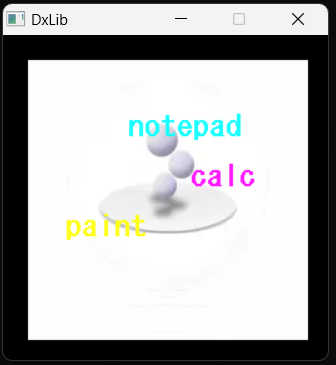
サンプルコード
using System;
using System.Diagnostics;
using DxLibDLL;

class Test {
	[STAThread]
	static void Main() {
		int X,
			Y;
		DX.ChangeWindowMode(DX.TRUE);
		DX.SetGraphMode(260, 260, 32);
		if (DX.DxLib_Init() == -1)
			return;
		int png = DX.LoadGraph("circledock.png");
		DX.DrawGraph(20, 20, png, DX.TRUE);
		DX.SetFontSize(24);
		DX.DrawString(100, 60, "notepad", DX.GetColor(25, 255, 255));
		DX.DrawString(150, 100, "calc", DX.GetColor(255, 25, 255));
		DX.DrawString(50, 140, "paint", DX.GetColor(255, 255, 25));
		while (DX.ProcessMessage() == 0 && DX.CheckHitKey(DX.KEY_INPUT_ESCAPE) == 0)
		{
			if ((DX.GetMouseInput() & DX.MOUSE_INPUT_LEFT) != 0)
			{
				DX.GetMousePoint(out X, out Y);
				if (X > 20 && X < 200 && Y > 60 && Y < 100)
				{
					Process.Start("notepad");
					break;
				}
				if (X > 20 && X < 200 && Y > 100 && Y < 140)
				{
					Process.Start("calc");
					break;
				}
				if (X > 20 && X < 200 && Y > 140 && Y < 180)
				{
					Process.Start("mspaint");
					break;
				}
			}
		}
		DX.DxLib_End();
	}
}
以上。