

編み物するときのあの悩み
ぐっと寒くなってきましたね。寒くなると始めたくなるのが~編み物です。3月半ばになると毛糸に見向きもしなくなるのも不思議です😆
ニッターのみなさんは、ゲージちゃんと合わせてますか?私は手が緩くて編み図の通りに作ると大抵一回り大きくなるのが常。そんなお悩み解消にむけ、ゲージ調整計算機作りました。
こちらです👇👇👇
相棒のGeminiと力を合わせて母さんがんばりましたよ。
見た目もかわいくピンクにしちゃったり~
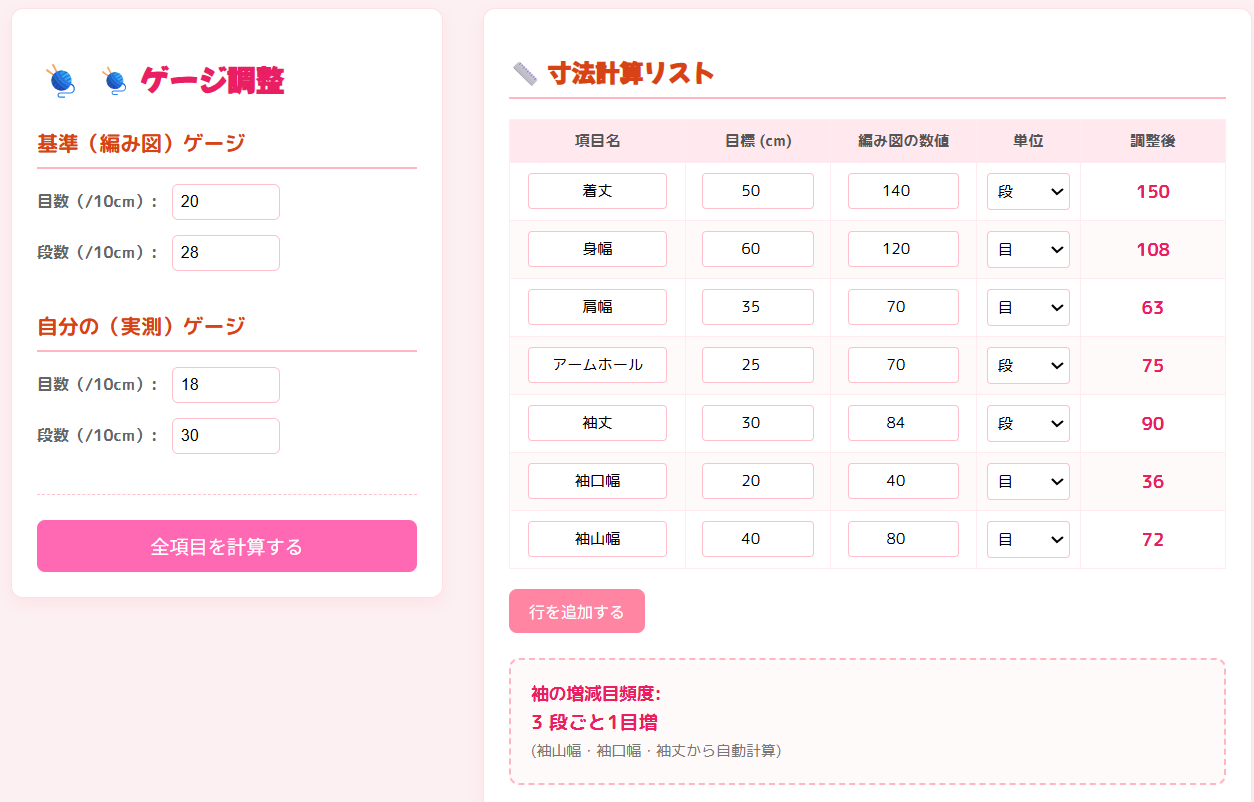
使い方はとても簡単
1.本の編み図のゲージと自分のゲージを入力する
2.着丈、身幅などの編み図の目数・段数を入力。あるいはサイズ(cm)を入力する
3.自動で調整後の段数および目数を計算
工夫したところ
作品によっていろいろなサイズがあるだろうと思って、項目は追加できる仕様に。そのため、計算時に段か目か選択できるようにした。目指したのは汎用性!
そして、ピンクでかわいく🩷🩷🩷
こんなコードをGeminiの言われるがまま
<!DOCTYPE html>
<html lang="ja">
<head>
    <meta charset="UTF-8">
    <title>knitting-gauge-calculator</title>
    <style>
        /* Google Fonts: M PLUS Rounded 1c を読み込み */
        @import url('https://fonts.googleapis.com/css2?family=Mochiy+Pop+One&family=M+PLUS+Rounded+1c:wght@400;700&display=swap');

        body {
            font-family: 'M PLUS Rounded 1c', sans-serif; /* 可愛いフォントに変更 */
            display: flex;
            padding: 30px;
            background-color: #fcf0f2; /* 背景色を淡いピンク系に */
            gap: 40px;
            min-width: 1000px;
        }

        /* ゲージ入力エリアのスタイル */
        .gauge-controls {
            width: 380px; /* 少し幅を広く */
            padding: 25px;
            background-color: #ffffff;
            border-radius: 12px; /* 角を丸く */
            box-shadow: 0 6px 15px rgba(255, 192, 203, 0.3); /* 影を柔らかいピンクに */
            flex-shrink: 0;
            height: fit-content;
            border: 1px solid #ffe0e6; /* 細いピンクのボーダーを追加 */
        }
        .gauge-controls input {
            width: 90px;
            padding: 8px;
            margin-bottom: 15px; /* 余白を少し広めに */
            border: 1px solid #ffc0cb; /* ボーダーの色を調整 */
            border-radius: 6px; /* 角を丸く */
            font-size: 1.0em;
        }
        .gauge-controls label {
            font-weight: bold;
            color: #666; /* 少し濃いピンク寄りのグレー */
            margin-right: 10px;
            display: inline-block;
            min-width: 100px; /* ラベルの幅を揃える */
        }
        .gauge-controls h1 {
            font-family: 'Mochiy Pop One', sans-serif; /* タイトルは可愛いフォント */
            font-size: 1.8em;
            color: #e91e63; /* 濃いめのピンクをアクセントカラーに */
            margin-bottom: 20px;
            display: flex;
            align-items: center;
        }
        .gauge-controls h1::before { /* ゲージのアイコンを可愛らしく */
            content: '🧶';
            font-size: 1.2em;
            margin-right: 10px;
            color: #e91e63; /* アイコンの色も合わせる */
        }
        .gauge-controls h2 {
            border-bottom: 2px solid #ffb6c1; /* 淡いピンクのボーダー */
            padding-bottom: 8px;
            margin-top: 25px;
            margin-bottom: 15px;
            color: #d84315; /* 少し濃い赤茶系に */
            font-size: 1.3em;
        }
        .gauge-controls hr {
            border: none;
            border-top: 1px dashed #ffc0cb; /* ピンクの点線 */
            margin: 25px 0;
        }
        .gauge-controls button {
            padding: 12px;
            width: 100%;
            font-size: 1.2em;
            background-color: #ff69b4; /* ホットピンク系のボタン */
            color: white;
            border: none;
            border-radius: 8px; /* 角を丸く */
            cursor: pointer;
            transition: background-color 0.2s ease; /* ホバーアニメーション */
        }
        .gauge-controls button:hover {
            background-color: #ff1493; /* ホバーで少し濃いピンクに */
        }

        /* --------------------------------- */
        /* 新しい計算テーブルエリアのスタイル */
        /* --------------------------------- */
        .calculation-table-container {
            flex-grow: 1;
            padding: 25px;
            background-color: #ffffff;
            border-radius: 12px;
            box-shadow: 0 6px 15px rgba(255, 192, 203, 0.3); /* 影を柔らかいピンクに */
            border: 1px solid #ffe0e6; /* ピンクのボーダー */
        }
        .calculation-table-container h2 {
            font-family: 'Mochiy Pop One', sans-serif;
            font-size: 1.5em;
            border-bottom: 2px solid #ffb6c1; /* 淡いピンクのボーダー */
            padding-bottom: 8px;
            margin-bottom: 20px;
            color: #d84315; /* 少し濃い赤茶系に */
        }

        /* テーブルスタイル */
        #calculation-table {
            width: 100%;
            border-collapse: collapse;
            margin-bottom: 20px;
        }
        #calculation-table th, #calculation-table td {
            border: 1px solid #ffebf0; /* 薄いピンクのボーダー */
            padding: 10px;
            text-align: center;
        }
        #calculation-table th {
            background-color: #ffe8ee; /* ヘッダーの背景色を淡いピンクに */
            font-size: 0.95em;
            color: #555; /* 文字色 */
            font-weight: bold;
        }
        #calculation-table tr:nth-child(even) { /* 偶数行の背景色 */
            background-color: #fffafa; /* さらに薄いピンク */
        }

        /* 入力欄のスタイル */
        #calculation-table input[type="number"],
        #calculation-table input[type="text"] {
            width: 90%;
            padding: 6px;
            box-sizing: border-box;
            border: 1px solid #ffc0cb; /* ピンクのボーダー */
            border-radius: 4px;
            text-align: center;
            font-family: 'M PLUS Rounded 1c', sans-serif;
            font-size: 0.95em;
        }

        /* 単位選択ドロップダウン */
        #calculation-table select {
            width: 100%;
            padding: 6px;
            border: 1px solid #ffc0cb; /* ピンクのボーダー */
            border-radius: 4px;
            font-family: 'M PLUS Rounded 1c', sans-serif;
            font-size: 0.95em;
            background-color: #fff;
        }

        /* 計算結果のスタイル */
        .result-val {
            color: #e91e63; /* アクセントカラーの濃いピンクに */
            font-weight: bold;
            display: block;
            min-width: 30px;
            font-size: 1.1em;
        }

        /* 行追加ボタン */
        #add-row-button {
            padding: 10px 20px;
            background-color: #ff85a2; /* やや明るいピンク */
            color: white;
            border: none;
            border-radius: 8px;
            cursor: pointer;
            margin-bottom: 25px;
            font-size: 1em;
            transition: background-color 0.2s ease;
        }
        #add-row-button:hover {
            background-color: #ff6b8e; /* ホバーで少し濃いピンクに */
        }

        /* 増減目エリア */
        .sleeve-increase-result {
            padding: 20px;
            border: 2px dashed #ffb6c1; /* 淡いピンクの点線ボーダー */
            border-radius: 10px;
            background-color: #fffafa; /* 淡いピンクの背景 */
            font-size: 1.1em;
            color: #333;
        }
        .sleeve-increase-result label {
            font-weight: bold;
            margin-right: 15px;
            color: #e91e63; /* アクセントカラーの濃いピンク */
        }
        .sleeve-increase-result small {
            color: #777;
            font-size: 0.85em;
        }
    </style>
</head>
<body>

    <div class="gauge-controls">
        <h1>🧶 ゲージ調整</h1>

        <h2>基準(編み図)ゲージ</h2>
        <label>目数(/10cm):</label>
        <input type="number" id="patternGauge" value="20"><br>
        <label>段数(/10cm):</label>
        <input type="number" id="patternRowGauge" value="28">

        <h2>自分の(実測)ゲージ</h2>
        <label>目数(/10cm):</label>
        <input type="number" id="myGauge" value="18"><br>
        <label>段数(/10cm):</label>
        <input type="number" id="myRowGauge" value="30">

        <hr>
        <button onclick="calculateAll()">全項目を計算する</button>
    </div>

    <div class="calculation-table-container">
        <h2>📏 寸法計算リスト</h2>

        <table id="calculation-table">
            <thead>
                <tr>
                    <th style="width: 150px;">項目名</th>
                    <th style="width: 120px;">目標 (cm)</th>
                    <th style="width: 120px;">編み図の数値</th>
                    <th style="width: 80px;">単位</th>
                    <th style="width: 120px;">調整後</th>
                </tr>
            </thead>
            <tbody>
                </tbody>
        </table>

        <button id="add-row-button">行を追加する</button>

        <div class="sleeve-increase-result">
            <label>袖の増減目頻度:</label>
            <span class="result-val" id="res_sleeve_increase">---</span>
            <small> (袖山幅・袖口幅・袖丈から自動計算)</small>
        </div>
    </div>

    <script>
        // 目数/段数とゲージ情報を使って調整後の数値を計算する関数
        function calculateSingleValue(patternCount, patternGauge, myGauge) {
            if (patternGauge === 0) return 0;
            const adjustedValue = patternCount * (myGauge / patternGauge);
            return Math.round(adjustedValue);
        }

        // 必須の計算項目リスト (デフォルト値設定)
        const initialItems = [
            { name: "着丈", unit: "row", cm: 50, pattern: 250 },
            { name: "身幅", unit: "stitch", cm: 60, pattern: 120 },
            { name: "肩幅", unit: "stitch", cm: 35, pattern: 70 },
            { name: "アームホール", unit: "row", cm: 25, pattern: 80 },
            { name: "袖丈", unit: "row", cm: 30, pattern: 150 },
            { name: "袖口幅", unit: "stitch", cm: 20, pattern: 40 },
            { name: "袖山幅", unit: "stitch", cm: 40, pattern: 80 },
        ];
        let calculationItems = [...initialItems]; // 編集・追加用のリスト

        // テーブルに行を追加する関数
        function addTableRow(item, index) {
            const tbody = document.getElementById('calculation-table').getElementsByTagName('tbody')[0];
            const row = tbody.insertRow();
            row.id = `row-${index}`;

            // 1. 項目名 (編集可能に)
            row.insertCell(0).innerHTML = `<input type="text" value="${item.name}">`;

            // 2. 目標 (cm)
            row.insertCell(1).innerHTML = `<input type="number" class="cm-input" data-index="${index}" value="${item.cm || ''}">`;

            // 3. 編み図の数値 (目数/段数)
            row.insertCell(2).innerHTML = `<input type="number" class="pattern-input" id="pattern-${index}" value="${item.pattern || ''}">`;

            // 4. 単位 (段/目)
            row.insertCell(3).innerHTML = `
                <select class="unit-select" data-index="${index}">
                    <option value="row" ${item.unit === 'row' ? 'selected' : ''}>段</option>
                    <option value="stitch" ${item.unit === 'stitch' ? 'selected' : ''}>目</option>
                </select>
            `;

            // 5. 調整後
            row.insertCell(4).innerHTML = `<span class="result-val" id="result-${index}">---</span>`;
        }

        // 全ての項目を計算し、結果をUIに表示するメイン関数
        function calculateAll() {
            // --- 1. ゲージ情報の取得 ---
            const patternGaugeInput = document.getElementById('patternGauge');
            const patternRowGaugeInput = document.getElementById('patternRowGauge');
            const myGaugeInput = document.getElementById('myGauge');
            const myRowGaugeInput = document.getElementById('myRowGauge');

            const patternGauge = parseFloat(patternGaugeInput.value);
            const patternRowGauge = parseFloat(patternRowGaugeInput.value);
            const myGauge = parseFloat(myGaugeInput.value);
            const myRowGauge = parseFloat(myRowGaugeInput.value);

            // 初期化チェック
            if (isNaN(patternGauge) || isNaN(patternRowGauge) || isNaN(myGauge) || isNaN(myRowGauge) || patternGauge === 0 || patternRowGauge === 0) {
                 document.querySelectorAll('.result-val').forEach(el => el.textContent = '---');
                 return;
            }

            // --- 2. cm入力から編み図の数値を更新(★修正ロジック★) ---
            document.querySelectorAll('.cm-input').forEach(input => {
                const cmValue = parseFloat(input.value);
                const index = parseInt(input.getAttribute('data-index'));
                const patternInput = document.getElementById(`pattern-${index}`);

                // 【★重要変更点★】 編み図の数値が空欄の場合のみ、cmから数値を計算して埋める
                if (!isNaN(cmValue) && (patternInput.value === '' || parseFloat(patternInput.value) === 0)) {

                    const unit = document.querySelector(`#row-${index} .unit-select`).value;
                    const gauge = unit === 'stitch' ? patternGauge : patternRowGauge;

                    if (gauge !== 0) {
                        // cmから目数/段数を計算: (cm * ゲージ) / 10cm
                        const calculatedCount = Math.round((cmValue * gauge) / 10);
                        patternInput.value = calculatedCount;
                    }
                }
            });

            // --- 3. 調整後数値を計算し、結果を表示 ---
            let adjSleeveTop = 0, adjSleeveCuff = 0, adjSleeveLength = 0;

            // 現在のDOMから値を読み取り、計算
            calculationItems.forEach((item, index) => {
                const patternInput = document.getElementById(`pattern-${index}`);
                if (!patternInput) return; // 新規追加行などでDOMがまだない場合はスキップ

                const unit = document.querySelector(`#row-${index} .unit-select`).value;
                const patternCount = parseFloat(patternInput.value);

                const pGauge = unit === 'stitch' ? patternGauge : patternRowGauge;
                const mGauge = unit === 'stitch' ? myGauge : myRowGauge;
                const resultSpan = document.getElementById(`result-${index}`);

                if (!isNaN(patternCount) && pGauge !== 0) {
                    const adjustedValue = calculateSingleValue(patternCount, pGauge, mGauge);
                    resultSpan.textContent = adjustedValue;

                    // 袖の増減目計算のために、必要な値を保持 (単位も確認)
                    const itemName = document.querySelector(`#row-${index} input[type="text"]`).value;
                    if (itemName.includes("袖山") && unit === "stitch") adjSleeveTop = adjustedValue;
                    if (itemName.includes("袖口") && unit === "stitch") adjSleeveCuff = adjustedValue;
                    if (itemName.includes("袖丈") && unit === "row") adjSleeveLength = adjustedValue;
                } else {
                    resultSpan.textContent = '---';
                }
            });

            // --- 4. 袖の増減目計算 ---
            const increaseStitchCount = adjSleeveTop - adjSleeveCuff;
            const increaseResultSpan = document.getElementById('res_sleeve_increase');

            if (adjSleeveLength > 0 && Math.abs(increaseStitchCount) > 0) {
                // 増減目頻度(段数 / 目数)
                const rawFrequency = adjSleeveLength / Math.abs(increaseStitchCount);
                const frequency = Math.round(rawFrequency);

                if (increaseStitchCount > 0) {
                    increaseResultSpan.textContent = `${frequency} 段ごと1目増`;
                } else {
                    increaseResultSpan.textContent = `${frequency} 段ごと1目減`;
                }
            } else if (increaseStitchCount === 0 && adjSleeveLength > 0) {
                 increaseResultSpan.textContent = '増減なし';
            } else {
                 increaseResultSpan.textContent = '計算不能';
            }
        }

        // イベントリスナーのセットアップ
        function setupEventListeners() {
            // すべての入力・選択フィールドの変更を監視
            document.querySelectorAll('input, select').forEach(element => {
                element.removeEventListener('input', calculateAll); // 重複防止
                element.addEventListener('input', calculateAll);
            });
        }

        // ゲージ値をローカルストレージに保存する関数
        function saveGaugeValues() {
            localStorage.setItem('patternGauge', document.getElementById('patternGauge').value);
            localStorage.setItem('patternRowGauge', document.getElementById('patternRowGauge').value);
            localStorage.setItem('myGauge', document.getElementById('myGauge').value);
            localStorage.setItem('myRowGauge', document.getElementById('myRowGauge').value);
        }

        // ページロード時に実行
        document.addEventListener('DOMContentLoaded', () => {
            // ローカルストレージからゲージ値を読み込み
            if (localStorage.getItem('patternGauge')) {
                document.getElementById('patternGauge').value = localStorage.getItem('patternGauge');
                document.getElementById('patternRowGauge').value = localStorage.getItem('patternRowGauge');
                document.getElementById('myGauge').value = localStorage.getItem('myGauge');
                document.getElementById('myRowGauge').value = localStorage.getItem('myRowGauge');
            }

            // 初期項目の描画
            calculationItems.forEach((item, index) => addTableRow(item, index));

            // 汎用項目追加ボタン
            document.getElementById('add-row-button').addEventListener('click', () => {
                const newIndex = calculationItems.length;
                // 新規項目のデフォルト値
                const newItem = { name: '新規項目', unit: 'stitch', cm: 30, pattern: 60 };
                calculationItems.push(newItem);
                addTableRow(newItem, newIndex);
                setupEventListeners(); // 新しい行にもリスナーを設定
                calculateAll();
            });

            // ゲージ入力フィールドに変更があったら保存
            document.getElementById('patternGauge').addEventListener('input', saveGaugeValues);
            document.getElementById('patternRowGauge').addEventListener('input', saveGaugeValues);
            document.getElementById('myGauge').addEventListener('input', saveGaugeValues);
            document.getElementById('myRowGauge').addEventListener('input', saveGaugeValues);

            setupEventListeners();
            calculateAll(); // 初回計算
        });
    </script>

</body>
</html>
この冬、自分サイズで編み物しましょう🧶
初めての自作WEBアプリ公開🫶
自分の人生で、自作アプリ公開なんて日が来るなんて昨日まで思ってなかった(笑)
Geminiに手取り足取りでGitHubに公開。いや~英語ムズイ😅GeminiいなかったらGitHubに公開なんて絶対無理。アプリの説明も英語だし。Geminiに翻訳どころか更なる提案までしてもらって公開までこぎつけた。
大好きだよGemini🩷