

これは Svelte AdventCalendar 2025 6日目の記事です。
昨日は @shamokit さんによる アクセシビリティが(比較的)高いSvelteコンポーネントライブラリ2025 でした。
モチベーションについて
SvelteKitのバージョン2.27以降から、まだ実験的機能ではあるものの、Remote functionsという機能が追加されています。
すでに記事などは沢山存在するのですが実際動いているデモをあまり見たことがなかったのと、触っておこうかなという気持ちがあり、今回記事にすることとしました。
作ったもの
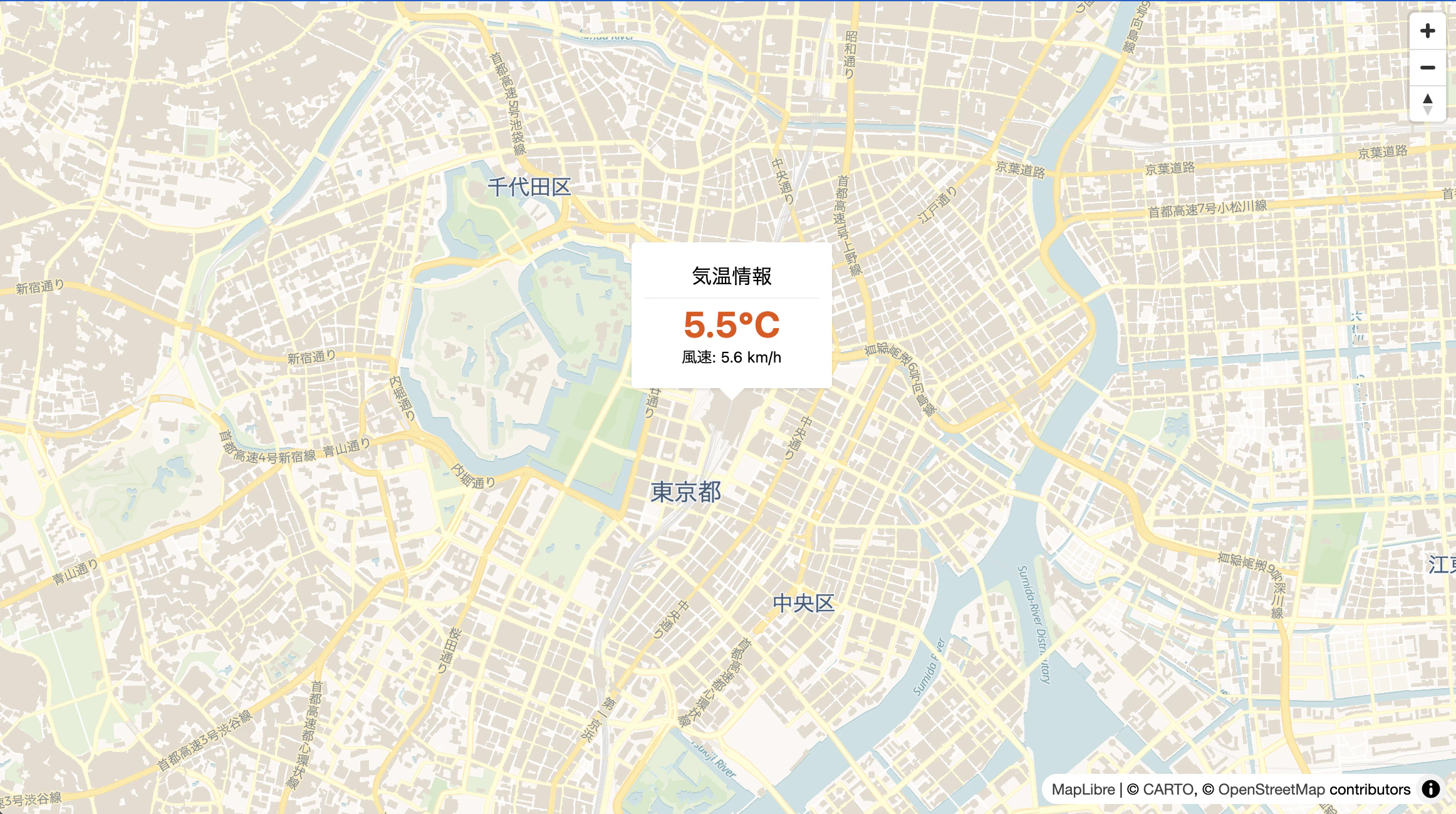
地図をクリックすると、その地点の気温の情報を表示するアプリケーションです。
構成
構成は以下のようにしています。
src/
├── lib/
│   ├── components/
│   │   └── WeatherPopup.svelte  <-- UI
│   └── weather.remote.ts        <-- ロジック
└── routes/
    └── +page.svelte             <-- ここから呼び出す
weather.remote.tsが今回のポイントです。
使う場合の設定
これはもう調べれば出てくるのですが、使う場合にはsvelte.config.jsを以下のように設定してあげる必要があります。
import adapter from '@sveltejs/adapter-auto';
import { vitePreprocess } from '@sveltejs/vite-plugin-svelte';

/** @type {import('@sveltejs/kit').Config} */
const config = {
	// Consult https://svelte.dev/docs/kit/integrations
	// for more information about preprocessors
	preprocess: vitePreprocess(),

	kit: {
		// adapter-auto only supports some environments, see https://svelte.dev/docs/kit/adapter-auto for a list.
		// If your environment is not supported, or you settled on a specific environment, switch out the adapter.
		// See https://svelte.dev/docs/kit/adapters for more information about adapters.
		adapter: adapter(),
		experimental: {
			remoteFunctions: true
		}
	},
	compilerOptions: {
		experimental: {
			async: true
		}
	}
};

export default config;
実際のコンポーネントのコード
<script lang="ts">
    import { getWeather } from '$lib/weather.remote';

    // 親から渡された lat, lng がここに入ります
    let { lat, lng } = $props();

    // 座標をもとに自動でフェッチ
    let weatherPromise = $derived(
        (lat && lng) ? getWeather({ lat, lng }) : null
    );
</script>

<div class="text-center font-sans min-w-[140px] min-h-[80px]">
    <h3 class="m-0 mb-2.5 p-0 pb-[5px] border-b border-[#eee] text-base">気温情報</h3>

    {#if weatherPromise}
        {#await weatherPromise}
            <div class="flex flex-col items-center justify-center mt-2.5 text-[#888]">
                <div class="w-5 h-5 border-2 border-current border-t-transparent rounded-full animate-spin mb-1"></div>
                <span class="text-xs">読み込み中...</span>
            </div>
        {:then data}
            <div>
                <span class="text-[1.8rem] font-bold text-[#e65100]">{data.temp}{data.unit}</span>
                <br>
                <span>風速: {data.wind} km/h</span>
            </div>
        {:catch error}
            <div class="text-red-500 mt-2.5">データ取得エラー</div>
        {/await}
    {:else}
        <div class="text-[#888] mt-2.5">データなし</div>
    {/if}
</div>
import { query } from '$app/server';
import * as v from 'valibot';
const CoordinatesSchema = v.object({
lat: v.number(),
lng: v.number()
});
export const getWeather = query(
CoordinatesSchema,
async (data: any) => {
const lat = data?.lat;
const lng = data?.lng;
if (!lat || !lng) {
throw new Error('Missing coordinates');
}
const url = `https://api.open-meteo.com/v1/forecast?latitude=${lat}&longitude=${lng}¤t=temperature_2m,wind_speed_10m`;
const res = await fetch(url);
if (!res.ok) {
throw new Error(`API Error: ${res.status}`);
}
const result = await res.json();
return {
temp: result.current.temperature_2m,
wind: result.current.wind_speed_10m,
unit: result.current_units.temperature_2m
};
}
);
APIはopen-meteo(デモなので正確性は捨てています)
バリデーションにvalibotを使っています。
地図はいつものSvelte MapLibre GLです。
何が良いと思ったか
今回分かりやすくする目的もあり、簡易なアプリケーションにしている影響もあって、わざわざRemote functionsである必要性は無いというのはそうなのですが、注目すべきはUIとロジックが分離しつつ、コンポーネントのコロケーションを実現できている点だと思います。
通常ですとサーバーロジックはSSRの場合+page.server.tsに書く必要があり、UIとロジックの分離は出来ているのですが、コンポーネントまではPropsやStoreなどで値を持っていく必要があります。コロケーションしたいのであれば、コンポーネントの中にロジックも含める必要があります。
「コンポーネントが、自分自身のサーバーサイドロジックを持ち運べるようになった」
これが今回触ってみてメリットかもと感じた部分でした。
読み込み待ちのUI実装もとてもスッキリ書けています。
逆にサーバーロジックがあちこちに分散しやすいという点もありますので、この実装は嫌だと思う人も居るかもなあという感想です。個人的にはUIが書きやすいので好きです。
参考に読んだ記事やドキュメント