
AutoGen にはコンテキストエンジニアリングにおける記憶レイヤを制御できる Mem0 が実装されており、簡単に豊富なメモリストアにアクセスして記憶を保存・検索できます。なんと Mem0 では Azure AI Search が vector_store として利用できるため、豊富な検索手法を用いてユーザーのパーソナライズ情報を永続化することができます。
記憶
記憶はコンテキストエンジニアリングの一角を占める要素であり、エージェントのパーソナライズ化のためにも必要な要素になってきます。今回は主に長期記憶について考えます。
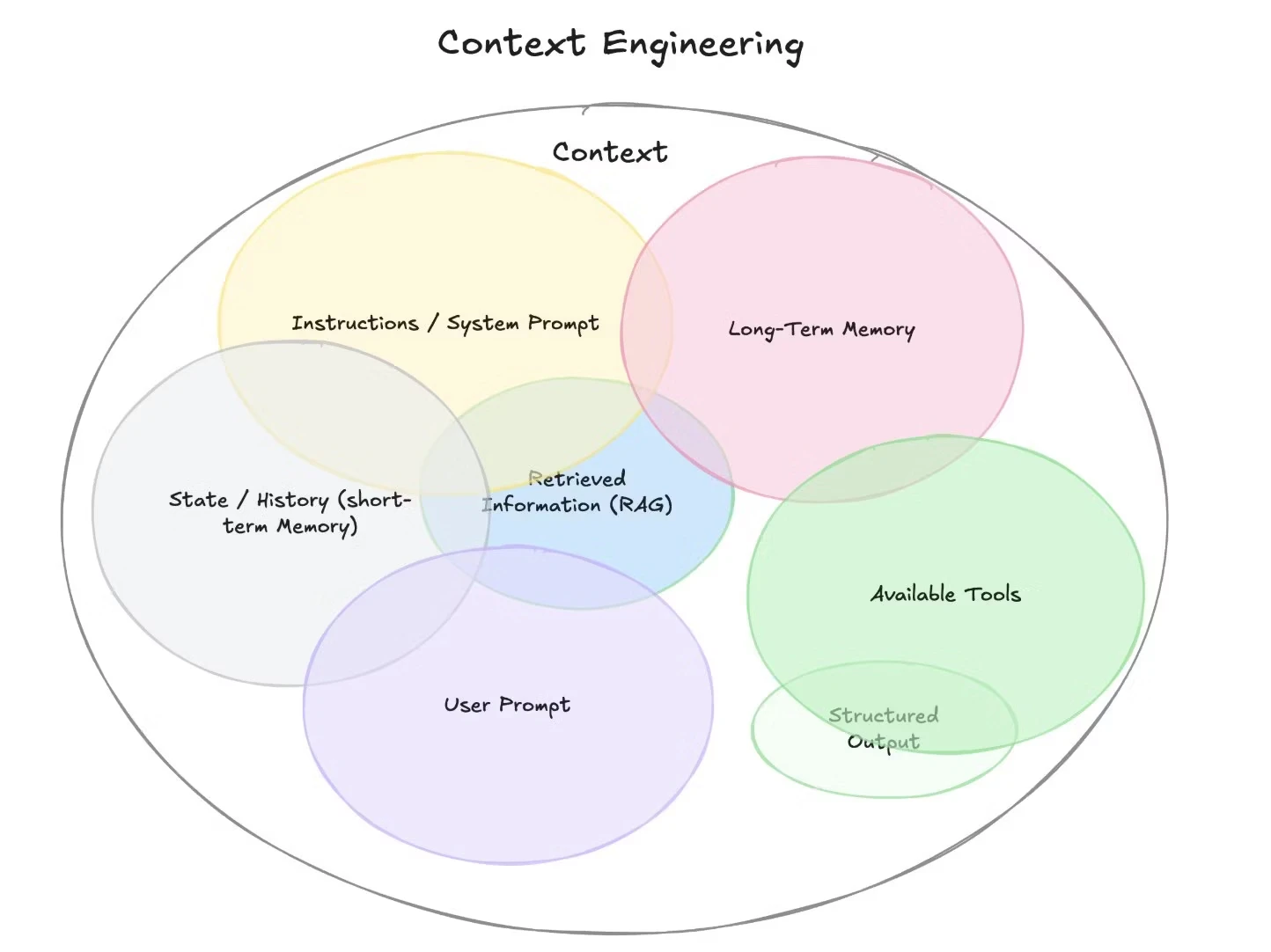
https://www.philschmid.de/context-engineering
Mem0 の記憶分類
1. 短期記憶
AI システムにおける最も基本的な記憶形態は、人が会話の中で直前に言われたことを覚えているのと同じように、即時の文脈を保持するものです。
- 会話履歴: 最近のメッセージとその順序
- ワーキングメモリ:一時的な変数と状態→Magentic-One
-
注目のコンテキスト: 会話の現在の焦点
2. 長期記憶
より高度な AI アプリケーションでは、会話を通じて情報を保持するために長期記憶が実装されています。
- 事実記憶:ユーザーの好み、ドメイン固有の情報に関する保存された知識★
- エピソード記憶:過去の交流や経験→Task-Centric Memory
- 意味記憶:概念とその関係性の理解
Mem0 が長期記憶を実装する方法
AutoGen-Mem0 の長期記憶システムは、以下のように実装されています。
- Embeddings を使用して意図情報を保存および取得する(
add) - セッション間でユーザー固有(
user_id)のコンテキストを維持する - 関連する過去のやりとりを効率的に検索するメカニズムの実装(
query)
インストール
pip install -U "autogen-ext[mem0]"       #クラウドの Mem0 用
pip install -U "autogen-ext[mem0-local]" #ローカルの Mem0 用
from autogen_agentchat.agents import AssistantAgent
from autogen_core.memory import MemoryContent
from autogen_ext.memory.mem0 import Mem0Memory
from autogen_ext.models.openai import AzureOpenAIChatCompletionClient

try:
    memory = Mem0Memory(
        user_id="user123",
        is_cloud=False,
        config={
            "vector_store": {
                "provider": "azure_ai_search",
                "config": {
                    "service_name": "your_search_service",
                    "api_key": "your_key",
                    "collection_name": "mem0",
                    "embedding_model_dims": 1536
                }
            },
            "llm": {
                "provider": "azure_openai",
                "config": {
                    "azure_kwargs": {
                        "azure_deployment": azure_deployment,
                        "api_version": api_version,
                        "azure_endpoint": azure_openai_endpoint,
                        "api_key": azure_openai_key,
                    },
                    "model": azure_deployment
                }
            },
            "embedder": {
                "provider": "azure_openai",
                "config": {
                    "model": embedding_deployment,
                    "embedding_dims": 1536,
                    "azure_kwargs": {
                        "api_version": api_version,
                        "azure_deployment": embedding_deployment,
                        "azure_endpoint": azure_openai_endpoint,
                        "api_key": azure_openai_key,
                    },
                }
            }
        }
    )
except Exception as e:
    print(f"Error initializing memory: {e}")
Mem0Memory の定義で is_cloud=False, に設定し、Azure AI Search の接続情報を config にセットするだけです。
記憶に追加
test_content = "ユーザーは Python が好きです。"
await memory.add(MemoryContent(content=test_content, mime_type="text/plain"))
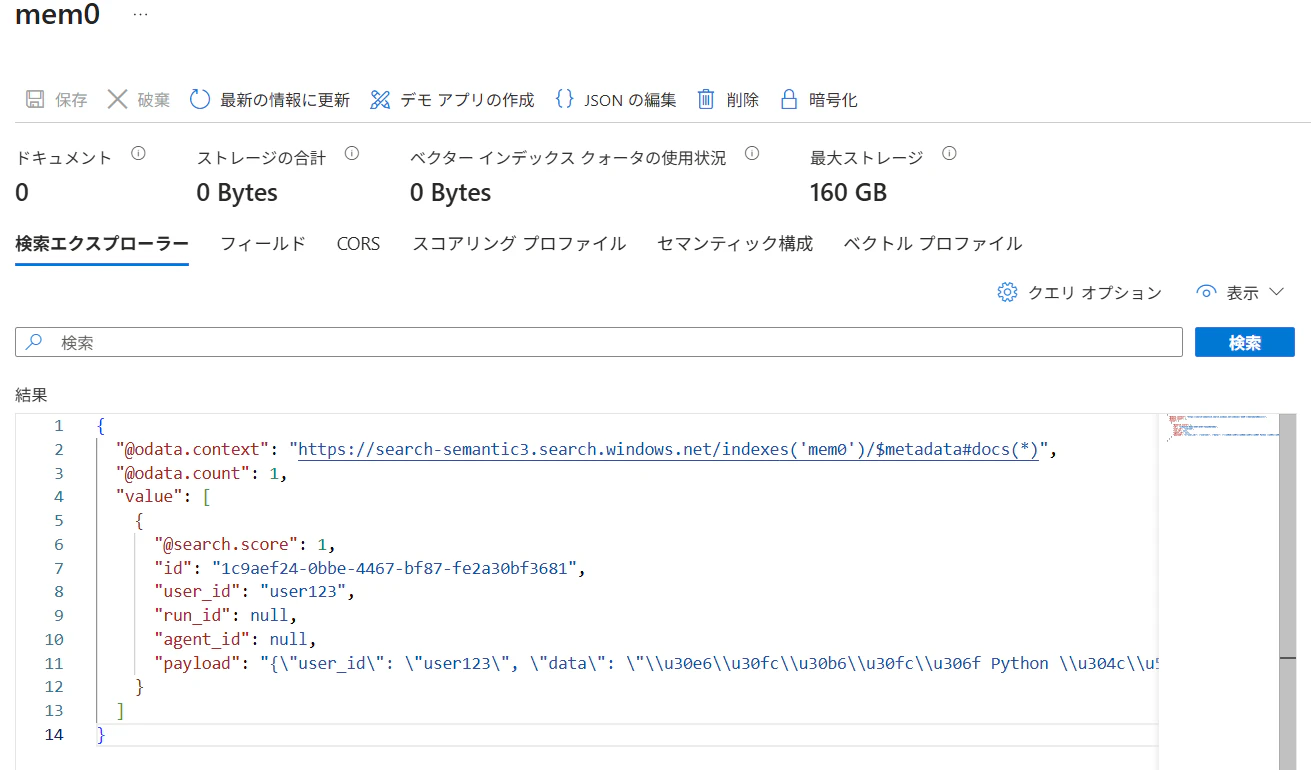
あちゃーデフォルト実装だと unicode-escape されて入っちゃってますね。これではキーワード検索が使えないです。メモリ add 時に指定した user_id も保存されているので、ユーザーごとの記憶として管理することができます。日本語に完全対応させるにはインデックスの再作成および改修が必要ですね😿
記憶から検索
await memory.query("ユーザーの好みに関係する記憶", limit=5, threshold=0.5)
limit や threshold パラメータでベクトル検索結果をフィルタできます。
[MemoryContent(content='ユーザーは Python が好きです。',
mime_type='text/plain', metadata={'score': 0.676624, 'created_at': datetime.datetime(2025, 7, 30, 22, 45, 31, 200037, tzinfo=datetime.timezone(datetime.timedelta(days=-1, seconds=61200)))})]
AutoGen への統合
AutoGen の AssistantAgent でメモリーを使う方法は簡単。memory パラメータに指定するだけです。
# Create an assistant agent with Mem0 memory
agent = AssistantAgent(
    name="assistant",
    model_client=model_client,
    memory=[memory],
    system_message="あなたはユーザーの好みを理解する便利なアシスタントです。",
)

# Run a sample task
result = await agent.run(task="ユーザーはどの開発言語がお好きですか?")
print(result.messages[-1].content)  # type: ignore
ユーザーはPythonがお好きです。Pythonのシンプルさや使いやすさを評価されています。
記憶の抽出
AutoGen の AssistantAgent を使用して対話から記憶として永続化するための情報を抽出するエージェントを開発します。このエージェントはパーソナライズ手法に関する論文「Hello Again! LLM-powered Personalized Agent for Long-term Dialogue」における Persona Module の Extractor に相当します。
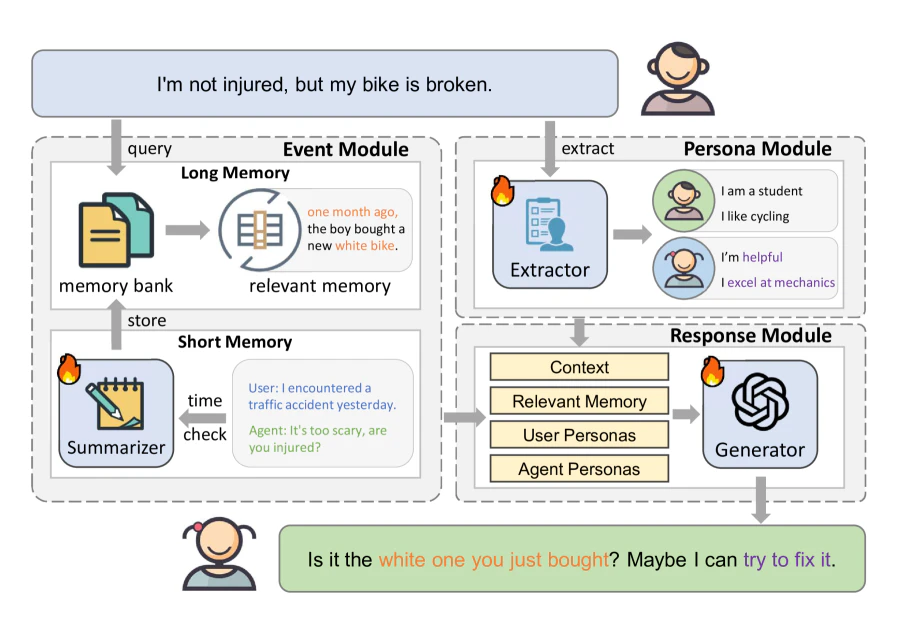
論文に記載された面白いプロンプトをそのまま引用して実装していきます。厳格な Structured Output を用いて抽出します。
from typing import Literal, List
from pydantic import BaseModel

# The response format for the agent as a Pydantic base model.
class PersonalInterests(BaseModel):
    response: List[str]

agent = AssistantAgent(
    name="assistant",
    model_client=model_client,
    output_content_type=PersonalInterests,
    system_message="あなたは、言葉からユーザーの個人的な特徴を抽出するのが得意で、地元では有名なコミュニケーションの専門家です。この文章を言った人物のパーソナルな特徴を抽出してリストで出力してください(20語以内)",
)

# Run a sample task
result = await agent.run(task="私は関西弁でしゃべります。3行で要約するのが好きです。")
print(result.messages[-1].content)  # type: ignore
['関西地方出身または影響を受けている', '関西弁を使うことに親しみがある', '要点を短くまとめるのが得意']
3行で要約が落ちてしまいました。まだ完璧じゃなさそう。
# Run a sample task
result = await agent.run(task="ユーザーの自己紹介をしてください。")
print(result.messages[-1].content)  # type: ignore
はい、自己紹介します。
Pythonが好きで、要点を短くまとめるのが得意です。関西弁にも親しみがあって、時々使うこともあります。よろしくお願いします!
推論内部
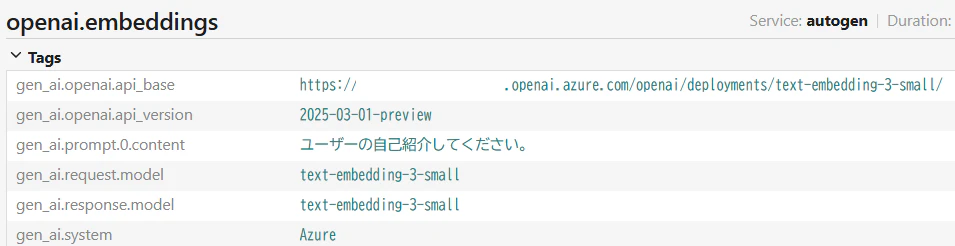
トレーサーからは以下のように記憶をコンテキストとして付加していることが分かります。
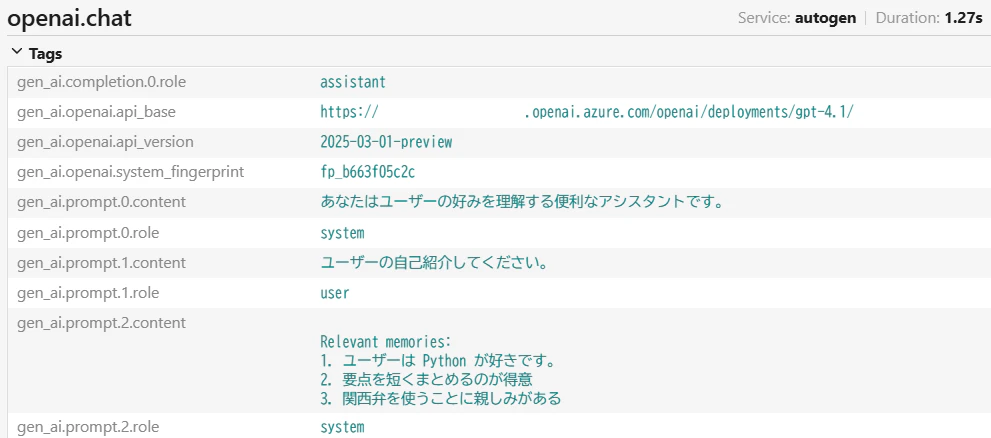
ベクトル検索についてはクエリをそのまま Embeddings 化していることが分かります。
TODO: GraphMemory
Mem0 はグラフメモリをサポートしています。記憶をグラフで持つことにより、ユーザーは情報間の複雑な関係性を構築・活用できるようになり、より繊細で文脈を考慮した応答が可能になります。
こちらも on Azure で検証していきましょう!
参考
現状実装されてない Update/Delete 系のメソッドのカスタム実装。
CustomMem0Memory
from autogen_ext.memory.mem0 import Mem0Memory
from autogen_core.memory import Memory, MemoryContent
from autogen_core import Component, ComponentBase
from typing import List, Dict, Any, Optional

class CustomMem0Memory(Mem0Memory):
    """カスタム機能を追加したMem0Memory"""

    def __init__(self, *args, **kwargs):
        super().__init__(*args, **kwargs)

    async def delete_memory(self, memory_id: str) -> None:
        """特定の記憶をIDで削除する

        Args:
            memory_id: 削除する記憶のID
        """
        try:
            # Mem0クライアントの削除メソッドを呼び出し
            self._client.delete(memory_id=memory_id)
            print(f"記憶 {memory_id} を削除しました")
        except Exception as e:
            print(f"記憶削除エラー {memory_id}: {str(e)}")
            raise

    async def update_memory(self, memory_id: str, new_content: str) -> None:
        """特定の記憶をIDで更新する

        Args:
            memory_id: 更新する記憶のID
            new_content: 新しい内容
        """
        try:
            # Mem0クライアントの更新メソッドを呼び出し
            self._client.update(
                memory_id=memory_id,
                data=new_content
            )
            print(f"記憶 {memory_id} を更新しました: {new_content}")
        except Exception as e:
            print(f"記憶更新エラー {memory_id}: {str(e)}")
            raise

    async def get_memories_with_ids(self) -> List[Dict[str, Any]]:
        """IDと共に全記憶を取得する

        Returns:
            記憶のリスト(IDとメタデータを含む)
        """
        try:
            # Mem0クライアントから全記憶を取得
            results = self._client.get_all(user_id=self._user_id)
            return results
        except Exception as e:
            print(f"記憶取得エラー: {str(e)}")
            return []