

はじめに
Elasticバージョン9.2からテクニカルプレビューで登場したElastic Agent Builderは、Elasticsearchに入っているデータに対するAIエージェントを作成する機能です。
また、MCP/A2Aにも対応しており、外部のAIエージェントからも連携し、Elasticsearchに対するデータアクセスができます。
本記事はこのElastic Agent Builderをローカル環境で誰でもほぼ無償で試用体験できる手順を紹介する記事です。(LLMだけご用意ください)
なお、Elastic Cloud HostedまたはElastic Cloud Serverlessでも同様の使い方となります。
Elastic Agent Builderについてのより詳しい詳細は、こちらのElastic社のブログで詳しく紹介されています。時間があればこちらを読むとより理解が進むと思います。
Introducing Elastic Agent Builder (2025年10月21日発行記事)
https://www.elastic.co/search-labs/blog/elastic-ai-agent-builder-context-engineering-introduction
なお、Elastic Agent Builderの正式な料金体系はまだアナウンスされていませんが、現状はローカル環境で有効化されているトライアルライセンス30日終了後(すなわちそのタイミングで無償のBasicライセンスになる)、有償のEnterpriseライセンスが必要となっています。
よって、セルフマネージド版Elastic、もしくはElastic Cloud Hostedの場合は正式利用にあたってはEnterpriseライセンスが必要となるもの現時点では考えられます。Elastic Cloud Serverlessに関しては、現状はElasticsearch Serverlessのプロジェクトタイプを選択すればで利用できます。
セットアップ
以下のコマンドを実行し、最新バージョン(執筆時点でv9.2.1)のElastic Stack環境をダウンロード・起動します。このコマンド一つで全部自動的に行ってくれます。(トライアルライセンスが自動的に有効化されています)
curl -fsSL https://elastic.co/start-local | sh
start-localについては、こちらのQiita記事もご参照ください。
上記実行時にKibanaのhttp://localhost:5601にログインするためのユーザーとパスワードが表示されるのでそれでブラウザでKibanaにログインします。
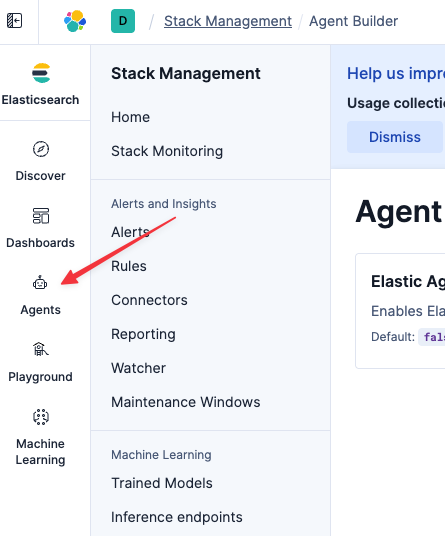
そして、メニューのStack Management > Agentsメニューを開き、Elastic Agent Builderを有効化します。

そうすると、左メニューにAgent Builderのアイコンが追加されます。
アクセスすると、LLMへの接続を求められます。
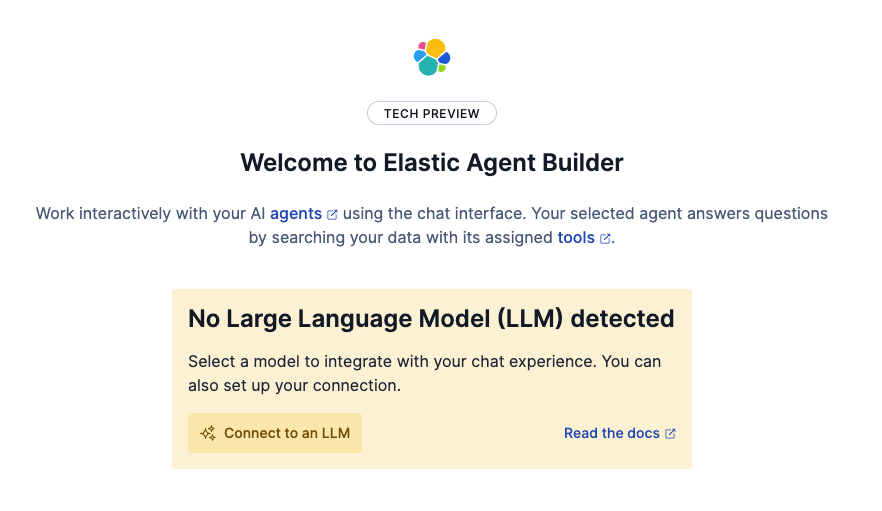
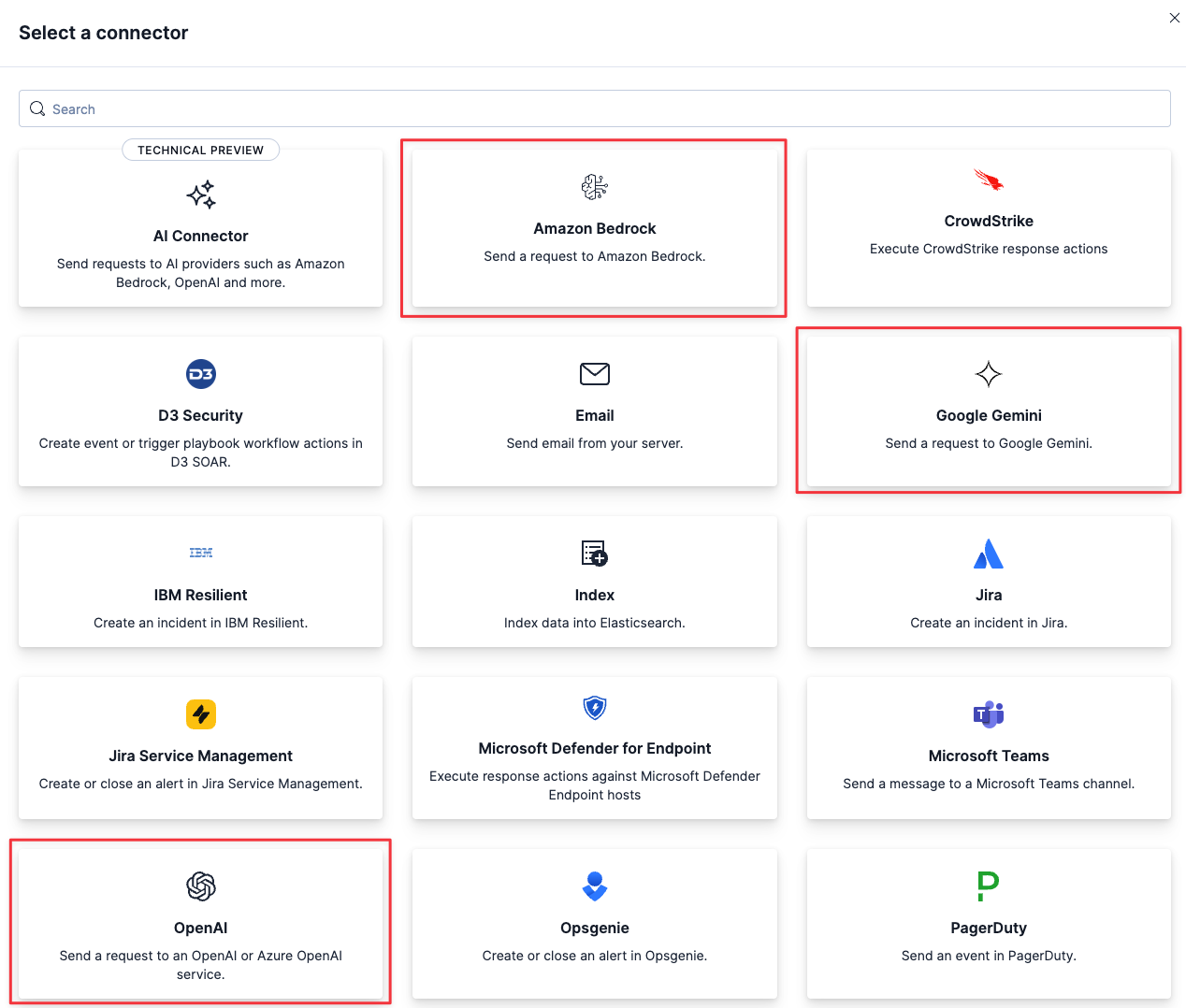
Connect to an LLMからAmazon Bedrock、OpenAI、Google Geminiのいずれかを選択してください。その後、所有しているLLMへの接続キーなどを設定してください。(マニュアルはこちら)
Elastic Cloudを使っている場合は、Elastic Managed LLMがデフォルトで使えるようになっていると思います。こちらを使うとElastic CloudのクレジットでLLMが使えるので、このためにわざわざLLMを用意する必要がなくて便利です。
今回の執筆においては、AWS Bedrockを選び、デフォルト設定のClaued Sonnet 4.5を使っています。

Elasticのサンプルデータのセットアップ
Agent Builderを使う前に、サンプルデータを用意しましょう。
トップの検索バーでintegrationsと検索し、Integrationsページに移動します。

Integrationsページで、sampleと検索し、Sample Dataをクリックします。

次の画面で、3つのSample data setsをAdd dataで追加します。これでサンプルデータのセットアップは完了です。

デフォルトのAgentと会話してみる
Agentのページを開き、デフォルトのエージェントElastic AI Agentを使ってサンプルデータについて色々質問してみます。


自然言語でデータに対する問い合わせができました!
このチャートはそのままKibanaのダッシュボードとして保存できます。
Claude Desktop (MCPクライアント)からアクセスしてみる
今回はClaude DesktopをMCPクライアントとして繋いでみました。
接続するにあたり、2つの情報が必要です。MCPサーバーURLと、APIキーです。
MCPサーバーURLは、AgentsのToolsページから取得できます。

APIキーは以下のホームページから作成します。
(もしくはトップにあるグローバル検索バーからページ探す場合では、API Keyで検索してください)

Claude Desktop側のMCPクライアントのセットアップについては色々Webで記事が存在するので割愛しますが、
claude_desktop_config.jsonに対して以下のような設定をします。
{
  "mcpServers": {
    "elastic-agent-builder": {
      "command": "npx",
      "args": [
        "mcp-remote",
        "http://localhost:5601/api/agent_builder/mcp",
        "--header",
        "Authorization:ApiKey 取得したAPIキー"
      ]
    }
  }
}
うまくいけば、このようにElaticsearchのデータにClaude Desktopからアクセスできます。


Kibanaでのチャットは、今回はKibana上で動くエージェント:'Elastic AI Agent'がToolsにアクセスしましたが、Claude Desktopの場合は、Claude DesktopがAIエージェントとして直接Toolsにアクセスする形となっています。
なお、Kibanaで動くAgentを外部から利用したい場合は、別の方式のA2Aにてアクセスする形となります。
おわり
今回はElastic Agent Builderを触り始めるための手順をご紹介しました。
現在Elasticを使っている方は、この機能でどのような分析が可能となるかぜひ試してみてください。
ただし、まだGAリリースではないので業務影響がありえる本番環境ではまだ試さない方がよいです。
次回以降、ToolsやAgentをカスタムで作成する例などを紹介していければと思っています。
最後、Elastic社の公式ブログにあもElastic Agent Builderの情報が色々アップされているので、リンクを掲載します。
Introducing Elastic Agent Builder
https://www.elastic.co/search-labs/blog/elastic-ai-agent-builder-context-engineering-introduction
Building an AI agent for HR with Elastic Agent Builder and GPT-OSS
https://www.elastic.co/search-labs/blog/build-an-ai-agent-hr-elastic-agent-builder-gpt-oss
Your first Elastic Agent: From a single query to an AI-powered chat
https://www.elastic.co/search-labs/blog/ai-agent-builder-elasticsearch
Getting started with Elastic Agent Builder and Microsoft Agent Framework
Getting started with Elastic Agent Builder and Microsoft Agent Framework
Top Elastic Agent Builder projects and learnings from Cal Hacks 12.0
https://www.elastic.co/search-labs/blog/agent-builder-projects-learnings-cal-hacks-12-0