
はじめに
以前下記の記事にてLINEチャットボットを作成したのですが、雑談ができるボットを作成してみたいと思い、リクルートが提供しているA3RTのTalk APIを試してみました。
LINEMessagingAPI+Herokuでのチャットボット実装に関しては、下記をご覧ください。(こちらの内容を前提の上で記載をしております。)
・LINE+Python+天気API を活用してチャットボットを作成してみた
https://qiita.com/neonsk/items/807e7398e71e18da1b01
・A3RT TalkAPIに関して
https://a3rt.recruit-tech.co.jp/product/talkAPI/
実装
実装したpythonファイルの全体像はこちらです。
main.py
from flask import Flask,request,abort
from linebot import LineBotApi,WebhookHandler
from linebot.exceptions import InvalidSignatureError
from linebot.models import MessageEvent,TextMessage,TextSendMessage
import os
import requests
import pprint
import pya3rt

app=Flask(__name__)
# 環境変数の取得
YOUR_CHANNEL_ACCESS_TOKEN="<各自で取得した値>"
YOUR_CHANNEL_SECRET="<各自で取得した値>"
line_bot_api=LineBotApi(YOUR_CHANNEL_ACCESS_TOKEN)
handler=WebhookHandler(YOUR_CHANNEL_SECRET)

@app.route("/callback",methods=["POST"])
def callback():
    signature=request.headers["X-Line-Signature"]

    body=request.get_data(as_text=True)
    app.logger.info("Request body"+body)

    try:
        handler.handle(body,signature)
    except InvalidSignatureError:
        abort(400)
    return "OK"

@handler.add(MessageEvent,message=TextMessage)
def handle_message(event):
    #入力された文字列を格納
    push_text = event.message.text

    #A3RTのTalkAPIにより応答
    reply_text = talkapi_response(push_text)

    #リプライ部分の記述
    line_bot_api.reply_message(event.reply_token,TextSendMessage(text=reply_text))

# A3RTのTalkAPIにより応答
def talkapi_response(text):
    apikey = "<各自で取得した値>"
    client = pya3rt.TalkClient(apikey)
    response = client.talk(text)
    return ((response['results'])[0])['reply']

if __name__=="__main__":
    port=int(os.getenv("PORT",5000))
    app.run(host="0.0.0.0",port=port)
A3RT TalkAPI 実装内容
Talk APIは下記の通りの実装となります。「talkapi_response」としてメソッドを作成しております。
# A3RTのTalkAPIにより応答
def talkapi_response(text):
    apikey = "<各自で取得した値>"
    client = pya3rt.TalkClient(apikey)
    response = client.talk(text)
    return ((response['results'])[0])['reply']
A3RTのTalkAPIのKeyに関しては、A3RTのHPにて、メールアドレス登録をすることで発行できます。
発行されたapikeyを上記コードの「apikey」に入力をします。
Herokuへの環境変数の追加
A3RTより取得したapikeyをHerokuの環境変数として追加します。
$ heroku config:set apikey="<各自で取得した値>"
requirements.txtの更新
またgitにてpushするrequirements.txtにpya3rtを追加しておきます。
requirements.txt
Flask==0.12
line-bot-sdk
pya3rt
出来たもの
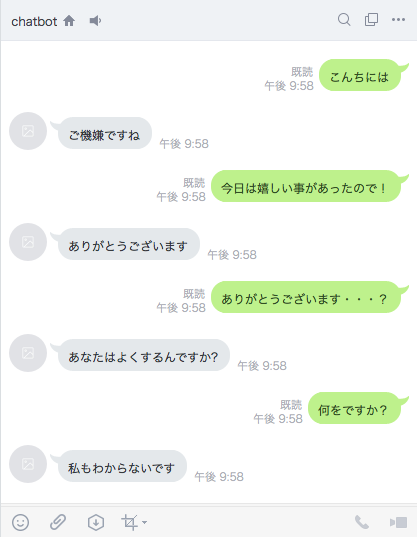
一問一答で返答をしてくれるボットが出来ました。全然コミュニケーションは取れておりませんが、、、
所感
API連携で簡単に雑談ボットを実装出来たのは感動しました!A3RTには他にも様々なAPIがあるので、色々試してみると面白いかもしれません。