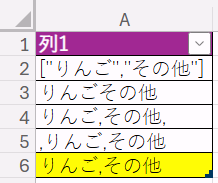
忘れた頃に扱うこととなるFormsの複数選択。SPOリストのときも文字列にする時も面倒です。
Copilotに質問しながら対策フローを作って動作検証しましたので共有です。
Formsの複数選択の質問はPower AutomateのFormsでコネクタで取得すると配列ではなくなってしまう
見出しのとおりです。配列を文字列に変換しようとしたところ、「エラーメッセージから変換元が配列でなく文字列になっているようです」というCopilotの回答を得ました。
回避策
- 文字列の変数を作成します(Initialize variable)
- JSON変数で配列にします(Compose)
json(outputs('Get_response_details')?['body/あなたのForms質問'])
-
Apply to eachで「配列を文字列変数に追加(Append to string variable)」を利用して文字列にする
- Nameには作成した文字列変数を設定します。
- Valueは「items('Apply to each'),」にします。文字列が区切りなく連結されるのを避けるためです -
Composeを使って最後のカンマだけ邪魔なので削ります
substring(variables('文字列の変数'), 0, sub(length(variables('文字列の変数')), 1))
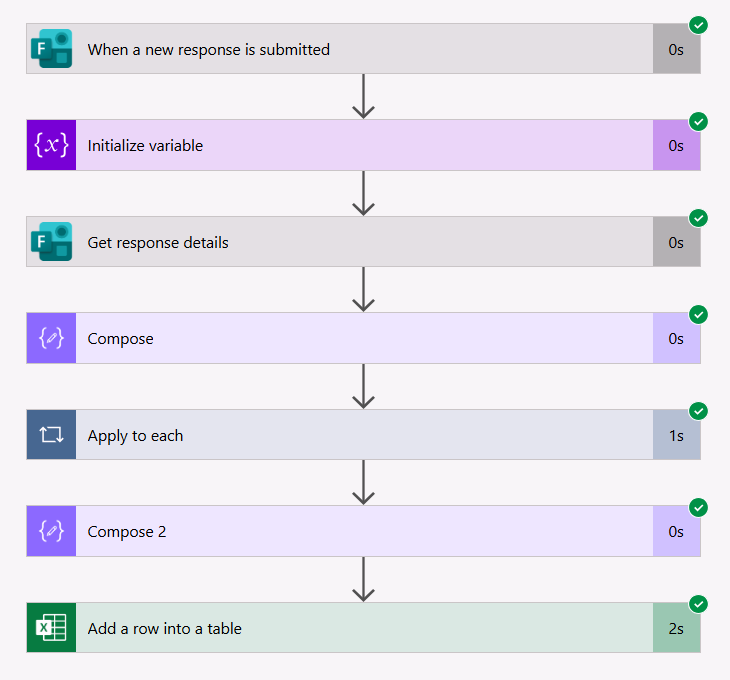
うまくいった例がテーブルの末尾のセルです!