3
0

Delete article

Deleted articles cannot be recovered.

Draft of this article would be also deleted.

Are you sure you want to delete this article?

More than 3 years have passed since last update.

Android Studio Arctic FoxでOpenCVを導入する際に躓いたこと

Last updated at Posted at 2021-09-10

躓いたポイント

File → New → Import Module...
でOpenCVをインポートしようとしたところ、Finishボタンがクリックできなかったので、その解決法。
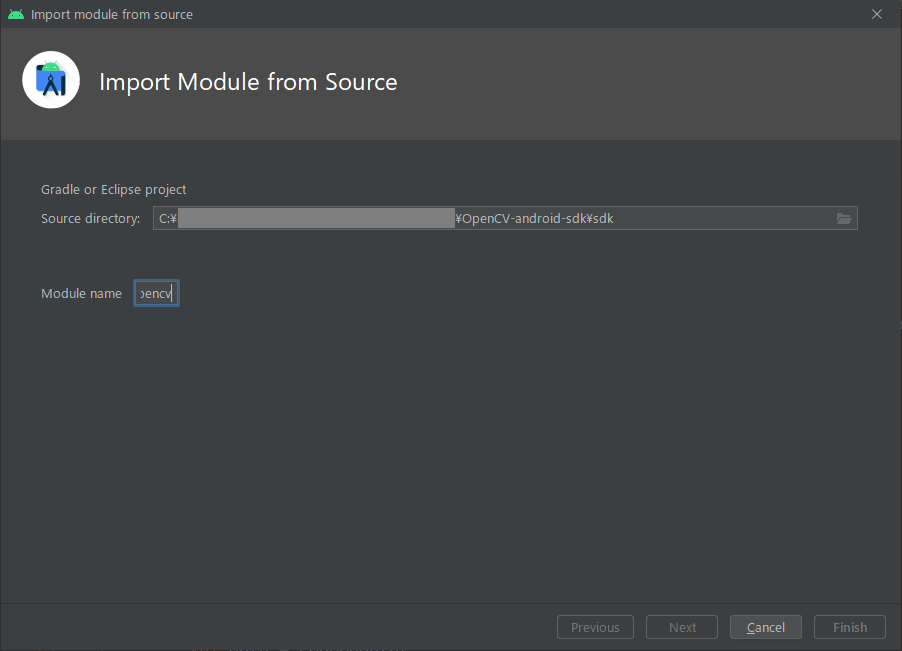
import_module.png

解決方法

どうやらバグらしい(参照)。以下の手順を行うことで解決。

1. ここからAndroid版OpenCVをダウンロード。
2. プロジェクトフォルダ直下に先ほどダウンロードしたOpenCV-android-sdkの中にあるsdkフォルダをコピー
3. settings.gradleファイルの一番下に下記内容を追加。

settings.gradle
//(省略)
include ':sdk'

4. sync nowをクリックし、終わるまで待つ。
5. File → Project Structureでウィンドウを開く
6. 左側のDependenciesから、appを選択し、DeclaredDependenciesの下にある+ボタンで3: Module dependencyを選択し、先ほどコピーしたsdkを選択。
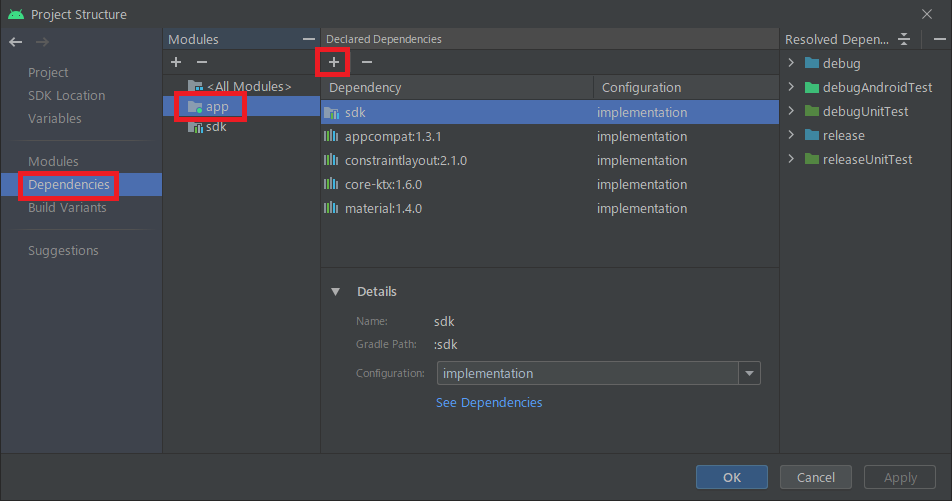
ProjectStructure.png
7. onCreate当たりにOpenCVLoader.OPENCV_VERSIONと記述してエラーが出なければ導入成功してるはず。

3
0
0

Register as a new user and use Qiita more conveniently

  1. You get articles that match your needs
  2. You can efficiently read back useful information
  3. You can use dark theme
What you can do with signing up
3
0

Delete article

Deleted articles cannot be recovered.

Draft of this article would be also deleted.

Are you sure you want to delete this article?