
概要
LM StudioがDecision Model(意思決定モデル)に対応したことを受け、ローカル環境におけるフィジビリティスタディを行いました。
外部のクラウドAPIにデータを送信することなく、LM Studioを用いて完全ローカルかつプライベートに識別を実行できる点は、セキュリティや運用の面で大きなメリットになり得ます。
今回、実務に直結する現実的なアプローチとして、「アナログメータの閾値超過判定」を題材に選び、モデルの適用可能性を検証しました。今後のための備忘録を兼ねて、その内容をここにまとめておきます。
2. 実行環境
| 項目 | 内容 |
|---|---|
| OS | Windows 11 |
| 実行環境 | LM Studio 0.4.27 |
| モデルファイル | Clef-Flash-Q4_K_M.gguf |
| API呼び出し | PythonからローカルサーバーへHTTPリクエスト |
| 使用エンドポイント | http://127.0.0.1:1234/v1/systemone |
LM Studioでモデルをロードし、ローカルサーバーを起動して使用する。
2.1 Clefとは
Clefは、CloudflareがApache-2.0ライセンスで公開している、判断・意思決定に特化したマルチモーダルモデルです。テキストに加え、画像の入力にも対応しています。
JevやSystemOneなどのDecision Model APIと互換性があり、通常のチャットモデルのように文章を自由生成するのではなく、定義した質問に対する判定結果や選択肢ごとの確率スコアを返す仕組みです。
質問の型は、用途に応じて以下の3種類から選択できます。
質問タイプ(type) |
回答形式 |
criteria(判定基準・選択肢の定義)の形式 |
|---|---|---|
noul |
True(真)/False(偽) | 任意。True/Falseそれぞれの説明を設定可能 |
choice |
名前付きの選択肢から単一選択 | マッピング型(選択肢ID: 説明の辞書形式) |
score |
順序付きの選択肢に対応する数値スコア | リスト型(インデックス0から始まる説明の配列) |
2.2 使用モデルとLM Studioの設定
Huggingfaceで公開されている、ggml-org/Clef-Flash-GGUF (Clef-Flash-Q4_K_M.gguf) を利用させていただきました。
LM StudioのLoad設定はほぼデフォルトですが、Physical Batch Size のみ 2048 に増やしました。
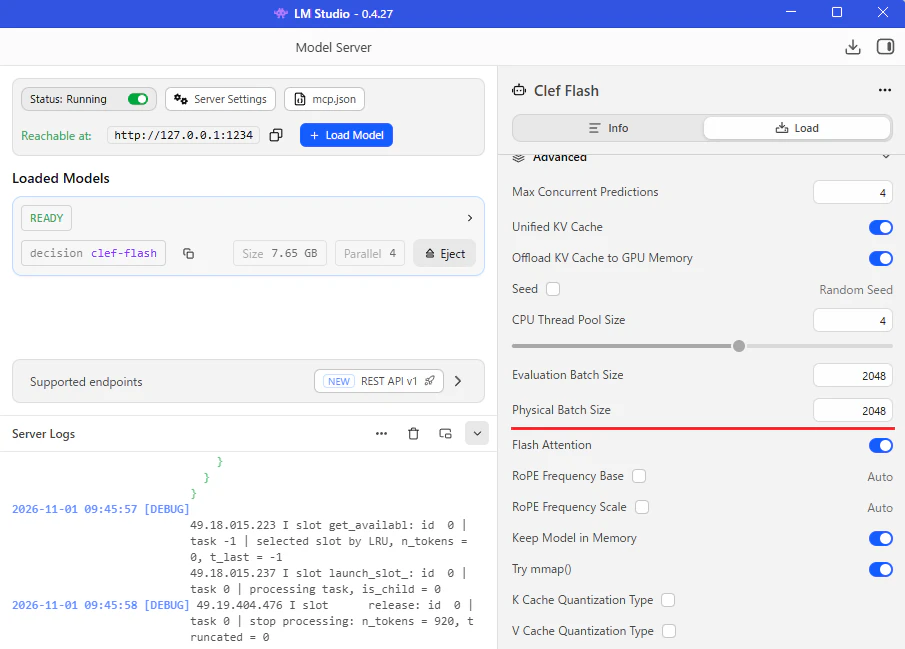
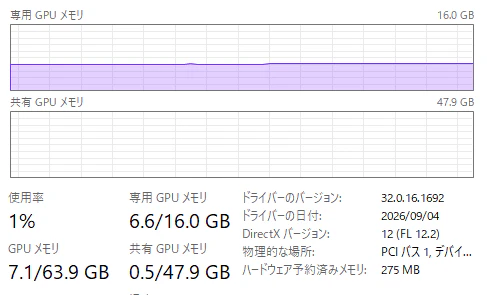
この設定でローカルサーバーを起動した際、VRAM使用量は7GB弱でした。
(今回の環境で観測した値であり、設定や実行条件によって変動する可能性があります)
3. 検討内容
アナログメータの画像から、現在の表示値が指定した閾値を超えているかを判定します。
choice 型の質問形式を用い、メータの数値を直接読み取るのではなく、以下の2枚の画像を比較する方式としました。
- 基準画像:針が閾値を示している画像
- 対象画像:針が現在値を示している画像
対象画像の表示値が基準画像の表示値を超えているかをClef-Flashに問い、判定結果と各選択肢の確率スコアを取得します。
3.1. 判定の定義
判定結果は、以下の3種類としました。
| 選択肢 | 表示名 | 判定条件 |
|---|---|---|
yes |
閾値超過 | 現在値が閾値より明らかに大きい |
no |
閾値非超過 | 現在値が閾値より明らかに小さい、または同値と判断できる |
uncertain |
判定不能・要確認 | 差が小さい、不鮮明などの理由で信頼できる比較ができない |
また、モデルには以下の点を指示しました。
- 1枚目を基準画像、2枚目を対象画像として扱う。
- 単純な左右の位置ではなく、目盛りの値が増加する方向に沿って比較する。
- 信頼できる比較ができない場合は、推測せずに
uncertainを選択する。
(これらはモデルへの指示であり、常に指示どおりの判定が得られることを保証するものではありません)
3.2. 使用スクリプト
PythonからローカルAPIに、基準画像と対象画像をPEG形式のData URLとして渡します。
使用したスクリプトは以下のとおりです。
import base64
import io
import json
from time import perf_counter

import requests
from PIL import Image, ImageOps


URL = "http://127.0.0.1:1234/v1/systemone"

# 1枚目:針が閾値を示している基準画像
REFERENCE_IMAGE_PATH = "input/analog/thlesh.jpg"

# 2枚目:閾値を超えているか判定する対象画像
TARGET_IMAGE_PATH = "input/analog/target.jpg"

MAX_IMAGE_SIDE = 512

# メータの値が増える方向を指定します。
# 不明な場合は None のままにしてください。
# 指定例:
# SCALE_DIRECTION = "The scale values increase clockwise."
# SCALE_DIRECTION = "The scale values increase counterclockwise."
SCALE_DIRECTION = None

QUESTIONS = {
    "threshold_exceeded": {
        "type": "choice",
        "instructions": (
            "Compare the analog meter readings in the two supplied images. "
            "The FIRST image is the reference image: "
            "its needle indicates the threshold reading. "
            "The SECOND image is the target image: "
            "its needle indicates the current reading. "
            "Determine whether the current reading is strictly greater "
            "than the threshold reading. "
            "Compare readings along the increasing-value direction "
            "of the same meter scale, not simply left/right positions. "
            "Use the reading end of the needle, not its counterweight. "
            "Choose uncertain if the difference is too small to distinguish "
            "reliably, the needle or scale is unclear, "
            "or the two images cannot be reliably compared. "
            "Do not guess."
        ),
        "criteria": {
            "yes": (
                "The current reading in the second image clearly exceeds "
                "the threshold reading in the first image."
            ),
            "no": (
                "The current reading in the second image is clearly below "
                "the threshold reading in the first image, "
                "or equality can be reliably established."
            ),
            "uncertain": (
                "A reliable comparison cannot be made because the readings "
                "are too close to distinguish, the needle or scale is unclear, "
                "or the images are not comparable."
            ),
        },
    },
}

RESULT_LABELS = {
    "yes": "閾値超過",
    "no": "閾値非超過",
    "uncertain": "判定不能・要確認",
}


def image_data_url(path):
    with Image.open(path) as source:
        image = ImageOps.exif_transpose(source).convert("RGB")
        image.thumbnail(
            (MAX_IMAGE_SIDE, MAX_IMAGE_SIDE),
            Image.Resampling.LANCZOS,
        )

        buffer = io.BytesIO()
        image.save(buffer, format="JPEG", quality=85)

    encoded = base64.b64encode(buffer.getvalue()).decode("ascii")
    return f"data:image/jpeg;base64,{encoded}"


def build_payload():
    state = (
        "Determine whether an analog meter reading exceeds a reference threshold. "
        "Two cropped images of the same analog meter and scale are supplied. "
        "Image 1 is the reference threshold image. "
        "Image 2 is the current reading to evaluate. "
        "The threshold is indicated by the needle in image 1, "
        "not by a colored marker or another pointer. "
        "'Exceeds' means strictly greater than, not greater than or equal to."
    )

    if SCALE_DIRECTION:
        state += f" {SCALE_DIRECTION}"

    return {
        "state": state,
        "images": [
            image_data_url(REFERENCE_IMAGE_PATH),
            image_data_url(TARGET_IMAGE_PATH),
        ],
        "questions": QUESTIONS,
    }


def main():
    try:
        payload = build_payload()
    except (OSError, ValueError) as error:
        print(f"画像エラー: {error}")
        return

    print(f"基準画像: {REFERENCE_IMAGE_PATH}")
    print(f"対象画像: {TARGET_IMAGE_PATH}")

    try:
        start = perf_counter()
        response = requests.post(URL, json=payload, timeout=120)
        elapsed = perf_counter() - start
        response.raise_for_status()
    except requests.RequestException as error:
        print(f"リクエストエラー: {error}")
        if error.response is not None:
            print(error.response.text)
        return

    try:
        response_data = response.json()
    except ValueError:
        print("JSONではないレスポンスが返されました:")
        print(response.text)
        print(f"\n処理時間: {elapsed:.3f} secs")
        return

    print("\n=== レスポンス全体 ===")
    print(json.dumps(response_data, indent=2, ensure_ascii=False))

    answers = (
        response_data.get("answers")
        if isinstance(response_data, dict)
        else None
    )

    answer = (
        answers.get("threshold_exceeded")
        if isinstance(answers, dict)
        else None
    )

    choice = answer.get("choice") if isinstance(answer, dict) else None

    print("\n=== 判定結果 ===")

    if isinstance(choice, str) and choice in RESULT_LABELS:
        print(f"閾値との比較: {RESULT_LABELS[choice]} ({choice})")
    else:
        print(f"期待した判定結果がありません。choice={choice!r}")
        print("この結果は非超過として扱わず、要確認としてください。")

    print(f"\n処理時間: {elapsed:.3f} secs")


if __name__ == "__main__":
    main()
4. 検証結果
検証用の画像としてこちらのデータセットを利用させて頂きました。
4.1. 基準画像
REFERENCE_IMAGE_PATHに指定した基準画像は、以下のとおりです。この画像の針位置を閾値とし、TARGET_IMAGE_PATHに指定した対象画像と比較しました。

4.2. 対象画像1:閾値より大幅に小さい値

=== レスポンス全体 ===
{
  "model": "clef-flash",
  "answers": {
    "threshold_exceeded": {
      "type": "choice",
      "choice": "no",
      "probabilities": {
        "no": 0.5743072655168491,
        "uncertain": 0.24274558911083705,
        "yes": 0.1829471453723139
      },
      "confidence": 0.3614608982752736
    }
  }
}

=== 判定結果 ===
閾値との比較: 閾値非超過 (no)
noのスコアが最も高く、想定どおり非超過と判定されました。
4.3. 対象画像2:閾値より大幅に大きい値

=== レスポンス全体 ===
{
  "model": "clef-flash",
  "answers": {
    "threshold_exceeded": {
      "type": "choice",
      "choice": "yes",
      "probabilities": {
        "no": 0.20866929009661858,
        "uncertain": 0.217601073604566,
        "yes": 0.5737296362988153
      },
      "confidence": 0.360594454448223
    }
  }
}

=== 判定結果 ===
閾値との比較: 閾値超過 (yes)
yesのスコアが最も高く、想定どおり超過と判定されました。
4.4. 対象画像3:閾値よりやや小さい値

判定結果
=== レスポンス全体 ===
{
  "model": "clef-flash",
  "answers": {
    "threshold_exceeded": {
      "type": "choice",
      "choice": "no",
      "probabilities": {
        "no": 0.46853710705684726,
        "uncertain": 0.3947635101402764,
        "yes": 0.13669938280287633
      },
      "confidence": 0.20280566058527089
    }
  }
}

=== 判定結果 ===
閾値との比較: 閾値非超過 (no)
非超過と判定されましたが、noのスコアは約46.85%、uncertainは約39.48%で、両者の差は約7.38ポイントでした。
4.5. 対象画像4:閾値よりやや大きい値

=== レスポンス全体 ===
{
  "model": "clef-flash",
  "answers": {
    "threshold_exceeded": {
      "type": "choice",
      "choice": "uncertain",
      "probabilities": {
        "no": 0.38561635923363924,
        "uncertain": 0.4874773054549917,
        "yes": 0.126906335311369
      },
      "confidence": 0.23121595818248752
    }
  }
}

=== 判定結果 ===
閾値との比較: 判定不能・要確認 (uncertain)
今回の設定では、超過という判定は得られず、uncertainが選択されました。
4.6. 結果の一覧
| 対象画像 | 想定する状態 | 判定結果 | no |
uncertain |
yes |
|---|---|---|---|---|---|
| 画像1 | 閾値より大幅に小さい | 非超過 | 57.43% | 24.27% | 18.29% |
| 画像2 | 閾値より大幅に大きい | 超過 | 20.87% | 21.76% | 57.37% |
| 画像3 | 閾値よりやや小さい | 非超過 | 46.85% | 39.48% | 13.67% |
| 画像4 | 閾値よりやや大きい | 判定不能 | 38.56% | 48.75% | 12.69% |
表中の百分率は、APIが返したprobabilitiesを百分率表記にしたものです。実際の正答確率と一致するかは未検証ですが、各選択肢に対する相対的な支持の強さの目安になると思います。
5. まとめ
閾値を示す基準画像と現在値を示す対象画像を比較し、アナログメータの閾値超過をClef-Flashで判定できるか検証しました。閾値から大きく離れた2例では想定どおりの結果が得られた一方、閾値付近では判定不能が選択されるなど、判断の不確かさが見られました。
検証数が少ないため、現時点では実務に必要な精度を満たすかどうかは判断できませんが、明確なケースを自動判定し、不明確なケースを人の確認に回すといった用途には活用の可能性があるかもしれません。