
リモート化
M5Stack GPS unit v1.1 と ESP32を使い、2種類の方法で GPSモジュールを リモート化します。
① Bluetoothシリアル 方式
一つは、GPSモジュールからのNMEAを Bluetoothシリアル にスルーする方式です。
PCはSPPによる仮想のシリアルポート(COMポート)を指定することで、リモートにあるGPSモジュールからNMEAを読み出すことができます。
(BLEではありませんので、BT(Classic)未対応のESP32-C3やESP32-C6では実装できません)
この方式は、PC側はSPP(OS標準)のため、リモートGPSとペアリングするだけで、ローカルのシリアルポートと同様にアクセスできるメリットがあります。SPPをOS標準でサポートしている Windows11 や macOS、Android や Linux(Raspberry Pi OS / Debian / Ubuntu など)で使えますが、残念ながらiOSは未対応です。
Windows11だと比較的安定して使うことができました。一方、macOS Tahoe 26.6.2 では最初のペアリング時は普通に仮想シリアルポートにアクセスできたのですが、リモート側を再起動した後の再ペアリングに相当苦労します。ESP32側のボンディングとmacOS側のキャッシュがどうにも相性が悪い(macOSのセキュリティが強固で、Tahoeのバグとも思える)。
そんな経緯もあって、次の方法も作成した次第です。
② WiFiシリアル 方式
もう一つは、
GPSモジュールからのNMEAを、WiFiを使って TCP/IPにスルーする方式です。
NMEAアプリの多くは TCP/IPからの入力をサポートしているので、その場合はサーバのIPアドレス/ポート番号を指定するだけでリモートのNMEAを受信できます。
シリアルポートしか指定できないアプリの場合は、socatやcom0com + com2tcpで仮想シリアルポートにマップすることで、ローカルのシリアルポートと同様にアクセスできます。
リモートGPSはTCP/IPのサーバー側として動作するため、複数のクライアントと接続することができます(ただし、ESP32のSRAM容量に依存します)。
また、リモートGPSとPCをつなぐWiFiは、STAモードと ESP32をAPにするモード から選べます。
リモートGPSのコード
Arduino環境で M5StickC-Plus2(ESP32-PICO-V3-02)を使用しました。
(BT/WiFiが使える Raspberry Pi Pico W 等でも可)
① Bluetoothシリアル 方式
GPS BT Serial
M5GpsSerial
BT Ready

View:12 H:1.35
PCの Bluetoothデバイス一覧にM5GpsSerialが表示されるので、クリックしてペアリングします。Macであれば/dev/cu.M5GpsSerial、WindowsであればCOM12等の 仮想COMポートを指定してアクセスします。
Windowsの場合、ペアリング時に以下の表示がでますが、
PINコードは気にせず「接続」します。
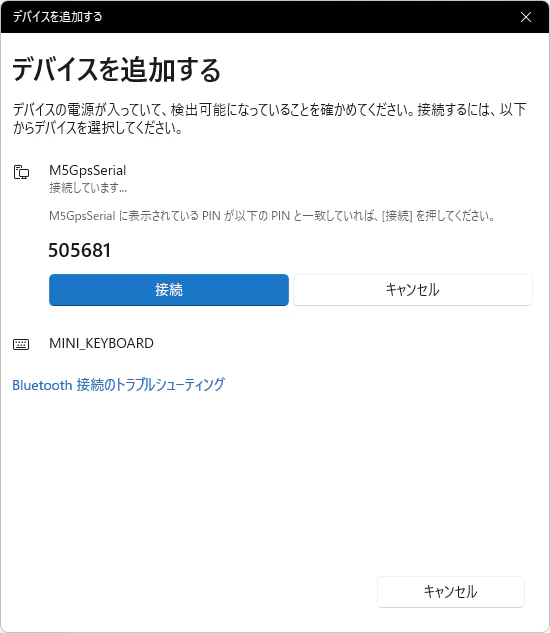
OSによっては 0000 や 1234 の入力を求められるケースがありますが、SSP(Secure Simple Pairing)が自動承認される処理を組み込んであります。
👇コードを見る
/*
    GPS-Bluetooth.ino

    M5StickC-Plus2 with M5Stack Unit GPS v1.1

    GPSモジュールからNMEAセンテンスを取得し、Bluetooth経由でPCへ送信する。
    PC側では、ターミナルアプリでBluetoothシリアルポートを開き、NMEAセンテンスを受信可能

*/
#include <M5Unified.h>
#include <BluetoothSerial.h>
#include "esp_gap_bt_api.h"

#define DEBUG_PRINT_NMEA 0 // 1 出力する、 0 出力しない

// M5Stack Unit GPS v1.1
static const int RXPin = 33, TXPin = 32;
static const uint32_t Baud = 115200;

HardwareSerial gpsSerial(1);
BluetoothSerial SerialBT; // Bluetoothシリアルインスタンス

char lineBuf1[128];
int lineLen1 = 0;
bool isBtConnected = false;          // 接続状態の管理用
uint32_t lastDiscoverableMs = 0;     // 未接続時に発見可能を再設定した時刻

// ---- GPS 状態 ----
int gpsInView = -1;       // 可視衛星数 (GSV field 3 を測位系ごとに合計)
float gpsHdop = -1.0f;    // 水平精度低下率 HDOP (GGA field 8)
bool gpsInfoDirty = true; // 画面再描画フラグ

// GSV は測位系ごと ($GPGSV/$GLGSV/...) に別々に出るので talker 別に保持して合計する
struct GsvEntry {
    char talker[3];
    int inView;
};
GsvEntry gsvTable[8];
int gsvCount = 0;

// カンマ区切りNMEAの idx 番目のフィールドを out へ取り出す
bool nmeaField(const char* s, int idx, char* out, size_t outsz)
{
    const char* p = s;
    for (int f = 0; f < idx; f++) {
        p = strchr(p, ',');
        if (!p) {
            return false;
        }
        p++;
    }
    const char* end = strchr(p, ',');
    size_t len = end ? (size_t)(end - p) : strlen(p);
    if (len >= outsz) {
        len = outsz - 1;
    }
    memcpy(out, p, len);
    out[len] = '\0';
    return true;
}

// GGA文 から HDOP(field 8) を更新
void parseGGA(const char* line)
{
    if (line[0] != '$' || strlen(line) < 6) {
        return;
    }
    if (strncmp(line + 3, "GGA", 3) != 0) {
        return;
    }

    char f[16];
    float hdop = -1.0f;
    if (nmeaField(line, 8, f, sizeof(f)) && f[0]) {
        hdop = atof(f);
    }

    if (hdop != gpsHdop) {
        gpsHdop = hdop;
        gpsInfoDirty = true;
    }
}

// GSV文 の field 3 (可視衛星数) を talker 別に記録し、合計を gpsInView に反映
void parseGSV(const char* line)
{
    if (line[0] != '$' || strlen(line) < 7) {
        return;
    }
    if (strncmp(line + 3, "GSV", 3) != 0) {
        return;
    }
    // 合成talker "GN" は測位系別の値と重複しうるので無視
    if (line[1] == 'G' && line[2] == 'N') {
        return;
    }

    char f[8];
    if (!nmeaField(line, 3, f, sizeof(f)) || !f[0]) {
        return;
    }
    int n = atoi(f);

    int idx = -1;
    for (int i = 0; i < gsvCount; i++) {
        if (gsvTable[i].talker[0] == line[1] && gsvTable[i].talker[1] == line[2]) {
            idx = i;
            break;
        }
    }
    if (idx < 0) {
        if (gsvCount >= (int)(sizeof(gsvTable) / sizeof(gsvTable[0]))) {
            return;
        }
        idx = gsvCount++;
        gsvTable[idx].talker[0] = line[1];
        gsvTable[idx].talker[1] = line[2];
        gsvTable[idx].talker[2] = '\0';
        gsvTable[idx].inView = -1;
    }
    if (gsvTable[idx].inView == n) {
        return;
    }
    gsvTable[idx].inView = n;

    int total = 0;
    for (int i = 0; i < gsvCount; i++) {
        if (gsvTable[i].inView > 0) {
            total += gsvTable[i].inView;
        }
    }
    if (total != gpsInView) {
        gpsInView = total;
        gpsInfoDirty = true;
    }
}

// 画面下段: 可視衛星数 / HDOP
void drawGps()
{
    const int y = 100;
    M5.Display.fillRect(0, y, M5.Display.width(), M5.Display.height() - y, TFT_BLACK);
    M5.Display.setCursor(0, y);

    if (gpsInView < 0) {
        M5.Display.setTextColor(TFT_RED, TFT_BLACK);
        M5.Display.print("View:-- H:--");
    } else {
        // 色は HDOP 基準: <=2=緑, <=5=黄, それ以上/不明=赤
        uint16_t col = TFT_RED;
        if (gpsHdop > 0.0f && gpsHdop <= 2.0f) {
            col = TFT_GREEN;
        } else if (gpsHdop > 0.0f && gpsHdop <= 5.0f) {
            col = TFT_YELLOW;
        }
        M5.Display.setTextColor(col, TFT_BLACK);
        M5.Display.printf("View:%2d H:%.2f", gpsInView, gpsHdop < 0.0f ? 0.0f : gpsHdop);
    }
    M5.Display.setTextColor(TFT_WHITE, TFT_BLACK);
}

// 接続可能 かつ 発見可能(inquiry/pageに応答)にする
void btMakeDiscoverable()
{
    esp_bt_gap_set_scan_mode(ESP_BT_CONNECTABLE, ESP_BT_GENERAL_DISCOVERABLE);
}

// SPP(RFCOMM)の接続/切断だけをUSBシリアルに出す
void btSppCallback(esp_spp_cb_event_t event, esp_spp_cb_param_t* param)
{
    switch (event) {
    case ESP_SPP_START_EVT:
        Serial.println("[BT] SPP server started (discoverable)");
        break;
    case ESP_SPP_SRV_OPEN_EVT:
        Serial.printf("[BT] client connected: %02x:%02x:%02x:%02x:%02x:%02x\n",
            param->srv_open.rem_bda[0], param->srv_open.rem_bda[1], param->srv_open.rem_bda[2],
            param->srv_open.rem_bda[3], param->srv_open.rem_bda[4], param->srv_open.rem_bda[5]);
        break;
    case ESP_SPP_CLOSE_EVT:
        Serial.printf("[BT] connection closed (status=%d) -> re-advertise\n", param->close.status);
        btMakeDiscoverable(); // 切断されたら再びペアリング/接続を受け付ける
        break;
    default:
        break;
    }
}

// SSP数値比較: Windows等が表示する確認番号をM5側で自動承認する
void btConfirmRequest(uint32_t numVal)
{
    Serial.printf("[BT] confirm request: %06u -> auto accept\n", numVal);
    SerialBT.confirmReply(true);
}

// ペアリング(SSP)完了/失敗
void btAuthComplete(boolean success)
{
    Serial.printf("[BT] pairing %s\n", success ? "SUCCESS" : "FAILED");
}

void pumpGps(HardwareSerial& src, char* buf, int& len)
{
    while (src.available()) {
        char c = src.read();
        if (c == '\r') {
            continue;
        }
        if (c == '\n') {
            buf[len] = '\0';

        #if DEBUG_PRINT_NMEA
            // 1. USBシリアル(デバッグ用)に出力
            Serial.println(buf);
        #endif

            // 2. Bluetooth経由でPCへNMEAセンテンスを送信 (\r\nを付与)
            if (SerialBT.hasClient()) {
                SerialBT.println(buf);
            }

            // 3. 画面表示用に可視衛星数(GSV)とHDOP(GGA)を抽出
            parseGGA(buf);
            parseGSV(buf);

            len = 0;
            continue;
        }
        if (len < 127) {
            buf[len++] = c;
        }
    }
}

void setup()
{
    M5.begin();
    M5.Display.setRotation(1);
    M5.Display.setTextSize(2);
    M5.Display.setTextColor(TFT_WHITE, TFT_BLACK);
    M5.Display.fillScreen(TFT_BLACK);
    M5.Display.println("GPS BT Serial");

    Serial.begin(115200);
    delay(1000);

    // Bluetoothシリアルの初期化
    SerialBT.register_callback(btSppCallback);      // 接続/切断ログ
    SerialBT.enableSSP();                           // SSP(数値比較)を有効化
    SerialBT.onConfirmRequest(btConfirmRequest);    // 確認番号を自動承認
    SerialBT.onAuthComplete(btAuthComplete);        // ペアリング結果ログ
    SerialBT.begin("M5GpsSerial");
    // 再ペアリングが必要になったときだけ次行を有効化してM5側の鍵を消す:
    // SerialBT.deleteAllBondedDevices();
    btMakeDiscoverable(); // 起動時に発見可能を明示
    M5.Display.println("M5GpsSerial");
    M5.Display.println("BT: Ready");

    gpsSerial.setRxBufferSize(1024);
    gpsSerial.begin(Baud, SERIAL_8N1, RXPin, TXPin);

    drawGps();
}

void loop()
{
    M5.update();

    // 画面への接続ステータス更新
    bool currentConnectStatus = SerialBT.hasClient();
    if (currentConnectStatus != isBtConnected) {
        isBtConnected = currentConnectStatus;
        M5.Display.fillRect(0, 60, 320, 40, TFT_BLACK);
        M5.Display.setCursor(0, 60);
        if (isBtConnected) {
            M5.Display.setTextColor(TFT_GREEN, TFT_BLACK);
            M5.Display.println("BT: Connected");
        } else {
            M5.Display.setTextColor(TFT_RED, TFT_BLACK);
            M5.Display.println("BT: Disconnected");
        }
        M5.Display.setTextColor(TFT_WHITE, TFT_BLACK);
    }

    // 未接続の間は10秒ごとに発見可能を再設定 (切断イベント取りこぼし対策)
    if (!isBtConnected && millis() - lastDiscoverableMs > 10000) {
        lastDiscoverableMs = millis();
        btMakeDiscoverable();
    }

    pumpGps(gpsSerial, lineBuf1, lineLen1);

    if (gpsInfoDirty) {
        gpsInfoDirty = false;
        drawGps();
    }
}
② WiFiシリアル 方式
TCP経由でNMEAデータを取り込めるアプリを使う場合、こちらの方法が便利です。
- アプリ例;(動作を保証するものではありません)
- NMEA monitor for windows
-
OpenCPN (OpenCPN Chart Plotter Navigation)
(Windows/Mac/Linux(Ubuntu/Raspberry Pi OS)/Android)
・ APモード
普通に M5StickC-Plus2 を起動すると、WiFi APモードになります。
GPS WiFi (AP)
AP:M5GpsAP
192.168.4.1:10110
Clients: 0
View: 11 H:1.35
PCのWiFi設定から SSID「M5GpsAP」に接続します。パスワード「gps12345」。
・ STAモード
M5StickC-Plus2 正面の「ボタンA」を押しながら 起動すると、WiFi STAモードになります。
GPS WiFi (STA)
STA:my-ssid
192.168.0.5:10110
Clients: 0
View:12 H:1.35
屋内なら STAモード、屋外なら APモードが使いやすいです。
(STA接続に失敗した場合は自動的にAPモードにフォールバックします)
・ STA/AP モード共通
TCP入力ができるアプリの場合、M5ディスプレイに表示されているIPアドレス/ポート番号を指定します。
macOSで、流れるNMEAを眺めるだけなら(netcat)ncコマンド、
$ nc 192.168.0.5 10110
シリアルポートにマッピングする場合、socatコマンドを使用します。
$ socat -d -d pty,link=~/gps0,raw,echo=0 tcp:192.168.0.5:10110

socat[49956] N PTY is /dev/ttys002
socat[49956] N opening connection to 192.168.0.5:10110
socat[49956] N opening connection to LEN=16 AF=2 192.168.0.5:10110
socat[49956] N successfully connected from local address LEN=16 AF=2 192.168.0.6:63735
socat[49956] N successfully connected to 192.168.0.5:10110
socat[49956] N starting data transfer loop with FDs [5,5] and [7,7]

# 別ターミナルから
$ python sky-plot.py ~/gps0
Windows11ならcom0com + com2tcpコマンドを使用します。他にもPoweShellのコマンドでも実現できるそうです。詳細省略。
sky-plot.py:M5Stack GPS unit v1.1 から読み込んだGPS情報をPCで描画してみた
👇コードを見る
/*
    GPS-WiFi.ino

    M5StickC-Plus2 with M5Stack Unit GPS v1.1

    GPSモジュールからNMEAセンテンスを取得し、WiFi(TCP)経由でPCへ送信する。

    起動時のボタンA(GPIO37)で動作モードを選択:
      - 押しながら電源ON  -> STAモード (既存WiFi に接続、DHCPのIPでTCP待受)
      - 押さずに電源ON    -> APモード  (M5自身がAP、192.168.4.1 でTCP待受)
    STA接続に失敗した場合は自動的にAPモードにフォールバックする。

*/
#include <M5Unified.h>
#include <WiFi.h>

#define DEBUG_PRINT_NMEA 0 // 1 出力する、 0 出力しない

// ---- WiFi 設定 ----
// APモード (ボタンAを押さずに起動)
static const char* AP_SSID = "M5GpsAP";
static const char* AP_PASS = "gps12345"; // 8文字以上。開放にするなら "" にする
// STAモード (ボタンAを押しながら起動)
static const char* STA_SSID = "MY-SSID";      // 環境に合わせて書き換え必要
static const char* STA_PASS = "MY-PASSWORD";  // 環境に合わせて書き換え必要
static const uint32_t STA_TIMEOUT_MS = 20000; // 接続タイムアウト。超過でAPへフォールバック

static const uint16_t TCP_PORT = 10110;  // NMEA over TCP の慣例ポート
static const int MAX_CLIENTS = 4;

bool staMode = false; // 実際に STA で起動できたか

// ---- M5Stack Unit GPS v1.1 ----
static const int RXPin = 33, TXPin = 32;
static const uint32_t Baud = 115200;

HardwareSerial gpsSerial(1);
WiFiServer tcpServer(TCP_PORT);
WiFiClient clients[MAX_CLIENTS];

char lineBuf1[128];
int lineLen1 = 0;
int lastClientCount = -1;

// ---- GPS 状態 ----
int gpsInView = -1;       // 可視衛星数 (GSV field 3 を測位系ごとに合計)
float gpsHdop = -1.0f;    // 水平精度低下率 HDOP (GGA field 8)
bool gpsInfoDirty = true; // 画面再描画フラグ

// GSV は測位系ごと ($GPGSV/$GLGSV/...) に別々に出るので talker 別に保持して合計する
struct GsvEntry {
    char talker[3];
    int inView;
};
GsvEntry gsvTable[8];
int gsvCount = 0;

// カンマ区切りNMEAの idx 番目のフィールドを out へ取り出す
bool nmeaField(const char* s, int idx, char* out, size_t outsz)
{
    const char* p = s;
    for (int f = 0; f < idx; f++) {
        p = strchr(p, ',');
        if (!p) {
            return false;
        }
        p++;
    }
    const char* end = strchr(p, ',');
    size_t len = end ? (size_t)(end - p) : strlen(p);
    if (len >= outsz) {
        len = outsz - 1;
    }
    memcpy(out, p, len);
    out[len] = '\0';
    return true;
}

// GGA文 から HDOP(field 8) を更新
void parseGGA(const char* line)
{
    if (line[0] != '$' || strlen(line) < 6) {
        return;
    }
    if (strncmp(line + 3, "GGA", 3) != 0) {
        return;
    }

    char f[16];
    float hdop = -1.0f;
    if (nmeaField(line, 8, f, sizeof(f)) && f[0]) {
        hdop = atof(f);
    }

    if (hdop != gpsHdop) {
        gpsHdop = hdop;
        gpsInfoDirty = true;
    }
}

// GSV文 の field 3 (可視衛星数) を talker 別に記録し、合計を gpsInView に反映
void parseGSV(const char* line)
{
    if (line[0] != '$' || strlen(line) < 7) {
        return;
    }
    if (strncmp(line + 3, "GSV", 3) != 0) {
        return;
    }
    // 合成talker "GN" は測位系別の値と重複しうるので無視
    if (line[1] == 'G' && line[2] == 'N') {
        return;
    }

    char f[8];
    if (!nmeaField(line, 3, f, sizeof(f)) || !f[0]) {
        return;
    }
    int n = atoi(f);

    int idx = -1;
    for (int i = 0; i < gsvCount; i++) {
        if (gsvTable[i].talker[0] == line[1] && gsvTable[i].talker[1] == line[2]) {
            idx = i;
            break;
        }
    }
    if (idx < 0) {
        if (gsvCount >= (int)(sizeof(gsvTable) / sizeof(gsvTable[0]))) {
            return;
        }
        idx = gsvCount++;
        gsvTable[idx].talker[0] = line[1];
        gsvTable[idx].talker[1] = line[2];
        gsvTable[idx].talker[2] = '\0';
        gsvTable[idx].inView = -1;
    }
    if (gsvTable[idx].inView == n) {
        return;
    }
    gsvTable[idx].inView = n;

    int total = 0;
    for (int i = 0; i < gsvCount; i++) {
        if (gsvTable[i].inView > 0) {
            total += gsvTable[i].inView;
        }
    }
    if (total != gpsInView) {
        gpsInView = total;
        gpsInfoDirty = true;
    }
}

int countClients()
{
    int n = 0;
    for (int i = 0; i < MAX_CLIENTS; i++) {
        if (clients[i] && clients[i].connected()) {
            n++;
        }
    }
    return n;
}

// 新規接続の受け入れ / 切断済みスロットの回収
void serviceClients()
{
    // 切断済みを掃除
    for (int i = 0; i < MAX_CLIENTS; i++) {
        if (clients[i] && !clients[i].connected()) {
            clients[i].stop();
        }
    }

    // 新規接続
    WiFiClient incoming = tcpServer.available();
    if (incoming) {
        int slot = -1;
        for (int i = 0; i < MAX_CLIENTS; i++) {
            if (!clients[i] || !clients[i].connected()) {
                slot = i;
                break;
            }
        }
        if (slot >= 0) {
            clients[slot] = incoming;
            clients[slot].setNoDelay(true); // NMEAは小さいのでNagle無効化
            Serial.printf("[NET] client connected: %s (slot %d)\n",
                incoming.remoteIP().toString().c_str(), slot);
        } else {
            Serial.println("[NET] client rejected (full)");
            incoming.stop();
        }
    }
}

// 1行のNMEAを全クライアントへ送信 (\r\n付与)
void broadcastLine(const char* line)
{
    for (int i = 0; i < MAX_CLIENTS; i++) {
        if (clients[i] && clients[i].connected()) {
            clients[i].print(line);
            clients[i].print("\r\n");
        }
    }
}

void pumpGps(HardwareSerial& src, char* buf, int& len)
{
    while (src.available()) {
        char c = src.read();
        if (c == '\r') {
            continue;
        }
        if (c == '\n') {
            buf[len] = '\0';

        #if DEBUG_PRINT_NMEA
            // 1. USBシリアル(デバッグ用)に出力
            Serial.println(buf);
        #endif

            // 2. WiFi(TCP)経由でPCへNMEAセンテンスを送信
            broadcastLine(buf);

            // 3. 画面表示用に可視衛星数(GSV)とHDOP(GGA)を抽出
            parseGGA(buf);
            parseGSV(buf);

            len = 0;
            continue;
        }
        if (len < 127) {
            buf[len++] = c;
        }
    }
}

// 上段: ネットワーク状態 (モード/SSID / IP:PORT / Clients)
void drawNet(int clientCount)
{
    M5.Display.fillRect(0, 40, M5.Display.width(), 58, TFT_BLACK);
    M5.Display.setCursor(0, 40);
    M5.Display.setTextColor(TFT_WHITE, TFT_BLACK);
    if (staMode) {
        M5.Display.printf("STA:%s\n", STA_SSID);
        if (WiFi.status() == WL_CONNECTED) {
            M5.Display.printf("%s:%u\n", WiFi.localIP().toString().c_str(), TCP_PORT);
        } else {
            M5.Display.setTextColor(TFT_YELLOW, TFT_BLACK);
            M5.Display.println("reconnecting..");
            M5.Display.setTextColor(TFT_WHITE, TFT_BLACK);
        }
    } else {
        M5.Display.printf("AP:%s\n", AP_SSID);
        M5.Display.printf("%s:%u\n", WiFi.softAPIP().toString().c_str(), TCP_PORT);
    }
    if (clientCount > 0) {
        M5.Display.setTextColor(TFT_GREEN, TFT_BLACK);
        M5.Display.printf("Clients: %d\n", clientCount);
    } else {
        M5.Display.setTextColor(TFT_RED, TFT_BLACK);
        M5.Display.println("Clients: 0");
    }
    M5.Display.setTextColor(TFT_WHITE, TFT_BLACK);
}

// 下段: GPS状態 (使用衛星数 / HDOP)
void drawGps()
{
    const int y = 100;
    M5.Display.fillRect(0, y, M5.Display.width(), M5.Display.height() - y, TFT_BLACK);
    M5.Display.setCursor(0, y);

    if (gpsInView < 0) {
        M5.Display.setTextColor(TFT_RED, TFT_BLACK);
        M5.Display.print("View:-- H:--");
    } else {
        // 色は HDOP 基準: <=2=緑, <=5=黄, それ以上/不明=赤
        uint16_t col = TFT_RED;
        if (gpsHdop > 0.0f && gpsHdop <= 2.0f) {
            col = TFT_GREEN;
        } else if (gpsHdop > 0.0f && gpsHdop <= 5.0f) {
            col = TFT_YELLOW;
        }
        M5.Display.setTextColor(col, TFT_BLACK);
        M5.Display.printf("View:%2d H:%.2f", gpsInView, gpsHdop < 0.0f ? 0.0f : gpsHdop);
    }
    M5.Display.setTextColor(TFT_WHITE, TFT_BLACK);
}

// APモードで起動
void startAP()
{
    staMode = false;
    WiFi.mode(WIFI_AP);
    bool ok = WiFi.softAP(AP_SSID, (strlen(AP_PASS) >= 8) ? AP_PASS : nullptr);
    Serial.printf("[NET] softAP %s ok=%d ip=%s port=%u\n",
        AP_SSID, ok, WiFi.softAPIP().toString().c_str(), TCP_PORT);
}

// STAモードで起動を試みる。成功すれば true
bool startSTA()
{
    WiFi.mode(WIFI_STA);
    WiFi.persistent(false);
    WiFi.setAutoReconnect(true); // 切断時はコア側でも自動再接続を試みる
    WiFi.begin(STA_SSID, STA_PASS);
    Serial.printf("[NET] STA connecting to %s ", STA_SSID);

    uint32_t t0 = millis();
    while (WiFi.status() != WL_CONNECTED && millis() - t0 < STA_TIMEOUT_MS) {
        delay(250);
        Serial.print('.');
    }
    Serial.println();

    if (WiFi.status() == WL_CONNECTED) {
        staMode = true;
        Serial.printf("[NET] STA connected ip=%s port=%u\n",
            WiFi.localIP().toString().c_str(), TCP_PORT);
        return true;
    }
    Serial.println("[NET] STA connect failed");
    return false;
}

// ---- STAモードのWiFi切断監視・自動再接続 ----
bool wifiWasConnected = true;    // 直前のSTA接続状態
uint32_t lastReconnectMs = 0;

void serviceWifi()
{
    if (!staMode) {
        return; // APモードは監視不要 (softAPは落ちない)
    }

    bool now = (WiFi.status() == WL_CONNECTED);
    if (now != wifiWasConnected) {
        wifiWasConnected = now;
        if (now) {
            Serial.printf("[NET] STA reconnected ip=%s\n",
                WiFi.localIP().toString().c_str());
            // IP変更に追従するため待受ソケットを張り直す
            tcpServer.end();
            tcpServer.begin();
            tcpServer.setNoDelay(true);
            lastClientCount = -1;
            drawNet(0);
        } else {
            Serial.println("[NET] STA disconnected -> reconnecting");
            for (int i = 0; i < MAX_CLIENTS; i++) {
                if (clients[i]) {
                    clients[i].stop(); // 切れたリンクのTCPクライアントを破棄
                }
            }
            lastClientCount = -1;
            drawNet(0);
        }
    }

    // コア側の自動再接続が停止している場合の保険 (5秒間隔で明示的に再試行)
    if (!now && millis() - lastReconnectMs > 5000) {
        lastReconnectMs = millis();
        Serial.println("[NET] WiFi.reconnect()");
        WiFi.reconnect();
    }
}

void setup()
{
    M5.begin();
    M5.Display.setRotation(1);
    M5.Display.setTextSize(2);
    M5.Display.setTextColor(TFT_WHITE, TFT_BLACK);
    M5.Display.fillScreen(TFT_BLACK);
    M5.Display.println("GPS WiFi TCP");

    Serial.begin(115200);
    delay(1000);

    // 起動時のボタンA(GPIO37)状態でモード選択 (押下=LOW)
    M5.update();
    bool wantSTA = M5.BtnA.isPressed();
    Serial.printf("[BOOT] BtnA=%d -> %s mode\n", wantSTA, wantSTA ? "STA" : "AP");
    M5.Display.println(wantSTA ? "Mode: STA" : "Mode: AP");

    if (wantSTA) {
        M5.Display.printf("Join %s..\n", STA_SSID);
        if (!startSTA()) {
            M5.Display.println("STA NG -> AP");
            startAP();
        }
    } else {
        startAP();
    }

    tcpServer.begin();
    tcpServer.setNoDelay(true);

    M5.Display.fillScreen(TFT_BLACK);
    M5.Display.setCursor(0, 0);
    M5.Display.setTextColor(TFT_WHITE, TFT_BLACK);
    M5.Display.println(staMode ? "GPS WiFi (STA)" : "GPS WiFi (AP)");
    drawNet(0);
    drawGps();

    gpsSerial.setRxBufferSize(1024);
    gpsSerial.begin(Baud, SERIAL_8N1, RXPin, TXPin);
}

void loop()
{
    M5.update();

    serviceWifi();
    serviceClients();

    int n = countClients();
    if (n != lastClientCount) {
        lastClientCount = n;
        drawNet(n);
    }

    pumpGps(gpsSerial, lineBuf1, lineLen1);

    if (gpsInfoDirty) {
        gpsInfoDirty = false;
        drawGps();
    }
}
Bluetooth/WiFi 両方式共通
  :   :
  :   :
View:12 H:1.35
M5ディスプレイ表示の下段に表示する View:xx H:xx.xx の意味は次のとおり。
-
View:GPSモジュールが捉えている衛星数(測位に利用している衛星数ではない) -
H:HDOP値。測位の精度を示し、小さい値ほど良好、大きい値ほど測位精度が低下していることを意味するHDOP値 Level 意味 1.0未満 Ideal 非常に良好。多くの衛星をバランスよく捕捉できている 2.0未満 Excellent 優れている。通常のナビゲーションや位置記録には十分 5.0未満 Moderate まずまずの精度。少し位置がズレる可能性がある 5.0以上 Poor 精度低下。測位できない(緯度経度が定まらない)こともある
各方式の特徴
各方式の特徴を表にまとめました。
| 項目 | ① Bluetoothシリアル方式 | ② WiFiシリアル方式 |
|---|---|---|
| $\small\textsf{ 主なメリット }$ | ペアリングするだけでローカルCOMポートと同様に扱える | TCP対応アプリなら設定が簡単。複数クライアント接続も可能 |
| $\small\textsf{ 主なデメリット }$ | iOS非対応。一部OS(macOS)とのペアリング相性問題がある | シリアル入力アプリで使う場合は 仮想マップツール(socat等)が必要 |
| $\small\textsf{ 屋外利用 }$ | 〇(PCとデバイス間のみで完結) | 〇(APモードで利用可能) |
| $\small\textsf{ 屋内利用 }$ | 同上 | 〇(STAモードで既存WiFiに参加可能) |
| $\small\textsf{ 通信距離 }$ | △ 約 10 〜 30m (建物の構造や障害物に依る) |
〇 約 50 〜 100m (建物の構造や障害物に依る) |
参考にしていただければ幸いです。
以上