

こんにちは。のびすけです。
ヒーローズビンゴに備えてプロトペディアの作品のいいね数を取得しようとした試みです。
プロトペディアのAPI
調べると色々情報が出てきて少し不安になりますがv2というものが最近のやつとのことです。
ドキュメント
アクセストークン
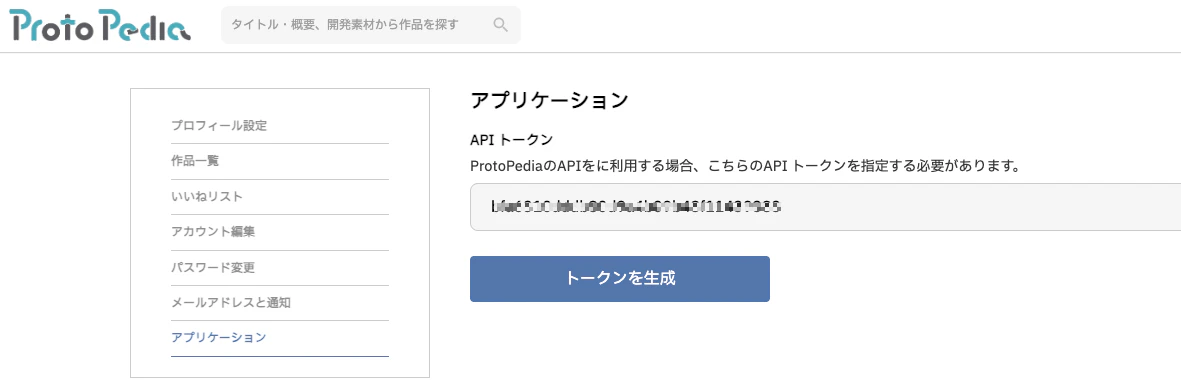
マイページのアプリケーション( https://protopedia.net/settings/application )のところから取得できます。
const API_BASE_URL = 'https://protopedia.net/v2/api/';
const ACCESS_TOKEN = 'アクセストークン';

async function debugFetch() {
  try {
    // テンプレートリテラルでURLを作成
    const url = `${API_BASE_URL}prototype/list?limit=1`; // 確認のため1件だけ取得
    console.log(`URL: ${url}`);

    const response = await fetch(url, {
      method: 'GET',
      headers: {
        'Authorization': `Bearer ${ACCESS_TOKEN}`,
        'Content-Type': 'application/json'
      }
    });

    if (!response.ok) {
      console.error(`Error: ${response.status} ${response.statusText}`);
      const text = await response.text();
      console.error(text);
      return;
    }

    const data = await response.json();

    console.log('\n====== 返ってきたデータの中身 ======');
    // データを整形してそのまま表示
    console.log(JSON.stringify(data, null, 2));
    console.log('==================================\n');

  } catch (error) {
    console.error("Connection Error:", error);
  }
}

debugFetch();
実行結果はこんな感じです。limit=1にして最新の1件を取得しているのでこんな感じになりました。
n0bisuke@nobisuke-n-switch2-2: ~/ds/2_playground/protopedia-api
$ node app.mjs
URL: https://protopedia.net/v2/api/prototype/list?limit=1

====== 返ってきたデータの中身 ======
{
  "metadata": {
    "detail": "The request sent by the client was successful.",
    "title": "OK",
    "status": 200
  },
  "count": 1,
  "links": {
    "self": {
      "href": "/v2/api/protopedia/list"
    }
  },
  "results": [
    {
      "summary": "合格したい!",
      "updateDate": "2018-07-10 16:17:57.0",
      "releaseDate": "2017-11-13 20:23:16.0",
      "releaseFlg": 2,
      "nid": "2421fcb1263b9530df88f7f002e78ea5",
      "uuid": "2a84d7e4-5fe0-418f-b6ec-2ec6574ec56f",
      "users": "ひさやん@hisayan",
      "tags": "おもちゃ|クラッピーチャレンジ",
      "commentCount": 0,
      "revision": 0,
      "licenseType": 1,
      "teamNm": "Pizayanz",
      "videoUrl": "https://www.youtube.com/embed/v_FaTz_Y5mw",
      "goodCount": 0,
      "id": 1,
      "prototypeNm": "クラッピーで仮装大賞",
      "freeComment": "クラッピーチャレンジしてみました<br><br>\\`\\`\\`  <br><br>$ 88888  <br><br>\\`\\`\\`<br><br>*** ** * ** ***<br><br>### クラッピー  <br><br><br><br><br><br>### Wi-Fi  <br><br>参考URL:<br><br><br>## Wow<br>> 合格したい!",
      "viewCount": 353,
      "mainUrl": "https://protopedia.net/pic/9c507193-d695-4795-b0e6-4a11daa719e9.jpg",
      "status": 2,
      "createDate": "2017-11-13 20:23:16.0",
      "thanksFlg": 1
    }
  ]
}
==================================
作品の詳細情報をとるAPIは無い...?
ドキュメントページを見ると一覧取得はあるけど個別情報はなさそうでした。
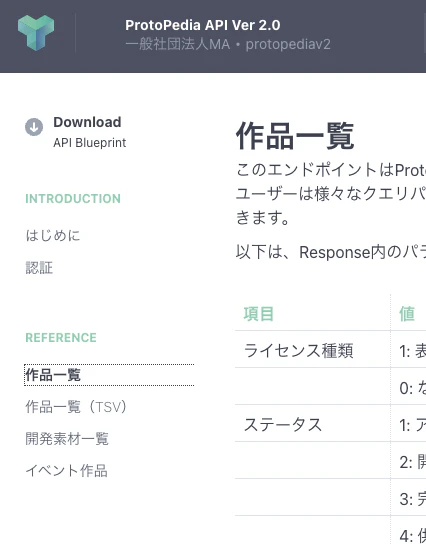
ということで、スクレイピングにていいね数やコメント数の取得チャレンジです。
// app.mjs
const TARGET_URL = 'https://protopedia.net/prototype/7822';

async function scrapeToJson() {
  try {
    // ログを出したくない場合はコメントアウトしてください
    // console.error(`Fetching HTML from: ${TARGET_URL}...`);

    const response = await fetch(TARGET_URL);
    if (!response.ok) {
      throw new Error(`HTTP Error! Status: ${response.status}`);
    }

    const html = await response.text();

    // 抽出用ヘルパー関数
    const extract = (pattern, index = 1) => {
      const match = html.match(pattern);
      return match && match[index] ? match[index].trim() : null;
    };

    // --- データ抽出処理 ---

    // 1. 基本情報
    const title = extract(/<h1[^>]*class="[^"]*title-h2[^"]*"[^>]*>([\s\S]*?)<\/h1>/);
    const catchCopy = extract(/<p\s+class="break">([\s\S]*?)<\/p>/);
    const externalLink = extract(/<div\s+class="post-link">[\s\S]*?<a\s+href="([^"]+)"/);
    const ogImage = extract(/<meta\s+property="og:image"\s+content="([^"]*)"/);

    // 2. 詳細テキスト (Markdown)
    // JSONなので改行コード(\n)はそのまま保持します
    const story = extract(/id="freeComment"[^>]*value="([^"]*)"/);
    const systemDescription = extract(/id="systemDescription"[^>]*value="([^"]*)"/);

    // 3. リスト系 (配列にする)
    // タグ
    const tagMatches = [...html.matchAll(/<span\s+class="tag">([\s\S]*?)<\/span>/g)];
    const tags = [...new Set(tagMatches.map(m => m[1].replace(',', '').trim()))];

    // 開発素材
    const materialMatches = [...html.matchAll(/<a\s+href="\/material\/[^"]+">([\s\S]*?)<\/a>/g)];
    const materials = [...new Set(materialMatches.map(m => m[1].trim()))];

    // メンバー
    const memberMatches = [...html.matchAll(/<dl\s+class="team-member-info">[\s\S]*?<dt>([\s\S]*?)<\/dt>/g)];
    const members = memberMatches.map(m => m[1].trim());

    // 4. 数値データ
    // いいね数
    const likesStr = extract(/<span\s+id="goodCnt\d*">(\d+)<\/span>/);
    // コメント数
    const commentMatches = html.match(/class="post-comment-box"/g);
    const commentCount = commentMatches ? commentMatches.length : 0;
    // 閲覧数
    const viewsStr = extract(/<span[^>]*>visibility<\/span>\s*<span>(\d+)<\/span>/);


    // --- JSONオブジェクトの構築 ---
    const result = {
      id: 3427, // URLから取れるなら動的にしてもOK
      title: title,
      catchCopy: catchCopy ? catchCopy.replace(/\s+/g, ' ') : "",
      url: externalLink,
      imageUrl: ogImage,
      tags: tags,
      materials: materials,
      members: members,
      content: {
        story: story,
        system: systemDescription
      },
      stats: {
        likes: Number(likesStr) || 0,
        comments: commentCount,
        views: Number(viewsStr) || 0
      },
      scrapedAt: new Date().toISOString()
    };

    // JSONとして出力
    console.log(JSON.stringify(result, null, 2));

  } catch (error) {
    console.error(JSON.stringify({ error: error.message }));
  }
}

scrapeToJson();
自分の作品で試してみました。
$ node ./single.mjs
{
  "id": 3427,
  "title": "はじめての経験を記録「 #未経験経験部 アプリ」 α版",
  "catchCopy": "「AI時代、未経験をした方が良い」ということで未経験の経験をして経験を積む部活 #未経験経験部 をWebアプリ化しました。「初めての経験をした」「おでかけした」など記録してシェア・いいねしましょう",
  "url": "https://keiken-club.suke.dev",
  "imageUrl": "https://protopedia.net/pic/7a0aae43-13b5-41b2-be51-c355961cee8d.png",
  "tags": [
    "アプリケーション",
    "データサイエンス / AI / BOT",
    "JavaScript"
  ],
  "materials": [
    "Cloudflare Workers",
    "Hono"
  ],
  "members": [
    "菅原のびすけ @n0bisuke",
    "りゆ @riyu11",
    "沖中(おきなか) @okinakamasayos1"
  ],
  "content": {
    "story": "## 未経験の経験をシェア\r\n\r\n一部界隈で話題沸騰中?の未経験経験部がアプリ化しました。\r\n\r\n## 開発モチベ \r\n\r\n### N=2\r\n\r\n開発時、N=2ですが、圧倒的に熱量の高い二人がいたのでそこをターゲットに作ってみました。\r\n\r\n「N=1でもいいから作ってみなよ」みたいなことはよく言ってるのでそこから育てるができるのかを検証してみたくもあります。\r\n\r\n### 自分の登壇から影響受けて行動してくれてるのが嬉しい\r\n\r\n動画にも入れましたが、登壇内容から影響を受けて実践してくれるのは嬉しいです。\r\n熱量がもっと上がるサポート材的になるといいですね。\r\n\r\n\r\n## 動画 \r\n\r\n更新があったら最新はこちら\r\n\r\nhttps://docs.google.com/videos/d/1fUau4nCUHSCjSwuLdzVhYrBNt2jpD6F8p9glWSYlxKA/edit?usp=sharing\r\n\r\n(Google VidsのURL載せたい)",
    "system": "バイブスです\r\n\r\n- Cloudflare Workers\r\n- Hono\r\n\r\nなど\r\n\r\nhttps://protopedia.net/prototype/7825 こっちで使った技術を転用。"
  },
  "stats": {
    "likes": 4,
    "comments": 2,
    "views": 297
  },
  "scrapedAt": "2025-12-17T06:25:47.412Z"
}
いいね数4、コメント2、ビュー数297などが無事に取れましたね。
いいねやコメントを全ての作品から取得
最後に先ほどの処理を複数の作品に対して実施します。最後の結果はJSON出力。
import { writeFile } from 'fs/promises';

// ★ここに取得したいURLを並べてください
const targetUrls = [
  "https://protopedia.net/prototype/3427",
  "https://protopedia.net/prototype/5609",
  // "https://protopedia.net/prototype/xxxx",
];

async function scrapePrototype(targetUrl) {
  try {
    console.log(`Fetching: ${targetUrl} ...`);

    const response = await fetch(targetUrl);
    if (!response.ok) {
      console.error(`HTTP Error (${response.status}) at ${targetUrl}`);
      return null;
    }

    const html = await response.text();

    const extract = (pattern, index = 1) => {
      const match = html.match(pattern);
      return match && match[index] ? match[index].trim() : null;
    };

    // --- データ抽出 ---
    const title = extract(/<h1[^>]*class="[^"]*title-h2[^"]*"[^>]*>([\s\S]*?)<\/h1>/);
    const catchCopy = extract(/<p\s+class="break">([\s\S]*?)<\/p>/);
    const externalLink = extract(/<div\s+class="post-link">[\s\S]*?<a\s+href="([^"]+)"/);
    const ogImage = extract(/<meta\s+property="og:image"\s+content="([^"]*)"/);

    const story = extract(/id="freeComment"[^>]*value="([^"]*)"/);
    const systemDescription = extract(/id="systemDescription"[^>]*value="([^"]*)"/);

    const tagMatches = [...html.matchAll(/<span\s+class="tag">([\s\S]*?)<\/span>/g)];
    const tags = [...new Set(tagMatches.map(m => m[1].replace(',', '').trim()))];

    const materialMatches = [...html.matchAll(/<a\s+href="\/material\/[^"]+">([\s\S]*?)<\/a>/g)];
    const materials = [...new Set(materialMatches.map(m => m[1].trim()))];

    const memberMatches = [...html.matchAll(/<dl\s+class="team-member-info">[\s\S]*?<dt>([\s\S]*?)<\/dt>/g)];
    const members = memberMatches.map(m => m[1].trim());

    const likesStr = extract(/<span\s+id="goodCnt\d*">(\d+)<\/span>/);
    const commentMatches = html.match(/class="post-comment-box"/g);
    const commentCount = commentMatches ? commentMatches.length : 0;
    const viewsStr = extract(/<span[^>]*>visibility<\/span>\s*<span>(\d+)<\/span>/);

    const idMatch = targetUrl.match(/\/prototype\/(\d+)/);
    const id = idMatch ? Number(idMatch[1]) : null;

    // オブジェクト作成
    return {
      id: id,
      title: title,
      protopediaUrl: targetUrl, // ★ここに追加しました (元のURL)
      externalUrl: externalLink, // 分かりやすく externalUrl に名称変更しました
      catchCopy: catchCopy ? catchCopy.replace(/\s+/g, ' ') : "",
      imageUrl: ogImage,
      tags: tags,
      materials: materials,
      members: members,
      content: {
        story: story || "",
        system: systemDescription || ""
      },
      stats: {
        likes: Number(likesStr) || 0,
        comments: commentCount,
        views: Number(viewsStr) || 0
      },
      scrapedAt: new Date().toISOString()
    };

  } catch (error) {
    console.error(`Error scraping ${targetUrl}:`, error.message);
    return null;
  }
}

async function main() {
  const results = [];
  console.log(`=== 処理開始: 全${targetUrls.length}件 ===`);

  for (const url of targetUrls) {
    const data = await scrapePrototype(url);
    if (data) {
      results.push(data);
    }
    await new Promise(r => setTimeout(r, 500));
  }

  const OUTPUT_FILE = 'protopedia_data.json';
  try {
    await writeFile(OUTPUT_FILE, JSON.stringify(results, null, 2));
    console.log(`\n=== 完了 ===`);
    console.log(`データは ${OUTPUT_FILE} に保存されました。`);
    console.log(`取得成功: ${results.length} / ${targetUrls.length} 件`);
  } catch (err) {
    console.error('ファイル書き込みエラー:', err);
  }
}

main();
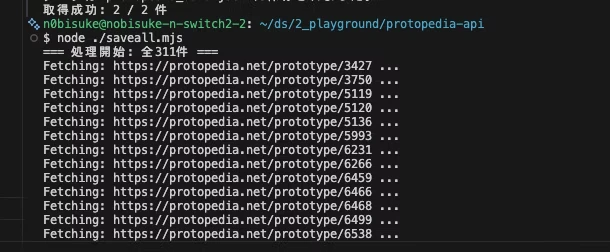
最後にprotopedia_data.jsonとして出力されたものを分析するといいね数ランキング1位やコメント数1位などがわかったりします。
最初に入れる作品リストが多すぎると大変なのでその年の作品とかで絞ると良さそうですね。
終わりに
ヒーローズビンゴではいきるか?
ヒーローズビンゴは受賞しそうな作品をビンゴのマスに設定できますが、 いいね数が多ければ受賞するということでもなかった です。
いいねやコメントは友達が多かったり、関連するハッカソンやチームメンバー数など(組織票というと聞こえがよく無いですが似たような感じも)によって増えるので、いいね数が多ければ受賞するといった形ではなく関連性は薄そうということが分かりました。
どちらかというと賞を狙うならテクニカルスポンサーなどの賞を把握した方が良さそうですね。
来年のビンゴも今から楽しみやで。