
・タイトルもGemini先生より。
(本日の)Gemini先生へ。
sympyで、左下直角の直角三角形に内接する正方形の座標を戻り値のユーザー定義関数を教えて下さい。計算結果もmarkdown背景黒で。
・戻り値を Tuple? を Point に変更してもらいました。
# 左下直角の直角三角形に内接する正方形の頂点座標をSymPyのPointオブジェクトで返す関数
import sympy as sp


def get_inscribed_square_coords(a, b):
  """左下直角の直角三角形(直角=(0,0), 底辺=(a,0), 高さ=(0,b))に

  内接する正方形の4つの頂点座標をSymPyのPointオブジェクトとして返します。
  """
  # 正方形の一辺の長さを変数 s とする
  s = sp.symbols("s", positive=True, real=True)

  # 斜辺の方程式 (bx + ay = ab) 上に正方形の右上頂点 (s, s) が乗る条件式
  eq = sp.Eq(b * s + a * s, a * b)

  # 方程式を解く
  sol = sp.solve(eq, s)
  if not sol:
    return []

  side_length = sol[0]

  # 4つの頂点座標をPointオブジェクトで返す (左下, 右下, 右上, 左上)
  coords = [
      sp.Point(0, 0),
      sp.Point(side_length, 0),
      sp.Point(side_length, side_length),
      sp.Point(0, side_length),
  ]
  return coords


# --- 実行と計算結果の確認 ---
if __name__ == "__main__":
  # 1. 一般記号 (a, b) での計算
  a_sym, b_sym = sp.symbols("a b", positive=True)
  general_result = get_inscribed_square_coords(a_sym, b_sym)
  print("一般解の座標 (Point):")
  for pt in general_result:
    print(pt)

  # 2. 具体的な数値 (底辺 a = 4, 高さ b = 3) での計算
  a_num, b_num = 4, 3
  numeric_result = get_inscribed_square_coords(a_num, b_num)
  print(f"\n底辺 a={a_num}, 高さ b={b_num} のときの座標 (Point):")
  for pt in numeric_result:
    print(pt)
計算結果
一般解の座標 (Point):
Point2D(0, 0)
Point2D(a*b/(a + b), 0)
Point2D(a*b/(a + b), a*b/(a + b))
Point2D(0, a*b/(a + b))

底辺 a=4, 高さ b=3 のときの座標 (Point):
Point2D(0, 0)
Point2D(12/7, 0)
Point2D(12/7, 12/7)
Point2D(0, 12/7)
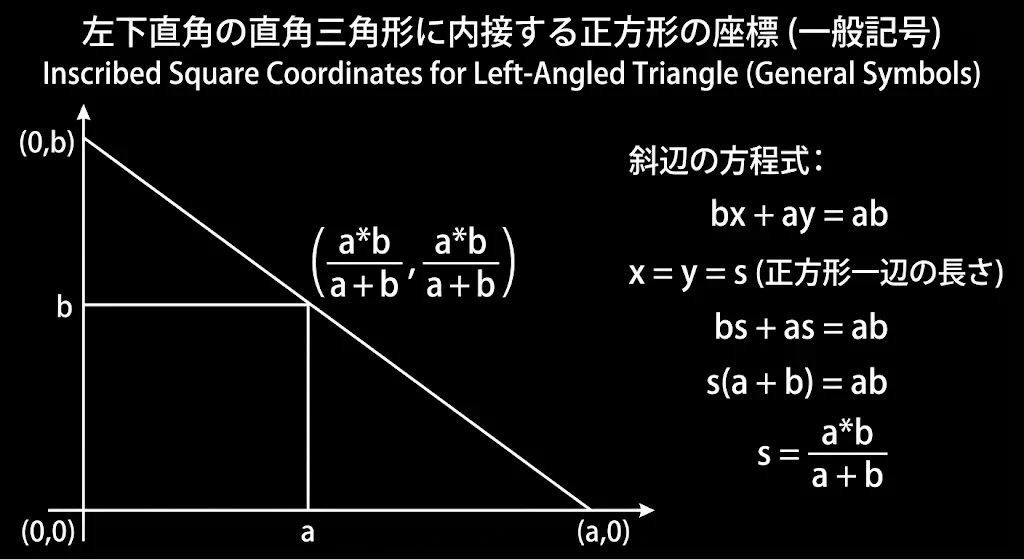
(本日の)Gemini先生へ。履歴。
1.sympyで、左下直角の直角三角形に内接する正方形の座標を戻り値のユーザー定義関数を教えて下さい。計算結果もmarkdown背景黒で。
2.上記のPNG図だけ出力して。
3.以上の内容の 全体の見出しを 英語と日本語で。各1行で。
4.一般記号(a,b) のPNG図だけ出力。
5.戻り値を Point で
6.SymPyによる直角三角形の内接正方形の計算 英語に翻訳して
7.上記の私の質問すべてから、Markdownのテキスト形式で、質問リストを出力して。追番を追加して。本質問も含めて。コピーできる形式で。空白行不要です。
いつもと違うおすすめです。
sympy のdoc
・いらないカモ。