
・ver1.1 今回、solveをあきらめて? solvesetでした。
・ver2.1 しょうがないな。(It can't be helped.)でした。Gemini先生翻訳より。
オリジナル
YUUU0123 様 (0:00〜3:53) いつもお世話になっております。
↓高校入試チャレンジ問題 AB=?
https://youtu.be/23isvux_Q6c
いつものsympyで(オリジナル Youtbe様の方法を参考に)
ver0.1
・先生の丸写しです。図形の証明は省略です。
・ステキです。補助線が2本でした。
xが4つ、○が2つ(4つ)。
>1:15 余分な長さを消しました。
# ver0.1
from sympy import *
var('x',real=True,positive=True)
AE,EC=4,6
EP   =x*Rational(6,10)
print("#",solve(Eq(AE*Rational(1,2)/EP,x/EC),x)[0])
# 2*sqrt(5)
ver0.2
・三角関数で、△DCB と△DCE で DC 共通。
これもDCで、ダブル三平方?です。
??? xは最後でした。
# ver0.2
from sympy import *
var('θ',real=True,positive=True)
AE,EC=4,6
AC   =AE+EC
BC   =AC*cos(θ)
θ_sol=solve(Eq(BC*cos(2*θ),EC*cos(θ)),θ)
print("#",AC*sin(θ_sol[1]))
# 2*sqrt(5)
ver0.3
・? 上を無理すれば
# ver0.3
from sympy import *
var('θ',real=True,positive=True)
AE,EC=4,6
print("#",(AE+EC) \
          *sin(solve(Eq((AE+EC)*cos(θ)*cos(2*θ),EC*cos(θ)),θ)[1]))
# 2*sqrt(5)
ver0.4
・Youtubeのコメント様より
https://qiita.com/mrrclb48z/items/ff4388ace062b63e98a8
いつもの sympyで
ver1.1
・方程式で、角度90°より、内積0が使いやすいです。
Lineのangle_between も、交点計算が必要ないカモ。でした。
# ver1.1
from sympy import *
var('θ',real=True,positive=True)
AE,EC=4,6
AC   =AE+EC
A,B,C=map(Point,[(0,AC*sin(θ)),(0,0),(AC*cos(θ),0)])
E    =A+AE*(C-A).unit
Ds   =(C+Point(1,0)).rotate(pi-2*θ,C)
# θ_sol=solve   (Eq((B-E).dot(Ds-C),0),θ)                              #;print(θ_sol)
θ_sol  =solveset(Eq((B-E).dot(Ds-C),0),θ,Interval(0,pi/2)).args[0]     #;print(θ_sol)
print("#",AC*sin(θ_sol))
# 2*sqrt(5)
Ds =B.rotate(-2*θ,C) でした。方向の点です。
ver1.2
・Lineのroateとdirection を教えてもらいました。
いいですね~。スマホのGemini先生に教えてもらって、チョコチョコと追加修正です。
・qiitaのカーソルとび? は、相変わらずでした。
from sympy import *

var("θ", real=True, positive=True)
AE, EC = 4, 6
AC = AE + EC
A, B, C = map(Point, [(0, AC * sin(θ)), (0, 0), (AC * cos(θ), 0)])
E = A + AE * (C - A).unit

# C と B を通る直線を作成
L_CB = Line(C, B)

# -2*θ だけ C を中心に回転
line_Ds = L_CB.rotate(-2 * θ, C)

# 条件式 (B-E) . (line_Ds.direction) == 0 より θ を解く
θ_sol = solveset(
    Eq((B - E).dot(line_Ds.direction), 0), θ, Interval(0, pi / 2)
).args[0]

# 計算結果の出力
ans = AC * sin(θ_sol)
print("θ_sol =", θ_sol)
print("#", ans)
出力結果
θ_sol = asin(sqrt(5)/5)
# 2*sqrt(5)
Gemini先生へ。
ver2.1
・正しいカシラ。私は理解できませんでした。
以下を θを使わずに x だけにして下さい。
(ver1.1 ソースコードの表示を省略)
・紆余曲折の末です。
# ver2.1
# [コード解説] cos(θ) = x として θ を使わずに解くプログラム
from sympy import *

x = Symbol('x', real=True, positive=True)

AE, EC = 4, 6
AC = AE + EC  # 10

# sin(θ) = sqrt(1 - x^2)
sin_theta = sqrt(1 - x**2)

# 各点の座標 (θを消去して x のみで表現)
A = Point(0, AC * sin_theta)
B = Point(0, 0)
C = Point(AC * x, 0)

# E は AC を 4:6 に内分する点
E = A + AE * (C - A) / AC

# ベクトル BE
BE = E - B

# ベクトル CD: (1,0) を pi - 2θ 回転させたベクトル
# cos(pi - 2θ) = 1 - 2*x**2
# sin(pi - 2θ) = 2*x*sqrt(1 - x**2)
vec_CD = Point(1 - 2*x**2, 2 * x * sin_theta)

# 方程式 BE・CD = 0 の左辺
eq_lhs = BE.dot(vec_CD)
print("# 内積の式:", simplify(eq_lhs))

# 内積 = 0 の方程式を解く (x = cos(θ))
x_sol = solveset(Eq(eq_lhs, 0), x, Interval(0, 1)).args[0]
print("# x (cos(θ)) の解:", x_sol)

# y座標: AC * sin(θ) = 10 * sqrt(1 - x^2)
ans = AC * sqrt(1 - x_sol**2)

print("# 最終結果 (AC*sin(θ)):", ans)
出力結果
# 内積の式: 4*x*(4 - 5*x**2)
# x (cos(θ)) の解: 2*sqrt(5)/5
# 最終結果 (AC*sin(θ)): 2*sqrt(5)
(本日の)Gemini先生へ。
PNG図のみ出力して下さい。
(ver1.1 ソースコードの表示を省略)
以下、作図のために追加しました。
rep={θ:θ_sol}
A=A.subs(rep)
B=B.subs(rep)
C=C.subs(rep)
D=Line(B,E).intersection(Line(C,Ds))
・matplotlibで。
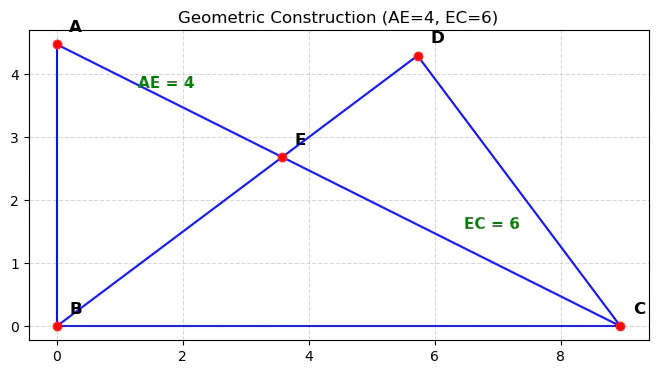
いつもの? sympyの実行環境 と 参考のおすすめです。
sympyのweb上での実行方法
SymPy Live Shellで。
ソースコードの解説は、私よりGemini先生へのソースコードの丸投げがおすすめです。質問の追加はいくらでも。
モーダル対応?「実行して」。「作図して」「問題文章の丸投げ」いい時代です。
いつもと違うおすすめです。
sympy のdoc
・いらないカモ。
ver0.1
ver0.2
ver0.3
ver0.4
・(済)
ver1.1
・solveset
https://docs.sympy.org/latest/modules/solvers/solveset.html