

はじめに
最近、Geminiが良い感じにインフォグラフィックを作成してくれることを聞き、使ってみたところ非常に良かったので紹介する。
私はAIとの壁打ち学習をよく実施するが、その後の知識整理やドキュメント化が課題と感じていた。Geminiのインフォグラフィック機能は、対話の内容を簡単に見やすい資料として出力してくれるためこの課題を解決できると考える。
インフォグラフィック
インフォグラフィックとは、情報・データ・知識を視覚的に表現したもの
題材
題材を決める。
せっかくなので今勉強中のGo言語の復習をしてそれをインフォグラフィックでまとめてみようと思う。
実際にやってみる
まずはGeminiを使っていつも通り気軽に聞いてみる。
最初の質問としては以下のようにした。
私はGo言語の初心者である。
Go言語の特徴やメリデメ・基礎的な文法・サンプル実装をまとめ、私をGo言語の中級者まで成長させてください。

ここから気になるところを壁打ちしていく。
満足したら最後に対話画面の下にあるCanvasを設定し、「対話の内容をファイルにまとめてください」といった内容のプロンプトを投げる。

すると、対話の要約に基づいた提案画面が表示されるため、「作成」ボタンを押し、次に「インフォグラフィック」を選択する。

これによりインフォグラフィックができる。
インフォグラフィックの中身に不満があれば、更にプロンプトで指示すると改良できる。
中身を確認してみる
作成されたインフォグラフィックは以下のようになった。HTML形式で出力され、チャートやコードハイライトが動的に表示されるのが特徴である。

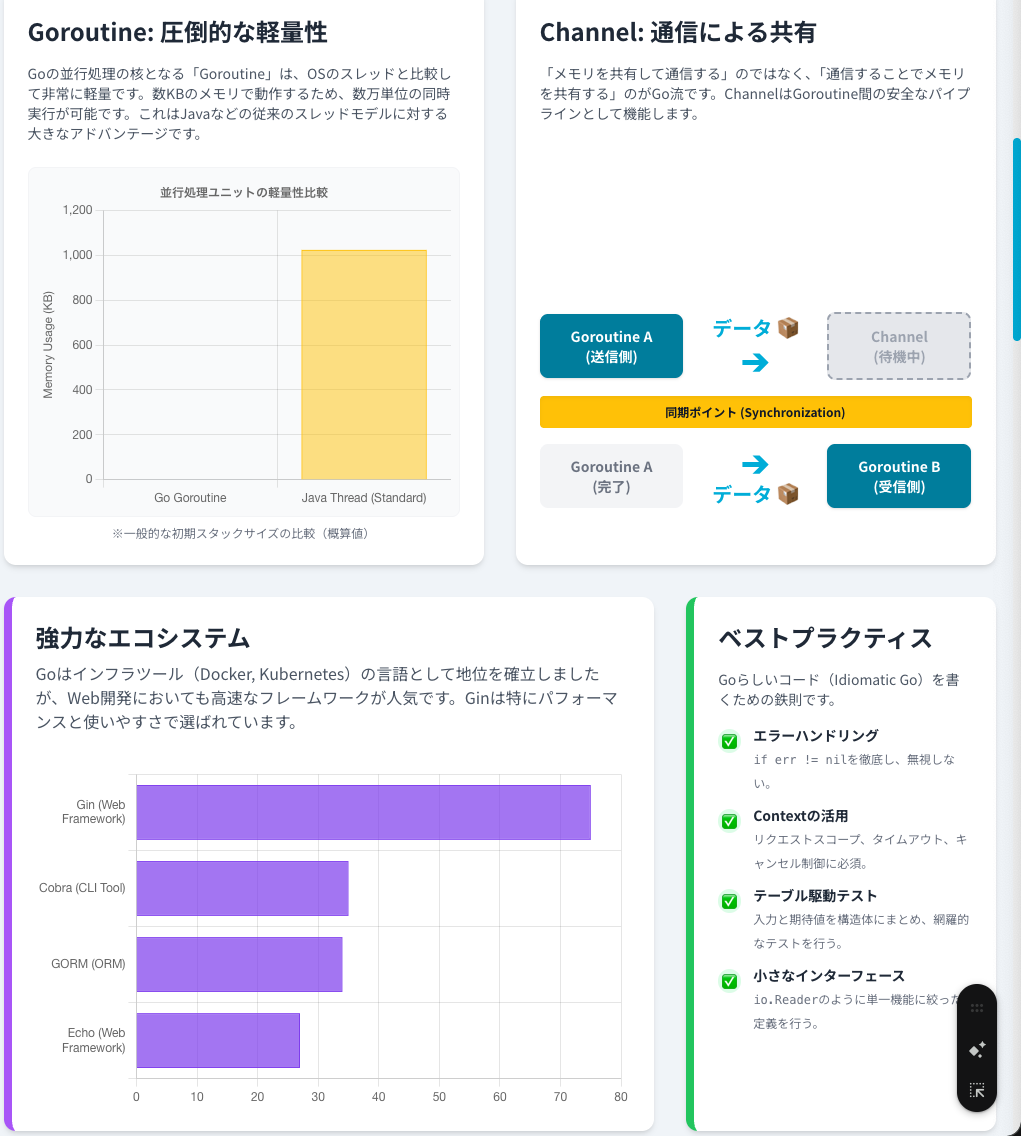
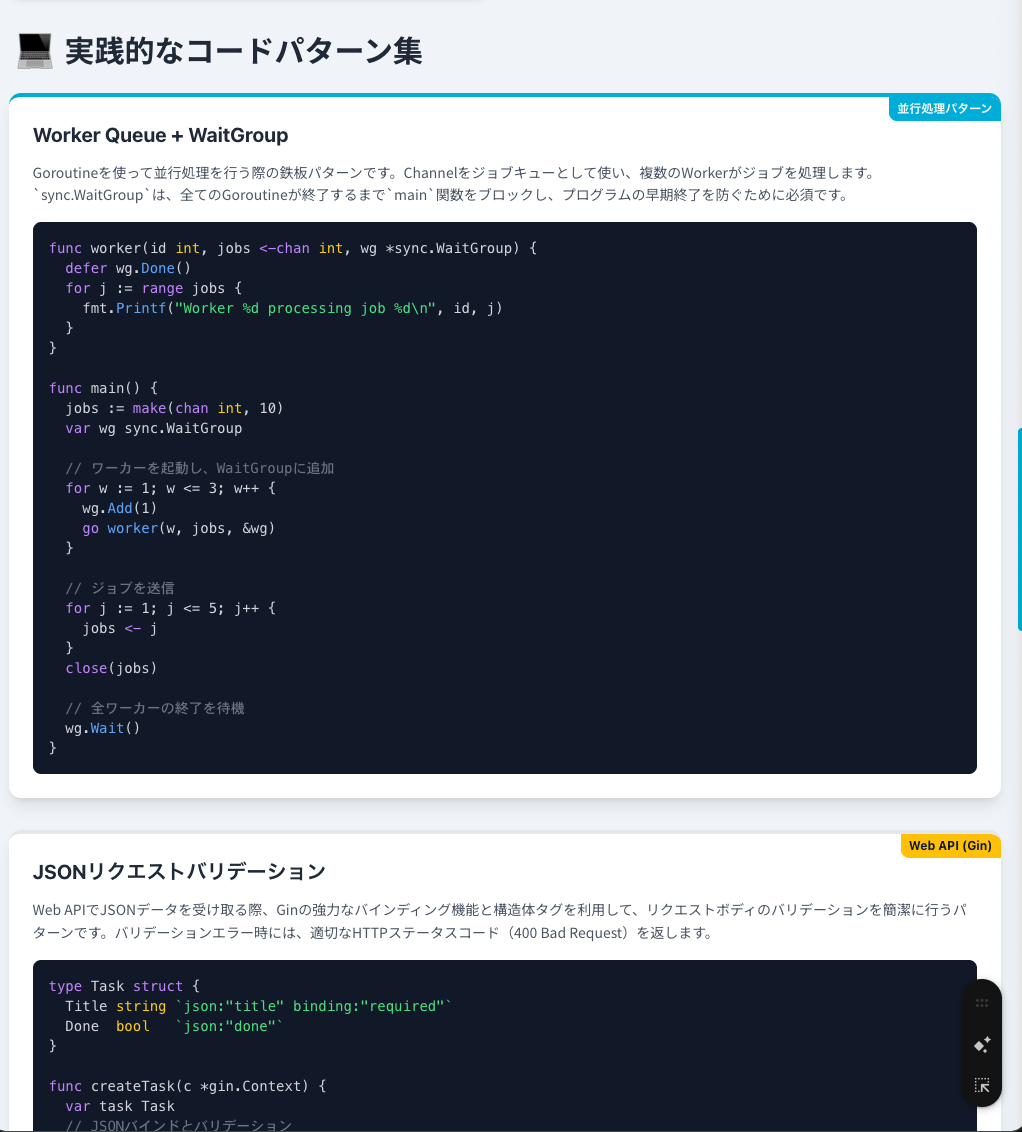
ご覧の通り、プロのデザイナーが作ったかのような完成度の高いレイアウトになった。
特に、壁打ちした内容を自動で要約し、関連性の高いグラフやコードパターンを盛り込んでくれている点が非常に優れている。
ChatGPTとの比較検討
ChatGPTにも同様に、対話の内容を整理しインフォグラフィックとして出力するよう指示してみた。ChatGPTにはGeminiのような専用の「作成」メニューはないが、プロンプトにその旨を入れてあげることで解決できる。
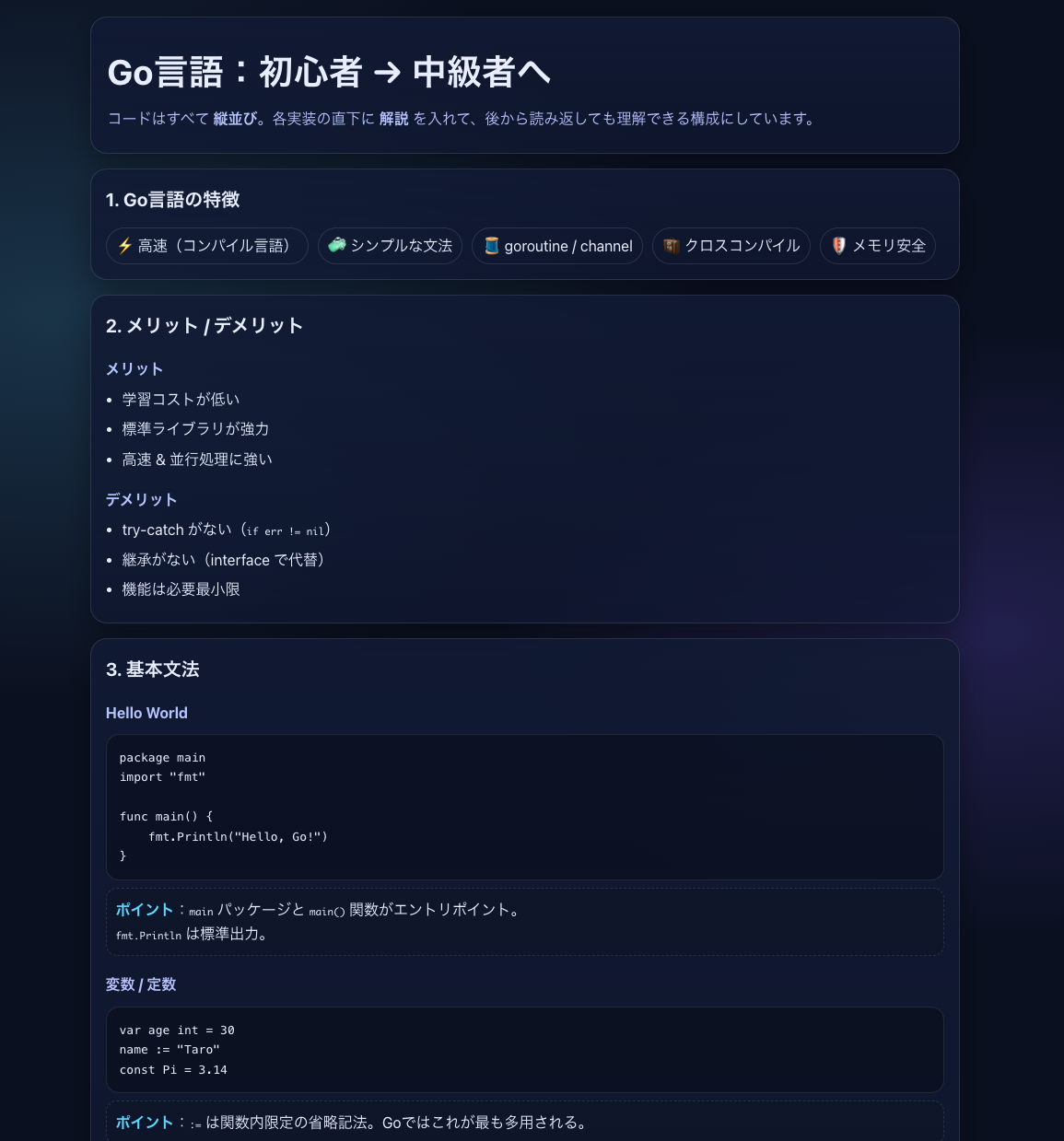

Geminiとはレイアウトの雰囲気は異なるが、良い感じにまとめてくれた。
グラフを使った表現においてはGeminiが優勢だが、内容にそこまで大差はなかった。
まとめると、インフォグラフィックの質としては若干Geminiの方が優れていると言えるだろう。
まとめ
今回はGeminiを利用してAI壁打ちした内容をインフォグラフィックで作成してみた。
短時間で簡単にデータを美しくまとめてくれるため、残しておきたい情報がある時はこの機能を使うことをオススメする。
DeepResearchなどの複雑な情報収集後にも非常に強力なツールとなるはずなので、更に使い込んでみようと思う。
ぜひ日々の開発・学習に取り入れてみてください。
参考
▫️Gemini
<!DOCTYPE html>
<html lang="ja">
<head>
<meta charset="UTF-8">
<meta name="viewport" content="width=device-width, initial-scale=1.0">
<title>Go言語のすべて:中級者向けマスターロードマップ</title>
<script src="https://cdn.tailwindcss.com"></script>
<script src="https://cdn.jsdelivr.net/npm/chart.js"></script>
<link href="https://fonts.googleapis.com/css2?family=Noto+Sans+JP:wght@400;700;900&display=swap" rel="stylesheet">
<style>
body {
font-family: 'Noto Sans JP', sans-serif;
background-color: #F0F4F8;
color: #333333;
}
.chart-container {
position: relative;
width: 100%;
max-width: 600px;
margin-left: auto;
margin-right: auto;
height: 300px;
max-height: 400px;
}
@media (min-width: 768px) {
.chart-container {
height: 350px;
}
}
.text-go-cyan { color: #00ADD8; }
.bg-go-cyan { background-color: #00ADD8; }
.border-go-cyan { border-color: #00ADD8; }
.text-go-blue { color: #007D9C; }
.bg-go-blue { background-color: #007D9C; }
.text-vibrant-amber { color: #FFC107; }
.bg-vibrant-amber { background-color: #FFC107; }
::-webkit-scrollbar {
width: 8px;
}
::-webkit-scrollbar-track {
background: #f1f1f1;
}
::-webkit-scrollbar-thumb {
background: #00ADD8;
border-radius: 4px;
}
::-webkit-scrollbar-thumb:hover {
background: #007D9C;
}
</style>
<!--
Source Material Analysis & Narrative Plan:
1. Introduction: Define Go (Compiled, Simple, Fast).
2. Concurrency: The "Killer Feature". Visualize Goroutines vs Threads. Explain Channels.
3. Ecosystem: Frameworks (Gin, Echo) and Infrastructure (Docker, K8s).
4. Best Practices: Error handling, Testing, Style.
5. Conclusion: The path to mastery.
Palette Choice: "Vibrant Tech Blue & Amber"
- Primary: Cyan #00ADD8
- Secondary: Blue #007D9C
- Accent: Amber #FFC107
- Neutral: Dark Grey #333333
-->
<!--
Chart Selection & Justification (NO SVG):
1. Memory Footprint (Bar Chart): Compares Goroutine (2KB) vs OS Thread (1MB). Goal: Compare.
2. Framework Popularity (Horizontal Bar): Compares Gin, Echo, GORM. Goal: Ranking/Compare.
3. Go Attributes (Radar Chart): Shows balance of Speed, Safety, Simplicity. Goal: Relationships.
-->
</head>
<body class="antialiased">
<!-- Header Section -->
<header class="bg-gradient-to-r from-cyan-500 to-blue-700 text-white shadow-lg">
<div class="container mx-auto px-4 py-12 text-center">
<div class="mb-4 text-6xl">🐹</div>
<h1 class="text-4xl md:text-6xl font-black mb-4 tracking-tight">Go言語 マスターへの道</h1>
<p class="text-xl md:text-2xl font-light opacity-90 max-w-3xl mx-auto">
並行処理の基礎から、ベストプラクティス、モダンなエコシステムまで。<br>
中級者へステップアップするための完全ガイド。
</p>
</div>
</header>
<!-- Main Content Grid -->
<main class="container mx-auto px-4 py-8 grid grid-cols-1 md:grid-cols-12 gap-8">
<!-- SECTION 1: The Go Philosophy (Inform) -->
<section class="col-span-1 md:col-span-12 mb-8">
<div class="bg-white rounded-xl shadow-md p-8 border-l-8 border-go-cyan">
<h2 class="text-3xl font-bold text-gray-800 mb-6 flex items-center">
<span class="text-4xl mr-3 text-go-cyan">⚡</span> Go言語の5つの柱
</h2>
<p class="text-gray-600 mb-6 text-lg leading-relaxed">
Go(Golang)は、Googleによって開発された静的型付けコンパイラ言語です。複雑さを排除し、スケーラビリティと可読性を極限まで高める設計思想が貫かれています。
</p>
<div class="grid grid-cols-1 md:grid-cols-5 gap-4">
<!-- Card 1 -->
<div class="bg-blue-50 p-4 rounded-lg text-center transform transition hover:scale-105 duration-300">
<div class="text-4xl mb-2">🚀</div>
<h3 class="font-bold text-go-blue">高速実行</h3>
<p class="text-sm text-gray-600">機械語へ直接コンパイル。VMなし。</p>
</div>
<!-- Card 2 -->
<div class="bg-blue-50 p-4 rounded-lg text-center transform transition hover:scale-105 duration-300">
<div class="text-4xl mb-2">💎</div>
<h3 class="font-bold text-go-blue">シンプル</h3>
<p class="text-sm text-gray-600">whileも三項演算子もない統一された文法。</p>
</div>
<!-- Card 3 -->
<div class="bg-blue-50 p-4 rounded-lg text-center transform transition hover:scale-105 duration-300">
<div class="text-4xl mb-2">🔄</div>
<h3 class="font-bold text-go-blue">並行処理</h3>
<p class="text-sm text-gray-600">GoroutineとChannelによる強力な基盤。</p>
</div>
<!-- Card 4 -->
<div class="bg-blue-50 p-4 rounded-lg text-center transform transition hover:scale-105 duration-300">
<div class="text-4xl mb-2">📦</div>
<h3 class="font-bold text-go-blue">ポータブル</h3>
<p class="text-sm text-gray-600">クロスコンパイルで単一バイナリを生成。</p>
</div>
<!-- Card 5 -->
<div class="bg-blue-50 p-4 rounded-lg text-center transform transition hover:scale-105 duration-300">
<div class="text-4xl mb-2">🛡️</div>
<h3 class="font-bold text-go-blue">安全性</h3>
<p class="text-sm text-gray-600">型安全かつメモリセーフな設計。</p>
</div>
</div>
</div>
</section>
<!-- SECTION 2: Concurrency (Compare & Process) -->
<section class="col-span-1 md:col-span-6 flex flex-col">
<div class="bg-white rounded-xl shadow-md p-6 h-full border-t-4 border-vibrant-amber">
<h2 class="text-2xl font-bold text-gray-800 mb-4">Goroutine: 圧倒的な軽量性</h2>
<p class="text-gray-600 mb-6 text-sm">
Goの並行処理の核となる「Goroutine」は、OSのスレッドと比較して非常に軽量です。数KBのメモリで動作するため、数万単位の同時実行が可能です。これはJavaなどの従来のスレッドモデルに対する大きなアドバンテージです。
</p>
<!-- Chart Container -->
<div class="chart-container bg-gray-50 rounded-lg p-2 border border-gray-100">
<canvas id="memoryChart"></canvas>
</div>
<p class="text-xs text-center text-gray-500 mt-2">※一般的な初期スタックサイズの比較(概算値)</p>
</div>
</section>
<section class="col-span-1 md:col-span-6 flex flex-col">
<div class="bg-white rounded-xl shadow-md p-6 h-full border-t-4 border-vibrant-amber">
<h2 class="text-2xl font-bold text-gray-800 mb-4">Channel: 通信による共有</h2>
<p class="text-gray-600 mb-6 text-sm">
「メモリを共有して通信する」のではなく、「通信することでメモリを共有する」のがGo流です。ChannelはGoroutine間の安全なパイプラインとして機能します。
</p>
<!-- CSS-based Flow Diagram (NO SVG/Mermaid) -->
<div class="flex flex-col items-center justify-center h-full space-y-4 py-4">
<!-- Step 1 -->
<div class="flex items-center w-full max-w-md">
<div class="w-1/3 bg-go-blue text-white p-3 rounded-lg text-center text-sm font-bold shadow">
Goroutine A<br>(送信側)
</div>
<div class="w-1/3 flex flex-col items-center text-go-cyan font-bold text-xl px-2">
<span>データ 📦</span>
<span class="text-3xl">➔</span>
</div>
<div class="w-1/3 bg-gray-200 text-gray-400 p-3 rounded-lg text-center text-sm font-bold border-2 border-dashed border-gray-400">
Channel<br>(待機中)
</div>
</div>
<!-- Step 2 -->
<div class="flex items-center w-full max-w-md">
<div class="w-full bg-vibrant-amber text-gray-900 p-2 rounded text-center font-bold text-xs shadow-inner">
同期ポイント (Synchronization)
</div>
</div>
<!-- Step 3 -->
<div class="flex items-center w-full max-w-md">
<div class="w-1/3 bg-gray-100 text-gray-500 p-3 rounded-lg text-center text-sm font-bold">
Goroutine A<br>(完了)
</div>
<div class="w-1/3 flex flex-col items-center text-go-cyan font-bold text-xl px-2">
<span class="text-3xl">➔</span>
<span>データ 📦</span>
</div>
<div class="w-1/3 bg-go-blue text-white p-3 rounded-lg text-center text-sm font-bold shadow">
Goroutine B<br>(受信側)
</div>
</div>
</div>
</div>
</section>
<!-- SECTION 3: Ecosystem (Ranking/Compare) -->
<section class="col-span-1 md:col-span-8">
<div class="bg-white rounded-xl shadow-md p-6 border-l-8 border-purple-500">
<h2 class="text-2xl font-bold text-gray-800 mb-2">強力なエコシステム</h2>
<p class="text-gray-600 mb-6">
Goはインフラツール(Docker, Kubernetes)の言語として地位を確立しましたが、Web開発においても高速なフレームワークが人気です。Ginは特にパフォーマンスと使いやすさで選ばれています。
</p>
<!-- Chart Container -->
<div class="chart-container">
<canvas id="ecosystemChart"></canvas>
</div>
</div>
</section>
<!-- SECTION 4: Best Practices (Checklist) -->
<section class="col-span-1 md:col-span-4">
<div class="bg-white rounded-xl shadow-md p-6 h-full border-l-8 border-green-500">
<h2 class="text-2xl font-bold text-gray-800 mb-4">ベストプラクティス</h2>
<p class="text-gray-600 mb-4 text-sm">
Goらしいコード(Idiomatic Go)を書くための鉄則です。
</p>
<ul class="space-y-3">
<li class="flex items-start">
<span class="bg-green-100 text-green-600 rounded-full p-1 mr-3 mt-1 text-xs">✅</span>
<div>
<strong class="block text-gray-800 text-sm">エラーハンドリング</strong>
<span class="text-xs text-gray-500"><code>if err != nil</code>を徹底し、無視しない。</span>
</div>
</li>
<li class="flex items-start">
<span class="bg-green-100 text-green-600 rounded-full p-1 mr-3 mt-1 text-xs">✅</span>
<div>
<strong class="block text-gray-800 text-sm">Contextの活用</strong>
<span class="text-xs text-gray-500">リクエストスコープ、タイムアウト、キャンセル制御に必須。</span>
</div>
</li>
<li class="flex items-start">
<span class="bg-green-100 text-green-600 rounded-full p-1 mr-3 mt-1 text-xs">✅</span>
<div>
<strong class="block text-gray-800 text-sm">テーブル駆動テスト</strong>
<span class="text-xs text-gray-500">入力と期待値を構造体にまとめ、網羅的なテストを行う。</span>
</div>
</li>
<li class="flex items-start">
<span class="bg-green-100 text-green-600 rounded-full p-1 mr-3 mt-1 text-xs">✅</span>
<div>
<strong class="block text-gray-800 text-sm">小さなインターフェース</strong>
<span class="text-xs text-gray-500"><code>io.Reader</code>のように単一機能に絞った定義を行う。</span>
</div>
</li>
</ul>
</div>
</section>
<!-- SECTION 5: Go Character Analysis (Radar) -->
<section class="col-span-1 md:col-span-6">
<div class="bg-white rounded-xl shadow-md p-6">
<h2 class="text-2xl font-bold text-gray-800 mb-4">Go言語の特性分析</h2>
<p class="text-gray-600 mb-4 text-sm">
他の言語と比較した際のGoの立ち位置です。シンプルさと処理速度のバランスが非常に高く、学習コストも比較的低いのが特徴です。
</p>
<!-- Chart Container -->
<div class="chart-container">
<canvas id="radarChart"></canvas>
</div>
</div>
</section>
<!-- SECTION 6: Practical Implementation (Code Cards) -->
<!-- 横幅いっぱいに変更 (col-span-12) -->
<section class="col-span-1 md:col-span-12">
<h2 class="text-3xl font-bold text-gray-800 mb-6 px-2 flex items-center">
<span class="text-4xl mr-3 text-go-blue">💻</span> 実践的なコードパターン集
</h2>
<!-- グリッドを1列に変更して縦に並べる -->
<div class="grid grid-cols-1 gap-8">
<!-- Code Card 1: Worker & Channel + WaitGroup (Expanded) -->
<div class="bg-white rounded-xl shadow-lg p-6 overflow-hidden relative border-t-4 border-go-cyan">
<div class="absolute top-0 right-0 bg-go-cyan text-white text-xs px-2 py-1 rounded-bl-lg font-sans font-bold">並行処理パターン</div>
<h3 class="text-gray-800 font-bold font-sans mb-3 text-xl">Worker Queue + WaitGroup</h3>
<p class="text-gray-600 mb-4 text-sm leading-relaxed">
Goroutineを使って並行処理を行う際の鉄板パターンです。Channelをジョブキューとして使い、複数のWorkerがジョブを処理します。`sync.WaitGroup`は、全てのGoroutineが終了するまで`main`関数をブロックし、プログラムの早期終了を防ぐために必須です。
</p>
<pre class="bg-gray-900 rounded-lg p-4 text-gray-300 font-mono text-sm whitespace-pre-wrap overflow-x-auto">
<span class="text-purple-400">func</span> worker(id <span class="text-yellow-400">int</span>, jobs <span class="text-purple-400"><-chan</span> <span class="text-yellow-400">int</span>, wg *sync.WaitGroup) {
<span class="text-purple-400">defer</span> wg.<span class="text-blue-400">Done</span>()
<span class="text-purple-400">for</span> j := <span class="text-purple-400">range</span> jobs {
fmt.<span class="text-blue-400">Printf</span>(<span class="text-green-400">"Worker %d processing job %d\n"</span>, id, j)
}
}
<span class="text-purple-400">func</span> main() {
jobs := <span class="text-purple-400">make</span>(<span class="text-purple-400">chan</span> <span class="text-yellow-400">int</span>, 10)
<span class="text-purple-400">var</span> wg sync.WaitGroup
<span class="text-gray-500">// ワーカーを起動し、WaitGroupに追加</span>
<span class="text-purple-400">for</span> w := 1; w <= 3; w++ {
wg.<span class="text-blue-400">Add</span>(1)
<span class="text-purple-400">go</span> <span class="text-blue-400">worker</span>(w, jobs, &wg)
}
<span class="text-gray-500">// ジョブを送信</span>
<span class="text-purple-400">for</span> j := 1; j <= 5; j++ {
jobs <span class="text-purple-400"><-</span> j
}
<span class="text-purple-400">close</span>(jobs)
<span class="text-gray-500">// 全ワーカーの終了を待機</span>
wg.<span class="text-blue-400">Wait</span>()
}</pre>
</div>
<!-- Code Card 2: JSON Handling (Gin) (Expanded) -->
<div class="bg-white rounded-xl shadow-lg p-6 overflow-hidden relative border-t-4 border-vibrant-amber">
<div class="absolute top-0 right-0 bg-vibrant-amber text-gray-900 text-xs px-2 py-1 rounded-bl-lg font-sans font-bold">Web API (Gin)</div>
<h3 class="text-gray-800 font-bold font-sans mb-3 text-xl">JSONリクエストバリデーション</h3>
<p class="text-gray-600 mb-4 text-sm leading-relaxed">
Web APIでJSONデータを受け取る際、Ginの強力なバインディング機能と構造体タグを利用して、リクエストボディのバリデーションを簡潔に行うパターンです。バリデーションエラー時には、適切なHTTPステータスコード(400 Bad Request)を返します。
</p>
<pre class="bg-gray-900 rounded-lg p-4 text-gray-300 font-mono text-sm whitespace-pre-wrap overflow-x-auto">
<span class="text-purple-400">type</span> Task <span class="text-purple-400">struct</span> {
Title <span class="text-yellow-400">string</span> <span class="text-green-400">`json:"title" binding:"required"`</span>
Done <span class="text-yellow-400">bool</span> <span class="text-green-400">`json:"done"`</span>
}
<span class="text-purple-400">func</span> createTask(c *gin.Context) {
<span class="text-purple-400">var</span> task Task
<span class="text-gray-500">// JSONバインドとバリデーション</span>
<span class="text-purple-400">if</span> err := c.<span class="text-blue-400">ShouldBindJSON</span>(&task); err != <span class="text-purple-400">nil</span> {
<span class="text-gray-500">// Bad Request (400) を返す</span>
c.<span class="text-blue-400">JSON</span>(400, gin.H{<span class="text-green-400">"error"</span>: err.<span class="text-blue-400">Error</span>()})
<span class="text-purple-400">return</span>
}
<span class="text-gray-500">// データベースに保存...</span>
c.<span class="text-blue-400">JSON</span>(201, task) <span class="text-gray-500">// Created (201) を返す</span>
}</pre>
</div>
<!-- Code Card 3: Error Wrapping (Expanded) -->
<div class="bg-white rounded-xl shadow-lg p-6 overflow-hidden relative border-t-4 border-purple-500">
<div class="absolute top-0 right-0 bg-purple-500 text-white text-xs px-2 py-1 rounded-bl-lg font-sans font-bold">エラーラッピング</div>
<h3 class="text-gray-800 font-bold font-sans mb-3 text-xl">UnwrapとIsによる検証</h3>
<p class="text-gray-600 mb-4 text-sm leading-relaxed">
Go 1.13以降で推奨されるエラーハンドリングパターンです。下層で発生したエラーを、より意味のあるカスタムエラーでラップ(`%w`)し、呼び出し側ではエラーチェーンを辿って特定の型のエラーかどうか(`errors.Is`)を判断します。
</p>
<pre class="bg-gray-900 rounded-lg p-4 text-gray-300 font-mono text-sm whitespace-pre-wrap overflow-x-auto">
<span class="text-purple-400">var</span> ErrConfigRead = errors.<span class="text-blue-400">New</span>(<span class="text-green-400">"configuration read error"</span>)
<span class="text-purple-400">func</span> readData(path <span class="text-yellow-400">string</span>) error {
_, err := os.<span class="text-blue-400">Open</span>(path)
<span class="text-purple-400">if</span> err != <span class="text-purple-400">nil</span> {
<span class="text-gray-500">// オリジナルのエラーを %w でラップ</span>
<span class="text-purple-400">return</span> fmt.<span class="text-blue-400">Errorf</span>(<span class="text-green-400">"%w: file %s access failed"</span>, ErrConfigRead, path)
}
<span class="text-purple-400">return</span> <span class="text-purple-400">nil</span>
}
<span class="text-purple-400">func</span> main() {
err := <span class="text-blue-400">readData</span>(<span class="text-green-400">"/nonexistent/config"</span>)
<span class="text-purple-400">if</span> errors.<span class="text-blue-400">Is</span>(err, ErrConfigRead) {
fmt.<span class="text-blue-400">Println</span>(<span class="text-green-400">"INFO: It's a config error."</span>)
}
}</pre>
</div>
<!-- Code Card 4: Context with Timeout (Expanded) -->
<div class="bg-white rounded-xl shadow-lg p-6 overflow-hidden relative border-t-4 border-green-500">
<div class="absolute top-0 right-0 bg-green-500 text-white text-xs px-2 py-1 rounded-bl-lg font-sans font-bold">並行処理制御</div>
<h3 class="text-gray-800 font-bold font-sans mb-3 text-xl">Contextによるキャンセルとタイムアウト</h3>
<p class="text-gray-600 mb-4 text-sm leading-relaxed">
ネットワーク処理や長時間かかるタスクにおいて、リクエストのスコープやタイムアウトを制御するための必須パターンです。`context.WithTimeout`で期限を設定し、Goroutine内では`select`文を使って、タイムアウトまたはタスク完了のどちらが先に発生したかを待ち受けます。
</p>
<pre class="bg-gray-900 rounded-lg p-4 text-gray-300 font-mono text-sm whitespace-pre-wrap overflow-x-auto">
<span class="text-purple-400">func</span> longTask(ctx context.Context, ch <span class="text-purple-400">chan</span> <span class="text-yellow-400">bool</span>) {
<span class="text-purple-400">select</span> {
<span class="text-purple-400">case</span> <span class="text-purple-400"><-</span>time.<span class="text-blue-400">After</span>(5 * time.<span class="text-blue-400">Second</span>):
<span class="text-gray-500">// 5秒経過して正常終了</span>
ch <span class="text-purple-400"><-</span> <span class="text-purple-400">true</span>
<span class="text-purple-400">case</span> <span class="text-purple-400"><-</span>ctx.<span class="text-blue-400">Done</span>():
<span class="text-gray-500">// Contextにより中断</span>
fmt.<span class="text-blue-400">Println</span>(<span class="text-green-400">"処理中断理由:"</span>, ctx.<span class="text-blue-400">Err</span>())
ch <span class="text-purple-400"><-</span> <span class="text-purple-400">false</span>
}
}
<span class="text-purple-400">func</span> main() {
ch := <span class="text-purple-400">make</span>(<span class="text-purple-400">chan</span> <span class="text-yellow-400">bool</span>)
ctx, cancel := context.<span class="text-blue-400">WithTimeout</span>(context.<span class="text-blue-400">Background</span>(), 2 * time.<span class="text-blue-400">Second</span>)
<span class="text-purple-400">defer</span> cancel()
<span class="text-purple-400">go</span> <span class="text-blue-400">longTask</span>(ctx, ch)
<span class="text-purple-400"><-</span>ch <span class="text-gray-500">// 結果を待つ</span>
}</pre>
</div>
<!-- Code Card 5: Defer for Resource Cleanup (UNCHANGED/COMPLETE) -->
<div class="bg-white rounded-xl shadow-lg p-6 overflow-hidden relative border-t-4 border-yellow-500">
<div class="absolute top-0 right-0 bg-yellow-500 text-gray-900 text-xs px-2 py-1 rounded-bl-lg font-sans font-bold">リソース管理</div>
<h3 class="text-gray-800 font-bold font-sans mb-3 text-xl">Defer によるクリーンアップ</h3>
<p class="text-gray-600 mb-4 text-sm leading-relaxed">
リソース(ファイル、データベース接続、ミューテックスロックなど)を確実に解放するためのパターンです。`defer`を使うことで、関数がどのパスで終了しても、対応するクリーンアップ処理(`Close()`や`Unlock()`など)が確実に実行されます。
</p>
<pre class="bg-gray-900 rounded-lg p-4 text-gray-300 font-mono text-sm whitespace-pre-wrap overflow-x-auto">
<span class="text-purple-400">func</span> processFile(name <span class="text-yellow-400">string</span>) {
f, err := os.<span class="text-blue-400">Open</span>(name)
<span class="text-purple-400">if</span> err != <span class="text-purple-400">nil</span> {
fmt.<span class="text-blue-400">Println</span>(<span class="text-green-400">"Error opening file"</span>)
<span class="text-purple-400">return</span>
}
<span class="text-gray-500">// 関数終了時に必ず呼ばれる</span>
<span class="text-purple-400">defer</span> f.<span class="text-blue-400">Close</span>()
<span class="text-gray-500">// ファイルの内容を読み込み...</span>
fmt.<span class="text-blue-400">Println</span>(<span class="text-green-400">"File processing started. Will close on exit."</span>)
}</pre>
</div>
<!-- Code Card 6: Interface and Struct Implementation (Expanded) -->
<div class="bg-white rounded-xl shadow-lg p-6 overflow-hidden relative border-t-4 border-red-500">
<div class="absolute top-0 right-0 bg-red-500 text-white text-xs px-2 py-1 rounded-bl-lg font-sans font-bold">抽象化設計</div>
<h3 class="text-gray-800 font-bold font-sans mb-3 text-xl">Interfaceによる多態性 (Polymorphism)</h3>
<p class="text-gray-600 mb-4 text-sm leading-relaxed">
Goの最も重要な設計パターンの一つです。具体的な実装(`Dog` struct)ではなく、抽象的なインターフェース(`Speaker`)に依存することで、柔軟でテストしやすい疎結合なコードを実現します。Goでは暗黙的なインターフェース実装が特徴です。
</p>
<pre class="bg-gray-900 rounded-lg p-4 text-gray-300 font-mono text-sm whitespace-pre-wrap overflow-x-auto">
<span class="text-purple-400">type</span> Speaker <span class="text-purple-400">interface</span> {
<span class="text-blue-400">Speak</span>() <span class="text-yellow-400">string</span>
}
<span class="text-purple-400">type</span> Dog <span class="text-purple-400">struct</span> { Name <span class="text-yellow-400">string</span> }
<span class="text-purple-400">func</span> (d Dog) <span class="text-blue-400">Speak</span>() <span class="text-yellow-400">string</span> {
<span class="text-purple-400">return</span> d.Name + <span class="text-green-400">": WanWan!"</span>
}
<span class="text-purple-400">func</span> makeItSpeak(s Speaker) {
fmt.<span class="text-blue-400">Println</span>(s.<span class="text-blue-400">Speak</span>())
}
<span class="text-purple-400">func</span> main() {
d := Dog{<span class="text-green-400">"Pochi"</span>}
<span class="text-blue-400">makeItSpeak</span>(d)
}</pre>
</div>
</div>
</section>
</main>
<!-- Footer -->
<footer class="bg-gray-800 text-white py-12 mt-8 border-t-4 border-go-cyan">
<div class="container mx-auto px-4 text-center">
<h2 class="text-3xl font-bold mb-4">Go言語で、スケーラブルな未来へ。</h2>
<p class="text-gray-400 mb-8">
シンプルさを武器に、複雑な現代のインフラストラクチャを支える技術。<br>
今日からあなたもGopherの仲間入りです。
</p>
<div class="text-6xl animate-bounce">🐹</div>
<p class="text-xs text-gray-500 mt-8">Based on Go Mastery Roadmap • No SVGs Used</p>
</div>
</footer>
<!-- JavaScript for Charts -->
<script>
function wrapLabel(str, maxLen) {
if (str.length <= maxLen) return str;
const words = str.split(' ');
const lines = [];
let currentLine = words[0];
for (let i = 1; i < words.length; i++) {
if (currentLine.length + 1 + words[i].length <= maxLen) {
currentLine += ' ' + words[i];
} else {
lines.push(currentLine);
currentLine = words[i];
}
}
lines.push(currentLine);
return lines;
}
const commonTooltipConfig = {
callbacks: {
title: function(tooltipItems) {
const item = tooltipItems[0];
let label = item.chart.data.labels[item.dataIndex];
if (Array.isArray(label)) {
return label.join(' ');
} else {
return label;
}
}
}
};
const ctxMemory = document.getElementById('memoryChart').getContext('2d');
new Chart(ctxMemory, {
type: 'bar',
data: {
labels: ['Go Goroutine', 'Java Thread (Standard)'],
datasets: [{
label: '初期メモリ消費量 (KB)',
data: [2, 1024],
backgroundColor: [
'rgba(0, 173, 216, 0.8)',
'rgba(255, 193, 7, 0.5)'
],
borderColor: [
'rgba(0, 173, 216, 1)',
'rgba(255, 193, 7, 1)'
],
borderWidth: 1
}]
},
options: {
responsive: true,
maintainAspectRatio: false,
plugins: {
legend: { display: false },
tooltip: commonTooltipConfig,
title: {
display: true,
text: '並行処理ユニットの軽量性比較'
}
},
scales: {
y: {
beginAtZero: true,
title: { display: true, text: 'Memory Usage (KB)' }
}
}
}
});
const ctxEco = document.getElementById('ecosystemChart').getContext('2d');
const ecoLabels = ['Gin (Web Framework)', 'Cobra (CLI Tool)', 'GORM (ORM)', 'Echo (Web Framework)'];
const wrappedEcoLabels = ecoLabels.map(l => wrapLabel(l, 16));
new Chart(ctxEco, {
type: 'bar',
data: {
labels: wrappedEcoLabels,
datasets: [{
label: 'GitHub Stars (Approx/Thousands)',
data: [75, 35, 34, 27],
backgroundColor: 'rgba(124, 58, 237, 0.7)',
borderColor: 'rgba(124, 58, 237, 1)',
borderWidth: 1
}]
},
options: {
indexAxis: 'y',
responsive: true,
maintainAspectRatio: false,
plugins: {
legend: { display: false },
tooltip: commonTooltipConfig
}
}
});
const ctxRadar = document.getElementById('radarChart').getContext('2d');
new Chart(ctxRadar, {
type: 'radar',
data: {
labels: ['Simplicity', 'Concurrency', 'Speed', 'Safety', 'Memory Efficiency', 'Learning Curve'],
datasets: [{
label: 'Go Language Profile',
data: [95, 100, 90, 85, 95, 80],
fill: true,
backgroundColor: 'rgba(0, 173, 216, 0.2)',
borderColor: '#00ADD8',
pointBackgroundColor: '#FFC107',
pointBorderColor: '#fff',
pointHoverBackgroundColor: '#fff',
pointHoverBorderColor: '#FFC107'
}]
},
options: {
responsive: true,
maintainAspectRatio: false,
elements: {
line: { borderWidth: 3 }
},
scales: {
r: {
angleLines: { display: false },
suggestedMin: 0,
suggestedMax: 100
}
},
plugins: {
tooltip: commonTooltipConfig
}
}
});
</script>
</body>
</html>
▫️chatGPT
<!doctype html>
<html lang="ja">
<head>
  <meta charset="utf-8" />
  <meta name="viewport" content="width=device-width, initial-scale=1" />
  <title>Go言語:初心者から中級者へ(インフォグラフィック)</title>
  <style>
    :root{
      --bg:#0b1020;--panel:#111a33;--panel2:#0f1730;--text:#e8eeff;--muted:#b7c3ff;
      --accent:#5dd6ff;--accent2:#7c5cff;--ok:#39d98a;--warn:#ffcc66;--bad:#ff6b6b;
      --line:rgba(232,238,255,.12);--shadow:0 12px 30px rgba(0,0,0,.35);--radius:18px;
    }
    *{box-sizing:border-box}
    body{
      margin:0;font-family:ui-sans-serif,system-ui,-apple-system,Segoe UI,Roboto,Helvetica,Arial;
      color:var(--text);
      background:radial-gradient(1200px 700px at 10% 10%, rgba(93,214,255,.18), transparent 60%),
                 radial-gradient(1000px 600px at 90% 20%, rgba(124,92,255,.20), transparent 55%),
                 radial-gradient(900px 700px at 60% 100%, rgba(57,217,138,.10), transparent 60%),
                 var(--bg);
      line-height:1.65;
    }
    .wrap{max-width:980px;margin:0 auto;padding:28px 18px 56px}
    header, .card{border:1px solid var(--line);border-radius:var(--radius);
      background:linear-gradient(180deg, rgba(17,26,51,.9), rgba(15,23,48,.75));box-shadow:var(--shadow)}
    header{padding:18px}
    h1{margin:10px 0 6px;font-size:clamp(26px,3.2vw,38px)}
    h2{margin:0 0 10px;font-size:20px}
    h3{margin:18px 0 6px;font-size:16px;color:var(--muted)}
    p{margin:6px 0;color:var(--muted)}
    ul{margin:6px 0 0;padding-left:18px}
    li{margin:6px 0}
    .section{margin-top:18px}
    .card{padding:16px;margin-top:16px}
    .pill{display:inline-block;border:1px solid var(--line);padding:6px 10px;border-radius:999px;margin:4px 6px 0 0}
    .code{background:rgba(0,0,0,.28);border:1px solid rgba(232,238,255,.10);border-radius:14px;
      padding:14px;margin-top:10px;white-space:pre;overflow:auto;
      font-family:ui-monospace,Menlo,Consolas,monospace;font-size:13px}
    .explain{background:rgba(11,16,32,.35);border:1px dashed var(--line);border-radius:12px;
      padding:10px;margin-top:8px;color:var(--text)}
    .explain b{color:var(--accent)}
    footer{margin-top:20px;color:var(--muted);font-size:12px;text-align:center}
  </style>
</head>
<body>
<div class="wrap">
<header>
  <h1>Go言語:初心者 → 中級者へ</h1>
  <p>コードはすべて <b>縦並び</b>。各実装の直下に <b>解説</b> を入れて、後から読み返しても理解できる構成にしています。</p>
</header>

<div class="card section">
  <h2>1. Go言語の特徴</h2>
  <span class="pill">⚡ 高速(コンパイル言語)</span>
  <span class="pill">🧼 シンプルな文法</span>
  <span class="pill">🧵 goroutine / channel</span>
  <span class="pill">🧳 クロスコンパイル</span>
  <span class="pill">🛡️ メモリ安全</span>
</div>

<div class="card section">
  <h2>2. メリット / デメリット</h2>
  <h3>メリット</h3>
  <ul>
    <li>学習コストが低い</li>
    <li>標準ライブラリが強力</li>
    <li>高速 & 並行処理に強い</li>
  </ul>
  <h3>デメリット</h3>
  <ul>
    <li>try-catch がない(<code>if err != nil</code>)</li>
    <li>継承がない(interface で代替)</li>
    <li>機能は必要最小限</li>
  </ul>
</div>

<div class="card section">
  <h2>3. 基本文法</h2>

  <h3>Hello World</h3>
  <div class="code">package main
import "fmt"

func main() {
    fmt.Println("Hello, Go!")
}</div>
  <div class="explain">
    <b>ポイント</b>:<code>main</code> パッケージと <code>main()</code> 関数がエントリポイント。<br>
    <code>fmt.Println</code> は標準出力。
  </div>

  <h3>変数 / 定数</h3>
  <div class="code">var age int = 30
name := "Taro"
const Pi = 3.14</div>
  <div class="explain">
    <b>ポイント</b>:<code>:=</code> は関数内限定の省略記法。Goではこれが最も多用される。
  </div>

  <h3>制御構文</h3>
  <div class="code">if score > 80 { /* ... */ }

for i := 0; i < 5; i++ { /* ... */ }

switch day { /* ... */ }</div>
  <div class="explain">
    <b>ポイント</b>:Goには <b>for しかループがない</b>。三項演算子も存在しない。
  </div>

  <h3>関数</h3>
  <div class="code">func add(a int, b int) int {
    return a + b
}</div>
  <div class="explain">
    <b>ポイント</b>:引数の型はまとめて書ける。戻り値の型は最後に指定。
  </div>
</div>

<div class="card section">
  <h2>4. goroutine / channel</h2>

  <h3>goroutine</h3>
  <div class="code">go worker()</div>
  <div class="explain">
    <b>意味</b>:関数を <b>非同期</b> に実行。非常に軽量なスレッド。
  </div>

  <h3>channel</h3>
  <div class="code">ch := make(chan int)
ch <- 10
x := <-ch</div>
  <div class="explain">
    <b>意味</b>:goroutine 間の通信手段。送信と受信が揃うまで処理はブロックされる。
  </div>

  <h3>並行処理の最小パターン</h3>
  <div class="code">func worker(id int, ch chan string) {
    ch <- fmt.Sprintf("worker %d done", id)
}

func main() {
    ch := make(chan string)
    go worker(1, ch)
    go worker(2, ch)
    go worker(3, ch)

    fmt.Println(<-ch)
    fmt.Println(<-ch)
    fmt.Println(<-ch)
}</div>
  <div class="explain">
    <b>学習ポイント</b>:起動した goroutine の数だけ受信することで「完了待ち」を実現。
  </div>
</div>

<div class="card section">
  <h2>5. Webサーバー(最小構成)</h2>
  <div class="code">package main

import (
    "fmt"
    "net/http"
)

func handler(w http.ResponseWriter, r *http.Request) {
    fmt.Fprintf(w, "Hello: %s", r.URL.Path)
}

func main() {
    http.HandleFunc("/", handler)
    http.ListenAndServe(":8080", nil)
}</div>
  <div class="explain">
    <b>ポイント</b>:標準ライブラリだけで Web サーバーが完成。<br>
    実務ではここにルーティング、認証、DB を追加していく。
  </div>
</div>

<div class="card section">
  <h2>6. 中級者への学習指針</h2>
  <ul>
    <li>goroutine / channel を設計に落とし込む</li>
    <li>interface を使った疎結合設計</li>
    <li>Go Modules による依存管理</li>
    <li>標準ライブラリを主軸に開発</li>
    <li>Web / CLI を実際に作る</li>
  </ul>
</div>

<footer>
  後から読み返して理解できる「学習用インフォグラフィック」
</footer>
</div>
</body>
</html>