

はじめに
社内の勉強会でWeb標準APIについてLTをしたので、資料を共有します。
Web標準APIとは?
Webブラウザが標準で提供している機能を利用するためのプログラミングインターフェースのことです。JavaScriptからWebページのコンテンツ操作、ブラウザの機能利用、サーバーとの通信、データの保存、位置情報の取得など様々な処理を実装できます。
主な種類と例
DOM (Document Object Model)
HTMLをプログラムから操作するためのAPIです。要素の取得、作成、変更、削除、イベントリスナーの設定など、Webページの構造やコンテンツを動的に制御できます。
- 例
document.getElementById()document.createElement()element.addEventListener()
- 例:要素のテキストを変更する
const heading = document.getElementById('main-title');
heading.textContent = '新しいタイトル';
BOM (Browser Object Model)
ブラウザ自身の機能にアクセスするためのAPIです。ウィンドウの操作、履歴の管理、アラートの表示などができます
- 例
window.locationwindow.historywindow.alert()
- 例:ブラウザの履歴を戻る
window.history.back();
Fetch API
非同期でHTTPリクエストを行うためのAPIです。サーバーからデータを取得したり、サーバーへデータを送信したりする際に利用する。
- 例:GETリクエストを送信してJSONデータを取得する
fetch('https://example.com/data.json')
.then(response => {
  if (!response.ok) {
    throw new Error(`HTTP error! status: ${response.status}`);
  }

  return response.json();
})
.then(data => {
  console.log('取得したデータ:', data);
})
.catch(error => {
  console.error('エラーが発生しました:', error);
});
- 補足
- axiosとの違い
機能 fetch Axios 標準API インストール不要 インストールが必要 自動JSONパース 手動 自動 タイムアウト設定 標準なし 可能 エラーハンドリング ネットワークエラーのみcatchで拾える HTTPエラーもcatchで拾える
- axiosとの違い
Web Storage API
Webブラウザにデータを保存するためAPIです。
-
localStorage- 明示的に削除するまでデータが永続的に保存されます
-
sessionStorage- ブラウザのタブやウィンドウが閉じられるまでデータが保存されます
- 例:localStorageにデータを保存
localStorage.setItem('username', 'john_doe');
Geolocation API
ユーザーの地理的な位置情報を取得するためのAPIです。
- 例:現在の位置情報を取得する
navigator.geolocation.getCurrentPosition(position => {
const latitude = position.coords.latitude;
const longitude = position.coords.longitude;
console.log(`緯度: ${latitude}, 経度: ${longitude}`);
}, error => {
console.error('位置情報の取得に失敗しました:', error.message);
});

// 株式会社GoQSystem 広島支社から実行した場合
// 緯度: 34.390805136635876, 経度: 132.45495756472206
出力された緯度と経度を入力すると、地図上で位置情報が確認できます。
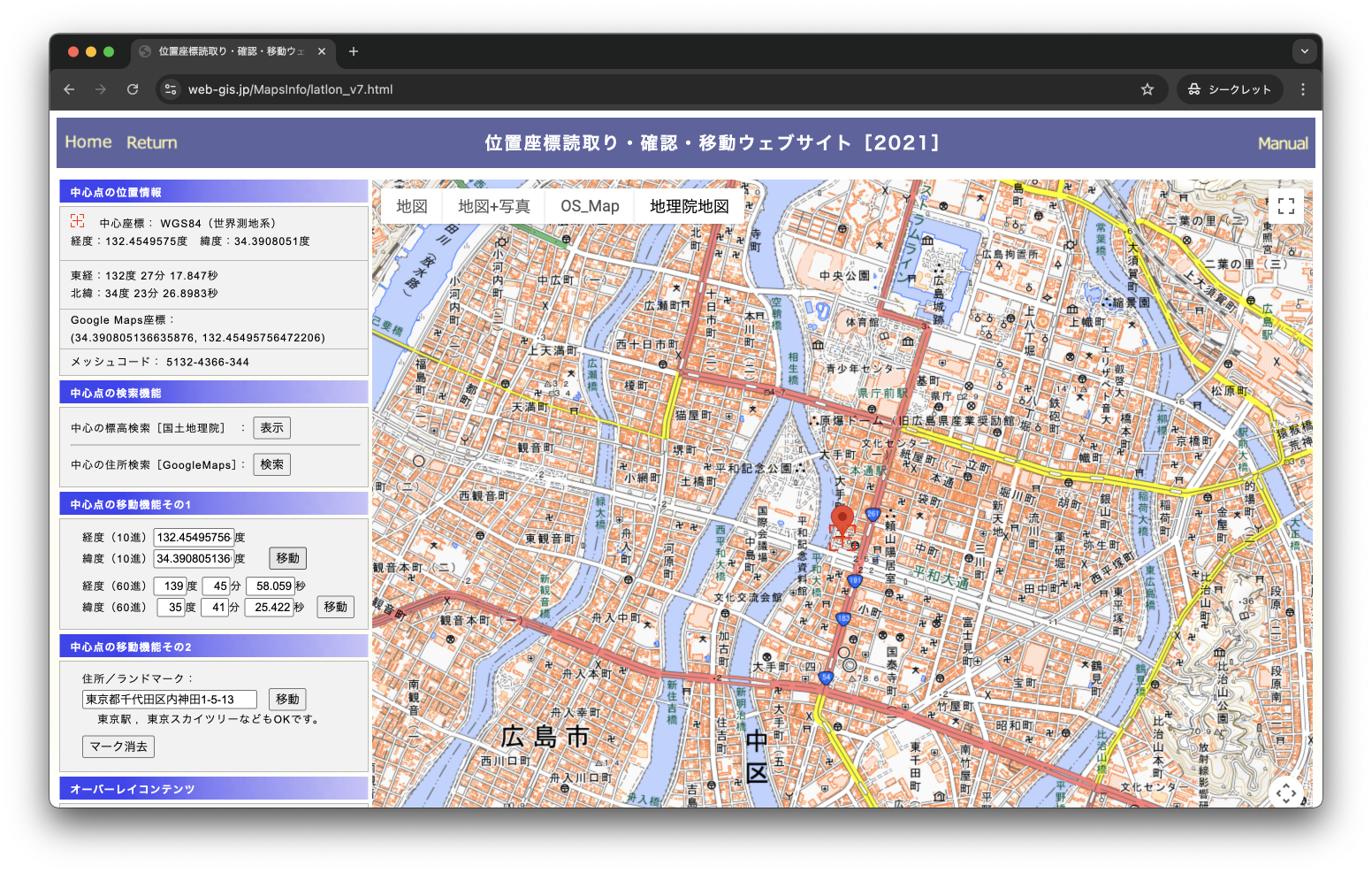
https://www.web-gis.jp/MapsInfo/latlon_v7.html
Canvas API
JavaScriptでWebページ上に図形、画像、アニメーションなどを描画するためのAPIです。
- 例:円を描画する
const canvas = document.getElementById('myCanvas');
const ctx = canvas.getContext('2d');

ctx.beginPath();
ctx.arc(100, 75, 50, 0, 2 * Math.PI);
ctx.fillStyle = 'red';
ctx.fill();
ctx.stroke();

Web Audio API
Webページ上で高度な音声処理や合成を行うためのAPIです。
- 例:音を再生
const audioCtx = new (window.AudioContext || window.webkitAudioContext)();
const oscillator = audioCtx.createOscillator();
const gainNode = audioCtx.createGain();

oscillator.connect(gainNode);
gainNode.connect(audioCtx.destination);

oscillator.type = 'sine';
oscillator.frequency.value = 440; // 440Hz (ラの音)
gainNode.gain.value = 0.5; // 音量を半分に

oscillator.start();
setTimeout(() => oscillator.stop(), 1000); // 1秒後に停止
WebSockets API
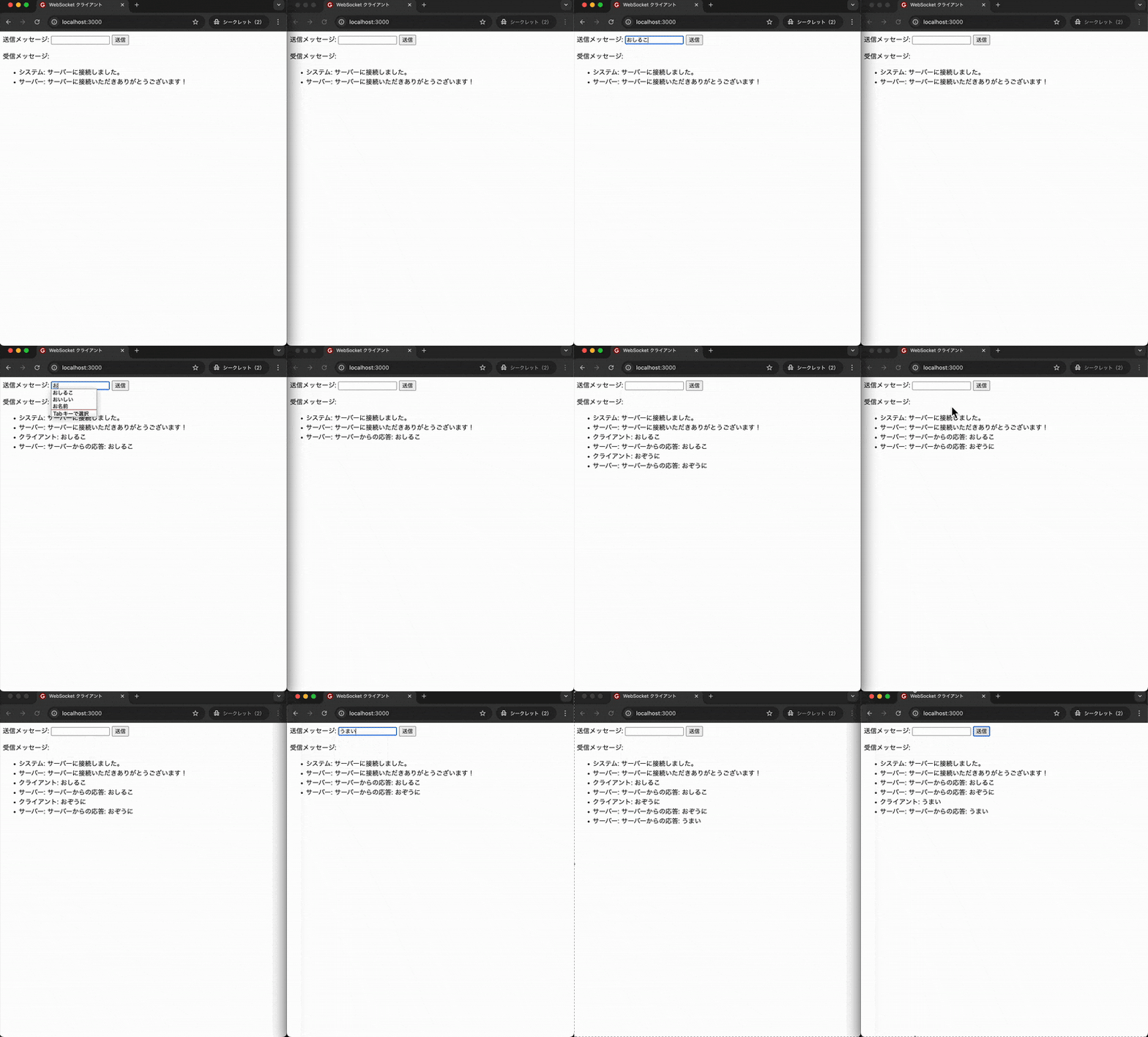
サーバーとクライアント間で双方向の永続的な通信チャネルを確立するためのAPIです。リアルタイムなアプリケーション(チャット、ゲームなど)の開発に利用されます。
- 例:WebSocket接続を確立し、メッセージを送受信する
コード
<!DOCTYPE html>
<html>
<head>
<title>WebSocket クライアント</title>
</head>
<body>
<div>
  <label for="message">送信メッセージ:</label>
  <input type="text" id="message">
  <button onclick="sendMessage()">送信</button>
</div>
<div>
  <p>受信メッセージ:</p>
  <ul id="messages"></ul>
</div>

<script>
  const websocket = new WebSocket('ws://localhost:8080'); // サーバーのアドレスを指定
  const messageInput = document.getElementById('message');
  const messagesList = document.getElementById('messages');

  websocket.onopen = () => {
    console.log('WebSocket接続が開きました。');
    appendMessage('システム', 'サーバーに接続しました。');
  };

  websocket.onmessage = event => {
    console.log('サーバーからのメッセージ:', event.data);
    appendMessage('サーバー', event.data);
  };

  websocket.onerror = error => {
    console.error('WebSocketエラー:', error);
    appendMessage('システム', `エラーが発生しました: ${error.message}`);
  };

  websocket.onclose = () => {
    console.log('WebSocket接続が閉じられました。');
    appendMessage('システム', 'サーバーとの接続が閉じられました。');
  };

  function sendMessage() {
    const message = messageInput.value;
    if (websocket.readyState === WebSocket.OPEN && message) {
      websocket.send(message);
      appendMessage('クライアント', message);
      messageInput.value = ''; // 送信後に入力欄をクリア
    } else if (websocket.readyState !== WebSocket.OPEN) {
      appendMessage('システム', 'WebSocket接続が開いていません。');
    } else {
      appendMessage('システム', '送信するメッセージを入力してください。');
    }
  }

  function appendMessage(sender, text) {
    const li = document.createElement('li');
    li.textContent = `${sender}: ${text}`;
    messagesList.appendChild(li);
  }
</script>
</body>
</html>
const WebSocket = require('ws');

const wss = new WebSocket.Server({ port: 8080 });

wss.on('connection', ws => {
console.log('クライアントが接続しました。');

ws.on('message', message => {
  console.log('受信したメッセージ:', message.toString());

  // 受信したメッセージをすべての接続中のクライアントに送信する
  wss.clients.forEach(client => {
    if (client.readyState === WebSocket.OPEN) {
      client.send(`サーバーからの応答: ${message.toString()}`);
    }
  });
});

ws.on('close', () => {
  console.log('クライアントが切断しました。');
});

ws.on('error', error => {
  console.error('WebSocketエラー:', error);
});

// 接続時にサーバーからクライアントへメッセージを送信する
ws.send('サーバーに接続いただきありがとうございます!');
});

console.log('WebSocketサーバーがポート 8080 で起動しました。');
まとめ
この記事ではWeb標準APIについて解説し、具体的な例をいくつかご紹介しました。
普段あまり使う機会のない「Geolocation API」や「Web Audio API」といったAPIを知る良い機会になったかと思います。特に「Geolocation API」はかなり正確な緯度・経度を取得できるため、使用する際は注意が必要だと感じました。
最後に
GoQSystemでは一緒に働いてくれる仲間を募集中です!
ご興味がある方は以下リンクよりご確認ください。