
この記事は
グラフィックス全般 Advent Calendar 2025 21日目の記事です。
Advent Calendar は久々に参加している最中のミズサワキヌコです。
よろしくお願いします。
※本記事は Chat GPT から得られた情報、構成案、本文を精査、リライトして制作しています
はじめに
この記事は、既存のホログラムシェーダーを参考にしつつ、
Unity(URP)で 「徐々に実体化する」 表現を自分の手元で再現してみた記録です。
参考にした元コードはこちらです(MITライセンス):
この記事でできること
- 元のコードの利用により、ホログラムで欲しい機能
(グリッチ、スキャンライン、リムなど)を一通り網羅することができる - _Progress(0〜1)で、ホログラム→実体化の進行を制御できる
完成イメージ
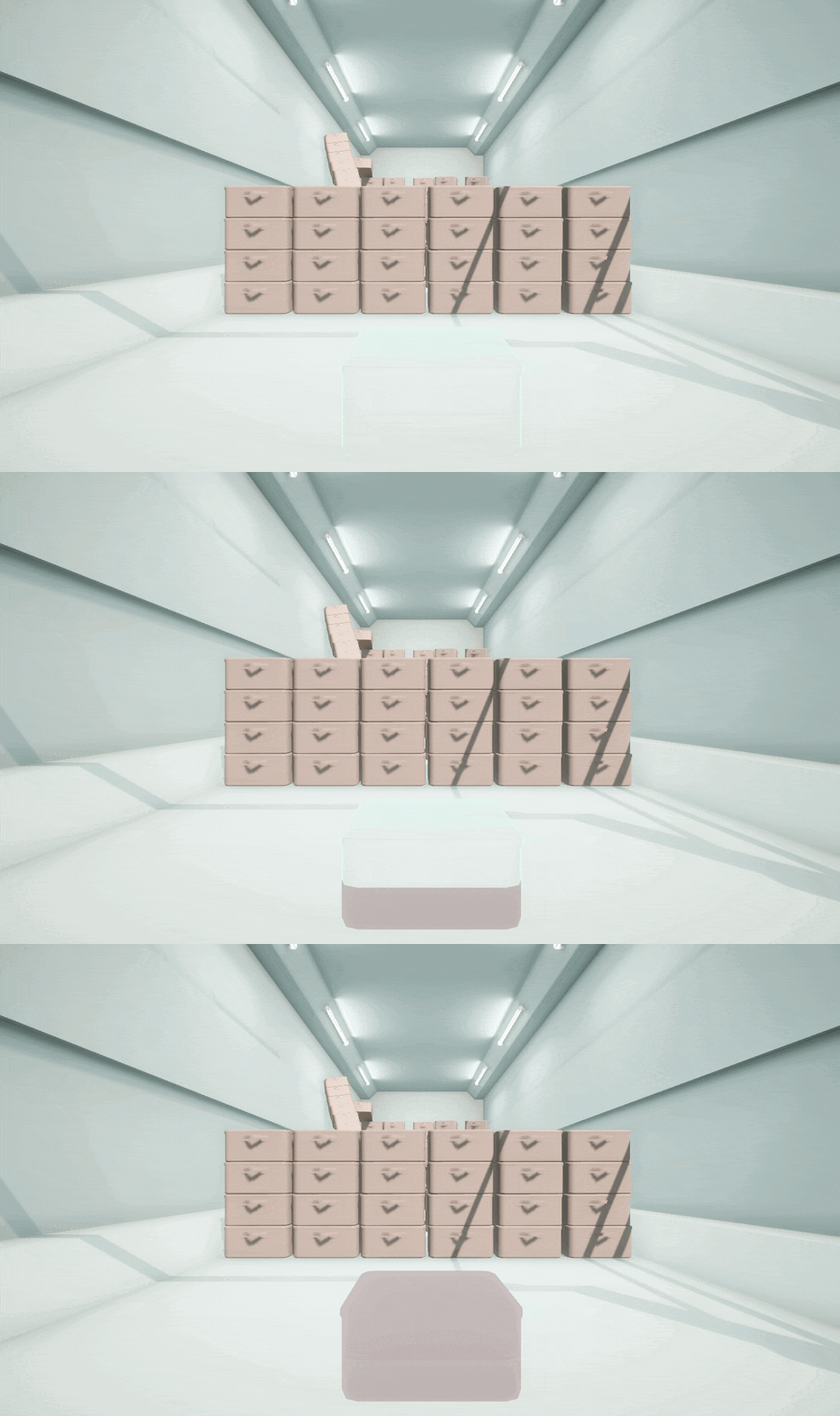
このような、横に一本、
境界線を引いてパッキリと見た目を切り替えるシェーダーです。
現状ではインスペクタからの変更でしか確認できませんが、
Progressを変更すると徐々に実体化/ホログラム化を切り替えることが出来ます。
- Progress=0 → 全てホログラム
- Progress=1 → 全て実体化
リム、グリッチなどを設定することで、
ホログラム部分の見た目を変えることができます。
開発&実行環境
Unity 2021.3.12f1
Windows 11
参考にしたコード
URP環境下で確認しましたが、そのまま動作させることは出来ました。
以降はこのコードをの一部ファイルを全文差し替える形で紹介します。
最小コード(コピペで動きます)
変更箇所の概要とポイント
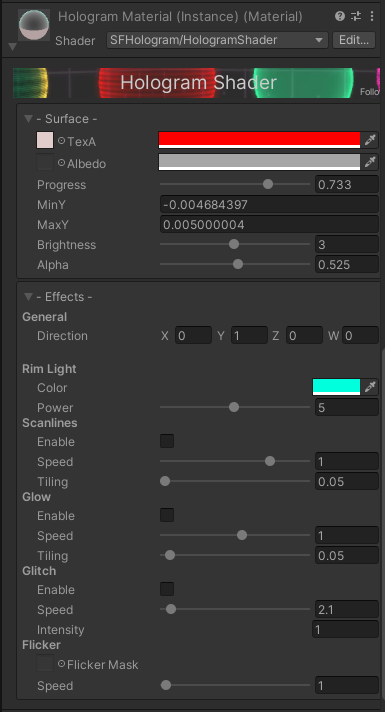
- シェーダーのコードと設定GUIに_Progress/_MinY/_MaxYの3項目を追加
- フラグメントシェーダーでmaskを作って_Progressを閾値としてlerpするよう変更
ホログラムシェーダーコードの差し替え内容
Assets/Hologram/Shader/Hologram.shader の差し替え内容は以下です。
Shader "SFHologram/HologramShader"
{
	Properties
	{
		// General
		_TexA ("Top Texture", 2D) = "white" {}
		_TexAColor ("Top Color", Color) = (1,1,1,1)
		_Brightness("Brightness", Range(0.1, 6.0)) = 3.0
		_Alpha ("Alpha", Range (0.0, 1.0)) = 1.0
		_Direction ("Direction", Vector) = (0,1,0,0)
		_Progress ("Progress", Range (0.0, 1.0)) = 1.0
		_MinY ("Min Y", Float) = -0.5                 // グラフ中の MinY
        _MaxY ("Max Y", Float) = 0.5                  // グラフ中の MaxY
		// Main Color
		_MainTex ("MainTexture", 2D) = "white" {}
		_MainColor ("MainColor", Color) = (1,1,1,1)
		// Rim/Fresnel
		_RimColor ("Rim Color", Color) = (1,1,1,1)
		_RimPower ("Rim Power", Range(0.1, 10)) = 5.0
		// Scanline
		_ScanTiling ("Scan Tiling", Range(0.01, 10.0)) = 0.05
		_ScanSpeed ("Scan Speed", Range(-2.0, 2.0)) = 1.0
		// Glow
		_GlowTiling ("Glow Tiling", Range(0.01, 1.0)) = 0.05
		_GlowSpeed ("Glow Speed", Range(-10.0, 10.0)) = 1.0
		// Glitch
		_GlitchSpeed ("Glitch Speed", Range(0, 50)) = 1.0
		_GlitchIntensity ("Glitch Intensity", Float) = 0
		// Alpha Flicker
		_FlickerTex ("Flicker Control Texture", 2D) = "white" {}
		_FlickerSpeed ("Flicker Speed", Range(0.01, 100)) = 1.0

		// Settings
		[HideInInspector] _Fold("__fld", Float) = 1.0
	}
	SubShader
	{
		Tags { "Queue"="Transparent" "RenderType"="Transparent" }
		Blend SrcAlpha OneMinusSrcAlpha
		LOD 100
		ColorMask RGB
        Cull Back

		Pass
		{
			HLSLPROGRAM

			#pragma shader_feature _SCAN_ON
			#pragma shader_feature _GLOW_ON
			#pragma shader_feature _GLITCH_ON
			#pragma vertex vert
			#pragma fragment frag

			#include "Packages/com.unity.render-pipelines.universal/ShaderLibrary/Core.hlsl"

			struct appdata
			{
				float4 vertex : POSITION;
				float3 normal : NORMAL;
				float2 uv : TEXCOORD0;
			};

			struct v2f
			{
				float4 vertex : SV_POSITION;
				float2 uv : TEXCOORD0;
				float4 positionOS : TEXCOORD1;
				float3 viewDir : TEXCOORD2;
				float3 worldNormal : NORMAL;
			};

			sampler2D _TexA;
			sampler2D _MainTex;
			sampler2D _FlickerTex;
			float4 _Direction;
			float4 _MainTex_ST;
			float4 _MainColor;
			float4 _RimColor;
			float _Progress;
			float _MinY;
            float _MaxY;
			float _RimPower;
			float _GlitchSpeed;
			float _GlitchIntensity;
			float _Brightness;
			float _Alpha;
			float _ScanTiling;
			float _ScanSpeed;
			float _GlowTiling;
			float _GlowSpeed;
			float _FlickerSpeed;

			v2f vert (appdata v)
			{
				v2f o;

				// Glitches
				#if _GLITCH_ON
					v.vertex.x += _GlitchIntensity * (step(0.5, sin(_Time.y * 2.0 + v.vertex.y * 1.0)) * step(0.99, sin(_Time.y*_GlitchSpeed * 0.5)));
				#endif

				o.vertex = mul(UNITY_MATRIX_MVP, v.vertex);

				o.uv = TRANSFORM_TEX(v.uv, _MainTex);
				float4 worldPos = mul(unity_ObjectToWorld, v.vertex);
				o.worldNormal = TransformObjectToWorldNormal(v.normal);
				o.viewDir = normalize(GetWorldSpaceViewDir(worldPos.xyz));

                o.uv = v.uv;
				o.positionOS = v.vertex.xyzw;
				return o;
			}


			//fixed4 frag (v2f i) : SV_Target
			half4 frag (v2f i) : SV_Target
			{
				half4 texColor = tex2D(_MainTex, i.uv);

				half dirVertex = (dot(i.positionOS, normalize(float4(_Direction.xyz, 1.0))) + 1) / 2;

				// Scanlines
				float scan = 0.0;
				#ifdef _SCAN_ON
					scan = step(frac(dirVertex * _ScanTiling + _Time.w * _ScanSpeed), 0.5) * 0.65;
				#endif

				// Glow
				float glow = 0.0;
				#ifdef _GLOW_ON
					glow = frac(dirVertex * _GlowTiling - _Time.x * _GlowSpeed);
				#endif

				// Flicker
				half4 flicker = tex2D(_FlickerTex, float2(_Time.x, _Time.y) * _FlickerSpeed);

				// Rim Light
				half rim = 1.0-saturate(dot(i.viewDir, i.worldNormal));
				half4 rimColor = _RimColor * pow (rim, _RimPower);

				float y = i.positionOS.y;

                // --- Shader Graph の処理再現 ---
                // Split: i.positionOS.y
                // Subtract: (y - MinY)
                float h = y - _MinY;

                // Divide: (h / (MaxY - MinY))
				// Saturate:0~1にクランプ
                float t = saturate(h / (_MaxY - _MinY));

                // Step ノード:Step(0, t)
                // → t >= 0 ? 1 : 0
                float mask = step(_Progress, t);

                // Texture sample
                float4 colA = tex2D(_TexA, i.uv);

				half4 col = texColor * _MainColor + (glow * 0.35 * _MainColor) + rimColor;

				col.a = texColor.a * _Alpha * (scan + rim + glow) * flicker.x;

				col.rgb *= _Brightness;

                // Lerp (A,B,mask)
                float4 finalColor = lerp(colA, col, mask);

				return finalColor;
			}
			ENDHLSL
		}
	}

	CustomEditor "HologramShaderGUI"
}
シェーダーGUIの差し替え内容
Assets/Hologram/Editor/HologramShaderGUI.cs の差し替え内容は以下です。
using Codice.Client.Commands;
using System;
using UnityEditor;
using UnityEngine;
using UnityEngine.Rendering;

public class HologramShaderGUI : ShaderGUI
{
    Material _material;
    MaterialProperty[] _props;
    MaterialEditor _materialEditor;

    // Properties

    private MaterialProperty TexA = null;
    private MaterialProperty TexAColor = null;

    // Albedo
    private MaterialProperty Albedo = null;
    private MaterialProperty AlbedoColor = null;
    private MaterialProperty Progress = null;
    private MaterialProperty MinY = null;
    private MaterialProperty MaxY = null;
    private MaterialProperty Brightness = null;
    private MaterialProperty Alpha = null;
    private MaterialProperty Direction = null;

    // Rim
    private MaterialProperty RimColor = null;
    private MaterialProperty RimPower = null;

    // Scanlines
    private MaterialProperty ScanSpeed = null;
    private MaterialProperty ScanTiling = null;

    // Glow
    private MaterialProperty GlowSpeed = null;
    private MaterialProperty GlowTiling = null;

    // Glitch
    private MaterialProperty GlitchSpeed = null;
    private MaterialProperty GlitchIntensity = null;

    // Flicker
    private MaterialProperty Flicker = null;
    private MaterialProperty FlickerSpeed = null;

    private static class Styles
    {
        public static GUIContent TexAText = new GUIContent("TexA");
        public static GUIContent AlbedoText = new GUIContent("Albedo");
        public static GUIContent FlickerText = new GUIContent("Flicker Mask");
    }

    enum Category
    {
        General = 0,
        Effects,
    }

    void AssignProperties()
    {
        TexA = FindProperty("_TexA", _props);
        TexAColor = FindProperty("_TexAColor", _props);

        Albedo = FindProperty("_MainTex", _props);
        AlbedoColor = FindProperty("_MainColor", _props);
        Progress = FindProperty("_Progress", _props);
        MinY = FindProperty("_MinY", _props);
        MaxY = FindProperty("_MaxY", _props);
        Brightness = FindProperty("_Brightness", _props);
        Alpha = FindProperty("_Alpha", _props);
        Direction = FindProperty("_Direction", _props);

        RimColor = FindProperty("_RimColor", _props);
        RimPower = FindProperty("_RimPower", _props);

        ScanSpeed = FindProperty("_ScanSpeed", _props);
        ScanTiling = FindProperty("_ScanTiling", _props);

        GlowSpeed = FindProperty("_GlowSpeed", _props);
        GlowTiling = FindProperty("_GlowTiling", _props);

        GlitchSpeed = FindProperty("_GlitchSpeed", _props);
        GlitchIntensity = FindProperty("_GlitchIntensity", _props);

        Flicker = FindProperty("_FlickerTex", _props);
        FlickerSpeed = FindProperty("_FlickerSpeed", _props);
    }

    public override void OnGUI(MaterialEditor materialEditor, MaterialProperty[] props)
    {
        _material = materialEditor.target as Material;
        _props = props;
        _materialEditor = materialEditor;

        AssignProperties();

        Layout.Initialize(_material);

        EditorGUILayout.BeginHorizontal();
        GUILayout.Space(-7);
        EditorGUILayout.BeginVertical();
        EditorGUI.BeginChangeCheck();
        DrawGUI();
        EditorGUILayout.EndVertical();
        GUILayout.Space(1);
        EditorGUILayout.EndHorizontal();

        Undo.RecordObject(_material, "Material Edition");
    }

    static Texture2D bannerTex = null;
    static GUIStyle rateTxt = null;
    static GUIStyle title = null;
    static GUIStyle linkStyle = null;
    static string twitterURL = "https://twitter.com/moj0111";

    void DrawBanner()
    {
        if (bannerTex == null)
            bannerTex = Resources.Load<Texture2D>("banner");

        if (rateTxt == null)
        {
            rateTxt = new GUIStyle();
            rateTxt.alignment = TextAnchor.LowerRight;
            rateTxt.normal.textColor = new Color(0.9f, 0.9f, 0.9f);
            rateTxt.fontSize = 9;
            rateTxt.padding = new RectOffset(0, 1, 0, 1);
        }

        if (title == null)
        {
            title = new GUIStyle(rateTxt);
            title.normal.textColor = new Color(1f, 1f, 1f);
            title.alignment = TextAnchor.MiddleCenter;
            title.fontSize = 19;
        }

        if (linkStyle == null) linkStyle = new GUIStyle();

        if (bannerTex != null)
        {
            GUILayout.Space(3);
            var rect = GUILayoutUtility.GetRect(0, int.MaxValue, 30, 30);
            EditorGUI.DrawPreviewTexture(rect, bannerTex, null, ScaleMode.ScaleAndCrop);
            rateTxt.alignment = TextAnchor.LowerRight;
            EditorGUI.LabelField(rect, "Follow", rateTxt);

            EditorGUI.LabelField(rect, "Hologram Shader", title);

            if (GUI.Button(rect, "", linkStyle)) {
                Application.OpenURL(twitterURL);
            }
            GUILayout.Space(3);
        }
    }

    void DrawGUI()
    {
        DrawBanner();

        if (Layout.BeginFold((int)Category.General, "- Surface -"))
            DrawGeneralSettings();
        Layout.EndFold();

        if (Layout.BeginFold((int)Category.Effects, "- Effects -"))
        {
            DrawGeneralEffect();
            DrawRimSettings();
            DrawScanlinesSettings();
            DrawGlowSettings();
            DrawGlitchSettings();
            DrawFlickerSettings();
        }
        Layout.EndFold();
    }

    void DrawGeneralEffect()
    {
        GUILayout.Space(-3);
        GUILayout.Label("General", EditorStyles.boldLabel);
        EditorGUI.indentLevel++;
        var ofs = EditorGUIUtility.labelWidth;
        _materialEditor.SetDefaultGUIWidths();
        _materialEditor.ShaderProperty(Direction, "Direction");
        EditorGUIUtility.labelWidth = ofs;
        EditorGUI.indentLevel--;
    }

    void DrawGeneralSettings()
    {
        GUILayout.Space(-3);
        EditorGUI.indentLevel++;
        var ofs = EditorGUIUtility.labelWidth;
        _materialEditor.SetDefaultGUIWidths();
        EditorGUIUtility.labelWidth = 0;
        _materialEditor.TexturePropertySingleLine(Styles.TexAText, TexA, TexAColor);
        _materialEditor.TexturePropertySingleLine(Styles.AlbedoText, Albedo, AlbedoColor);
        EditorGUIUtility.labelWidth = ofs;
        _materialEditor.ShaderProperty(Progress, "Progress");
        _materialEditor.ShaderProperty(MinY, "MinY");
        _materialEditor.ShaderProperty(MaxY, "MaxY");
        _materialEditor.ShaderProperty(Brightness, "Brightness");
        _materialEditor.ShaderProperty(Alpha, "Alpha");
        EditorGUI.indentLevel--;
    }

    void DrawRimSettings()
    {
        GUILayout.Space(-3);
        GUILayout.Label("Rim Light", EditorStyles.boldLabel);
        EditorGUI.indentLevel++;
        var ofs = EditorGUIUtility.labelWidth;
        _materialEditor.SetDefaultGUIWidths();
        _materialEditor.ShaderProperty(RimColor, "Color");
        _materialEditor.ShaderProperty(RimPower, "Power");
        EditorGUIUtility.labelWidth = ofs;
        EditorGUI.indentLevel--;
    }

    void DrawScanlinesSettings()
    {
        GUILayout.Space(-3);
        GUILayout.Label("Scanlines", EditorStyles.boldLabel);
        EditorGUI.indentLevel++;

        bool toggle = Array.IndexOf(_material.shaderKeywords, "_SCAN_ON") != -1;
        EditorGUI.BeginChangeCheck();
        toggle = EditorGUILayout.Toggle("Enable", toggle);
        if (EditorGUI.EndChangeCheck())
        {
            if (toggle)
                _material.EnableKeyword("_SCAN_ON");
            else
                _material.DisableKeyword("_SCAN_ON");
        }

        var ofs = EditorGUIUtility.labelWidth;
        _materialEditor.SetDefaultGUIWidths();
        _materialEditor.ShaderProperty(ScanSpeed, "Speed");
        _materialEditor.ShaderProperty(ScanTiling, "Tiling");
        EditorGUIUtility.labelWidth = ofs;
        EditorGUI.indentLevel--;
    }

    void DrawGlowSettings()
    {
        GUILayout.Space(-3);
        GUILayout.Label("Glow", EditorStyles.boldLabel);
        EditorGUI.indentLevel++;

        bool toggle = Array.IndexOf(_material.shaderKeywords, "_GLOW_ON") != -1;
        EditorGUI.BeginChangeCheck();
        toggle = EditorGUILayout.Toggle("Enable", toggle);
        if (EditorGUI.EndChangeCheck())
        {
            if (toggle)
                _material.EnableKeyword("_GLOW_ON");
            else
                _material.DisableKeyword("_GLOW_ON");
        }

        var ofs = EditorGUIUtility.labelWidth;
        _materialEditor.SetDefaultGUIWidths();
        _materialEditor.ShaderProperty(GlowSpeed, "Speed");
        _materialEditor.ShaderProperty(GlowTiling, "Tiling");
        EditorGUIUtility.labelWidth = ofs;
        EditorGUI.indentLevel--;
    }

    void DrawGlitchSettings()
    {
        GUILayout.Space(-3);
        GUILayout.Label("Glitch", EditorStyles.boldLabel);
        EditorGUI.indentLevel++;

        bool toggle = Array.IndexOf(_material.shaderKeywords, "_GLITCH_ON") != -1;
        EditorGUI.BeginChangeCheck();
        toggle = EditorGUILayout.Toggle("Enable", toggle);
        if (EditorGUI.EndChangeCheck())
        {
            if (toggle)
                _material.EnableKeyword("_GLITCH_ON");
            else
                _material.DisableKeyword("_GLITCH_ON");
        }

        var ofs = EditorGUIUtility.labelWidth;
        _materialEditor.SetDefaultGUIWidths();
        _materialEditor.ShaderProperty(GlitchSpeed, "Speed");
        _materialEditor.ShaderProperty(GlitchIntensity, "Intensity");
        EditorGUIUtility.labelWidth = ofs;
        EditorGUI.indentLevel--;
    }

    void DrawFlickerSettings()
    {
        GUILayout.Space(-3);
        GUILayout.Label("Flicker", EditorStyles.boldLabel);
        EditorGUI.indentLevel++;
        var ofs = EditorGUIUtility.labelWidth;
        _materialEditor.SetDefaultGUIWidths();
        EditorGUIUtility.labelWidth = 0;
        _materialEditor.TexturePropertySingleLine(Styles.FlickerText, Flicker, null);
        EditorGUIUtility.labelWidth = ofs;
        _materialEditor.ShaderProperty(FlickerSpeed, "Speed");
        EditorGUI.indentLevel--;
    }
}
オブジェクトのBoundsを取得するコンポーネント
実体化するにあたり、
オブジェクトへの追加が必要になったコンポーネントは以下です。
using UnityEngine;

[RequireComponent(typeof(MeshFilter))]
[RequireComponent(typeof(Renderer))]
public class AutoVerticalBounds : MonoBehaviour
{
    void Start()
    {
        var mesh = GetComponent<MeshFilter>().sharedMesh;
        var mat = GetComponent<Renderer>().material;

        float minY = mesh.bounds.min.y;
        float maxY = mesh.bounds.max.y;

        mat.SetFloat("_MinY", minY);
        mat.SetFloat("_MaxY", maxY);
    }
}
今後改良したい・作りたいところ
今回、時間の都合で対応できなかった箇所がありました。
ここではそちらの解決策(案)について触れたいとおもいます。
元のコードにあるグリッチが、ホログラム部分だけでなく実体化部分にも反映されてしまう
解決策(案):
頂点シェーダー側でも_Progressのマスクを使って頂点の位置を制御する
実体化された部分の裏面が描画されない
解決策(案):
カリングの設定を見直す
_Progressの変更がインスペクタでしか出来ない
解決策(案):
Timeline, DOTweenなどを使用して変更できるようにし、ゲームシーケンスに組み込む
おわりに
既存のシェーダーを元にして実装したシェーダーですが、いかがでしたでしょうか。
今回は「完璧な設計」より「まず動かして理解を進める」を優先しています。
次は_Progressの変更、実体化部分の裏面描画・グリッチ処理からの退避あたりを
触ってみる予定です。
この記事で、Unityでのシェーダー表現に少しでも活かして頂けたらさいわいです。