
やりたい事
こんなコードがあったとして
<template>
  <b-table
    :items="items"
    :fields="fields"
  />
</template>

<script>
export default {
  data() {
    return {
      items: [
        { num: "12,345,678" },
        { num: "54,321" },
        { num: "1,234" },
        { num: "10" }
      ]
      fields: [
        { key: 'num', sortable: true }
      ]
    }
  }
}
テーブルがあったとして、ソートするとこんな感じにカンマの影響で文字列としてソートしようとして想定していた並びになりません。
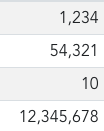
これに直接的に対応できるオプションは無いので、ソートのルールを自作していきましょう。
やり方
https://bootstrap-vue.org/docs/components/table#sort-compare-routine
この、 sort-compare を使います。ソートのルールを記述する事ができます。
  <b-table
    :items="items"
    :fields="fields"
    :sort-compare="sortCompare" // <- これ追加
  />
ソート時に sortCompare メソッドを呼びソートを行ってくれます。
実際のsortCompareを実装しましょう。
  methods: {
    sortCompare(a, b, key) {
      const numA = Number(a[key].split(',').join(''))
      const numB = Number(b[key].split(',').join(''))
      return numA - numB;
    }
  }
第4引数以降も色々受け取れますが、今回は不要なのでこの3つだけ使います。
- 引数1
a: 前列のオブジェクト - 引数2
b: 次列のオブジェクト - 引数3
key: ソートしようとしたカラムのキー (num をソートしようとしたならば、num)
列のオブジェクトから、今回ソートしようとしたカラムを取り出すために a[key] として、そこから .split(',').join('') としてカンマを切り捨て Number() で数値に変換します。
そこから比較して返してあげるようにします。これで数値でソートができるようになりました。
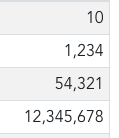
最初からカンマ区切りに対応するようなオプションがあればいいんですけどね。