
本記事は、めんどい太郎の Advent Calendar 2025 10日目の記事です。
はじめに
皆さんはGitHub Copilot使ってますか?
今回は自分のコードをGitHub Copilotにレビューしてもらいたいと思います!
方法
今、Pull Requestを送ると自動的にGitHub Copilotがレビューをするようになっています。
私はなぜか勝手に設定が有効化されていました。(この記事はこれを伝えたいだけだったりする)
もしかしたら私だけかもしれないので方法を紹介しておきます。
方法①自動でレビューしてもらう
GitHubを開き、自分のアイコンを押してメニューを開きます。
メニューのCopilot settingsを開きます。
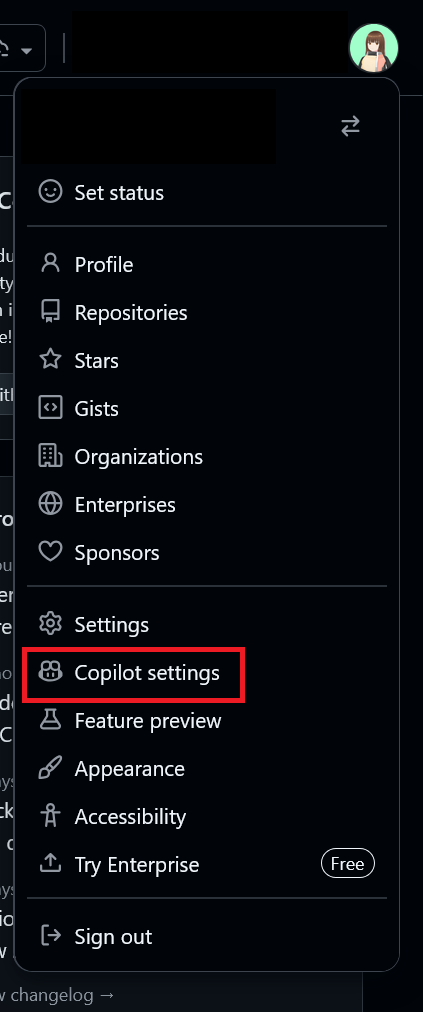
Copilot code reviewの項目のAutomatic Copilot code reviewをEnableにします。
あとはPull Requestを送ればCopilotが勝手にレビューしてくれます。

方法②手動でレビューをお願いする
Pull Requestを送る際、ReviewersにCopilotを指定します。
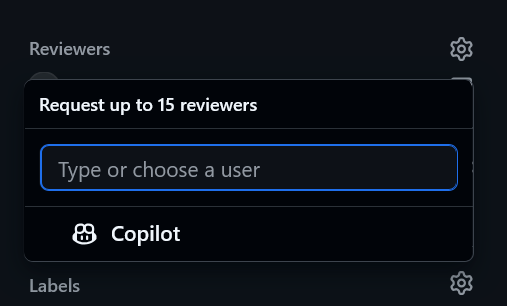
すると、レビューしてくれます。
送った後でも、Copilotを指定すればレビューしてくれますよ。
実際のレビュー
この前投稿した「ConoHaのサーバコンソールに楽々アクセスするためのCLIツール」をCopilot君がレビューしてくれていたのでリンクを貼り付けておきます。
(ガン無視してるけど)
おわりに
GitHub CopilotにPull Requestのレビューをしてもらう方法を紹介しました。
的確なレビューをしてくれる時もあるので、結構便利かもです。
まぁこの記事で伝えたかったのは勝手に自動レビューがONにされてたことでした。もしかしたら僕だけかもしれませんが。
(なんかで操作を間違えた可能性もある)
まぁ便利ではあります!
ぜひ試してみてください!