
概要
・凸包の限界計算量を調査
・32Gメモリでは20次元まで計算可能(計算可能なデータ量は次元が上がるほど減少)
・メモリ、CPUが異なれば結果が変わるのであしからず
背景
scipyでは凸包(convexhull)が計算できる。
以前(2022?)は3次元までしか計算できなかったが、いつの間にか任意の次元で計算できるようになっていた。
しかし、凸包の計算はメモリを馬鹿食いするのが通例。
そこで、計算上限を調べる事にした。
内容
環境
Windows11、8 vcpu 数、32 GiB メモリ:大体28Gぐらいはフリーで使える状態
乱数でDataを作成して、それをscipyで凸包を作成した。
①作成できたか? ②その時の時間 を検証した。
# import
# -----------------------
import numpy as np
import time
from scipy.spatial import ConvexHull

import logging
from datetime import datetime


# logファイル作成
# ----------------------
# 任意のログファイルの保存場所
log_filepath = "C:/Users/Desktop/log/logfile.log"  # ここを任意のパスに変更

# ログに記録
log_message = "start\n"
with open(log_filepath, "a") as log_file:
    log_file.write(log_message)


# 凸包の計算
# -----------------------
np.random.seed(42)  # 再現性のためにシードを設定


# データ次元とデータ数を設定
dimensions = [5]
data_sizes = [10000,100000,1000000,10000000,100000000,1000000000]

#dimensions = [10]
#data_sizes = [1100,1200,1300,1400]

#dimensions = [15]
#data_sizes = [60,70,80,90]

#dimensions = [20]
#data_sizes = [21,30,40,50]

#dimensions = [25]
#data_sizes = [26,30,40,50]


# 結果を保存するリスト
results = []

# 各組み合わせで凸包の計算時間を測定
for dim in dimensions:
    for size in data_sizes:

        # データ生成
        data = np.random.rand(size, dim)

        # 時間計測開始
        start_time = time.time()
        print(dim,size,datetime.now())

        hull = ConvexHull(data)

        end_time = time.time()
        print(dim,size,datetime.now())

        # 計算時間
        elapsed_time = end_time - start_time
        results.append((dim, size, elapsed_time))

        # ログに保存
        log_message = f"{datetime.now()} - Dim: {dim}, Rows: {size}, Convex hull computation time: {elapsed_time:.6f} seconds\n"
        with open(log_filepath, "a") as log_file:
            log_file.write(log_message)
結果
以下の図のようになった。計算が出来た上限値を記載している。
横軸はデータ次元(cols)、縦軸はデータ数(rows)である。数値は計算時間を示す。

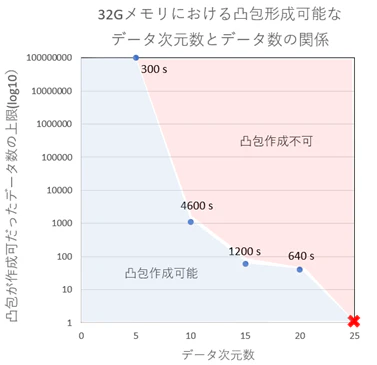
25次元では、凸包形成に必要な最低点である26点でも凸包が形成できなかった。
※凸包形成には、最低でも次元+1点が必要。例:2次元では、最低3点(三角形)
まとめ
凸包計算量の上限を調査した。
ちなみに、2025年段階ではGPUで凸包を計算できるPythonライブラリはたぶん無い。
野良ライブラリもあるが、scipyが一番安定している気がする。