概要
Databricks(Spark)にてPysparkによりSparkテーブルのファイルフォーマットを変数にセットする方法を共有します。
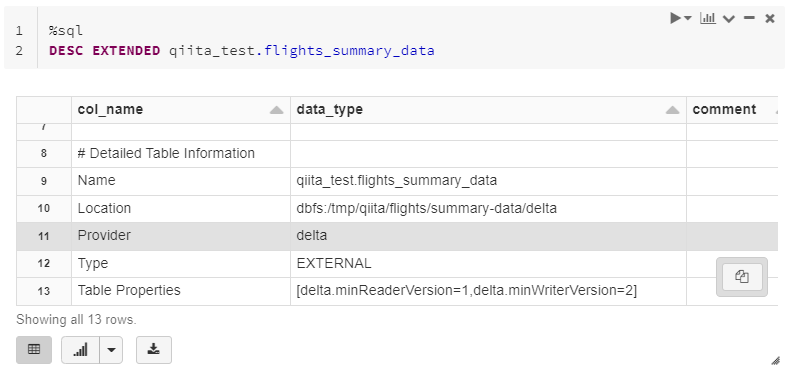
DESC EXTENDEDにより取得できるデータに含まれており、Sparkデータフレームに格納後、値を変数にセットする手順です。
実行環境
databricks runtime: 8.3.x-cpu-ml-scala2.12
Python version: 3.8.8
pyspark version: 3.1.2.dev0
手順
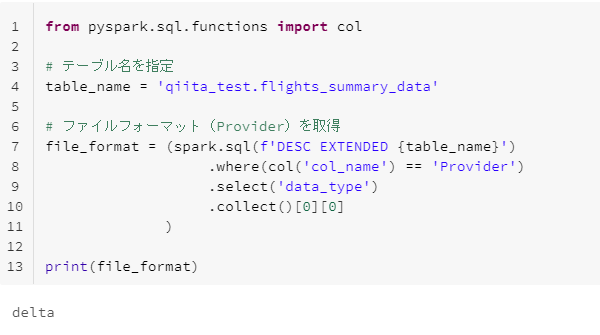
下記のコードを実行。
Delta Lake形式の場合には、deltaと表示されます。
from pyspark.sql.functions import col

# テーブル名を指定
table_name = 'qiita_test.flights_summary_data'

# ファイルフォーマット(Provider)を取得
file_format = (spark.sql(f'DESC EXTENDED {table_name}')
                   .where(col('col_name') == 'Provider')
                   .select('data_type')
                   .collect()[0][0]
              )

print(file_format)
Parquet形式の場合には、parquetと表示されます。
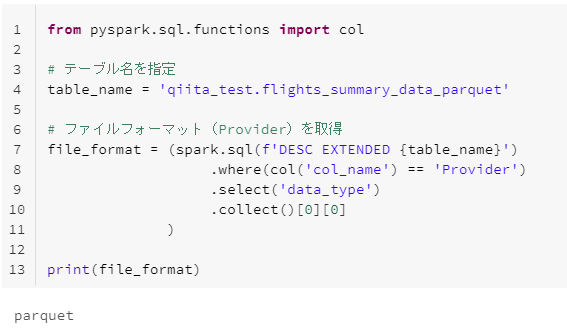
from pyspark.sql.functions import col

# テーブル名を指定
table_name = 'qiita_test.flights_summary_data_parquet'

# ファイルフォーマット(Provider)を取得
file_format = (spark.sql(f'DESC EXTENDED {table_name}')
                   .where(col('col_name') == 'Provider')
                   .select('data_type')
                   .collect()[0][0]
              )

print(file_format)