
はじめに
2026年3月10日、Amazon Bedrock AgentCore Runtime が Stateful MCP サーバー機能に対応しました。
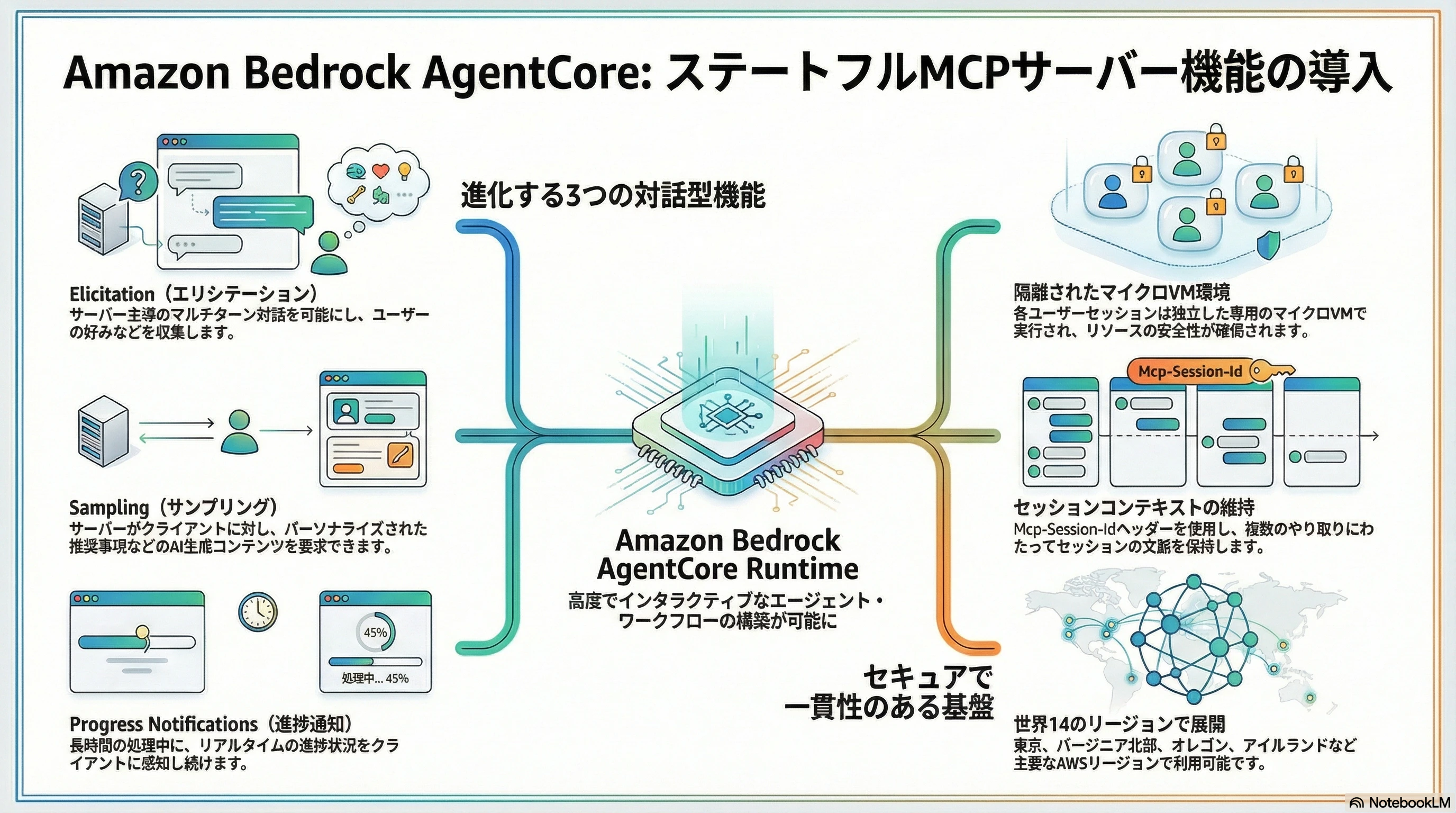
3つの新機能
1. Elicitation(対話的入力収集)
サーバー側からユーザーに質問を投げかけ、情報を段階的に収集できる機能です。
これまでのMCPでは、ツール呼び出し時に必要なパラメータをすべて一度に渡す必要がありました。Elicitationを使うと、ツールの実行中にサーバーがユーザーへ質問を投げ、マルチターンで情報を収集することが可能です。
2. Sampling(LLMテキスト生成リクエスト)
サーバーがクライアント側のLLMにテキスト生成を依頼できる機能です。
例えば旅行プランのツールが、ユーザーの好みに基づいた「パーソナライズされたおすすめ文」をLLMに生成させるといった使い方ができます。サーバー自身がLLMを持っていなくても、クライアント側のLLMの力を借りられるのがポイントです。
3. Progress Notifications(進捗通知)
長時間かかる処理の進捗をリアルタイムでクライアントに通知できる機能です。
フライト検索や予約処理など、時間のかかるオペレーションで「いま何をしているか」をユーザーに見せることができるため、ユーザーの満足度に貢献します。
Stateless vs Stateful:何が変わったのか
今回のアップデートの核心は「セッションが状態を持てるようになった」ことです。
実際に動かしてみた
理屈はわかったので、3つの機能をすべて使う旅行予約エージェントのサンプルを実際に動かしてみました。
Step 0:環境準備
# 必要なパッケージをインストール
pip install "fastmcp>=3.0.0" mcp
執筆時点では Python 3.13 / fastmcp==3.1.1 / mcp==1.26.0 で動作を確認しています。
Step 1:サンプルアプリの準備
from fastmcp import FastMCP, Context
import asyncio, json

mcp = FastMCP("Travel-Booking-Agent")

# ============================================================
# Resources — 目的地データをクライアントに公開
# ============================================================
DESTINATIONS = {
    "paris":    {"name": "パリ(フランス)",       "flight": 450, "hotel": 180,
                 "highlights": ["エッフェル塔", "ルーヴル美術館", "ノートルダム大聖堂"]},
    "tokyo":    {"name": "東京(日本)",           "flight": 900, "hotel": 150,
                 "highlights": ["渋谷", "浅草寺", "富士山日帰り"]},
    "new york": {"name": "ニューヨーク(アメリカ)", "flight": 350, "hotel": 250,
                 "highlights": ["タイムズスクエア", "中央公園", "自由の女神"]},
    "bali":     {"name": "バリ(インドネシア)",   "flight": 600, "hotel": 120,
                 "highlights": ["ウブド", "タナロット寺院", "スミニャックビーチ"]},
}

# 日本語名 → 辞書キーのマッピング
DEST_ALIASES = {
    "パリ":         "paris",
    "東京":         "tokyo",
    "ニューヨーク": "new york",
    "バリ":         "bali",
}

@mcp.resource("travel://destinations")
def list_destinations() -> str:
    """すべての目的地と料金情報を返す"""
    return json.dumps(DESTINATIONS, indent=2, ensure_ascii=False)

# ============================================================
# Prompts — パッキングリストなどのテンプレート
# ============================================================
@mcp.prompt()
def packing_list(destination: str, days: int, trip_type: str) -> str:
    """持ち物リスト生成用のプロンプトテンプレート"""
    return f"{destination}への{trip_type}{days}日間の持ち物リストを作成してください。"

# ============================================================
# Tool — 全MCP機能を活用した旅行プランニング
# ============================================================
@mcp.tool()
async def plan_trip(ctx: Context) -> str:
    """Elicitation / Progress / Sampling の3機能をフル活用するメインツール"""

    # ---- Phase 1: Elicitation(対話的に情報収集) ----
    dest_result = await ctx.elicit(
        message="どこに行きたいですか?\n選択肢: パリ, 東京, ニューヨーク, バリ",
        response_type=str
    )
    if dest_result.action != "accept":
        return "旅行計画をキャンセルしました。"

    # 日本語名も英語名もどちらも受け付ける
    raw_input = dest_result.data.strip()
    dest_key = DEST_ALIASES.get(raw_input) or raw_input.lower()
    dest = DESTINATIONS.get(dest_key, DESTINATIONS["paris"])

    type_result = await ctx.elicit(
        message="旅行の種類は?",
        response_type=["ビジネス", "レジャー", "家族旅行"]
    )
    if type_result.action != "accept":
        return "旅行計画をキャンセルしました。"
    trip_type = type_result.data

    days_result = await ctx.elicit(
        message="何日間ですか?(3〜14日)",
        response_type=int
    )
    if days_result.action != "accept":
        return "旅行計画をキャンセルしました。"
    days = max(3, min(14, days_result.data))

    travelers_result = await ctx.elicit(
        message="旅行者の人数は?",
        response_type=int
    )
    if travelers_result.action != "accept":
        return "旅行計画をキャンセルしました。"
    travelers = travelers_result.data

    # ---- Phase 2: Progress Notifications(進捗通知) ----
    total_steps = 5
    for step in range(1, total_steps + 1):
        await ctx.report_progress(progress=step, total=total_steps)
        await asyncio.sleep(0.4)  # 検索処理のシミュレーション

    # ---- Phase 3: Sampling(LLMにおすすめ文を生成させる) ----
    response = await ctx.sample(
        messages=f"{dest['name']}への旅行のおすすめを3つ、60文字以内で教えてください。",
        max_tokens=150
    )
    ai_tips = response.text if response.text else "良い旅を!"

    # ---- コスト計算 ----
    flight_cost = dest["flight"] * travelers
    rooms = (travelers + 1) // 2
    hotel_cost = dest["hotel"] * days * rooms
    total_cost = flight_cost + hotel_cost

    # ---- 最終確認(Elicitation で予約確定を問う) ----
    confirm = await ctx.elicit(
        message=f"""
========== 旅行プランの概要 ==========
行き先: {dest['name']}
旅行タイプ: {trip_type}
期間: {days}日間
旅行者: {travelers}人

費用:
  航空券: ${flight_cost}
  ホテル: ${hotel_cost}({rooms}部屋 × {days}泊)
  合計:   ${total_cost}

予約を確定しますか?""",
        response_type=["はい", "いいえ"]
    )

    if confirm.action != "accept" or confirm.data == "いいえ":
        return "予約をキャンセルしました。検索結果は24時間保存されます。"

    # ---- 最終結果を返却 ----
    highlights = "\n".join(f"  * {h}" for h in dest["highlights"])
    return f"""
==================================================
  予約が確定しました!
==================================================
予約番号: TRV-{ctx.session_id[:8].upper()}

旅行の詳細:
  {dest['name']}
  {days}日間 | {travelers}名
  旅行タイプ: {trip_type}

航空券: ${flight_cost}
宿泊:   ${hotel_cost}({rooms}部屋 × {days}泊)
合計:   ${total_cost}

おすすめスポット:
{highlights}

AIからのおすすめ:
{ai_tips}
==================================================
"""

# サーバー起動(Statefulモード)
if __name__ == "__main__":
    mcp.run(
        transport="streamable-http",
        host="0.0.0.0",
        port=8000,
        stateless_http=False  # ← ここでStatefulを有効にします
    )
Step 2:ローカルで起動&テスト
ターミナル1(サーバー起動):
python travel_server.py
[03/29/26 16:51:11] INFO     Starting MCP server 'Travel-Booking-Agent' with transport 'streamable-http' on
                             http://0.0.0.0:8000/mcp
INFO:     Started server process [19566]
INFO:     Waiting for application startup.
INFO:     Application startup complete.
INFO:     Uvicorn running on http://0.0.0.0:8000 (Press CTRL+C to quit)
ターミナル2(テストクライアント実行):
テストクライアント(test_client.py)を実行すると、まずResources / Promptsのテストを経て、メインのplan_tripツールが呼び出されます。(Resources / Prompts は今回の本題ではありませんので実質不要です。)
import asyncio
import sys
from fastmcp import Client
from fastmcp.client.transports import StreamableHttpTransport
from fastmcp.client.elicitation import ElicitResult
from mcp.types import CreateMessageResult, TextContent, SamplingMessage


async def elicit_handler(message, response_type, params, ctx):
    """Elicitation ハンドラー — サーバーからの質問に応答する。"""
    print(f"\n>>> サーバーからの質問: {message}")

    # スキーマから入力型と選択肢を取得する
    schema = params.requestedSchema if hasattr(params, "requestedSchema") else {}
    value_schema = schema.get("properties", {}).get("value", {})
    enum_values = value_schema.get("enum")       # 選択肢がある場合はリスト
    value_type  = value_schema.get("type", "string")  # "integer" / "string" など

    if enum_values:
        # 選択肢がある場合 — 番号で選ぶ(無効な入力は再入力を促す)
        for i, opt in enumerate(enum_values, 1):
            print(f"    {i}. {opt}")
        while True:
            try:
                choice = int(input("    番号を選択: ").strip())
                response = enum_values[choice - 1]
                break
            except (ValueError, IndexError):
                print(f"    ※ 1〜{len(enum_values)} の番号を入力してください")
    elif value_type == "integer":
        # 整数入力の場合(無効な入力は再入力を促す)
        while True:
            try:
                response = int(input("    回答(数値): ").strip())
                break
            except ValueError:
                print("    ※ 数値を入力してください")
    else:
        # 文字列入力の場合
        response = input("    回答: ").strip()

    print(f"<<< 回答送信: {response}")
    # content は {"value": <値>} の形式で返す(スキーマが value フィールドを要求するため)
    return ElicitResult(action="accept", content={"value": response})


async def sampling_handler(messages, params, ctx):
    """Sampling ハンドラー — サーバーからの LLM 生成リクエストに応答する。"""
    print(f"\n>>> AI生成リクエスト受信")

    # SamplingMessage リストからテキストを抽出する
    if isinstance(messages, list):
        texts = [
            m.content.text
            for m in messages
            if isinstance(m, SamplingMessage) and hasattr(m.content, "text")
        ]
        prompt = " ".join(texts) if texts else str(messages)
    else:
        prompt = str(messages)

    print(f"    プロンプト: {prompt[:80]}...")

    user_input = input("    AI応答を入力(Enterで自動生成): ").strip()
    if not user_input:
        user_input = "1. 人気スポットは早めに予約 2. 地元の屋台グルメを堪能 3. 基本的な挨拶を覚えよう!"

    print(f"<<< AI応答: {user_input}")
    return CreateMessageResult(
        role="assistant",
        content=TextContent(type="text", text=user_input),
        model="test-model",
        stopReason="endTurn"
    )


async def progress_handler(progress, total, message):
    """Progress ハンドラー — 進捗通知を表示する"""
    pct = int((progress / total) * 100) if total else 0
    bar = "#" * (pct // 5) + "-" * (20 - pct // 5)
    print(f"\r    進捗: [{bar}] {pct}% ({int(progress)}/{int(total or 0)})",
          end="", flush=True)
    if progress == total:
        print(" 完了!")


async def main():
    url = sys.argv[1] if len(sys.argv) > 1 else "http://localhost:8000/mcp"

    print("=" * 60)
    print("  旅行予約エージェント - MCPテストクライアント")
    print("=" * 60)

    transport = StreamableHttpTransport(url=url, headers={})
    client = Client(
        transport,
        elicitation_handler=elicit_handler,     # ← Elicitation 対応
        sampling_handler=sampling_handler,       # ← Sampling 対応
        progress_handler=progress_handler        # ← Progress 対応
    )

    async with client:
        # Resources のテスト
        print("\n[1] リソースのテスト...")
        resources = await client.list_resources()
        print(f"    {len(resources)} 件のリソースを検出")

        # Prompts のテスト
        print("\n[2] プロンプトのテスト...")
        prompts = await client.list_prompts()
        print(f"    {len(prompts)} 件のプロンプトを検出")

        # メインツール(Elicitation + Progress + Sampling の統合テスト)
        print("\n[3] plan_trip ツールのテスト...")
        print("    (Elicitation / Progress / Sampling の統合テスト)\n")
        result = await client.call_tool("plan_trip", {})

        print("\n" + "=" * 60)
        print("結果:")
        print("=" * 60)
        print(result.content[0].text)


if __name__ == "__main__":
    asyncio.run(main())
============================================================
  旅行予約エージェント - MCPテストクライアント
============================================================

[1] リソースのテスト...
    1 件のリソースを検出

[2] プロンプトのテスト...
    1 件のプロンプトを検出

[3] plan_trip ツールのテスト...
    (Elicitation / Progress / Sampling の統合テスト)
Step 3:Elicitation → Progress → Sampling の流れを体験
ここからがStateful MCPの出番です。ツール実行中にサーバーから質問が飛んできます。
>>> サーバーからの質問: どこに行きたいですか?
選択肢: パリ, 東京, ニューヨーク, バリ
    回答: 東京                   ← ユーザーが入力
<<< 回答送信: 東京

>>> サーバーからの質問: 旅行の種類は?
    1. ビジネス
    2. レジャー
    3. 家族旅行
    番号を選択: 2               ← ユーザーが入力
<<< 回答送信: レジャー

>>> サーバーからの質問: 何日間ですか?(3〜14日)
    回答(数値): 5              ← ユーザーが入力
<<< 回答送信: 5

>>> サーバーからの質問: 旅行者の人数は?
    回答(数値): 2              ← ユーザーが入力
<<< 回答送信: 2
Elicitationで情報収集が完了すると、即座にProgress通知が流れてきます。
    進捗: [####----------------]  20% (1/5)
    進捗: [########------------]  40% (2/5)
    進捗: [############--------]  60% (3/5)
    進捗: [################----]  80% (4/5)
    進捗: [####################] 100% (5/5) 完了!
そしてSamplingでクライアントのLLMにおすすめ文の生成が依頼されます。
>>> AI生成リクエスト受信
    プロンプト: 東京(日本)への旅行のおすすめを3つ、60文字以内で教えてください。...
    AI応答を入力(Enterで自動生成):
<<< AI応答: 1. 人気スポットは早めに予約 2. 地元の屋台グルメを堪能 3. 基本的な挨拶を覚えよう!
最後に確認のElicitationが入り、承認すると予約完了です。
>>> サーバーからの質問:

========== 旅行プランの概要 ==========
行き先: 東京(日本)
旅行タイプ: レジャー
期間: 5日間
旅行者: 2人

費用:
  航空券: $1800
  ホテル: $750(1部屋 × 5泊)
  合計:   $2550

予約を確定しますか?
    1. はい
    2. いいえ
    番号を選択: 1               ← 「はい」を選択
<<< 回答送信: はい
============================================================
結果:
============================================================

==================================================
  予約が確定しました!
==================================================
予約番号: TRV-A2E35582

旅行の詳細:
  東京(日本)
  5日間 | 2名
  旅行タイプ: レジャー

航空券: $1800
宿泊:   $750(1部屋 × 5泊)
合計:   $2550

おすすめスポット:
  * 渋谷
  * 浅草寺
  * 富士山日帰り

AIからのおすすめ:
1. 人気スポットは早めに予約 2. 地元の屋台グルメを堪能 3. 基本的な挨拶を覚えよう!
==================================================
Elicitation → Progress → Sampling → 最終確認Elicitation の一連のフローが、1つのツール実行の中でシームレスに動作しました。
Step 4:AgentCore Runtimeにデプロイ
デプロイ手順
# AgentCore CLIのインストール
pip install bedrock-agentcore-starter-toolkit

# 設定(MCP プロトコル、メモリ機能なしで最小構成)
agentcore configure -e travel_server.py -p MCP -n travel_agent_demo --non-interactive --disable-memory

# デプロイ
agentcore deploy
Deploying agent: travel_agent_demo

Agent ARN: arn:aws:bedrock-agentcore:ap-northeast-1:XXXXXXXXXXXX:runtime/travel_agent_demo-XXXXXXXXXX
Status: READY
デプロイが完了すると Agent ARN が払い出されます。
プロジェクトルートの requirements.txt を読んでサーバー側の依存パッケージを自動インストールします。今回は以下の内容で作成しました:
fastmcp>=3.0.0
mcp>=1.10.0
bedrock-agentcore
AgentCore エンドポイントへのアクセス
AgentCore Runtime のエンドポイントには AWS SigV4 認証が必要です。テストクライアント(test_agentcore.py)では httpx.Auth サブクラスを使って署名を行います。
エンドポイントURLの形式は以下のとおりです:
https://bedrock-agentcore.{region}.amazonaws.com/runtimes/{URLエンコードしたARN}/invocations?qualifier=DEFAULT
"""AgentCore Runtime にデプロイされた Stateful MCP サーバーのテストクライアント

SigV4 認証を使って AgentCore エンドポイントへ接続し、
Elicitation / Progress / Sampling の全機能を動作確認する。
"""
import asyncio
import urllib.parse
import datetime

import boto3
import httpx
from botocore.auth import SigV4Auth as BotocoreSigV4Auth
from botocore.awsrequest import AWSRequest
from botocore.credentials import Credentials

from fastmcp import Client
from fastmcp.client.transports import StreamableHttpTransport
from fastmcp.client.elicitation import ElicitResult
from mcp.types import CreateMessageResult, TextContent, SamplingMessage

# ----------------------------------------------------------------
# AgentCore エンドポイント設定
# ----------------------------------------------------------------
AGENT_ARN = "arn:aws:bedrock-agentcore:ap-northeast-1:XXXXXXXXXXXX:runtime/travel_agent_demo-XXXXXXXXXX"
REGION    = "ap-northeast-1"
SERVICE   = "bedrock-agentcore"


def build_endpoint_url(arn: str, region: str) -> str:
    """AgentCore MCP エンドポイントURLを構築する"""
    encoded_arn = urllib.parse.quote(arn, safe="")
    return (
        f"https://bedrock-agentcore.{region}.amazonaws.com"
        f"/runtimes/{encoded_arn}/invocations?qualifier=DEFAULT"
    )


# ----------------------------------------------------------------
# SigV4 認証クラス(httpx.Auth 準拠)
# ----------------------------------------------------------------
class SigV4HttpAuth(httpx.Auth):
    """AWS SigV4 署名を httpx リクエストに付加する認証クラス"""

    def __init__(self, region: str, service: str):
        self.region  = region
        self.service = service
        # デフォルト認証情報チェーンから取得(~/.aws/credentials や環境変数を自動参照)
        session     = boto3.Session()
        credentials = session.get_credentials().get_frozen_credentials()
        self._credentials = Credentials(
            access_key=credentials.access_key,
            secret_key=credentials.secret_key,
            token=credentials.token,
        )

    def auth_flow(self, request: httpx.Request):
        # botocore の SigV4Auth が期待するリクエストオブジェクトを作成
        aws_request = AWSRequest(
            method  =request.method,
            url     =str(request.url),
            data    =request.content,
            headers =dict(request.headers),
        )
        # X-Amz-Date ヘッダーを付加(必須)
        aws_request.headers["X-Amz-Date"] = (
            datetime.datetime.now(datetime.timezone.utc)
            .strftime("%Y%m%dT%H%M%SZ")
        )

        # SigV4 署名を付加
        signer = BotocoreSigV4Auth(self._credentials, self.service, self.region)
        signer.add_auth(aws_request)

        # 署名されたヘッダーを httpx リクエストに反映
        for key, value in aws_request.headers.items():
            request.headers[key] = value

        yield request


# ----------------------------------------------------------------
# Elicitation / Sampling / Progress ハンドラー
# ※ ローカルテスト用の test_client.py と同一実装
# ----------------------------------------------------------------
async def elicit_handler(message, response_type, params, ctx):
    """Elicitation ハンドラー — サーバーからの質問に応答する"""
    print(f"\n>>> サーバーからの質問: {message}")

    schema       = params.requestedSchema if hasattr(params, "requestedSchema") else {}
    value_schema = schema.get("properties", {}).get("value", {})
    enum_values  = value_schema.get("enum")
    value_type   = value_schema.get("type", "string")

    if enum_values:
        for i, opt in enumerate(enum_values, 1):
            print(f"    {i}. {opt}")
        while True:
            try:
                choice   = int(input("    番号を選択: ").strip())
                response = enum_values[choice - 1]
                break
            except (ValueError, IndexError):
                print(f"    ※ 1〜{len(enum_values)} の番号を入力してください")
    elif value_type == "integer":
        while True:
            try:
                response = int(input("    回答(数値): ").strip())
                break
            except ValueError:
                print("    ※ 数値を入力してください")
    else:
        response = input("    回答: ").strip()

    print(f"<<< 回答送信: {response}")
    return ElicitResult(action="accept", content={"value": response})


async def sampling_handler(messages, params, ctx):
    """Sampling ハンドラー — messages は list[SamplingMessage]"""
    print(f"\n>>> AI生成リクエスト受信")

    if isinstance(messages, list):
        texts = [
            m.content.text
            for m in messages
            if isinstance(m, SamplingMessage) and hasattr(m.content, "text")
        ]
        prompt = " ".join(texts) if texts else str(messages)
    else:
        prompt = str(messages)

    print(f"    プロンプト: {prompt[:80]}...")
    user_input = input("    AI応答を入力(Enterで自動生成): ").strip()
    if not user_input:
        user_input = "1. 人気スポットは早めに予約 2. 地元グルメを堪能 3. 基本的な挨拶を覚えよう!"

    print(f"<<< AI応答: {user_input}")
    return CreateMessageResult(
        role="assistant",
        content=TextContent(type="text", text=user_input),
        model="test-model",
        stopReason="endTurn",
    )


async def progress_handler(progress, total, message):
    """Progress ハンドラー — 進捗バーを表示する"""
    pct = int((progress / total) * 100) if total else 0
    bar = "#" * (pct // 5) + "-" * (20 - pct // 5)
    print(f"\r    進捗: [{bar}] {pct}% ({int(progress)}/{int(total or 0)})",
          end="", flush=True)
    if progress == total:
        print(" 完了!")


# ----------------------------------------------------------------
# メイン
# ----------------------------------------------------------------
async def main():
    url = build_endpoint_url(AGENT_ARN, REGION)
    print("=" * 60)
    print("  旅行予約エージェント - AgentCore テストクライアント")
    print("=" * 60)
    print(f"\n接続先: {url[:70]}...")

    transport = StreamableHttpTransport(
        url=url,
        auth=SigV4HttpAuth(region=REGION, service=SERVICE),  # SigV4 認証
    )
    client = Client(
        transport,
        elicitation_handler=elicit_handler,
        sampling_handler=sampling_handler,
        progress_handler=progress_handler,
    )

    async with client:
        print("\n[1] リソースのテスト...")
        resources = await client.list_resources()
        print(f"    {len(resources)} 件のリソースを検出")

        print("\n[2] プロンプトのテスト...")
        prompts = await client.list_prompts()
        print(f"    {len(prompts)} 件のプロンプトを検出")

        print("\n[3] plan_trip ツールのテスト...")
        print("    (Elicitation / Progress / Sampling の統合テスト)\n")
        result = await client.call_tool("plan_trip", {})

        print("\n" + "=" * 60)
        print("結果:")
        print("=" * 60)
        print(result.content[0].text)


if __name__ == "__main__":
    asyncio.run(main())
実行には boto3 と botocore も必要です:
pip install boto3 botocore
python test_agentcore.py
AgentCore Runtime での実行結果
ローカルとまったく同じ対話フローが、AgentCore Runtime で動作することを確認しました。
============================================================
  旅行予約エージェント - AgentCore テストクライアント
============================================================

接続先: https://bedrock-agentcore.ap-northeast-1.amazonaws.com/runtimes/arn%3A...

[1] リソースのテスト...
    1 件のリソースを検出

[2] プロンプトのテスト...
    1 件のプロンプトを検出

[3] plan_trip ツールのテスト...
    (Elicitation / Progress / Sampling の統合テスト)


>>> サーバーからの質問: どこに行きたいですか?
選択肢: パリ, 東京, ニューヨーク, バリ
    回答: 東京
<<< 回答送信: 東京

>>> サーバーからの質問: 旅行の種類は?
    1. ビジネス
    2. レジャー
    3. 家族旅行
    番号を選択: 2
<<< 回答送信: レジャー

>>> サーバーからの質問: 何日間ですか?(3〜14日)
    回答(数値): 5
<<< 回答送信: 5

>>> サーバーからの質問: 旅行者の人数は?
    回答(数値): 2
<<< 回答送信: 2

    進捗: [####----------------]  20% (1/5)
    進捗: [########------------]  40% (2/5)
    進捗: [############--------]  60% (3/5)
    進捗: [################----]  80% (4/5)
    進捗: [####################] 100% (5/5) 完了!Session termination failed: 404

>>> AI生成リクエスト受信
    プロンプト: 東京(日本)への旅行のおすすめを3つ、60文字以内で教えてください。...
    AI応答を入力(Enterで自動生成):
<<< AI応答: 1. 人気スポットは早めに予約 2. 地元グルメを堪能 3. 基本的な挨拶を覚えよう!

>>> サーバーからの質問:
========== 旅行プランの概要 ==========
行き先: 東京(日本)
旅行タイプ: レジャー
期間: 5日間
旅行者: 2人

費用:
  航空券: $1800
  ホテル: $750(1部屋 × 5泊)
  合計:   $2550

予約を確定しますか?
    1. はい
    2. いいえ
    番号を選択: 1
<<< 回答送信: はい

============================================================
結果:
============================================================

==================================================
  予約が確定しました!
==================================================
予約番号: TRV-8CF43662

旅行の詳細:
  東京(日本)
  5日間 | 2名
  旅行タイプ: レジャー

航空券: $1800
宿泊:   $750(1部屋 × 5泊)
合計:   $2550

おすすめスポット:
  * 渋谷
  * 浅草寺
  * 富士山日帰り

AIからのおすすめ:
1. 人気スポットは早めに予約 2. 地元グルメを堪能 3. 基本的な挨拶を覚えよう!
==================================================