
はじめに
Pythonの学習を始めたい、あるいはちょっとしたデータ分析をしたい時、環境構築でつまずいたことはありませんか?
「Pythonをインストールして、PATHを通して、仮想環境を作って、ライブラリをpipして...」
そんな手間を過去のものにする、ブラウザだけで完結するPython Notebookを試作しました。 コードをコピーしてHTMLとして保存するだけで、あなたのブラウザが即座に強力なPython実行環境に変わります。
特徴:なぜ「ブラウザ完結」が最強なのか
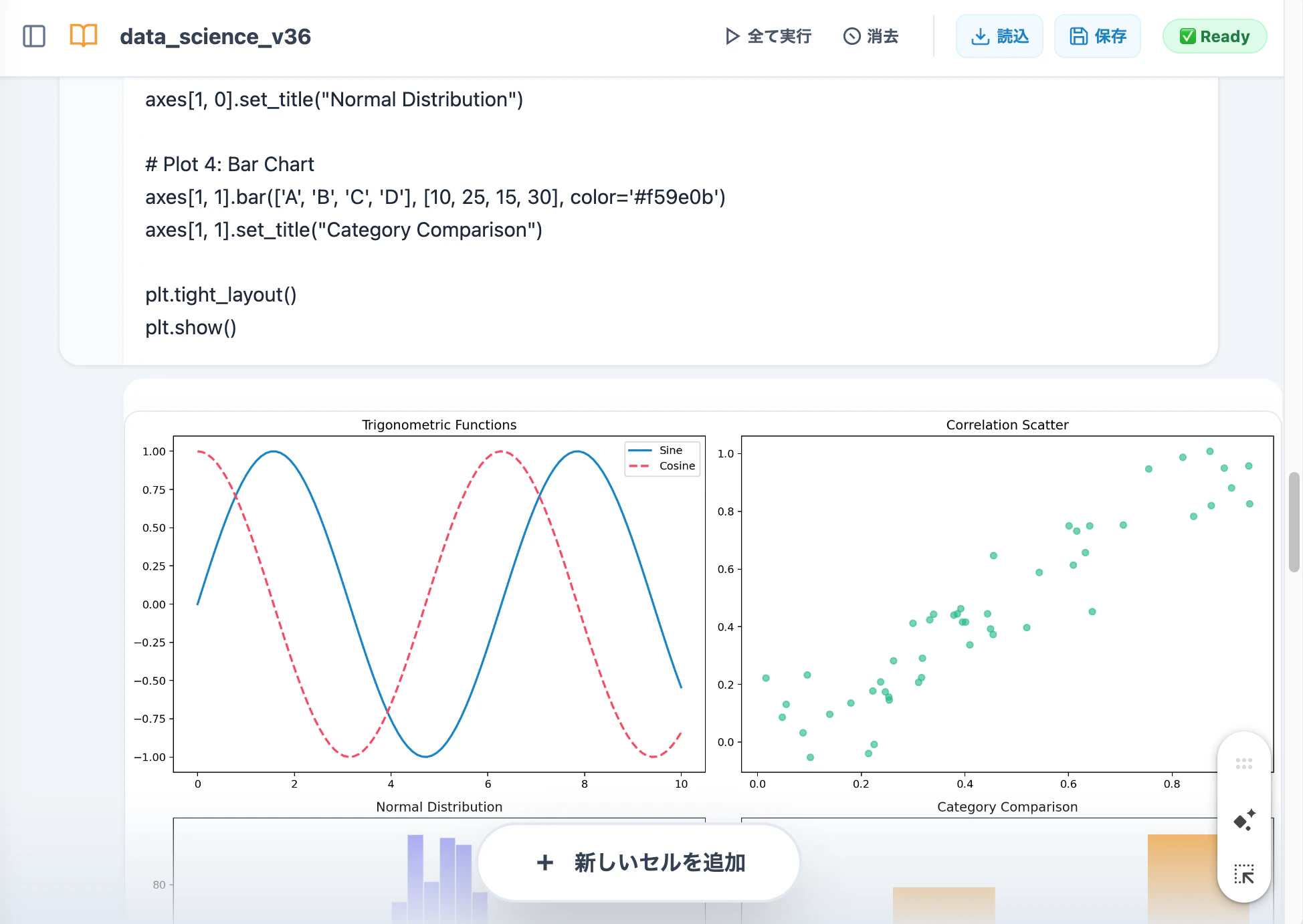
1. ローカルPCへのインストール不要(完全サンドボックス)
このツールは Pyodide (WebAssembly) を利用して、ブラウザ内の隔離された「サンドボックス」でPythonを実行します。
ローカルPCにPython本体やライブラリをダウンロードする必要が一切ありません。OSの環境を汚さず、セキュリティ的にもクリーンな状態で試行錯誤が可能です。
2. VS Code や Google Colab も不要
VS Code や Google Colab も不要です。
ソースコードをコピー&ペーストして、拡張子を .html にして保存するだけ。 ダブルクリックで開けば、ブラウザがそこはもうJupyterライクな環境です。
3. Jupyter Notebook (.ipynb) 形式に完全対応
これが最大のポイントです。ブラウザ上で作成したノートブックを .ipynb 形式でダウンロードしたり、既存のファイルをアップロードして再開したりできます。
「ブラウザでクイックに分析して、重い処理はクラウドのJupyterへ持っていく」といった柔軟な運用が可能です。
4. データサイエンス・スタック完備
主要なライブラリは、import と書くだけで自動検知・ロードされるように設計しました。
・Matplotlib / Pandas / NumPy: データ分析の標準セットがすぐに使えます。
・Scikit-learn: ブラウザ上で機械学習モデルの構築まで可能です。
・SQLite3: データベース操作もブラウザ内で完結。
・外部API通信: ネットワーク越しにデータを取得して解析することも可能です。
🛠技術的なこだわり
今回のプロトタイプ開発では、ブラウザ上でデスクトップアプリに近い操作感を実現するため、以下の設計を導入しました。
① 仮想ファイルシステム(VFS)のフル制御
・ブラウザメモリ上のファイルシステムを直感的に操作するためのエクスプローラを自作しました。
・ノートブックの保存・復元: ヘッダーのボタンから .ipynb をシームレスにDL/UL。
・データの持ち込み: CSVやJSONなどのデータファイルをドラッグ&ドロップ感覚でアップロード。
・成果物の書き出し: 分析で生成した画像やCSVを個別にローカルへダウンロード。
これにより、ブラウザ完結でありながら、実用的なデータ分析のワークフローを完遂できるようになっています。
② ライブラリの「魔法のロード」
通常のPython環境とは異なり、このアプリはJavaScript側でコードを解析し、import pandas などを見つけると、裏側で自動的にWASMパッケージをプリロードします。ユーザーは pip の待ち時間を意識することなく分析に集中できます。
🔒 会社PCでも安心な理由
「機密データをクラウド(Colab等)に上げたくない」というニーズにも応えます。
このアプリは読み込ませたデータや書いたコードがインターネット上のサーバーに送信されることは物理的にありません。 すべてはあなたのブラウザのメモリ内だけで完結します
使い方(5秒でスタート)
1.本記事の末尾にあるコードをコピーします。
2.テキストエディタに貼り付け、 mynotebook.html という名前で保存します。
3.ブラウザでそのファイルを開きます。
4.「全て実行」ボタンを押して、動作確認してください。
5.自分のノートブックがあれば「読込」ボタンから .ipynb を読み込んでみてください。
6. Jupyter Notebookと同様に自由にコードを書いて実行することができます。
⚠️ 留意事項
本コードはプロトタイプ版です。WebAssemblyの制限により、以下の点にご注意ください。
PIPインストールについて
!pip install(内部的には micropip)を使用してライブラリを動的に追加できます。ただし、インストール可能なのは Pure Python(依存関係がすべて Python のみで記述された)ライブラリに限られます。
動作しないパッケージ: C言語拡張を含む未対応のバイナリパッケージや、OSの低レイヤー機能(マルチスレッド、生ソケット通信、GUI等)に依存するものは動作しません。
メモリ制限
ブラウザのメモリ制限に依存するため、極端に巨大なデータセットの処理には適さない場合があります。
品質や安定性については、あらかじめご了承いただいた上での試用をお願いします。
まとめ:これからのPython開発
「Pythonを動かすに試すには、開発環境の構築が必要」という常識は、WebAssemblyによって書き換えられようとしています。教育現場やクイックなプロトタイピングにおいて、この「HTML1枚のPython環境」は非常に強力な武器になるはずです。
ソースコード
ソースコードhtml
<!DOCTYPE html>
<html lang="ja">
<head>
<meta charset="UTF-8">
<meta name="viewport" content="width=device-width, initial-scale=1.0">
<title>WebPython NoteBook - Data Science Suite V36</title>
<!-- Tailwind CSS & Markdown Parser -->
<script src="https://cdn.tailwindcss.com?plugins=typography"></script>
<script src="https://cdn.jsdelivr.net/npm/marked/marked.min.js"></script>
<!-- Pyodide WASM Engine -->
<script src="https://cdn.jsdelivr.net/pyodide/v0.25.0/full/pyodide.js"></script>
<style>
:root { --bg-primary: #f1f5f9; --cell-bg: #ffffff; --accent: #0284c7; }
body { background-color: var(--bg-primary); }
textarea, .output-text, .sql-table {
font-family: 'ui-monospace', 'Cascadia Code', 'Source Code Pro', Menlo, Monaco, Consolas,
'Apple Color Emoji', 'Segoe UI Emoji', 'Segoe UI Symbol', 'Noto Color Emoji', monospace;
}
/* ARCHITECT RULE: Physically block any auto-generated canvas from leaking */
body > canvas, body > div[id^="matplotlib"] { display: none !important; visibility: hidden !important; }
.output-container {
position: relative;
width: 100%;
min-height: 0;
overflow: hidden;
}
.output-text {
white-space: pre-wrap; word-break: break-all;
display: block; line-height: 1.6; padding: 1.25rem;
font-size: 13px; background-color: var(--cell-bg);
border-top: 1px solid #e2e8f0; color: #334155;
}
/* Professional Plot Sandbox: V36 100% Fit */
.plot-sandbox {
width: 100% !important;
max-width: 100% !important;
margin: 1.5rem 0;
display: none;
background: white;
border: 1px solid #e2e8f0;
border-radius: 0.75rem;
box-shadow: 0 10px 25px -5px rgba(0, 0, 0, 0.1);
overflow: hidden;
box-sizing: border-box;
}
.plot-sandbox.active { display: block; }
.plot-sandbox img {
width: 100% !important;
height: auto !important;
display: block;
image-rendering: -webkit-optimize-contrast;
}
.sql-table-wrapper { width: 100%; overflow-x: auto; margin: 12px 0; border-radius: 8px; border: 1px solid #e2e8f0; }
.sql-table { width: 100%; border-collapse: collapse; font-size: 12px; background: white; }
.sql-table th { background: #f8fafc; color: #475569; font-weight: bold; border-bottom: 2px solid #e2e8f0; padding: 12px; text-align: left; }
.sql-table td { border-bottom: 1px solid #f1f5f9; padding: 10px 12px; color: #1e293b; }
#file-sidebar { transition: transform 0.3s cubic-bezier(0.4, 0, 0.2, 1); transform: translateX(-100%); z-index: 60; width: 320px; }
body.sidebar-open #file-sidebar { transform: translateX(0); }
.breadcrumb-separator { margin: 0 4px; color: #cbd5e1; }
.code-input { overflow: hidden; resize: none; min-height: 2.5rem; line-height: 1.5; outline: none; border-radius: 0.75rem; }
.fade-in { animation: fadeIn 0.4s ease-out; }
@keyframes fadeIn { from { opacity: 0; transform: translateY(10px); } to { opacity: 1; transform: translateY(0); } }
.toolbar-btn { transition: all 0.2s; display: flex; align-items: center; gap: 0.25rem; font-weight: 600; padding: 0.4rem 0.6rem; border-radius: 0.5rem; font-size: 0.75rem; }
.toolbar-btn:hover { background-color: #f1f5f9; }
</style>
</head>
<body class="text-slate-800 min-h-screen flex flex-col font-sans overflow-x-hidden">
<header class="bg-white border-b border-slate-200 p-3 flex justify-between items-center shadow-sm sticky top-0 z-50">
<div class="flex items-center gap-2 flex-1 overflow-hidden">
<button id="toggle-sidebar-btn" class="p-2 hover:bg-slate-100 rounded-lg text-slate-500">
<svg width="20" height="20" viewBox="0 0 24 24" fill="none" stroke="currentColor" stroke-width="2"><rect x="3" y="3" width="18" height="18" rx="2" ry="2"></rect><line x1="9" y1="3" x2="9" y2="21"></line></svg>
</button>
<div class="flex items-center gap-2 overflow-hidden">
<svg width="22" height="22" viewBox="0 0 24 24" fill="none" stroke="#f59e0b" stroke-width="2"><path d="M2 3h6a4 4 0 0 1 4 4v14a3 3 0 0 0-3-3H2z"></path><path d="M22 3h-6a4 4 0 0 0-4 4v14a3 3 0 0 1 3-3h7z"></path></svg>
<input type="text" id="notebook-filename-input" value="data_science_v36" class="text-base font-bold text-slate-700 px-2 py-1 rounded truncate bg-transparent border-none outline-none focus:bg-slate-50 transition-all">
</div>
</div>
<div class="flex items-center gap-2 md:gap-4">
<div class="flex items-center gap-1 border-r border-slate-200 pr-2 md:pr-4">
<button id="run-all-btn" class="toolbar-btn text-slate-600 hover:text-green-600">
<svg width="14" height="14" viewBox="0 0 24 24" fill="none" stroke="currentColor" stroke-width="2.5"><polygon points="5 3 19 12 5 21 5 3"></polygon></svg>
<span class="hidden md:inline">全て実行</span>
</button>
<button id="clear-all-outputs-btn" class="toolbar-btn text-slate-600 hover:text-red-500">
<svg width="14" height="14" viewBox="0 0 24 24" fill="none" stroke="currentColor" stroke-width="2.5"><circle cx="12" cy="12" r="10"></circle><line x1="9" y1="9" x2="15" y2="15"></line></svg>
<span class="hidden md:inline">消去</span>
</button>
</div>
<div class="flex items-center gap-1 md:gap-2">
<button id="load-ipynb-btn" class="toolbar-btn text-sky-600 border border-sky-100 bg-sky-50 hover:bg-sky-100">
<svg width="16" height="16" viewBox="0 0 24 24" fill="none" stroke="currentColor" stroke-width="2"><path d="M21 15v4a2 2 0 0 1-2 2H5a2 2 0 0 1-2-2v-4M7 10l5 5 5-5M12 15V3"/></svg>
<span class="hidden md:inline">読込</span>
</button>
<button id="save-ipynb-btn" class="toolbar-btn text-sky-600 border border-sky-100 bg-sky-50 hover:bg-sky-100">
<svg width="16" height="16" viewBox="0 0 24 24" fill="none" stroke="currentColor" stroke-width="2"><path d="M19 21H5a2 2 0 0 1-2-2V5a2 2 0 0 1 2-2h11l5 5v11a2 2 0 0 1-2 2zM17 21v-8H7v8M7 3v5h8V3"/></svg>
<span class="hidden md:inline">保存</span>
</button>
<input type="file" id="ipynb-file-input" accept=".ipynb" class="hidden">
</div>
<span id="status-badge" class="px-3 py-1 rounded-full text-[10px] font-bold bg-amber-100 text-amber-600 border border-amber-200 ml-2 transition-all">
<span id="status-text">Booting</span>
</span>
</div>
</header>
<div class="flex flex-1 relative overflow-hidden">
<aside id="file-sidebar" class="absolute inset-y-0 left-0 bg-white border-r border-slate-200 z-40 p-4 flex flex-col gap-4 shadow-xl lg:shadow-none overflow-y-auto">
<div class="flex justify-between items-center border-b border-slate-100 pb-2">
<h2 class="font-bold text-slate-700 text-xs tracking-wider uppercase">📁 仮想エクスプローラ</h2>
<button id="refresh-files-btn" class="p-1 hover:bg-slate-100 rounded text-slate-400"><svg width="14" height="14" viewBox="0 0 24 24" fill="none" stroke="currentColor" stroke-width="2.5"><path d="M23 4v6h-6"></path><path d="M20.49 15a9 9 0 1 1-2.12-9.36L23 10"></path></svg></button>
</div>
<div class="flex gap-2">
<button id="upload-file-trigger" class="flex-1 py-2 bg-slate-800 text-white text-[10px] rounded font-bold hover:bg-black transition-all">アップロード</button>
<input type="file" id="general-file-input" class="hidden">
<button id="go-up-btn" class="px-3 py-2 bg-slate-100 text-slate-600 text-[10px] rounded font-bold hover:bg-slate-200">上へ</button>
</div>
<div id="breadcrumb-container" class="bg-slate-50 p-2 rounded-lg border border-slate-100 flex items-center text-[10px] font-bold text-sky-700 overflow-x-auto whitespace-nowrap scrollbar-hide"></div>
<div id="file-list" class="flex flex-col gap-1 mt-2"></div>
</aside>
<main id="notebook-container" class="flex-1 overflow-y-auto p-4 md:p-12 space-y-12 pb-40 scroll-smooth"></main>
</div>
<div class="fixed bottom-0 left-0 right-0 p-6 bg-gradient-to-t from-slate-200 to-transparent pointer-events-none flex justify-center z-40">
<button id="add-cell-btn" class="pointer-events-auto bg-white border-2 border-slate-200 text-slate-700 px-10 py-4 rounded-full font-bold shadow-2xl flex items-center gap-3 transition-all hover:scale-105 active:scale-95">
<svg width="20" height="20" viewBox="0 0 24 24" fill="none" stroke="currentColor" stroke-width="3"><line x1="12" y1="5" x2="12" y2="19"></line><line x1="5" y1="12" x2="19" y2="12"></line></svg>
新しいセルを追加
</button>
</div>
<script>
const ui = {
statusBadge: document.getElementById('status-badge'),
statusText: document.getElementById('status-text'),
notebookContainer: document.getElementById('notebook-container'),
addCellBtn: document.getElementById('add-cell-btn'),
runAllBtn: document.getElementById('run-all-btn'),
clearAllOutputsBtn: document.getElementById('clear-all-outputs-btn'),
saveIpynbBtn: document.getElementById('save-ipynb-btn'),
loadIpynbBtn: document.getElementById('load-ipynb-btn'),
ipynbFileInput: document.getElementById('ipynb-file-input'),
fileList: document.getElementById('file-list'),
breadcrumbContainer: document.getElementById('breadcrumb-container'),
toggleSidebarBtn: document.getElementById('toggle-sidebar-btn'),
refreshFilesBtn: document.getElementById('refresh-files-btn'),
uploadTrigger: document.getElementById('upload-file-trigger'),
fileInput: document.getElementById('general-file-input'),
goUpBtn: document.getElementById('go-up-btn'),
filenameInput: document.getElementById('notebook-filename-input')
};
let pyodide = null, isReady = false, isRunning = false, executionCount = 0, currentActiveOutputDiv = null, currentSqlDbAbsPath = null;
async function initPyodide() {
try {
pyodide = await loadPyodide({ stdout: (msg) => handleStdout(msg), stderr: (msg) => printToOutput(msg, 'error') });
await pyodide.runPythonAsync("import os; os.chdir('/')");
isReady = true;
ui.statusBadge.className = "px-3 py-1 rounded-full text-xs font-bold bg-green-100 text-green-700 border border-green-200";
ui.statusText.textContent = "✅ Ready";
updateFileList();
} catch (err) { ui.statusText.textContent = "❌ Error"; }
}
function handleStdout(msg) {
if (msg.startsWith("@@@PLOT_DATA@@@")) {
const b64 = msg.replace("@@@PLOT_DATA@@@", "").trim();
renderCapturedPlot(b64);
return;
}
printToOutput(msg, 'stdout');
}
function renderCapturedPlot(base64) {
if (!currentActiveOutputDiv) return;
const sandbox = currentActiveOutputDiv.querySelector('.plot-sandbox');
sandbox.innerHTML = '';
const img = new Image();
img.src = `data:image/png;base64,${base64}`;
img.className = 'fade-in';
img.onload = () => {
sandbox.appendChild(img);
sandbox.classList.add('active');
currentActiveOutputDiv.scrollTop = currentActiveOutputDiv.scrollHeight;
};
}
function printToOutput(text, type = 'stdout') {
if (!currentActiveOutputDiv) return;
const line = document.createElement('div');
line.className = 'output-line fade-in';
line.textContent = text;
if (type === 'error') line.classList.add('text-red-500', 'font-semibold');
else if (type === 'system') line.classList.add('text-sky-600', 'font-semibold');
currentActiveOutputDiv.appendChild(line);
}
async function updateFileList() {
if (!isReady || !pyodide) return;
try {
const cwd = await pyodide.runPythonAsync("import os; os.getcwd()");
renderBreadcrumbs(cwd);
const entries = pyodide.FS.readdir(cwd).filter(f => !['.', '..', 'tmp', 'dev', 'proc', 'sys', 'lib', 'etc', 'usr', 'var'].includes(f));
ui.fileList.innerHTML = entries.length === 0 ? '<span class="text-[10px] text-slate-400 italic px-2">No files</span>' : '';
entries.forEach(filename => {
const fullPath = (cwd === '/' ? '/' : cwd + '/') + filename;
const stats = pyodide.FS.stat(fullPath);
const isDir = pyodide.FS.isDir(stats.mode);
const item = document.createElement('div');
item.className = "group flex items-center justify-between p-2 hover:bg-slate-100 rounded text-[11px] cursor-pointer border border-transparent transition-colors";
item.innerHTML = `
<div class="flex items-center gap-2 overflow-hidden flex-1 file-info">
<svg width="14" height="14" viewBox="0 0 24 24" fill="none" stroke="currentColor" stroke-width="2"><path d="${isDir ? 'M22 19a2 2 0 0 1-2 2H4a2 2 0 0 1-2-2V5a2 2 0 0 1 2-2h5l2 3h9a2 2 0 0 1 2 2z' : 'M13 2H6a2 2 0 0 0-2 2v16a2 2 0 0 0 2 2h12a2 2 0 0 0 2-2V9z'}"/></svg>
<span class="truncate font-medium">${filename}</span>
</div>
<div class="flex items-center gap-1 opacity-0 group-hover:opacity-100 transition-opacity">
${!isDir ? `<button class="dl-btn text-sky-600 p-1 hover:bg-sky-200 rounded" title="Download"><svg width="14" height="14" viewBox="0 0 24 24" fill="none" stroke="currentColor" stroke-width="2.5"><path d="M21 15v4a2 2 0 0 1-2 2H5a2 2 0 0 1-2-2v-4M7 10l5 5 5-5M12 15V3"/></svg></button>` : ''}
<button class="del-btn text-red-500 p-1 hover:bg-red-100 rounded" title="Delete"><svg width="14" height="14" viewBox="0 0 24 24" fill="none" stroke="currentColor" stroke-width="2.5"><path d="M3 6h18M19 6v14a2 2 0 0 1-2 2H7a2 2 0 0 1-2-2V6M8 6V4a2 2 0 0 1 2-2h4a2 2 0 0 1 2 2v2"/></svg></button>
</div>`;
item.querySelector('.file-info').onclick = async () => { if (isDir) { await pyodide.runPythonAsync(`import os; os.chdir(${JSON.stringify(fullPath)})`); updateFileList(); } };
const dl = item.querySelector('.dl-btn'), de = item.querySelector('.del-btn');
if(dl) dl.onclick = (e) => { e.stopPropagation(); const d = pyodide.FS.readFile(fullPath); const a = document.createElement('a'); a.href = URL.createObjectURL(new Blob([d])); a.download = filename; a.click(); };
if(de) de.onclick = async (e) => { e.stopPropagation(); await pyodide.runPythonAsync(`import shutil, os; p=${JSON.stringify(fullPath)}; shutil.rmtree(p) if os.path.isdir(p) else os.remove(p)`); updateFileList(); };
ui.fileList.appendChild(item);
});
} catch(e) {}
}
function renderBreadcrumbs(path) {
ui.breadcrumbContainer.innerHTML = '';
const parts = path.split('/').filter(p => p !== '');
const addNode = (label, targetPath) => {
const span = document.createElement('span');
span.className = "hover:text-sky-800 cursor-pointer whitespace-nowrap px-1";
span.textContent = label;
span.onclick = async () => { await pyodide.runPythonAsync(`import os; os.chdir(${JSON.stringify(targetPath)})`); await updateFileList(); };
ui.breadcrumbContainer.appendChild(span);
};
addNode('Root', '/');
let acc = ''; parts.forEach(p => {
const sep = document.createElement('span'); sep.className = "breadcrumb-separator opacity-30"; sep.textContent = '/';
ui.breadcrumbContainer.appendChild(sep); acc += '/' + p; addNode(p, acc);
});
}
ui.refreshFilesBtn.onclick = updateFileList;
ui.goUpBtn.onclick = async () => { await pyodide.runPythonAsync("import os; os.chdir('..')"); updateFileList(); };
ui.uploadTrigger.onclick = () => ui.fileInput.click();
ui.fileInput.onchange = async (e) => {
const file = e.target.files[0]; if (!file) return;
const reader = new FileReader(); reader.onload = async () => {
pyodide.FS.writeFile(file.name, new Uint8Array(reader.result));
updateFileList();
};
reader.readAsArrayBuffer(file); e.target.value = '';
};
async function safeRunPython(code) {
const hasPlot = code.includes("matplotlib") || code.includes("plt.") || code.includes(".plot");
const pkgs = [];
if (code.includes("sqlite3")) pkgs.push("sqlite3");
if (code.includes("sklearn")) pkgs.push("scikit-learn");
if (hasPlot || code.includes("pandas") || code.includes("numpy")) pkgs.push("matplotlib", "pandas", "numpy");
if (pkgs.length > 0) await pyodide.loadPackage(pkgs);
await pyodide.loadPackagesFromImports(code);
if (hasPlot) {
await pyodide.runPythonAsync(`
try:
import matplotlib
matplotlib.use('Agg', force=True)
import matplotlib.pyplot as plt
plt.close('all')
plt.switch_backend('Agg')
matplotlib.interactive(False)
except Exception: pass
`);
}
const pythonWrapper = `
import sys, io, base64, warnings
_has_mp = 'matplotlib' in sys.modules or 'matplotlib.pyplot' in sys.modules
if _has_mp:
import matplotlib
matplotlib.use('Agg', force=True)
import matplotlib.pyplot as plt
plt.rcParams['figure.figsize'] = (14, 7)
plt.rcParams['figure.dpi'] = 180
plt.show = lambda *args, **kwargs: None
warnings.filterwarnings("ignore", category=UserWarning, message="Matplotlib is currently using agg")
# --- EXECUTION ---
${code}
# -----------------
if _has_mp and plt.get_fignums():
for _i in plt.get_fignums():
_buf = io.BytesIO()
plt.figure(_i).savefig(_buf, format='png', bbox_inches='tight', pad_inches=0.1)
_buf.seek(0)
print(f"@@@PLOT_DATA@@@{base64.b64encode(_buf.read()).decode('utf-8')}")
plt.close('all')
`;
try {
const res = await pyodide.runPythonAsync(pythonWrapper);
if (res !== undefined && res !== null) {
if (pyodide.isPyProxy(res)) { printToOutput(res.toString(), 'result'); res.destroy(); }
else if (typeof res !== 'function') printToOutput(String(res), 'result');
}
return true;
} catch(e) { throw e; }
}
async function handleSqlMagic(line) {
try { await pyodide.loadPackage("sqlite3"); } catch (e) {}
const connMatch = line.match(/^%sql\s+sqlite:\/\/\/(.*)/);
if (connMatch) {
const dbPath = connMatch[1].trim();
const absPath = await pyodide.runPythonAsync(`import os; p="${dbPath}"; abs_p=os.path.abspath(p); abs_p`);
currentSqlDbAbsPath = absPath;
printToOutput(`✅ Connected DB: ${absPath}`, 'system');
return true;
}
if (line.startsWith('%sql ')) {
if (!currentSqlDbAbsPath) return true;
const query = line.replace('%sql ', '').trim();
pyodide.globals.set("__tmp_query", query);
try {
const res = await pyodide.runPythonAsync(`import sqlite3; conn=sqlite3.connect("${currentSqlDbAbsPath}"); cur=conn.cursor(); res=None;
try:
cur.execute(__tmp_query)
if cur.description: res={"cols": [d[0] for d in cur.description], "rows": [list(r) for r in cur.fetchall()]}
conn.commit()
finally: conn.close()
res`);
const jsRes = res ? res.toJs() : null;
if (jsRes) renderSqlTable(jsRes.get('cols'), jsRes.get('rows'));
else printToOutput("✅ Success", 'system');
} catch (e) { throw e; }
return true;
}
return false;
}
function renderSqlTable(columns, rows) {
if (!currentActiveOutputDiv || !columns) return;
const wrapper = document.createElement('div'); wrapper.className = 'sql-table-wrapper fade-in';
const table = document.createElement('table'); table.className = 'sql-table';
const trH = document.createElement('tr'); columns.forEach(c => { const th = document.createElement('th'); th.textContent = c; trH.appendChild(th); });
table.appendChild(trH);
rows.forEach(r => {
const tr = document.createElement('tr');
r.forEach(cell => { const td = document.createElement('td'); td.textContent = (cell === null) ? 'NULL' : String(cell); tr.appendChild(td); });
table.appendChild(tr);
});
wrapper.appendChild(table); currentActiveOutputDiv.appendChild(wrapper);
}
function createCell(initialCode = "", cellType = "code") {
const cellDiv = document.createElement('div');
cellDiv.className = "group flex flex-col gap-2 relative cell-wrapper fade-in";
cellDiv.innerHTML = `
<div class="flex items-center gap-2 text-slate-400 font-mono text-[10px] ml-1">
<span class="run-count ${cellType === 'markdown' ? 'invisible' : ''}">In [ ]:</span>
<select class="cell-type-select ml-1 bg-slate-200 rounded px-1 font-bold uppercase cursor-pointer">
<option value="code" ${cellType === 'code' ? 'selected' : ''}>Code</option>
<option value="markdown" ${cellType === 'markdown' ? 'selected' : ''}>Markdown</option>
</select>
<div class="opacity-0 group-hover:opacity-100 flex gap-2 ml-auto transition-opacity duration-200">
<button class="move-up-btn p-1 hover:text-sky-600" title="Move Up"><svg width="14" height="14" viewBox="0 0 24 24" fill="none" stroke="currentColor" stroke-width="2.5"><polyline points="18 15 12 9 6 15"></polyline></svg></button>
<button class="move-down-btn p-1 hover:text-sky-600" title="Move Down"><svg width="14" height="14" viewBox="0 0 24 24" fill="none" stroke="currentColor" stroke-width="2.5"><polyline points="6 9 12 15 18 9"></polyline></svg></button>
<button class="del-cell-btn p-1 text-red-400 hover:text-red-500" title="Delete"><svg width="14" height="14" viewBox="0 0 24 24" fill="none" stroke="currentColor" stroke-width="2"><path d="M3 6h18M19 6v14a2 2 0 0 1-2 2H7a2 2 0 0 1-2-2V6M8 6V4a2 2 0 0 1 2-2h4a2 2 0 0 1 2 2v2"/></svg></button>
</div>
</div>
<div class="markdown-preview hidden w-full px-8 py-5 bg-white prose prose-slate max-w-none rounded-2xl shadow-sm border border-transparent text-sm"></div>
<div class="editor-container flex items-stretch bg-white border border-slate-200 rounded-2xl overflow-hidden shadow-sm focus-within:border-sky-400 transition-all">
<div class="bg-slate-50 border-r border-slate-100 p-2 flex flex-col items-center min-w-[48px]"><button class="run-cell-btn text-slate-300 hover:text-green-600 transition-all active:scale-90"><svg width="26" height="26" viewBox="0 0 24 24" fill="none" stroke="currentColor" stroke-width="2.5"><polygon points="5 3 19 12 5 21 5 3"></polygon></svg></button></div>
<textarea class="code-input w-full p-4 bg-transparent text-[15px] text-slate-800 leading-relaxed" rows="1" spellcheck="false" autocomplete="off">${initialCode}</textarea>
</div>
<div class="output-container hidden ml-12 bg-white border border-slate-100 rounded-2xl shadow-sm text-sm overflow-hidden">
<div class="plot-sandbox"></div>
</div>`;
ui.notebookContainer.appendChild(cellDiv);
const ts = cellDiv.querySelector('.cell-type-select'), ta = cellDiv.querySelector('.code-input'), rb = cellDiv.querySelector('.run-cell-btn'), oc = cellDiv.querySelector('.output-container'), rc = cellDiv.querySelector('.run-count'), mp = cellDiv.querySelector('.markdown-preview'), ec = cellDiv.querySelector('.editor-container');
const resz = () => { ta.style.height = '0px'; ta.style.height = (ta.scrollHeight) + 'px'; };
ta.addEventListener('input', resz); setTimeout(resz, 50);
mp.onclick = () => { mp.classList.add('hidden'); ec.classList.remove('hidden'); ta.focus(); };
cellDiv.querySelector('.move-up-btn').onclick = () => { const p = cellDiv.previousElementSibling; if (p) cellDiv.parentNode.insertBefore(cellDiv, p); };
cellDiv.querySelector('.move-down-btn').onclick = () => { const n = cellDiv.nextElementSibling; if (n) cellDiv.parentNode.insertBefore(n, cellDiv); };
const execute = async () => {
if (ts.value === 'markdown') { mp.innerHTML = marked.parse(ta.value || ''); ec.classList.add('hidden'); mp.classList.remove('hidden'); return true; }
if (!isReady || isRunning) return true; isRunning = true;
rb.innerHTML = '<svg class="animate-spin text-amber-500" width="24" height="24" viewBox="0 0 24 24"><circle class="opacity-25" cx="12" cy="12" r="10" stroke="currentColor" stroke-width="4"></circle><path class="opacity-75" fill="currentColor" d="M4 12a8 8 0 018-8V0C5.3733 0 0 5.373 0 12h4zm2 5.291A7.962 7.962 0 014 12H0c0 3.042 1.135 5.824 3 7.938l3-2.647z"></path></svg>';
rc.textContent = `In [*]:`;
const plotArea = oc.querySelector('.plot-sandbox');
plotArea.innerHTML = ''; plotArea.classList.remove('active');
Array.from(oc.childNodes).forEach(n => { if (n !== plotArea) n.remove(); });
oc.classList.remove('hidden'); currentActiveOutputDiv = oc;
try {
const lines = ta.value.split('\n'); let py = [];
for (const l of lines) {
const t = l.trim();
if (t.startsWith('%sql')) { if (py.length > 0) { await safeRunPython(py.join('\n')); py = []; } await handleSqlMagic(t); }
else if (t.startsWith('!pip install')) { if (py.length > 0) { await safeRunPython(py.join('\n')); py = []; }
const p = t.replace('!pip install', '').trim().split(/\s+/);
await pyodide.loadPackage("micropip");
await pyodide.runPythonAsync(`import micropip; await micropip.install([${p.map(x => `"${x}"`).join(',')}])`);
printToOutput(`📦 Installed: ${p.join(', ')}`, 'system');
} else py.push(l);
}
if (py.length > 0) await safeRunPython(py.join('\n'));
executionCount++; rc.textContent = `In [${executionCount}]:`; await updateFileList(); return true;
} catch (e) { printToOutput(e.message || String(e), 'error'); return false; }
finally { isRunning = false; currentActiveOutputDiv = null; rb.innerHTML = '<svg width="26" height="26" viewBox="0 0 24 24" fill="none" stroke="currentColor" stroke-width="2.5"><polygon points="5 3 19 12 5 21 5 3"></polygon></svg>'; }
};
rb.onclick = execute; cellDiv.executeCell = execute;
cellDiv.querySelector('.del-cell-btn').onclick = () => cellDiv.remove();
return cellDiv;
}
ui.addCellBtn.onclick = () => createCell();
ui.runAllBtn.onclick = async () => {
if (!isReady || isRunning) return;
const cells = Array.from(document.querySelectorAll('.cell-wrapper'));
for (const cell of cells) { cell.scrollIntoView({ behavior: 'smooth', block: 'center' }); const s = await cell.executeCell(); if (!s) break; }
};
ui.clearAllOutputsBtn.onclick = async () => {
if (pyodide && isReady) { try { await pyodide.runPythonAsync("import matplotlib.pyplot as plt; plt.close('all')"); } catch (e) {} }
document.querySelectorAll('.output-container').forEach(o => { o.innerHTML = '<div class="plot-sandbox"></div>'; o.classList.add('hidden'); });
document.querySelectorAll('.run-count').forEach(s => s.textContent = 'In [ ]:'); executionCount = 0;
};
ui.saveIpynbBtn.onclick = () => {
const nb = { cells: Array.from(document.querySelectorAll('.cell-wrapper')).map(div => ({ cell_type: div.querySelector('.cell-type-select').value, metadata: {}, source: div.querySelector('.code-input').value.split('\n').map((l, i, a) => l + (i < a.length - 1 ? '\n' : '')) })), metadata: { kernelspec: { display_name: "Python 3", name: "python3" }, language_info: { name: "python" } }, nbformat: 4, nbformat_minor: 5 };
const a = document.createElement('a'); a.href = URL.createObjectURL(new Blob([JSON.stringify(nb, null, 2)], { type: "application/x-ipynb+json" })); a.download = (ui.filenameInput.value || 'notebook') + ".ipynb"; a.click();
};
ui.loadIpynbBtn.onclick = () => ui.ipynbFileInput.click();
ui.ipynbFileInput.onchange = (e) => {
const f = e.target.files[0]; if (!f) return;
const r = new FileReader(); r.onload = (ev) => {
try {
const nb = JSON.parse(ev.target.result); ui.notebookContainer.innerHTML = '';
nb.cells.forEach(c => createCell(Array.isArray(c.source) ? c.source.join('') : (c.source || ""), c.cell_type));
ui.filenameInput.value = f.name.replace(/\.ipynb$/i, '');
} catch(e) { alert("Invalid Format"); }
};
r.readAsText(f); e.target.value = '';
};
window.addEventListener('resize', () => { document.querySelectorAll('.code-input').forEach(ta => { ta.style.height = '0px'; ta.style.height = (ta.scrollHeight) + 'px'; }); });
ui.toggleSidebarBtn.onclick = () => document.body.classList.toggle('sidebar-open');
initPyodide();
// ------------------------------------------------------------
// V36: ULTIMATE DATA SCIENCE STARTER SUITE
// ------------------------------------------------------------
createCell(`# 🧪 Step 1: NumPy による数値計算とシステムチェック\nimport numpy as np\nimport sys\n\n# 行列演算のデモ\nA = np.array([[1, 2], [3, 4]])\nB = np.linalg.inv(A)\n\nprint(f"Platform: {sys.platform}")\nprint(f"NumPy Version: {np.__version__}")\nprint("Matrix A:\\n", A)\nprint("Inverse of A:\\n", B)\nprint("A * Inv(A):\\n", np.dot(A, B))`, "code");
createCell(`# 🧪 Step 2: 外部 Web API からのデータ取得 (Fetch)\nfrom pyodide.http import open_url\nimport json\n\nprint("📡 JSONPlaceholder からポストデータを取得中...")\nresponse = open_url("https://jsonplaceholder.typicode.com/posts/1")\ndata = json.loads(response.read())\n\nprint(f"\\nTitle: {data['title']}\\nBody: {data['body'][:80]}...")\n\n# 仮想FSに保存してエクスプローラで確認\nwith open("last_fetch.json", "w") as f: json.dump(data, f)\nprint("\\n💾 'last_fetch.json' に保存しました。")`, "code");
createCell(`# 🧪 Step 3: Pandas によるデータ加工と集計\nimport pandas as pd\nimport numpy as np\n\n# ダミー売上データの生成\ndata = {\n 'Month': ['Jan', 'Jan', 'Feb', 'Feb', 'Mar', 'Mar'],\n 'Product': ['Apple', 'Orange', 'Apple', 'Orange', 'Apple', 'Orange'],\n 'Sales': [150, 200, 180, 210, 230, 190],\n 'Costs': [90, 120, 100, 130, 110, 105]\n}\ndf = pd.DataFrame(data)\ndf['Profit'] = df['Sales'] - df['Costs']\n\nprint("--- Raw Data ---")\nprint(df)\n\nprint("\\n--- Product Aggregation ---")\nprint(df.groupby('Product')[['Sales', 'Profit']].sum())\n\nprint("\\n--- Statistical Summary ---")\nprint(df.describe())`, "code");
createCell(`# 🧪 Step 4: Matplotlib による高度なマルチプロット\nimport matplotlib.pyplot as plt\nimport numpy as np\n\n# データの準備\nx = np.linspace(0, 10, 100)\ny_sin = np.sin(x)\ny_cos = np.cos(x)\nrandom_data = np.random.randn(1000)\n\n# 2x2 のレイアウトを作成\nfig, axes = plt.subplots(2, 2, figsize=(15, 10))\n\n# Plot 1: Sine & Cosine\naxes[0, 0].plot(x, y_sin, label='Sine', color='#0284c7', lw=2)\naxes[0, 0].plot(x, y_cos, label='Cosine', color='#f43f5e', lw=2, ls='--')\naxes[0, 0].set_title("Trigonometric Functions")\naxes[0, 0].legend()\n\n# Plot 2: Scatter (Correlation)\nx_rand = np.random.rand(50); y_rand = x_rand + np.random.normal(0, 0.1, 50)\naxes[0, 1].scatter(x_rand, y_rand, alpha=0.6, color='#10b981')\naxes[0, 1].set_title("Correlation Scatter")\n\n# Plot 3: Histogram\naxes[1, 0].hist(random_data, bins=30, color='#6366f1', alpha=0.7, edgecolor='white')\naxes[1, 0].set_title("Normal Distribution")\n\n# Plot 4: Bar Chart\naxes[1, 1].bar(['A', 'B', 'C', 'D'], [10, 25, 15, 30], color='#f59e0b')\naxes[1, 1].set_title("Category Comparison")\n\nplt.tight_layout()\nplt.show()`, "code");
createCell(`# 🧪 Step 5: Scikit-learn による簡易機械学習 (線形回帰)\nfrom sklearn.linear_model import LinearRegression\nimport numpy as np\n\n# 特徴量 X と ターゲット y の生成 (y = 2X + 1 + noise)\nX = np.arange(10).reshape(-1, 1)\ny = 2 * X.flatten() + 1 + np.random.normal(0, 1, 10)\n\n# モデルの学習\nmodel = LinearRegression()\nmodel.fit(X, y)\n\n# 予測結果\ny_pred = model.predict(X)\nprint(f"Coefficient (Weight): {model.coef_[0]:.4f}")\nprint(f"Intercept (Bias): {model.intercept_:.4f}")\nprint(f"R^2 Score: {model.score(X, y):.4f}")\n\n# 可視化\nimport matplotlib.pyplot as plt\nplt.figure(figsize=(10, 5))\nplt.scatter(X, y, color='black', label='Observed')\nplt.plot(X, y_pred, color='blue', linewidth=3, label='Predicted (Regression Line)')\nplt.title("Simple Linear Regression Test")\nplt.legend()\nplt.show()`, "code");
createCell(`# 🧪 Step 6: SQLite 統合データベース操作\nimport sqlite3\n%sql sqlite:///analysis_v36.db\n\n# 1. テーブル作成\n%sql DROP TABLE IF EXISTS logs\n%sql CREATE TABLE logs (id INTEGER PRIMARY KEY, event TEXT, val REAL)\n\n# 2. データ挿入 (Python から直接)\nconn = sqlite3.connect("/analysis_v36.db")\nconn.executemany("INSERT INTO logs (event, val) VALUES (?, ?)", \n [("Initial", 1.2), ("Processing", 4.5), ("Final", 9.8)])\nconn.commit(); conn.close()\n\n# 3. マジックでクエリ実行\n%sql SELECT * FROM logs WHERE val > 2.0`, "code");
</script>
</body>
</html>