
コマンド内容
下記のwingetを実行すると、Podman-DesktopとDocker CLI、Docker Composeをまとめてインストールしてくれる。
しかもパス通しやcli-pluginsの設定までよしなにやってくれるのでメチャクチャ楽である。
winget.exe install --id "RedHat.Podman-Desktop" --exact --source winget --accept-source-agreements --disable-interactivity --silent --accept-package-agreements --force
winget.exe install --id "Docker.DockerCLI" --exact --source winget --accept-source-agreements --disable-interactivity --silent --accept-package-agreements --force
winget.exe install --id "Docker.DockerCompose" --exact --source winget --accept-source-agreements --disable-interactivity --silent --accept-package-agreements --force
設定内容
Podman-Desktopを起動し、初回設定を完了させる。
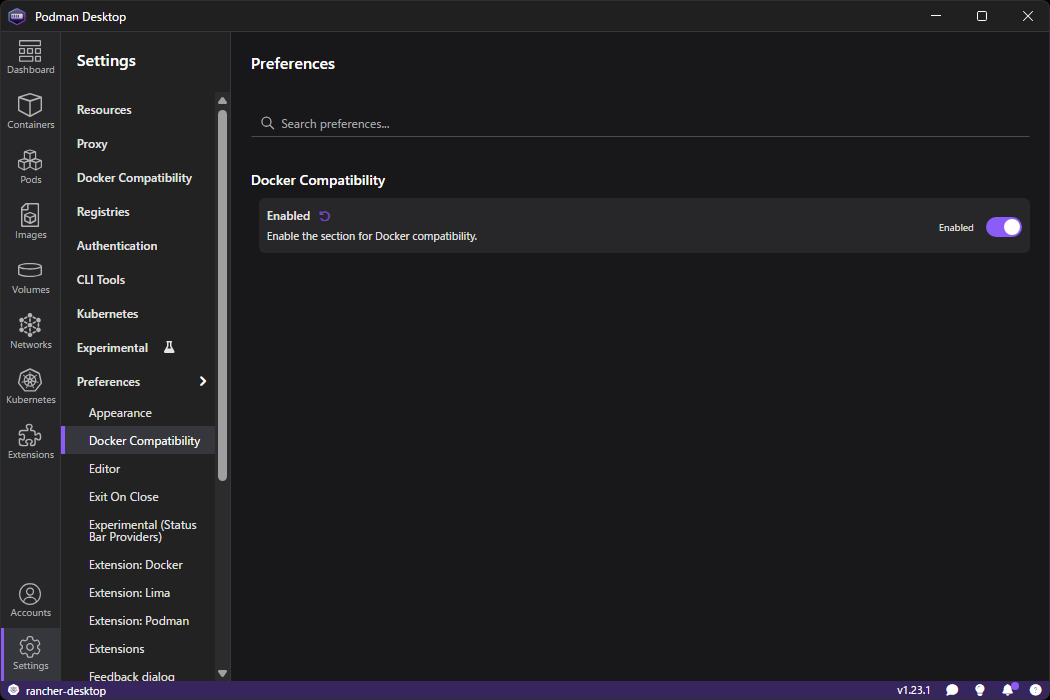
Settingsを開き、Preferences→Docker CompatibilityのEnabledEnabledにする
SettingsのSystem socket statusがpodman is listeningになっていればOK。
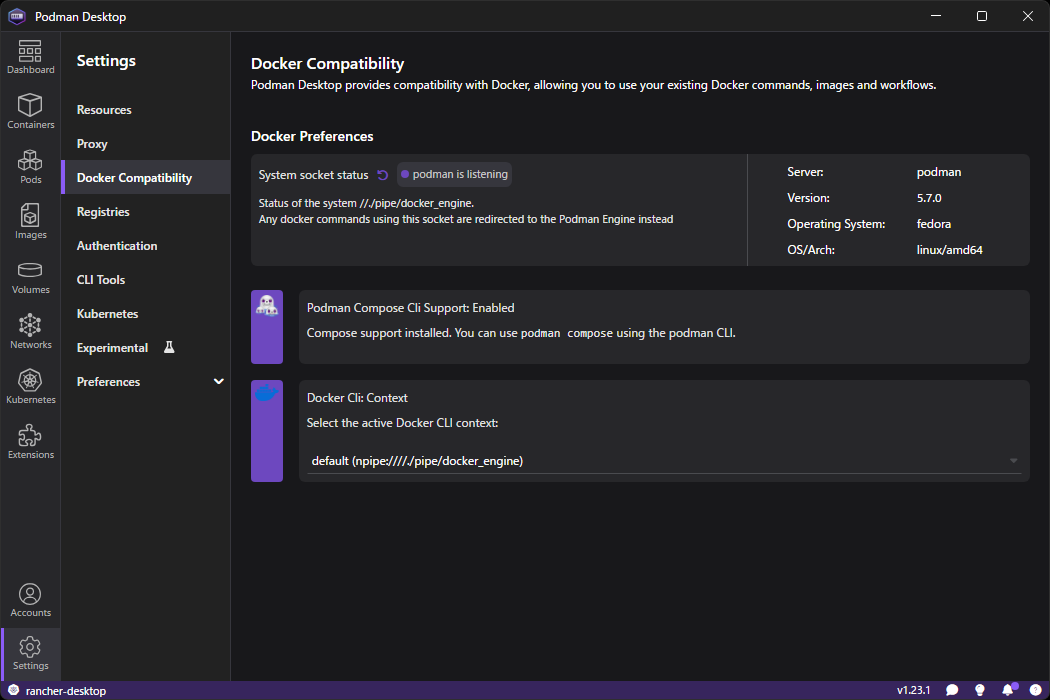
もしこの時点で動いていない場合、他のDockerdサービスと競合している可能性がある。
Docker DesktopやRancher Desktopなど、インストールしたことがある場合はアンインストールし、Windowsのサービス一覧にDockerdが起動していないか確認する。
動作確認
C:\Users\***>where docker
C:\Users\***\AppData\Local\Microsoft\WinGet\Packages\Docker.DockerCLI_Microsoft.Winget.Source_8wekyb3d8bbwe\docker\docker.exe

C:\Users\***>docker -v
Docker version 29.0.2, build 8108357

C:\Users\***>docker compose -v
Docker version 29.0.2, build 8108357

C:\Users\***>docker run hello-world
Unable to find image 'hello-world:latest' locally
17eec7bbc9d7: Download complete
1b44b5a3e06a: Download complete

Hello from Docker!
This message shows that your installation appears to be working correctly.

To generate this message, Docker took the following steps:
 1. The Docker client contacted the Docker daemon.
 2. The Docker daemon pulled the "hello-world" image from the Docker Hub.
    (amd64)
 3. The Docker daemon created a new container from that image which runs the
    executable that produces the output you are currently reading.
 4. The Docker daemon streamed that output to the Docker client, which sent it
    to your terminal.

To try something more ambitious, you can run an Ubuntu container with:
 $ docker run -it ubuntu bash

Share images, automate workflows, and more with a free Docker ID:
 https://hub.docker.com/

For more examples and ideas, visit:
 https://docs.docker.com/get-started/
docker-credential-wincredエラーが出た場合
エラー全文はこんな感じ
error getting credentials - err: exec: "docker-credential-wincred": executable file not found in %PATH%, out: ``
以前にDocker DesktopやRancher Desktopを入れていると、~\.docker\config.jsonにcredsStoreという項目が設定されている。
この項目を削除するか、config.json自体を削除して再度コマンドを実行するとエラーは解消できる。
おまけ
winget自体でも更新出来るが、UniGetUIを入れておけば自動的に定期チェックして新しいバージョンが出たときに自動更新してくれる。