
TerraformのAWS Providerにコントリビュートしてみたのでその時の流れなどをブログに残します。
やってみようと思った経緯
以下のissueでハマってしまって問題が発生したことが経緯です。
改善するのを待ってもよかったのですが、結構前から対応が進んでなさそうなのでやってみました。
流れ
基本的な流れは以下のようになります。
- ローカル環境作成
- 開発修正
- テスト
- PR作成
ローカル開発環境作成
私はWindows PCを使っているのでWSL2を使って開発を行っています。
開発環境の作成手順は以下のガイドに記載されているのでこちらは必読です。
とりあえず環境を作成するだけであれば以下のコマンドで作れます。(最新の情報は必ずガイドを読むようにしてください)
mkdir -p development/hashicorp
cd development/hashicorp/
git clone https://github.com/hashicorp/terraform-provider-aws.git
cd terraform-provider-aws

# 必要なgoのバージョンを確認する
cat .go-version

# 必要なバージョンをインストールする (私が作業したときは1.26.5が必要でした)
cd /tmp
curl -LO https://go.dev/dl/go1.26.5.linux-amd64.tar.gz
sudo rm -rf /usr/local/go && sudo tar -C /usr/local -xzf go1.26.5.linux-amd64.tar.gz
echo 'export PATH=$PATH:/usr/local/go/bin' >> ~/.bashrc
echo 'export PATH=$PATH:$(go env GOPATH)/bin' >> ~/.bashrc
source ~/.bashrc
go version
git cloneしたディレクトリに戻って以下のコマンドでビルドを行います。
ファイルが完成していれば開発環境は作成できています。
make tools
make build
ls -lh "$(go env GOPATH)/bin/terraform-provider-aws"
開発修正
テストコードの作成と問題個所の修正を実施します。
テストの実施方法は以下のドキュメントに記載されています。
ということで流れに沿って作業します。
まずはAWSの認証情報が必要と言うことなので環境変数に設定します。
export AWS_ACCESS_KEY_ID="hogehoge"
export AWS_SECRET_ACCESS_KEY="fugafuga"
export AWS_SESSION_TOKEN="piyopiyo"
コード修正前にテストコードでFAILすることを確認します。
make testacc TESTS=TestAccAutoScalingSchedule_startTimeRecalculated PKG=autoscaling
起動設定がすでに廃止済みだったのでテストコードなどの修正も実施しました。
make testacc TESTS=TestAccAutoScalingSchedule_recurrence_startTimeUnspecified PKG=autoscaling
make: Verifying source code with gofmt...
==> Checking that code complies with gofmt requirements...
make: Validating schemas
ok      github.com/hashicorp/terraform-provider-aws/internal/provider/sdkv2     0.169s
ok      github.com/hashicorp/terraform-provider-aws/internal/provider/framework 0.165s
make: Running acceptance tests on branch: 🌿 fix-autoscaling-schedule-start-time 🌿...
TF_ACC=1 go1.26.5 test ./internal/service/autoscaling/... -v -count 1 -parallel 20 -run='TestAccAutoScalingSchedule_recurrence_startTimeUnspecified'  -timeout 360m -vet=off -buildvcs=false
2026/08/13 22:41:54 Creating Terraform AWS Provider (SDKv2-style)...
2026/08/13 22:41:54 Initializing Terraform AWS Provider (SDKv2-style)...
=== RUN   TestAccAutoScalingSchedule_recurrence_startTimeUnspecified
=== PAUSE TestAccAutoScalingSchedule_recurrence_startTimeUnspecified
=== CONT  TestAccAutoScalingSchedule_recurrence_startTimeUnspecified
    acctest.go:1744: skipping test for aws/us-west-2: Error running apply: exit status 1

        Error: creating Auto Scaling Launch Configuration (tf-acc-test-hoge): operation error Auto Scaling: CreateLaunchConfiguration, https response error StatusCode: 400, RequestID: fuga, api error UnsupportedOperation: The Launch Configuration creation operation is not available in your account. Use launch templates to create configuration templates for your Auto Scaling groups.

          with aws_launch_configuration.test,
          on terraform_plugin_test.tf line 42, in resource "aws_launch_configuration" "test":
          42: resource "aws_launch_configuration" "test" {

--- SKIP: TestAccAutoScalingSchedule_recurrence_startTimeUnspecified (10.80s)
PASS
ok      github.com/hashicorp/terraform-provider-aws/internal/service/autoscaling        10.902s
修正前なのでFAILすることが確認できます。
make: Verifying source code with gofmt...
==> Checking that code complies with gofmt requirements...
make: Validating schemas
ok      github.com/hashicorp/terraform-provider-aws/internal/provider/sdkv2     0.166s
ok      github.com/hashicorp/terraform-provider-aws/internal/provider/framework 0.153s
make: Running acceptance tests on branch: 🌿 fix-autoscaling-schedule-start-time 🌿...
TF_ACC=1 go1.26.5 test ./internal/service/autoscaling/... -v -count 1 -parallel 20 -run='TestAccAutoScalingSchedule_startTimeRecalculated'  -timeout 360m -vet=off -buildvcs=false
2026/08/13 23:02:02 Creating Terraform AWS Provider (SDKv2-style)...
2026/08/13 23:02:02 Initializing Terraform AWS Provider (SDKv2-style)...
=== RUN   TestAccAutoScalingSchedule_startTimeRecalculated
=== PAUSE TestAccAutoScalingSchedule_startTimeRecalculated
=== CONT  TestAccAutoScalingSchedule_startTimeRecalculated
    schedule_test.go:126: Step 2/2 error: Check failed: Check 2/2 error: expected start_time to be 2026-08-13 17:02:00 +0000 UTC, got 2026-08-13 16:02:00 +0000 UTC
--- FAIL: TestAccAutoScalingSchedule_startTimeRecalculated (41.55s)
FAIL
FAIL    github.com/hashicorp/terraform-provider-aws/internal/service/autoscaling        41.651s
FAIL
make: *** [GNUmakefile:989: testacc] Error 1
FAILが確認出来たら該当コードの修正を実施します。
テスト
テストコマンドを実行して完了を待ちます。
make testacc TESTS=TestAccAutoScalingSchedule_startTimeRecalculated PKG=autoscaling
make quick-fix PKG=autoscaling
テストの実行が完了すると次のようにPASSと表示されます。
make testacc TESTS=TestAccAutoScalingSchedule_recurrence_startTimeUnspecified PKG=autoscaling
make: Verifying source code with gofmt...
==> Checking that code complies with gofmt requirements...
make: Validating schemas
ok      github.com/hashicorp/terraform-provider-aws/internal/provider/sdkv2     (cached)
ok      github.com/hashicorp/terraform-provider-aws/internal/provider/framework (cached)
make: Running acceptance tests on branch: 🌿 fix-autoscaling-schedule-start-time 🌿...
TF_ACC=1 go1.26.5 test ./internal/service/autoscaling/... -v -count 1 -parallel 20 -run='TestAccAutoScalingSchedule_recurrence_startTimeUnspecified'  -timeout 360m -vet=off -buildvcs=false
2026/08/13 22:46:07 Creating Terraform AWS Provider (SDKv2-style)...
2026/08/13 22:46:07 Initializing Terraform AWS Provider (SDKv2-style)...
=== RUN   TestAccAutoScalingSchedule_recurrence_startTimeUnspecified
=== PAUSE TestAccAutoScalingSchedule_recurrence_startTimeUnspecified
=== CONT  TestAccAutoScalingSchedule_recurrence_startTimeUnspecified
--- PASS: TestAccAutoScalingSchedule_recurrence_startTimeUnspecified (54.29s)
PASS
ok      github.com/hashicorp/terraform-provider-aws/internal/service/autoscaling        54.407s
PR作成
GitHub上でフォークを作成します。
以下のコマンドでフォークしたリポジトリに向けてpushします。
git branch -m b-autoscaling-schedule-start-time
git add \
  internal/service/autoscaling/schedule.go \
  internal/service/autoscaling/schedule_test.go
git commit -m "r/aws_autoscaling_schedule: Recalculate start time"
git remote rename origin upstream
git remote add origin git@github.com:ユーザー名/terraform-provider-aws.git
git remote -v
git push -u origin b-autoscaling-schedule-start-time
フォークしたリポジトリからPRを作成します。
ここまで正常に進めていればPR作成時に修正したコードなどの差分が確認できます。
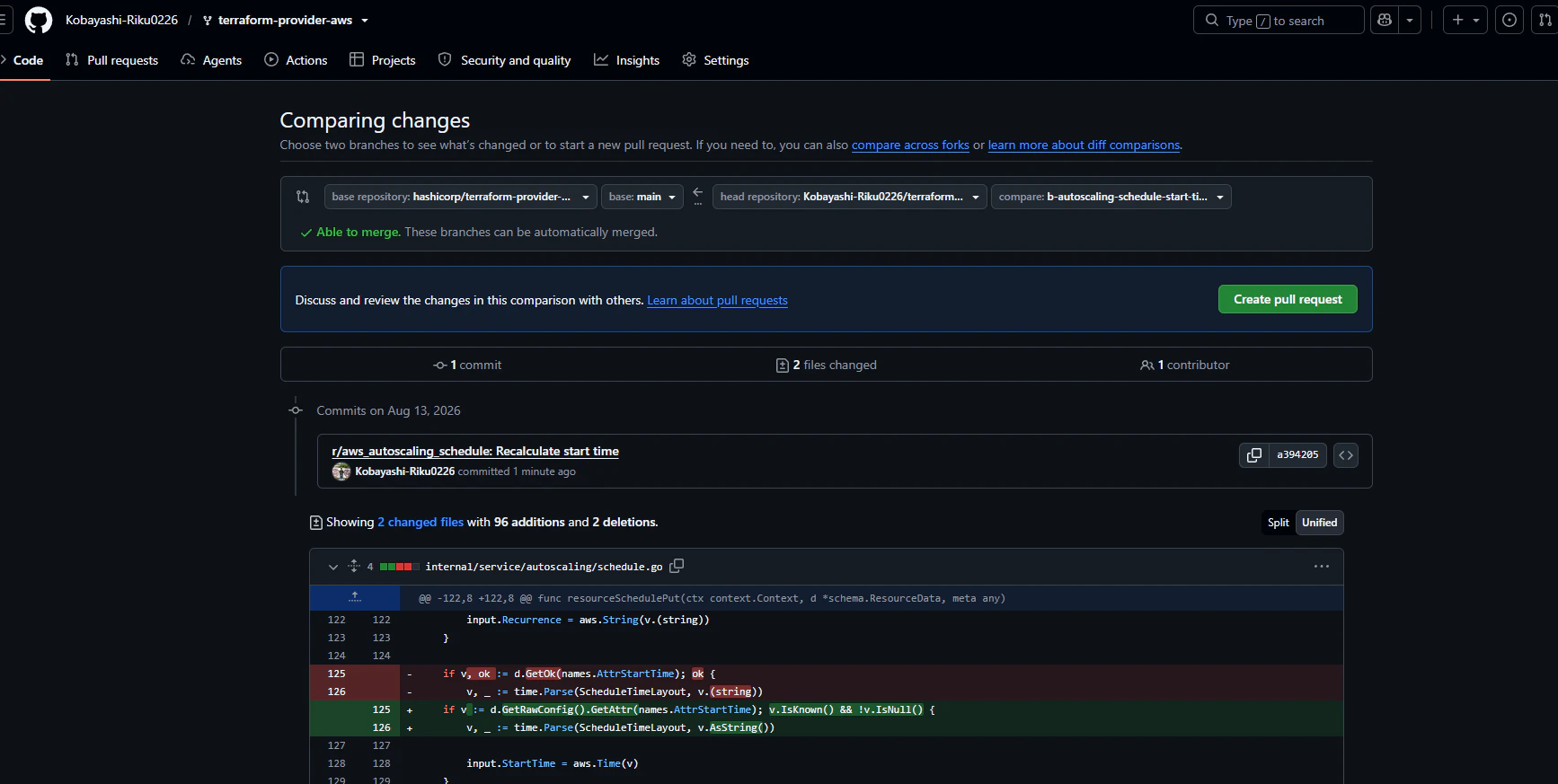
作成したPRはこちらです。
https://github.com/hashicorp/terraform-provider-aws/pull/49465
AIを使用した場合はPRの説明文に使用したことを明記するようにしましょう。
私も今回はCodexを使用したので明記しています。
https://hashicorp.github.io/terraform-provider-aws/ai-usage/
チェンジログをPR番号で作成してpushします。
git add .changelog/49465.txt
git commit -m "add changelog entry"
git push origin b-autoscaling-schedule-start-time
ここまで完了したらマージされるのを待ちます。
メンテナーから修正依頼やコメントなどが来ることがあるので、GitHubからのメールは確認しておくようにしましょう。
マージされたことの確認
残念ながら2026/11/13 (金) 時点ではマージされてません。
大量のIssueとPRがあるため、すべてをすぐにレビューすることはできない状態なのだと思います...
ここの欄はマージされたら更新します。
さいごに
初めてOSSにコミットしてみました。
ちょっとしたものではありますが、自分が普段から利用しているものに貢献できたなという気持ちが少し芽生えました。
今後もちょくちょくやっていきたいなと思っています。