
エクスプローラーを開きすぎてとっちらかってるときに、数が多すぎたりパスが長いとタスクバーの一覧表示だと使いづらいので、表形式でリストアップするツールを作ってみた。
キャプチャ
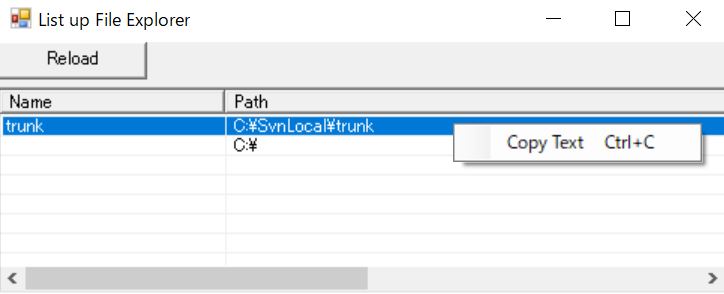
項目をダブルクリックすると、そのウィンドウが最前面表示されます。
※すでに閉じてしまっていた場合はノーケアです。
ソースコード
ListUpFileExplorer.cs
using System;
using System.ComponentModel;
using System.Data;
using System.Drawing;
using System.IO;
using System.Reflection;
using System.Runtime.InteropServices;
using System.Text;
using System.Windows.Forms;

class ListUpFileExplorer : Form
{
    ListView lsv;

    class NativeMethods
    {
        [DllImport("user32.dll")]
        [return: MarshalAs(UnmanagedType.Bool)]
        public static extern bool SetForegroundWindow(IntPtr hWnd);

        [DllImport("user32.dll")]
        [return: MarshalAs(UnmanagedType.Bool)]
        public static extern bool IsIconic(IntPtr hWnd);

        [DllImport("user32.dll")]
        [return: MarshalAs(UnmanagedType.Bool)]
        public static extern bool ShowWindow(IntPtr hWnd, int nCmdShow);

        public const int SW_RESTORE = 9;

        //[DllImport("user32.dll", SetLastError = true)]
        //public static extern int GetWindowThreadProcessId(IntPtr hWnd, out int lpdwProcessId);
    }

    ListUpFileExplorer()
    {
        Text = "List up File Explorer";
        ClientSize = new Size(960,250);


        var btn = new Button(){
            Location = new Point(0,0),
            Size = new System.Drawing.Size(100,25),
            Text = "Reload",
        };
        btn.Click += (s,e)=>{ReloadList();};
        Controls.Add(btn);


        Controls.Add(lsv = new ListView(){
            Location = new Point(0,30),
            Size = new System.Drawing.Size(700,200),
            View = View.Details,
            FullRowSelect = true,
            GridLines = true,
        });
        lsv.Columns.Add("Name", 150, HorizontalAlignment.Left);
        lsv.Columns.Add("Path", 800, HorizontalAlignment.Left);
        lsv.DoubleClick += (s,e)=>{Lsv_DoubleClick();};
        var cms = new ContextMenuStrip();
        cms.Opening += Cms_Opening;
        cms.Items.Add(new ToolStripMenuItem("Copy Text", null, (s,e)=>{CopySelectedItemText();}, Keys.Control | Keys.C));
        lsv.ContextMenuStrip = cms;

        ReloadList();

        Load += (s,e)=>{Form_Resize();};
        Resize += (s,e)=>{Form_Resize();};
        ResizeEnd += (s,e)=>{Form_Resize();};
    }

    void ReloadList()
    {
        {
            lsv.Items.Clear();
            lsv.BeginUpdate();
            try {
                Type comShellType = Type.GetTypeFromProgID("Shell.Application");
                dynamic shell = Activator.CreateInstance(comShellType);

                dynamic windows = shell.Windows();

                foreach (dynamic win in windows) {
                    //エクスプローラのみ(IEを除外)
                    string tmp = win.FullName;
                    if (String.Compare(Path.GetFileName(tmp), "EXPLORER.EXE", true)==0) { // 大文字小文字無視で比較
                        string webUri = win.LocationURL;
                        if ( webUri != "" ) {
                            Uri u = new Uri(webUri);
                            if (u.IsFile) {
                                //Windows形式のパス表現に変換する
                                string path = u.LocalPath + Uri.UnescapeDataString(u.Fragment);
                                var item = new ListViewItem(new string[]{Path.GetFileName(path),path});
                                long hwndValue = win.HWND;
                                item.Tag = new IntPtr(hwndValue);
                                lsv.Items.Add(item);
                            }
                        }
                    }
                }
            }
            finally{
                lsv.EndUpdate();
            }
        }

        // COMオブジェクト解放 ... これでいいはず
        GC.Collect();
        GC.WaitForPendingFinalizers();
    }

    void Cms_Opening(object sender, CancelEventArgs e)
    {
        Point p = lsv.PointToClient(Cursor.Position);
        var item = lsv.HitTest(p).Item;
        if ( item == null ) {
            e.Cancel = true;
        }
        else if ( item.Bounds.Contains(p) ) {
        }
        else {
            e.Cancel = true;
        }
    }

    void CopySelectedItemText()
    {
        var indices = lsv.SelectedIndices;

        if ( indices.Count == 1 ) {
            string path = lsv.Items[indices[0]].SubItems[1].Text;
            Clipboard.SetText(path);
        }
    }

    void Lsv_DoubleClick()
    {
        var indices = lsv.SelectedIndices;

        if ( indices.Count == 1 ) {
            var hwnd = (IntPtr)(lsv.Items[indices[0]].Tag);

            //int pid;
            //NativeMethods.GetWindowThreadProcessId(hWnd, out pid);
            //Process p = Process.GetProcessById(pid);

            if ( NativeMethods.IsIconic(hwnd) ){
                // 最小化から戻す
                NativeMethods.ShowWindow(hwnd, NativeMethods.SW_RESTORE);
            }

            if ( ! NativeMethods.SetForegroundWindow(hwnd) ) {
                // フォーカス移動失敗
            }
        }
    }

    void Form_Resize()
    {
        int h = ClientSize.Height - lsv.Top;
        if(h<=10){h=10;}
        lsv.Size = new Size(ClientSize.Width,h);
    }

    [STAThread]
    static void Main(string[] args)
    {
        Application.Run(new ListUpFileExplorer());
    }
}
参考サイト
右クリックメニュー関連: