
はじめに
業務で個人情報や機密データを含むCSVやExcelファイルを扱う際、「特定の列だけをサクッとマスキング(伏せ字化)したい」という要件がありました。
近年では、社内データを外部のAIサービスに渡して分析や要約を行いたい場面も増えていますが
「個人情報や機密情報が含まれているため、そのままではAIを利用できない」 という会社もあると思います。
今回は、そんなセキュリティ上の懸念をクリアしつつ、Excel・CSV・TSVに対応して
「どの文字で・何文字おきにマスクするか」をセルで自由に変更でき
さらにGUIでシートや列を柔軟に選択して処理できるVBAツールを作成したので、そのコードと仕組みをご紹介します。
マスク前後のイメージ
実際にこのツールを使ってデータを処理した際のイメージは以下の通りです。
例えば、氏名やメールアドレス、電話番号などの機密列を指定してマスクすることができます。
💡 テストデータについての補足
今回のサンプルで使用しているデータは、実在の個人情報を避けるため
生成AIで作成した架空のデータを使用しています。
実際の業務データを扱う前の動作検証には、生成AIや個人情報テストデータ生成ツールの活用をおすすめします。
マスク前

マスク後

ツールの概要・特徴
- Excel / CSV / TSV のシームレスな対応
- セルで簡単設定: マスキングに使う文字や、何文字おきに置換するか(間隔)をExcelのセル(B1, B2)で自由に切り替え可能
- 柔軟な選択機能:
- Excelの場合は処理したいシートを個別に選択可能(未選択のシートもそのまま出力に保持されます)
- ヘッダー行を任意に指定可能
- 動的に生成されるチェックボックスからマスキングしたい列を選択可能
- 文字コード自動判定: Shift_JISとUTF-8(BOM付き/なし)を自動判別
ツールの使い方(実行手順)
-
マクロの実行:
VBAエディタやExcelのリボンからMaskFileマクロを実行します。 -
ファイルの選択:
ファイル選択ダイアログが立ち上がるので、マスキングしたいExcelファイルまたはCSV/TSVファイルを選択します。

-
パスワード入力(Excelの場合):
パスワード保護されている場合は入力欄に指定します(不要な場合はそのままOK)。

-
シートの選択(Excelの場合):
処理したいシートにチェックを入れてOKを押します。

-
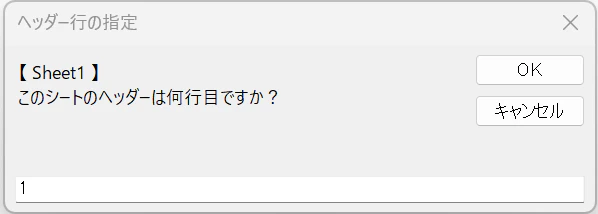
ヘッダー行の指定:
「ヘッダーは何行目ですか?」というダイアログが表示されるため、列名が記載されている行番号(例:1)を入力します。
-
マスキング列の選択:
自動生成されるチェックボックス画面で、伏せ字化したい列にチェックを入れて画面を閉じます。

-
完了:
処理が完了するとメッセージが表示され、元ファイルと同じ場所にMasked_ファイル名という名前で出力されます。

画面イメージ・事前準備
1. Excel側の設定
設定用のシート(例:Sheet1)のセルに、以下のようにマスク設定を配置します。

2. ユーザーフォームの準備
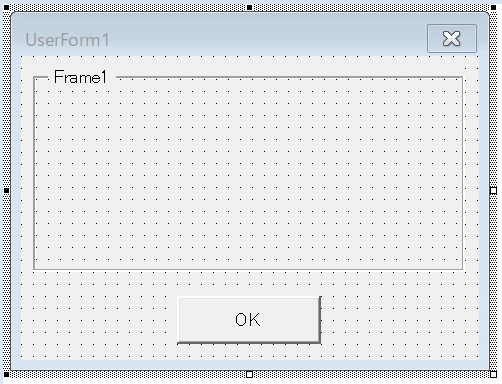
VBAエディタで以下の2つのユーザーフォームを作成し
それぞれの中に Frame コントロール(オブジェクト名:ScrollFrame)と CommandButton コントロール(オブジェクト名:btnOK)を配置してください。
-
UserForm1(列選択用)
-
UserForm2(シート選択用)

実装コード
1. 標準モジュール
以下のコードを標準モジュールに貼り付けます。
Option Explicit

' エントリーポイント
Sub MaskFile()
    Dim fd As FileDialog
    Dim targetPath As String, outPath As String
    Dim fso As Object, ext As String

    Set fd = Application.FileDialog(msoFileDialogFilePicker)
    fd.Title = "マスキング対象のファイルを選択してください"
    If fd.Show <> -1 Then Exit Sub
    targetPath = fd.SelectedItems(1)

    Set fso = CreateObject("Scripting.FileSystemObject")
    ext = LCase(fso.GetExtensionName(targetPath))

    ' --- セルからマスキング設定を読み込む ---
    Dim wsConfig As Worksheet
    On Error Resume Next
    Set wsConfig = ThisWorkbook.Sheets("Sheet1")
    On Error GoTo 0

    Dim maskChar As String, maskInterval As Long
    If Not wsConfig Is Nothing Then
        maskChar = CStr(wsConfig.Range("B1").Value)
        maskInterval = CLng(wsConfig.Range("B2").Value)
    Else
        maskChar = "〇" ' シートが見つからない場合のデフォルト
        maskInterval = 2  ' デフォルトの間隔
    End If

    If maskChar = "" Then maskChar = "〇"
    If maskInterval <= 0 Then maskInterval = 2

    Dim pWord As String: pWord = ""

    Application.ScreenUpdating = False
    Application.Calculation = xlCalculationManual
    Application.EnableEvents = False

    On Error GoTo ErrorHandler

    ' --- Excelファイルの場合 ---
    If ext = "xls" Or ext = "xlsx" Or ext = "xlsm" Then
        Dim wb As Workbook
        pWord = InputBox("指定したExcelファイルに設定しているパスワードを入力してください。" & vbCrLf & "設定していない場合は空欄のまま「OK」をクリックしてください", "パスワード入力", "")

        If pWord <> "" Then
            Set wb = Workbooks.Open(targetPath, Password:=pWord, ReadOnly:=True)
        Else
            Set wb = Workbooks.Open(targetPath, ReadOnly:=True)
        End If

        ' シート選択用フォーム(UserForm2)の動的生成・表示
        Dim ufSheet As Object: Set ufSheet = New UserForm2
        With ufSheet
            .Caption = "処理するシートを選択してください"
            .ScrollFrame.ScrollBars = 2
            Dim sIdx As Long, topPos As Long: topPos = 10
            For sIdx = 1 To wb.Sheets.Count
                Dim chkSheet As Object
                Set chkSheet = .ScrollFrame.Controls.Add("Forms.CheckBox.1", "chkSheet_" & sIdx, True)
                chkSheet.Caption = "[" & sIdx & "] " & wb.Sheets(sIdx).Name
                chkSheet.Left = 10: chkSheet.Top = topPos: chkSheet.Width = 300
                topPos = topPos + 25
            Next sIdx
            .ScrollFrame.ScrollHeight = topPos + 20
            .Show
        End With

        Dim sheetIndices As Collection
        Set sheetIndices = ufSheet.SelectedSheetIndices
        Unload ufSheet

        ' チェックされたシートのインデックスを辞書に登録
        Dim selectedDict As Object: Set selectedDict = CreateObject("Scripting.Dictionary")
        Dim vSh As Variant
        For Each vSh In sheetIndices
            selectedDict.Add CStr(vSh), True
        Next vSh

        ' 全シートを出力用ブックにコピーして作成
        wb.Sheets.Copy
        Dim outWb As Workbook
        Set outWb = ActiveWorkbook

        ' ブック内の各シートを走査して、チェックが入っていたシートのみマスキング処理を行う
        Dim wsOut As Worksheet
        For sIdx = 1 To outWb.Sheets.Count
            Set wsOut = outWb.Sheets(sIdx)

            ' このシートがチェックされていた場合のみマスキングを実行
            If selectedDict.Exists(CStr(sIdx)) Then
                Dim hInput As String
                hInput = InputBox("【 " & wsOut.Name & " 】" & vbCrLf & "このシートのヘッダーは何行目ですか?", "ヘッダー行の指定", "1")
                If Not IsNumeric(hInput) Then GoTo SkipMasking
                Dim headerRowVal As Long: headerRowVal = CLng(hInput)

                Dim lastRow As Long, lastCol As Long
                lastRow = wsOut.Cells(wsOut.Rows.Count, 1).End(xlUp).Row
                lastCol = wsOut.Cells(headerRowVal, wsOut.Columns.Count).End(xlToLeft).Column

                If lastRow < headerRowVal Then GoTo SkipMasking

                Dim rawData As Variant
                rawData = wsOut.Range(wsOut.Cells(1, 1), wsOut.Cells(lastRow, lastCol)).Value

                Dim headers() As String
                ReDim headers(0 To lastCol - 1)
                Dim c As Long
                For c = 1 To lastCol
                    headers(c - 1) = CStr(rawData(headerRowVal, c))
                Next c

                Dim ufCol As Object: Set ufCol = New UserForm1
                With ufCol
                    .Caption = "列選択 [" & wsOut.Name & "]"
                    .ScrollFrame.ScrollBars = 2
                    topPos = 10
                    Dim i As Long
                    For i = 0 To UBound(headers)
                        Dim chkCol As Object
                        Set chkCol = .ScrollFrame.Controls.Add("Forms.CheckBox.1", "chkHeader_" & i, True)
                        chkCol.Caption = "[" & (i + 1) & "] " & headers(i)
                        chkCol.Left = 10: chkCol.Top = topPos: chkCol.Width = 300
                        topPos = topPos + 25
                    Next i
                    .ScrollFrame.ScrollHeight = topPos + 20
                    .Show
                End With

                Dim maskDict As Object: Set maskDict = CreateObject("Scripting.Dictionary")
                Dim vIdx As Variant
                For Each vIdx In ufCol.SelectedIndices: maskDict.Add CStr(vIdx), True: Next vIdx
                Unload ufCol

                Dim r As Long
                For r = headerRowVal + 1 To lastRow
                    For c = 1 To lastCol
                        Dim cellVal As String
                        cellVal = CStr(rawData(r, c))

                        If maskDict.Exists(CStr(c - 1)) Then
                            rawData(r, c) = "'" & MaskText(cellVal, maskChar, maskInterval)
                        Else
                            If Left(cellVal, 1) = "0" And Len(cellVal) > 1 Then
                                rawData(r, c) = "'" & cellVal
                            Else
                                rawData(r, c) = cellVal
                            End If
                        End If
                    Next c
                Next r

                wsOut.Columns.NumberFormat = "@"
                wsOut.Range(wsOut.Cells(1, 1), wsOut.Cells(lastRow, lastCol)).Value = rawData
            End If
SkipMasking:
        Next sIdx

        wb.Close SaveChanges:=False

        outPath = fso.GetParentFolderName(targetPath) & "\Masked_" & fso.GetFileName(targetPath)
        If pWord <> "" Then
            outWb.SaveAs outPath, Password:=pWord
        Else
            outWb.SaveAs outPath
        End If
        outWb.Close

    Else
        ' --- CSV / TSVファイルの場合 ---
        Dim delim As String: delim = IIf(ext = "tsv" Or ext = "txt", vbTab, ",")

        Dim charSetUsed As String
        charSetUsed = DetectCharset(targetPath)

        Dim promptResult As String
        promptResult = InputBox("ヘッダーは何行目ですか?", "ヘッダー行の指定", "1")
        If Not IsNumeric(promptResult) Then GoTo Finally
        Dim headerRowValCsv As Long: headerRowValCsv = CLng(promptResult)

        Dim stream As Object
        Set stream = CreateObject("ADODB.Stream")
        stream.Type = 2: stream.Charset = charSetUsed: stream.Open
        stream.LoadFromFile targetPath

        Dim lineCount As Long: lineCount = 0
        Dim targetHeaderStr As String
        Do While Not stream.EOS
            lineCount = lineCount + 1
            Dim curLine As String
            curLine = stream.ReadText(-2)
            If lineCount = headerRowValCsv Then
                targetHeaderStr = TrimLine(curLine)
                Exit Do
            End If
        Loop
        stream.Close

        If targetHeaderStr = "" Then
            MsgBox "指定されたヘッダー行が見つかりませんでした。", vbCritical
            GoTo Finally
        End If

        headers = Split(targetHeaderStr, delim)

        Set ufCol = New UserForm1
        With ufCol
            .Caption = "マスキング対象列を選択"
            .ScrollFrame.ScrollBars = 2
            topPos = 10
            For i = 0 To UBound(headers)
                Set chkCol = .ScrollFrame.Controls.Add("Forms.CheckBox.1", "chkHeader_" & i, True)
                chkCol.Caption = "[" & (i + 1) & "] " & headers(i)
                chkCol.Left = 10: chkCol.Top = topPos: chkCol.Width = 300
                topPos = topPos + 25
            Next i
            .ScrollFrame.ScrollHeight = topPos + 20
            .Show
        End With

        Set maskDict = CreateObject("Scripting.Dictionary")
        For Each vIdx In ufCol.SelectedIndices: maskDict.Add CStr(vIdx), True: Next vIdx
        Unload ufCol

        outPath = fso.GetParentFolderName(targetPath) & "\Masked_" & fso.GetFileName(targetPath)

        Dim inStream As Object, outStream As Object
        Set inStream = CreateObject("ADODB.Stream")
        Set outStream = CreateObject("ADODB.Stream")

        inStream.Type = 2: inStream.Charset = charSetUsed: inStream.Open
        inStream.LoadFromFile targetPath

        outStream.Type = 2: outStream.Charset = charSetUsed: outStream.Open

        lineCount = 0
        Do While Not inStream.EOS
            lineCount = lineCount + 1
            curLine = inStream.ReadText(-2)

            If lineCount < headerRowValCsv Or lineCount = headerRowValCsv Then
                outStream.WriteText curLine & vbCrLf
            Else
                Dim lineStr As String: lineStr = TrimLine(curLine)
                If lineStr <> "" Then
                    Dim cols() As String
                    cols = Split(lineStr, delim)
                    Dim cIdx As Long
                    For cIdx = 0 To UBound(cols)
                        If maskDict.Exists(CStr(cIdx)) Then
                            cols(cIdx) = MaskText(cols(cIdx), maskChar, maskInterval)
                        End If
                    Next cIdx
                    outStream.WriteText Join(cols, delim) & vbCrLf
                Else
                    outStream.WriteText vbCrLf
                End If
            End If
        Loop

        inStream.Close
        outStream.SaveToFile outPath, 2
        outStream.Close
    End If

Finally:
    Application.ScreenUpdating = True
    Application.Calculation = xlCalculationAutomatic
    Application.EnableEvents = True

    If outPath <> "" Then
        MsgBox "マスキング処理が完了しました。" & vbCrLf & outPath, vbInformation
    End If
    Exit Sub

ErrorHandler:
    Application.ScreenUpdating = True
    Application.Calculation = xlCalculationAutomatic
    Application.EnableEvents = True
    MsgBox "エラーが発生しました: " & Err.Description, vbCritical
End Sub


' 改行削除関数
Function TrimLine(ByVal txt As String) As String
    TrimLine = Replace(Replace(txt, vbCr, ""), vbLf, "")
End Function


' セルから受け取った「文字」と「間隔」でマスキングを行う関数
Function MaskText(ByVal txt As String, ByVal mChar As String, ByVal mInterval As Long) As String
    Dim i As Long
    Dim res As String: res = ""
    For i = 1 To Len(txt)
        ' 指定された間隔毎にマスク文字に置き換え
        If i Mod mInterval = 0 Then
            res = res & mChar
        Else
            res = res & Mid(txt, i, 1)
        End If
    Next i
    MaskText = res
End Function


' 文字コード自動判定関数
Function DetectCharset(filePath As String) As String
    Dim stream As Object
    Set stream = CreateObject("ADODB.Stream")
    stream.Type = 1 ' Binary
    stream.Open
    stream.LoadFromFile filePath

    Dim bin() As Byte
    If stream.Size >= 3 Then
        bin = stream.Read(3)
    ElseIf stream.Size > 0 Then
        bin = stream.Read(stream.Size)
    Else
        stream.Close
        DetectCharset = "Shift_JIS"
        Exit Function
    End If
    stream.Close

    ' UTF-8 BOM付き (EF BB BF) のチェック
    If UBound(bin) >= 2 Then
        If bin(0) = &HEF And bin(1) = &HBB And bin(2) = &HBF Then
            DetectCharset = "UTF-8"
            Exit Function
        End If
    End If

    ' BOMなしUTF-8 か Shift_JIS かのテスト読み込み判定
    On Error Resume Next
    Dim testStream As Object
    Set testStream = CreateObject("ADODB.Stream")
    testStream.Type = 2
    testStream.Charset = "UTF-8"
    testStream.Open
    testStream.LoadFromFile filePath

    Dim testStr As String
    testStr = testStream.ReadText(1000)
    testStream.Close

    If Err.Number = 0 And Len(testStr) > 0 Then
        DetectCharset = "UTF-8"
        Exit Function
    End If
    On Error GoTo 0

    ' デフォルト:Shift_JIS
    DetectCharset = "Shift_JIS"
End Function
2. UserForm1
UserForm1 のコードエディタに以下を貼り付けます。
Public SelectedIndices As Collection

Private Sub UserForm_Initialize()
    Set SelectedIndices = New Collection
End Sub

Private Sub btnOK_Click()
    Dim ctrl As Control
    Set SelectedIndices = New Collection
    For Each ctrl In ScrollFrame.Controls
        If TypeName(ctrl) = "CheckBox" Then
            If ctrl.Value = True Then
                Dim idx As Long
                idx = CLng(Mid(ctrl.Name, InStr(ctrl.Name, "_") + 1))
                SelectedIndices.Add idx
            End If
        End If
    Next ctrl
    Me.Hide
End Sub
2. UserForm2
UserForm2 のコードエディタに以下を貼り付けます。
Public SelectedSheetIndices As Collection

Private Sub UserForm_Initialize()
    Set SelectedSheetIndices = New Collection
End Sub

Private Sub btnOK_Click()
    Dim ctrl As Control
    Set SelectedSheetIndices = New Collection
    For Each ctrl In ScrollFrame.Controls
        If TypeName(ctrl) = "CheckBox" Then
            If ctrl.Value = True Then
                Dim idx As Long
                idx = CLng(Mid(ctrl.Name, InStr(ctrl.Name, "_") + 1))
                SelectedSheetIndices.Add idx
            End If
        End If
    Next ctrl
    Me.Hide
End Sub
まとめ
今回は、AI利用前のセキュリティ対策や日々のデータ成形に役立つ、柔軟なExcel・CSV・TSV対応のマスキングツールをご紹介しました。
GUIで直感的に操作でき、ルールもセルで簡単に変更できるため、ぜひ日々の業務効率化に活用してみてください!