

概要
毎日Cost Explorerでコストの利用状況を確認するのはなかなか難しいのでメールでコスト利用状況を通知する仕組みの実装方法です。
主な機能は以下のとおりです。
- 指定したメールアドレスにコスト利用状況の通知
- サービス別のコスト分析
- タグ別コスト分析
- 3日前の利用状況通知(コストが状況が確定するのが2-3日かかるため)
- 3日前と4日前の前日比較
- 前週同曜日との比較
- 前月同日の比較
- 過去2週間の平均と比較
- Trusted Advisor連携(出力にはBusiness/Enterpriseサポートプランが必要)
- ルールベースでのコスト最適化アドバイス
実装にはCost Explorerが有効化されている必要があります。
通知例
以下のような内容がメールで通知されます。
============================================================
AWS コスト利用状況レポート - 2025-12-04
============================================================

【サービス別コスト】
  • AWS Cost Explorer: $0.28 (増加傾向 (+716.7%))
  • Amazon Lightsail: $0.20 (横ばい (-0.8%))
  • EC2 - Other: $0.07 (横ばい (-2.6%))
  • Amazon Simple Storage Service: $0.01 (横ばい (-5.4%))
  • Amazon Route 53: $0.00 (減少傾向 (-98.1%))
  • Claude 3.5 Haiku (Amazon Bedrock Edition): $0.00 (増加傾向 (+434.4%))
  • Amazon API Gateway: $0.00 (増加傾向 (+83.0%))
  • Amazon DynamoDB: $0.00 (減少傾向 (-47.4%))
  • Amazon FSx: $0.00 (横ばい (-2.6%))
  • Amazon CloudFront: $0.00 (増加傾向 (+39772.7%))

合計: $0.57

【期間別コスト比較】

前日比較:
  前日 (2025-12-03): $0.78
  今回 (2025-12-04): $0.57
  差額: $-0.21 (-26.9%)

前週同曜日比較:
  前週同曜日 (2025-11-27): $0.29
  今回 (2025-12-04): $0.57
  差額: $+0.28 (+95.2%)

前月同日比較:
  前月同日 (2025-11-04): $0.29
  今回 (2025-12-04): $0.57
  差額: $+0.29 (+99.2%)

【日別コスト推移 (過去14日間)】

  2025-11-20: █████ $0.80
  2025-11-21: ██ $0.32
  2025-11-22: ██ $0.29
  2025-11-23: ██ $0.31
  2025-11-24: ██ $0.29
  2025-11-25: ██ $0.29
  2025-11-26: █████ $0.79
  2025-11-27: ██ $0.29
  2025-11-28: ██ $0.30
  2025-11-29: ██ $0.29
  2025-11-30: ██ $0.29
  2025-12-01: ████████████████████████████████████████ $5.58
  2025-12-02: █████ $0.72
  2025-12-03: █████ $0.78
  2025-12-04: ████ $0.57

【タグ別コスト(Environment)】
  • Environment$: $0.57

【AWS Trusted Advisor コスト最適化チェック】
Trusted Advisorのチェックを取得できませんでした(Business/Enterpriseサポートプランが必要)

【コスト削減アドバイス】
• **AWS Cost Explorerの最適化** ($0.28/日)
  - 利用状況の確認と不要なリソースの削除
  - 適切なサービスプランへの変更を検討

• **Amazon Lightsailの最適化** ($0.20/日)
  - Reserved InstancesやSavings Plansの検討
  - 未使用インスタンスの停止または削除
  - 適切なインスタンスタイプへのリサイジング

• **EC2 - Otherの最適化** ($0.07/日)
  - Reserved InstancesやSavings Plansの検討
  - 未使用インスタンスの停止または削除
  - 適切なインスタンスタイプへのリサイジング

============================================================
このレポートは自動生成されました
============================================================
実装方法
実装はマネージドコンソール操作の手順で記載します。
マネージドコンソールの画面が変わっている場合がありますので適意設定時の画面で最適化してください。
1. IAMロールの作成
1-1. IAMコンソールの選択
- AWSマネジメントコンソールにログイン
- 検索バーで「IAM」と入力して、IAMサービスを開く
- 左メニューから「ロール」を選択
「ロールを作成」ボタンをクリック
1-2. 信頼されたエンティティを選択
- 「信頼されたエンティティタイプ」で AWSのサービス を選択
- 「ユースケース」で Lambda を選択
- 「次へ」をクリック
1-3. 権限をアタッチ
- 検索バーで
「AWSLambdaBasicExecutionRole」を検索 - チェックボックスをオンにして選択
- 「次へ」をクリック
1-4. ロール名を設定
- ロール名:
cost-notification-lambda-role - 「ロールを作成」をクリック
1-5. カスタムポリシーを追加
- 作成したロールに追加の権限を付与します。
- 作成した「
cost-notification-lambda-role」をクリックして開く - 「許可を追加」→「インラインポリシーを作成」をクリック
- 「JSON」タブを選択
以下のJSONを貼り付け
{
    "Version": "2012-10-17",
    "Statement": [
        {
            "Effect": "Allow",
            "Action": [
                "ce:GetCostAndUsage",
                "ce:GetCostForecast",
                "ce:GetDimensionValues"
            ],
            "Resource": "*"
        },
        {
            "Effect": "Allow",
            "Action": [
                "support:DescribeTrustedAdvisorChecks",
                "support:DescribeTrustedAdvisorCheckResult"
            ],
            "Resource": "*"
        },
        {
            "Effect": "Allow",
            "Action": [
                "sns:Publish"
            ],
            "Resource": "arn:aws:sns:us-east-1:*:cost-notification-topic"
        }
    ]
}
5. 「次へ」をクリック
6. ポリシー名: CostNotificationPolicy
7. 「ポリシーの作成」をクリック
2. SNSトピックの作成
2-1. SNSコンソールの選択
- 検索バーで「SNS」と入力
- Amazon Simple Notification Serviceを開く
- リージョンが「us-east-1(バージニア北部)」になっていることを確認
- 左メニューから「トピック」を選択
- 「トピックの作成」をクリック
2-2. トピックを作成
- タイプ: スタンダード を選択
- 名前:
cost-notification-topic - 表示名:
AWS Cost Notification(オプション) - その他の設定はデフォルトのまま
- 「トピックの作成」をクリック
2-3. トピックARNをメモ
作成されたトピックのARNをメモしておきます(後でLambdaの環境変数に使用)。
例: arn:aws:sns:us-east-1:123456789012:cost-notification-topic
2-4. メールサブスクリプションを作成
- 作成したトピックサブスクリプションタブを選択して「サブスクリプションの作成」をクリック
- プロトコル:
Eメールを選択 - エンドポイント: 通知を受け取りたいメールアドレスを入力
- 「サブスクリプションの作成」をクリック
- 入力したメールアドレスに確認メールが届くので、メール内の「Confirm subscription」リンクをクリック

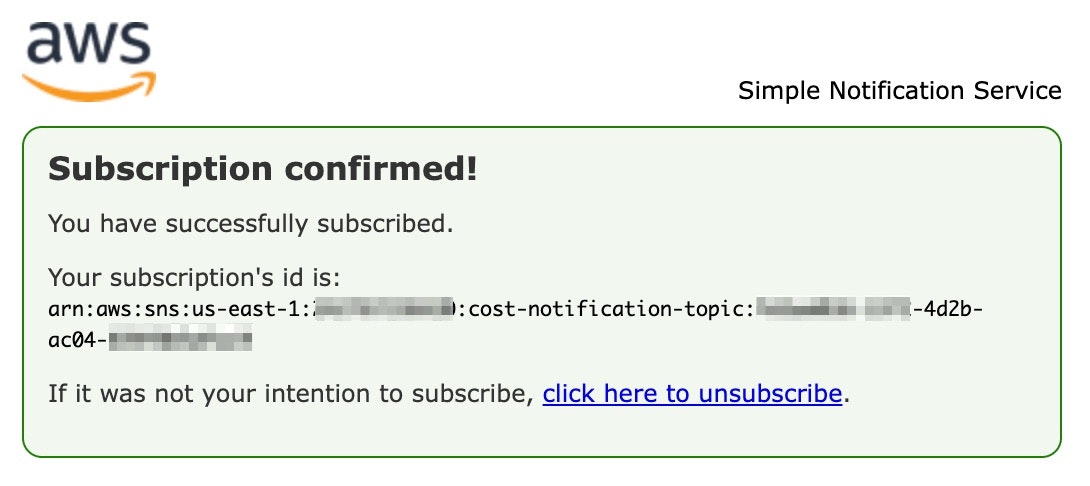
6. ブラウザに「Subscription confirmed!」と表示されれば登録完了です
3. Lambda関数の作成
3-1. Lambdaコンソールの選択
- 検索バーで「Lambda」と入力
- AWS Lambdaサービスを開く
- リージョンが「us-east-1(バージニア北部)」になっていることを確認
- 「関数の作成」をクリック
3-2. 関数の基本設定
- 「一から作成」を選択
- 関数名:
cost-notification-function - ランタイム:
Python 3.14を選択 - アーキテクチャ:
x86_64を選択(デフォルト) - 「デフォルトの実行ロールの変更」を展開
- 「既存のロールを使用する」を選択
- 既存のロール:
cost-notification-lambda-roleを選択 - 「関数の作成」をクリック
3-3. 関数コードを設定
- 「コード」タブで、lambda_function.pyのコード全体を削除
- 以下のコードを貼り付け
import boto3
import os
from datetime import datetime, timedelta
from typing import Dict, List, Tuple, Any
import json

# AWS クライアントの初期化
ce_client = boto3.client('ce', region_name='us-east-1')
sns_client = boto3.client('sns', region_name='us-east-1')

# 環境変数
SNS_TOPIC_ARN = os.environ.get('SNS_TOPIC_ARN')

def lambda_handler(event, context):
    """
    Lambda関数のメインハンドラー
    """
    try:
        # 3日前の日付を取得(Cost Explorerのデータ遅延を考慮)
        target_date = datetime.now() - timedelta(days=3)
        target_date_str = target_date.strftime('%Y-%m-%d')
        next_day_str = (target_date + timedelta(days=1)).strftime('%Y-%m-%d')

        # 過去2週間のデータも取得(トレンド分析用)
        two_weeks_ago = target_date - timedelta(days=14)
        two_weeks_ago_str = two_weeks_ago.strftime('%Y-%m-%d')

        print(f"分析対象日: {target_date_str}")
        print(f"比較期間: {two_weeks_ago_str} から {target_date_str}")

        # コストデータ取得
        current_results = get_cost_data(target_date_str, next_day_str)
        past_results = get_cost_data(two_weeks_ago_str, target_date_str)

        # サービス別コストの抽出
        service_costs = extract_service_costs(current_results)

        # タグ別コストの抽出
        tag_costs = get_cost_by_tags(target_date_str, next_day_str)

        # トレンド分析(過去2週間の平均との比較)
        trends = analyze_cost_trend(current_results, past_results, period_days=14)

        # 複数の期間との比較データを取得
        comparisons = get_comparison_data(target_date)

        # 日別推移グラフ作成(過去2週間)
        daily_graph = create_daily_trend_graph(two_weeks_ago_str, next_day_str)

        # コスト最適化アドバイスの生成(ルールベース)
        advice = get_cost_optimization_advice(service_costs)

        # Trusted Advisor チェック(サポートプランがある場合)
        trusted_advisor_info = get_trusted_advisor_cost_optimization()

        # 通知メッセージの作成
        message = format_notification_message(
            target_date_str,
            service_costs,
            tag_costs,
            trends,
            comparisons,
            daily_graph,
            advice,
            trusted_advisor_info
        )

        # SNS経由でメール送信
        send_notification(message, target_date_str)

        return {
            'statusCode': 200,
            'body': json.dumps('コスト通知を正常に送信しました')
        }

    except Exception as e:
        print(f"エラーが発生しました: {str(e)}")
        import traceback
        traceback.print_exc()
        return {
            'statusCode': 500,
            'body': json.dumps(f'エラー: {str(e)}')
        }

def get_cost_data(start_date: str, end_date: str) -> Dict:
    """Cost Explorerからコストデータを取得"""
    response = ce_client.get_cost_and_usage(
        TimePeriod={
            'Start': start_date,
            'End': end_date
        },
        Granularity='DAILY',
        Metrics=['UnblendedCost'],
        GroupBy=[
            {'Type': 'DIMENSION', 'Key': 'SERVICE'}
        ]
    )
    return response

def extract_service_costs(results: Dict) -> List[Tuple[str, float]]:
    """サービス別のコストを抽出"""
    service_costs = []

    if results['ResultsByTime']:
        for group in results['ResultsByTime'][0]['Groups']:
            service = group['Keys'][0]
            cost = float(group['Metrics']['UnblendedCost']['Amount'])
            if cost > 0:
                service_costs.append((service, cost))

    # コストの高い順にソート
    service_costs.sort(key=lambda x: x[1], reverse=True)
    return service_costs

def get_cost_by_tags(start_date: str, end_date: str) -> Dict[str, float]:
    """タグ別のコストを取得"""
    try:
        response = ce_client.get_cost_and_usage(
            TimePeriod={
                'Start': start_date,
                'End': end_date
            },
            Granularity='DAILY',
            Metrics=['UnblendedCost'],
            GroupBy=[
                {'Type': 'TAG', 'Key': 'Environment'}
            ]
        )

        tag_costs = {}
        if response['ResultsByTime']:
            for group in response['ResultsByTime'][0]['Groups']:
                tag_value = group['Keys'][0].replace('Environment$', '')
                cost = float(group['Metrics']['UnblendedCost']['Amount'])
                if cost > 0:
                    tag_costs[tag_value] = cost

        return tag_costs
    except Exception as e:
        print(f"タグ別コスト取得エラー: {str(e)}")
        return {}

def analyze_cost_trend(current_results: Dict, past_results: Dict, period_days: int = 14) -> List[Dict]:
    """コストトレンドを分析"""
    trends = []

    # 現在のコストを取得
    current_costs = {}
    if current_results['ResultsByTime']:
        for group in current_results['ResultsByTime'][0]['Groups']:
            service = group['Keys'][0]
            cost = float(group['Metrics']['UnblendedCost']['Amount'])
            current_costs[service] = cost

    # 過去の平均コストを計算
    past_costs = {}
    for result in past_results['ResultsByTime']:
        for group in result['Groups']:
            service = group['Keys'][0]
            cost = float(group['Metrics']['UnblendedCost']['Amount'])
            if service not in past_costs:
                past_costs[service] = []
            past_costs[service].append(cost)

    # 平均を計算
    past_avg_costs = {
        service: sum(costs) / len(costs)
        for service, costs in past_costs.items()
    }

    # トレンド分析(±20%を閾値とする)
    for service, current_cost in current_costs.items():
        if current_cost < 0.01:  # $0.01未満は無視
            continue

        past_avg = past_avg_costs.get(service, 0)

        if past_avg > 0:
            change_percent = ((current_cost - past_avg) / past_avg) * 100

            if abs(change_percent) >= 20:
                trends.append({
                    'service': service,
                    'current_cost': current_cost,
                    'past_avg_cost': past_avg,
                    'change_percent': change_percent,
                    'period_days': period_days
                })

    return sorted(trends, key=lambda x: abs(x['change_percent']), reverse=True)

def get_comparison_data(target_date: datetime) -> Dict[str, Any]:
    """複数の比較データを取得"""
    comparisons = {}

    # 1. 前日との比較
    yesterday = target_date - timedelta(days=1)
    yesterday_str = yesterday.strftime('%Y-%m-%d')
    yesterday_next = (yesterday + timedelta(days=1)).strftime('%Y-%m-%d')
    yesterday_data = get_cost_data(yesterday_str, yesterday_next)
    comparisons['yesterday'] = {
        'date': yesterday_str,
        'data': yesterday_data
    }

    # 2. 前週同曜日との比較
    last_week_same_day = target_date - timedelta(days=7)
    last_week_str = last_week_same_day.strftime('%Y-%m-%d')
    last_week_next = (last_week_same_day + timedelta(days=1)).strftime('%Y-%m-%d')
    last_week_data = get_cost_data(last_week_str, last_week_next)
    comparisons['last_week_same_day'] = {
        'date': last_week_str,
        'data': last_week_data
    }

    # 3. 前月同日との比較
    if target_date.month == 1:
        month_ago = target_date.replace(year=target_date.year - 1, month=12)
    else:
        try:
            month_ago = target_date.replace(month=target_date.month - 1)
        except ValueError:
            # 31日など、前月に存在しない日付の場合
            month_ago = (target_date.replace(day=1) - timedelta(days=1))

    month_ago_str = month_ago.strftime('%Y-%m-%d')
    month_ago_next = (month_ago + timedelta(days=1)).strftime('%Y-%m-%d')
    month_ago_data = get_cost_data(month_ago_str, month_ago_next)
    comparisons['month_ago'] = {
        'date': month_ago_str,
        'data': month_ago_data
    }

    return comparisons

def calculate_total_cost(results: Dict) -> float:
    """結果から総コストを計算"""
    total = 0.0
    if results['ResultsByTime']:
        for group in results['ResultsByTime'][0]['Groups']:
            cost = float(group['Metrics']['UnblendedCost']['Amount'])
            total += cost
    return total

def create_daily_trend_graph(start_date: str, end_date: str) -> str:
    """日別コスト推移のテキストグラフを作成"""
    try:
        response = ce_client.get_cost_and_usage(
            TimePeriod={
                'Start': start_date,
                'End': end_date
            },
            Granularity='DAILY',
            Metrics=['UnblendedCost']
        )

        daily_costs = []
        for result in response['ResultsByTime']:
            date = result['TimePeriod']['Start']
            cost = float(result['Total']['UnblendedCost']['Amount'])
            daily_costs.append((date, cost))

        if not daily_costs:
            return "データなし"

        # グラフの作成
        max_cost = max(cost for _, cost in daily_costs)
        graph_lines = []

        for date, cost in daily_costs:
            # 日付を短縮表示(MM-DD形式)
            date_short = date[5:]  # YYYY-MM-DD から MM-DD を取得

            # バーの長さを計算(最大40文字)
            if max_cost > 0:
                bar_length = int((cost / max_cost) * 40)
            else:
                bar_length = 0

            bar = '█' * bar_length
            graph_lines.append(f"{date_short}: {bar} ${cost:.2f}")

        return '\n'.join(graph_lines)

    except Exception as e:
        print(f"日別グラフ作成エラー: {str(e)}")
        return "グラフ作成に失敗しました"

def get_cost_optimization_advice(service_costs: List[Tuple[str, float]]) -> str:
    """コスト最適化の基本的なアドバイスを生成(ルールベース)"""
    advice_lines = []

    # コストの高い上位3サービスに対してアドバイスを生成
    top_services = sorted(service_costs, key=lambda x: x[1], reverse=True)[:3]

    for service, cost in top_services:
        if cost < 0.01:  # $0.01未満は無視
            continue

        # サービス別の最適化アドバイス
        if 'EC2' in service or 'Lightsail' in service:
            advice_lines.append(
                f"• **{service}の最適化** (${cost:.2f}/日)\n"
                "  - Reserved InstancesやSavings Plansの検討\n"
                "  - 未使用インスタンスの停止または削除\n"
                "  - 適切なインスタンスタイプへのリサイジング"
            )
        elif 'RDS' in service or 'Database' in service:
            advice_lines.append(
                f"• **{service}の最適化** (${cost:.2f}/日)\n"
                "  - Reserved Instancesの検討\n"
                "  - 開発環境DBの自動停止スケジュール設定\n"
                "  - ストレージの自動スケーリング設定見直し"
            )
        elif 'S3' in service:
            advice_lines.append(
                f"• **{service}の最適化** (${cost:.2f}/日)\n"
                "  - ライフサイクルポリシーの設定(Glacier移行)\n"
                "  - 不要なバージョニングデータの削除\n"
                "  - Intelligent-Tieringの活用"
            )
        elif 'Lambda' in service:
            advice_lines.append(
                f"• **{service}の最適化** (${cost:.2f}/日)\n"
                "  - メモリ設定の最適化(Compute Optimizerの活用)\n"
                "  - 不要な実行の削減\n"
                "  - タイムアウト設定の見直し"
            )
        elif 'CloudWatch' in service:
            advice_lines.append(
                f"• **{service}の最適化** (${cost:.2f}/日)\n"
                "  - ログ保持期間の見直し\n"
                "  - 不要なメトリクスの削除\n"
                "  - カスタムメトリクスの頻度見直し"
            )
        elif 'NAT' in service or 'VPC' in service:
            advice_lines.append(
                f"• **{service}の最適化** (${cost:.2f}/日)\n"
                "  - NAT Gatewayの使用見直し(NAT Instanceへの変更)\n"
                "  - VPCエンドポイントの活用\n"
                "  - データ転送量の削減"
            )
        else:
            advice_lines.append(
                f"• **{service}の最適化** (${cost:.2f}/日)\n"
                "  - 使用状況の確認と不要なリソースの削除\n"
                "  - リソースの適切なサイジング\n"
                "  - コスト配分タグの設定"
            )

    if not advice_lines:
        return "現在、特に注目すべきコスト項目はありません。"

    return "\n\n".join(advice_lines)

def get_trusted_advisor_cost_optimization() -> str:
    """Trusted Advisorのコスト最適化チェックを取得"""
    try:
        support_client = boto3.client('support', region_name='us-east-1')

        # Trusted Advisorチェックのリストを取得
        checks = support_client.describe_trusted_advisor_checks(language='en')

        # コスト最適化カテゴリのチェックを抽出
        cost_checks = [
            check for check in checks['checks']
            if check['category'] == 'cost_optimizing'
        ]

        findings = []
        for check in cost_checks[:5]:  # 最初の5つのチェック
            try:
                result = support_client.describe_trusted_advisor_check_result(
                    checkId=check['id'],
                    language='en'
                )

                if result['result']['resourcesSummary']['resourcesFlagged'] > 0:
                    findings.append(
                        f"• {check['name']}: "
                        f"{result['result']['resourcesSummary']['resourcesFlagged']}件の推奨事項"
                    )
            except Exception as e:
                print(f"Trusted Advisorチェック取得エラー ({check['name']}): {str(e)}")
                continue

        if findings:
            return "\n".join(findings)
        else:
            return "コスト最適化の推奨事項はありません。"

    except Exception as e:
        print(f"Trusted Advisor情報取得エラー: {str(e)}")
        return "Trusted Advisorの情報を取得できませんでした(サポートプランが必要です)"

def format_notification_message(
    date: str,
    service_costs: List[Tuple[str, float]],
    tag_costs: Dict[str, float],
    trends: List[Dict],
    comparisons: Dict[str, Any],
    daily_graph: str,
    advice: str,
    trusted_advisor_info: str
) -> str:
    """通知メッセージをフォーマット"""

    message_parts = [
        f"AWS コスト分析レポート - {date}",
        "=" * 60,
        ""
    ]

    # サービス別コスト(上位10件)
    message_parts.append("【サービス別コスト(上位10件)】")
    total_cost = sum(cost for _, cost in service_costs)
    message_parts.append(f"総コスト: ${total_cost:.2f}\n")

    for i, (service, cost) in enumerate(service_costs[:10], 1):
        percentage = (cost / total_cost * 100) if total_cost > 0 else 0
        message_parts.append(f"{i}. {service}: ${cost:.2f} ({percentage:.1f}%)")

    message_parts.append("")

    # タグ別コスト
    if tag_costs:
        message_parts.append("【タグ別コスト(Environment)】")
        for tag, cost in sorted(tag_costs.items(), key=lambda x: x[1], reverse=True):
            message_parts.append(f"• {tag}: ${cost:.2f}")
        message_parts.append("")

    # 複数期間との比較
    message_parts.append("【期間別比較】")

    current_total = total_cost

    # 前日との比較
    yesterday_total = calculate_total_cost(comparisons['yesterday']['data'])
    yesterday_diff = current_total - yesterday_total
    yesterday_change = (yesterday_diff / yesterday_total * 100) if yesterday_total > 0 else 0
    message_parts.append(
        f"• 前日({comparisons['yesterday']['date']}): ${yesterday_total:.2f} "
        f"→ {yesterday_diff:+.2f} ({yesterday_change:+.1f}%)"
    )

    # 前週同曜日との比較
    last_week_total = calculate_total_cost(comparisons['last_week_same_day']['data'])
    last_week_diff = current_total - last_week_total
    last_week_change = (last_week_diff / last_week_total * 100) if last_week_total > 0 else 0
    message_parts.append(
        f"• 前週同曜日({comparisons['last_week_same_day']['date']}): ${last_week_total:.2f} "
        f"→ {last_week_diff:+.2f} ({last_week_change:+.1f}%)"
    )

    # 前月同日との比較
    month_ago_total = calculate_total_cost(comparisons['month_ago']['data'])
    month_ago_diff = current_total - month_ago_total
    month_ago_change = (month_ago_diff / month_ago_total * 100) if month_ago_total > 0 else 0
    message_parts.append(
        f"• 前月同日({comparisons['month_ago']['date']}): ${month_ago_total:.2f} "
        f"→ {month_ago_diff:+.2f} ({month_ago_change:+.1f}%)"
    )

    message_parts.append("")

    # トレンド分析
    if trends:
        message_parts.append("【コストトレンド(過去2週間平均との比較)】")
        for trend in trends[:5]:  # 上位5件
            direction = "増加" if trend['change_percent'] > 0 else "減少"
            message_parts.append(
                f"⚠ {trend['service']}: ${trend['past_avg_cost']:.2f} → ${trend['current_cost']:.2f} "
                f"({trend['change_percent']:+.1f}% {direction})"
            )
        message_parts.append("")

    # 日別推移グラフ
    message_parts.append("【日別コスト推移(過去2週間)】")
    message_parts.append(daily_graph)
    message_parts.append("")

    # コスト最適化アドバイス
    message_parts.append("【コスト最適化のアドバイス】")
    message_parts.append(advice)
    message_parts.append("")

    # Trusted Advisor情報
    message_parts.append("【Trusted Advisor - コスト最適化】")
    message_parts.append(trusted_advisor_info)
    message_parts.append("")

    message_parts.append("=" * 60)
    message_parts.append("このレポートは自動生成されました")

    return '\n'.join(message_parts)

def send_notification(message: str, date: str):
    """SNS経由で通知を送信"""
    try:
        response = sns_client.publish(
            TopicArn=SNS_TOPIC_ARN,
            Subject=f'AWS コスト分析レポート - {date}',
            Message=message
        )
        print(f"通知送信成功: MessageId={response['MessageId']}")
    except Exception as e:
        print(f"通知送信エラー: {str(e)}")
        raise
3. 「Deploy」ボタンをクリック
3-4. 環境変数を設定
- 「設定」タブをクリック
- 左メニューから「環境変数」を選択
- 「編集」ボタンをクリック
- 「環境変数を追加」をクリック
キー:SNS_TOPIC_ARN
値: 2-3でメモしたSNSトピックのARNを貼り付け(例:arn:aws:sns:us-east-1:123456789012:cost-notification-topic)
5.「保存」をクリック
4. EventBridgeスケジュールの設定
4-1. Lambda関数からトリガーを追加
- Lambda関数の画面で「設定」タブを開く
- 左メニューから「トリガー」を選択
- 「トリガーを追加」ボタンをクリック
4-2. EventBridgeルールを作成
- トリガーの設定: EventBridge (CloudWatch Events) を選択
- ルール: 新規ルールの作成 を選択
- ルール名:
cost-notification-schedule - ルールの説明:
Daily cost notification trigger(オプション) - ルールタイプ: スケジュール式 を選択
- スケジュール式:
cron(0 0 * * ? *)を入力 - 「追加」ボタンをクリック
上記毎日UTC 0:00(日本時間9:00)に実行される設定です
日本時間の別の時間に変更したい場合は、UTCとの時差を計算してください
例: 日本時間22:00 = UTC 13:00 → cron(0 13 * * ? *)
4-3. トリガーの確認
- Lambda関数の画面上部の図に「EventBridge (CloudWatch Events)」が表示されていれば設定完了です。
以上で設定完了です。
テスト実行する場合はLambda関数からテストを実行してください。
毎日出力されるコスト状況を確認して異常に利用されているサービスがないか、前日と比べて大きな変動があればリリース作業が行われたのか、スパイスアクセスによって通信料が高騰したかなど日々分析をしてコスト最適化を行ってください。