
既存サービスはたくさんあるけど今ひとつマッチしない予約システム
地域の工作室「もくもくはりねずみ」の店長をやっている私市です。
一日1000円で木工工具からデジファブまでいろいろ使えて
ときどきワークショップイベントも開催される施設です。
イベントや機材予約など予約管理をすることがとても多く
状況に応じて色々な予約ツールを渡り歩いてきました。
うちのお客さまは子どもからシニアまで幅広く、「デジタル慣れ」してない方も多いです。
SNSや各種SaaSを普段から使い、「サインアップの経験」を十分につんでいる人にとって、メールアドレス、X、Googleアカウントでサインアップできることは「便利」なことですよね。
しかし、普段からあまりWebサービスを使わない人にとってはパスワード管理ができてなかったりしてアカウント作成そのものが「離脱ポイント」になり得ます。
これをなんとかできないものかーとずっと悩んでいたのですが、
アドベントカレンダーの機会にひとつ、プロトタイプとして作成してみることにしました。
これだけはゆずれない要件の一覧
- 利用者がサインアップ無しでつかえる
- 利用者はGoogleフォームから入力できる
- 予約枠は 空いている時間のみ 選択できる
- 送信された予約は Googleカレンダーへ自動登録
- カレンダーのイベント名は 「氏名 + 固定の予定タイトル」
- 入力内容は 説明欄に自動反映
- 予約ログはスプレッドシートに保存
- Discordへ自動通知
- 直近4週間のみ予約可能
- 土日13-17時 / 月火水17-21時のみ予約可(木金は受け付けない)
- 予約できない日はカレンダー側で予定を入れれば自動除外
つくる
完成イメージ
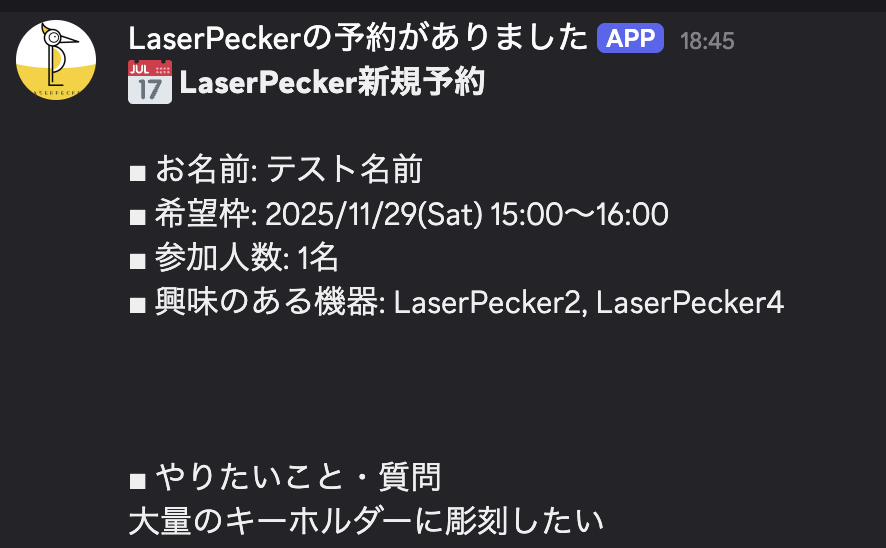
予約が入るとカレンダーにちゃんと登録されて
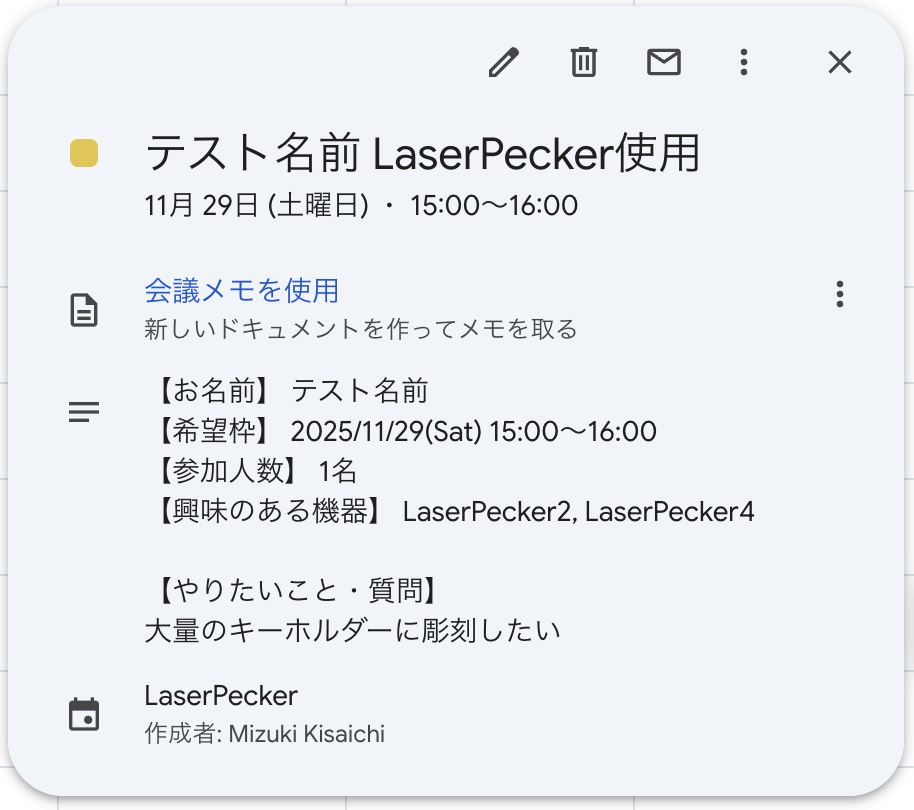
Discordに通知される
システムの流れはこんな感じ
ユーザー
↓ Googleフォーム
↓ 回答送信
GAS (フォーム送信トリガー)
├ カレンダー重複確認
├ 予約イベント作成 (title + description)
├ Discord通知
├ スプレッドシートへログ書き込み
└ updateFormAvailableSlots()
      └ フォームの「希望枠」選択肢を空き枠のみで再生成
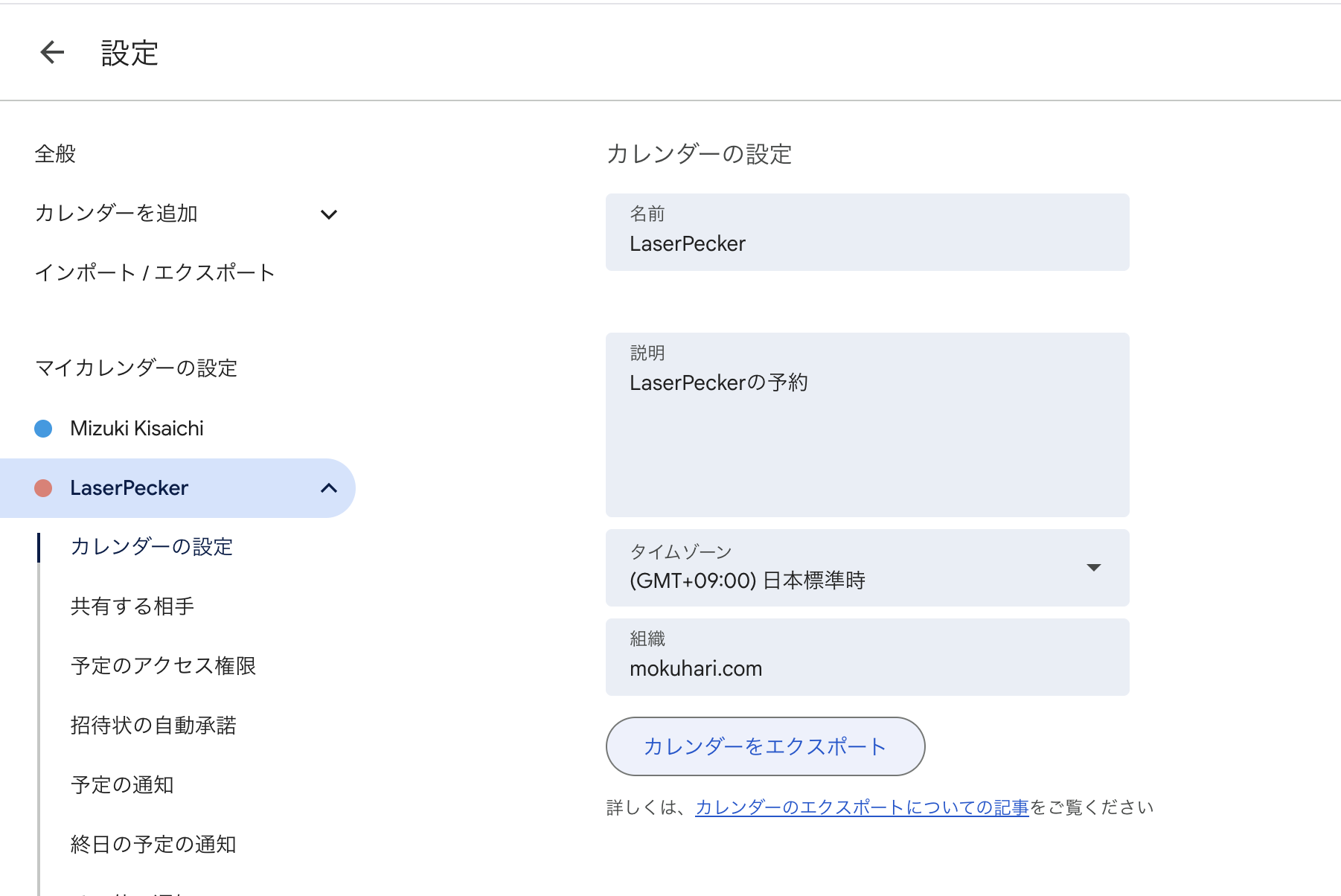
Googleカレンダーの作成
今回は、LaserPeckerというレーザー加工機の体験予約に特化したものを作りたいので専用のカレンダーを作成します。
「カレンダーID」の値が必要なので後ほど使えるようにひかえておきます。
フォームの入力項目
| 質問タイトル | タイプ |
|---|---|
| お名前 | 短文 |
| 希望枠 | プルダウン(GASで動的更新) |
| 参加人数 | 数値 or 短文 |
| 興味のある機器 | チェックボックス |
| やりたいこと・質問 | 段落 |
🕒 予約制約
| 曜日 | 予約可 |
|---|---|
| 土日 | 13:00–17:00 |
| 月火水 | 17:00–21:00 |
| 木金 | 予約不可 |
| その他 | 方法 |
|---|---|
| 直近4週間のみ | GAS側で制御 |
| 使えない日 | カレンダーに予定を入れると自動ブロック |
| 埋まり枠除外 |
getEvents() で確認 |
| 予約直後に枠更新 |
onFormSubmit 内で updateFormAvailableSlots() を呼ぶ |
⚙ トリガー設定
| 関数名 | 種類 | ソース |
|---|---|---|
onFormSubmit |
フォーム送信時 | フォーム |
updateFormAvailableSlots |
時間主導型 | 毎時 or 毎日 |
GASのコード全文
コードはChatGPTとやりとりして完成させました。楽ちんでした。
コードを見る
// ===== 設定値 =====
const CALENDAR_ID = 'YOUR_CALENDAR_ID'; // GoogleカレンダーID
const TIMEZONE = 'Asia/Tokyo';
const FORM_ID = 'YOUR_FORM_ID'; // GoogleフォームID
const DAYS_AHEAD = 28; // 直近4週間
const DISCORD_WEBHOOK_URL = 'YOUR_DISCORD_WEBHOOK_URL';

// ===== フォームの「希望枠」選択肢を、空き枠のみで更新 =====
function updateFormAvailableSlots() {
  const form = FormApp.openById(FORM_ID);
  const cal = CalendarApp.getCalendarById(CALENDAR_ID);
  const now = new Date();

  const labels = [];

  for (let i = 0; i < DAYS_AHEAD; i++) {
    const base = new Date(now.getFullYear(), now.getMonth(), now.getDate() + i);
    const dow = base.getDay(); // 0:日〜6:土

    let slotStartHour = null;
    let slotEndHour = null;

    // 土日 13:00-17:00
    if (dow === 0 || dow === 6) {
      slotStartHour = 13;
      slotEndHour = 17;
    }
    // 月火水 17:00-21:00
    else if (dow === 1 || dow === 2 || dow === 3) {
      slotStartHour = 17;
      slotEndHour = 21;
    } else {
      continue; // 木金は予約なし
    }

    for (let h = slotStartHour; h < slotEndHour; h++) {
      const start = new Date(base.getFullYear(), base.getMonth(), base.getDate(), h, 0);
      const end   = new Date(start.getTime() + 60 * 60 * 1000);

      const events = cal.getEvents(start, end);
      if (events.length > 0) continue;

      const label =
        Utilities.formatDate(start, TIMEZONE, 'yyyy/MM/dd(E) HH:mm') +
        '〜' +
        Utilities.formatDate(end, TIMEZONE, 'HH:mm');

      labels.push(label);
    }
  }

  const items = form.getItems();
  const slotItem = items.filter(item => item.getTitle && item.getTitle() === '希望枠')[0];
  if (!slotItem) throw new Error('希望枠が見つかりません');

  slotItem.asListItem().setChoiceValues(labels);
}

// ===== フォーム送信時処理 =====
function onFormSubmit(e) {
  if (!e) return;

  let namedValues = e.namedValues;
  if (!namedValues && e.response) namedValues = buildNamedValuesFromFormResponse(e.response);

  const name     = getAnswer(namedValues, 'お名前');
  const persons  = getAnswer(namedValues, '参加人数');
  const devices  = getAnswer(namedValues, '興味のある機器');
  const question = getAnswer(namedValues, 'やりたいこと・質問');
  const slotLabel = getAnswer(namedValues, '希望枠');

  const { start, end } = parseSlotLabel(slotLabel);

  const cal = CalendarApp.getCalendarById(CALENDAR_ID);
  const events = cal.getEvents(start, end);

  let result, eventId = '';

  if (events.length > 0) {
    result = 'NG:埋まり';
  } else {
    const title = name + ' LaserPecker使用';
    const description = [
      '【お名前】 ' + name,
      '【希望枠】 ' + slotLabel,
      '【参加人数】 ' + persons,
      '【興味のある機器】 ' + devices,
      '',
      '【やりたいこと・質問】',
      question
    ].join('\n');

    const event = cal.createEvent(title, start, end, { description });
    eventId = event.getId();
    result = 'OK';

    updateFormAvailableSlots();

    postToDiscord({
      name, persons, devices, question, label: slotLabel
    });
  }

  // ---- 回答スプレッドシートへ書き込み ----
  const form = FormApp.openById(FORM_ID);
  const ss = SpreadsheetApp.openById(form.getDestinationId());
  const sheet = ss.getSheets()[0];
  const row = sheet.getLastRow();
  sheet.getRange(row, 10).setValue(result);
  sheet.getRange(row, 11).setValue(eventId);
}

// ===== FormResponse → namedValues に変換 =====
function buildNamedValuesFromFormResponse(response) {
  const map = {};
  response.getItemResponses().forEach(r => {
    const title = r.getItem().getTitle();
    const resp = r.getResponse();
    map[title] = [Array.isArray(resp) ? resp.join(', ') : resp];
  });
  return map;
}

// ===== "2025/11/30(日) 13:00〜14:00" → Date =====
function parseSlotLabel(label) {
  const [datePart, timePart] = label.split(' ');
  const dateOnly = datePart.split('(')[0];
  const [startStr, endStr] = timePart.split('〜');

  const [y, m, d] = dateOnly.split('/').map(Number);
  const [sh, sm] = startStr.split(':').map(Number);
  const [eh, em] = endStr.split(':').map(Number);

  return {
    start: new Date(y, m - 1, d, sh, sm),
    end:   new Date(y, m - 1, d, eh, em)
  };
}

// ===== 値取り出しヘルパー =====
function getAnswer(namedValues, title) {
  const v = namedValues[title];
  return (!v || v.length === 0) ? '' : v[0];
}

// ===== Discord通知 =====
function postToDiscord(info) {
  const content = [
    '📅 **LaserPecker新規予約**',
    '',
    '■お名前: ' + info.name,
    '■希望枠: ' + info.label,
    '■人数: ' + info.persons,
    '■興味機器: ' + info.devices,
    '',
    info.question
  ].join('\n');

  UrlFetchApp.fetch(DISCORD_WEBHOOK_URL, {
    method: 'post',
    contentType: 'application/json',
    payload: JSON.stringify({ content }),
    muteHttpExceptions: true
  });
}
これで実際に運用をしつつ、今後やりたいことも盛り込んでいきたいと思います。