0
0

Delete article

Deleted articles cannot be recovered.

Draft of this article would be also deleted.

Are you sure you want to delete this article?

【macOS】ショートカットアプリでクイックアクションを作成

0
Posted at

Automator.appでクイックアクションを作れますが、ショートカットアプリでも作ることができます。以下に、PDFをページに分割するクイックアクションを例に紹介します。

まずショートカット.appを起動します。
pic1.jpg
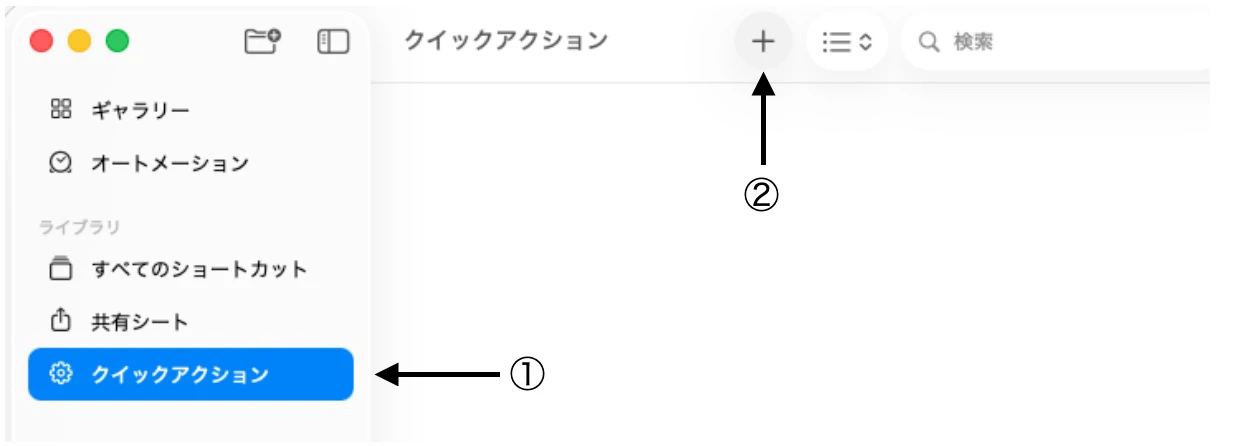
クイックアクション①を選択して+②を押す。

pic2.jpg
「PDF」で検索して、PDFページに分割③をダブルクリック
一番上のアクション「クイックアクションから...」の「アプリ、その他18個」をクリックすることでクイックアクションが反応する書類を制限できます。

pic3.jpg
④を選択してチェックボックスを図⑤のように、名称を設定⑥、閉じる⑦
ショートカット.appを終了

FinderでPDF書類を右クリックで選択すると、クイックアクションメニューに現れます。

MacOS Tahoe 26.2
ショートカット バージョン7.0

0
0
0

Register as a new user and use Qiita more conveniently

  1. You get articles that match your needs
  2. You can efficiently read back useful information
  3. You can use dark theme
What you can do with signing up
0
0

Delete article

Deleted articles cannot be recovered.

Draft of this article would be also deleted.

Are you sure you want to delete this article?